1. پراڊڪٽ ختمview
The EPOMAKER Aura75 is a 75% layout mechanical keyboard kit designed for customization and versatile connectivity. It features a compact design, hot-swappable switch sockets, and dynamic RGB backlighting. This kit supports multiple connection modes and is compatible with various operating systems.
اهم خاصيتون:
- 75٪ لي آئوٽ: Optimized for functionality and space efficiency.
- ٽرائي موڊ ڪنيڪٽوٽي: Supports 2.4GHz wireless, Bluetooth 5.0, and USB-C wired connections.
- گرم مٽاسٽا لائق پي سي بي: Allows for easy installation and removal of 3-pin and 5-pin mechanical switches without soldering.
- متحرڪ آر جي بي بيڪ لائيٽ: Features per-key RGB lighting and unique side lighting effects.
- Multifunction Knob: Provides control over volume and RGB brightness.
- آواز جذب: Equipped with silicone pads and IXPE switch cushioning for a quieter typing experience.
- پائيدار تعمير: Crafted with a robust injection-molded casing and PC plate.
2. سيٽ اپ گائيڊ
پيڪيج مواد:
- EPOMAKER Aura75 Keyboard Kit
- USB-سي ڪيبل
- 2.4GHz وائرليس ڊونگل
- ڪيپ ڪيپيندڙ
- مٽائڻ وارو
2.1 سوئچز ۽ ڪي ڪيپس انسٽال ڪرڻ
The Aura75 is a barebone kit, meaning switches and keycaps are not pre-installed. You will need to install your preferred 3-pin or 5-pin mechanical switches and keycaps.
- Align the pins of your mechanical switch with the hot-swappable socket on the PCB.
- Gently press the switch until it clicks into place. Ensure the pins are straight to avoid bending.
- سڀني گهربل سوئچ پوزيشن لاءِ ورجايو.
- Place your chosen keycaps onto the installed switches, pressing firmly until they are secure.
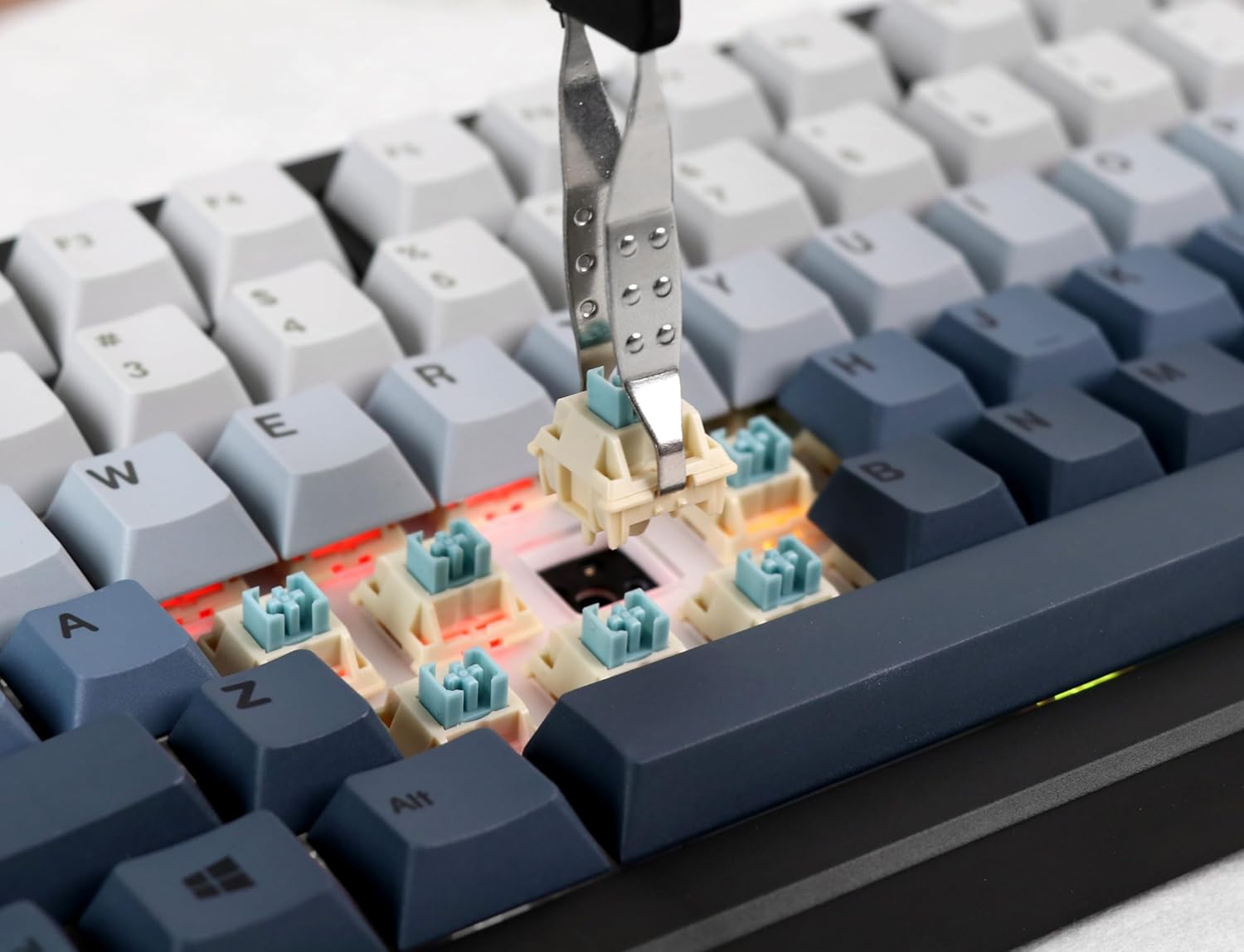
Image: Proper installation of a mechanical switch into the hot-swappable PCB.

Image: The hot-swappable barebone kit featuring south-facing RGB LEDs and tuned plate-mounted stabilizers.
2.2 Connecting the Keyboard:
The Aura75 offers three connectivity options:
- USB-C وائرڊ: Connect the keyboard directly to your device using the provided USB-C cable.
- 2.4GHz وائرليس: Insert the 2.4GHz USB dongle into your device. Flip the switch on the back of the keyboard to the 2.4G position.
- بلوٽوٽ 5.0: Flip the switch on the back of the keyboard to the Bluetooth position. Press FN + 1/2/3 to enter pairing mode for up to three different devices. The indicator light will flash, then become solid upon successful connection.
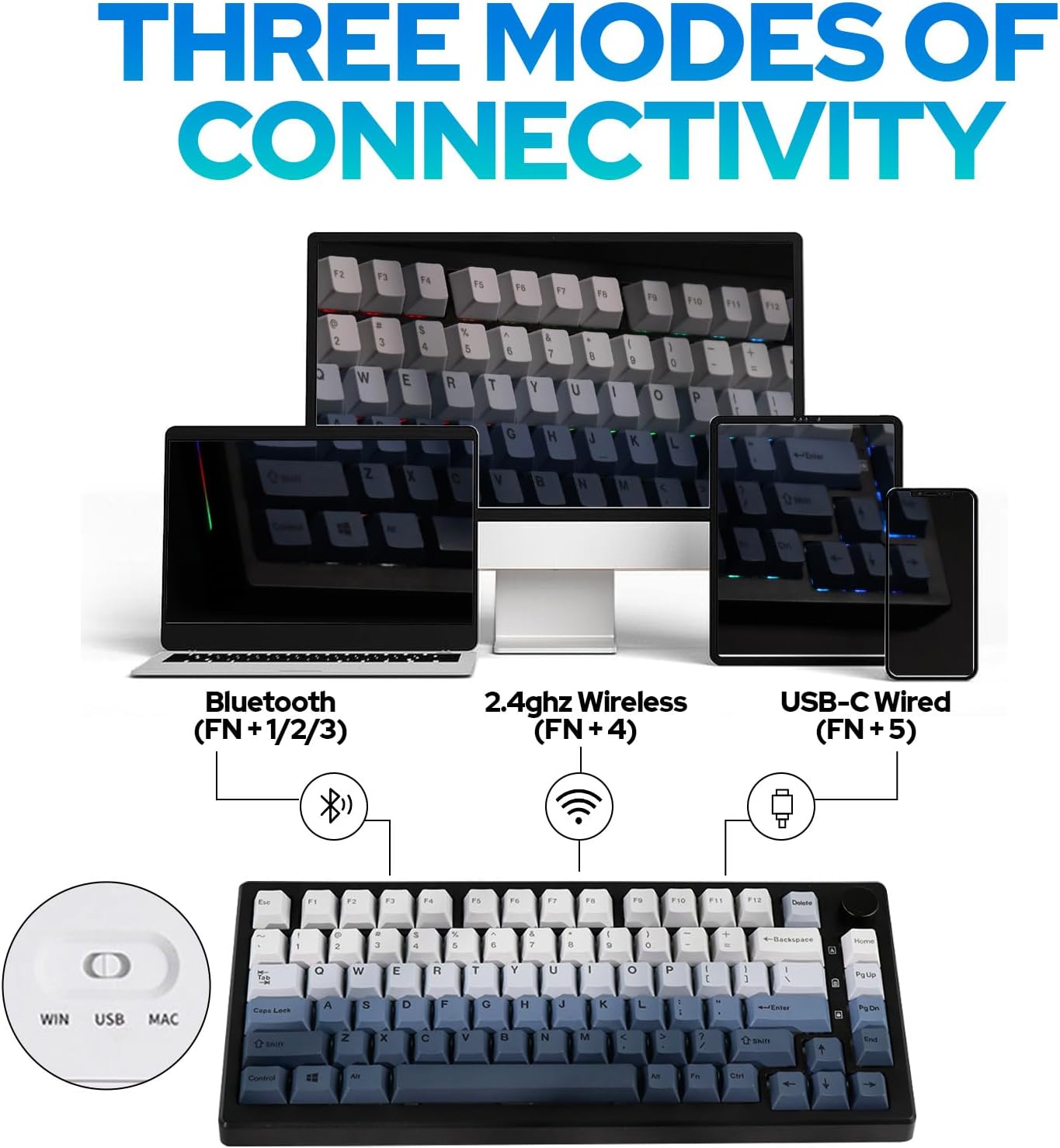
تصوير: مٿانview of the three connectivity modes: Bluetooth (FN+1/2/3), 2.4GHz Wireless (FN+4), and USB-C Wired (FN+5).

تصوير: تفصيلي view of the keyboard's rear, highlighting the connectivity switch, 2.4GHz dongle storage, and USB-C port.
2.3 Adjusting Keyboard Height:
ڪيبورڊ ۾ ٻہ-ايس شامل آهنtage adjustable feet on the underside to customize the typing angle for ergonomic comfort.
3. آپريٽنگ هدايتون
3.1 RGB Backlight Control:
The Aura75 features extensive RGB lighting options, including per-key and side lighting.
- FN + \ |: Cycle through different backlight effects (Light Effect 1-20).
- FN + Home/PU: Cycle through different backlight colors/brightness (Light Effect 1-10).
- ايف اين + ايل: بيڪ لائيٽ آن/آف ڪريو.
- FN + L_Ctrl: Toggle sidelight effect on/off.
- FN + L_Alt: Cycle through sidelight colors.
- ايف اين + زيڊ/ايڪس: Adjust sidelight brightness/speed.

تصوير: ڪي بورڊ شوڪasing its RGB backlight and unique side light effects.

Image: FN key combinations for adjusting backlight effects, colors, brightness, and speed.
3.2 Multifunction Knob:
The knob located on the top right of the keyboard serves dual functions:
- گھمايو: Adjusts system volume or RGB brightness.
- پريس: Toggles between volume control and RGB brightness control.

Image: The multifunction knob, used to switch between volume and RGB brightness adjustments.
3.3 Operating System Mode Switching:
The keyboard supports both Windows and Mac operating systems.
- ونڊوز موڊ: دٻايو FN + W.
- ميڪ موڊ: دٻايو FN + E. If this does not work, try FN + ق.
3.4 Software Programming:
The EPOMAKER Aura75 is programmable using the dedicated EPOMAKER software. This software allows for:
- Key remapping
- Macro creation
- Customizing lighting effects
- Setting sleep modes

Image: The EPOMAKER software interface for advanced keyboard customization.
4. سار سنڀال
Regular maintenance helps ensure the longevity and optimal performance of your EPOMAKER Aura75 keyboard.
- ڪي ڪيپس جي صفائي: Use a keycap puller to remove keycaps. Clean them with a mild soap solution and a soft cloth, then air dry completely before reattaching.
- Cleaning the PCB/Switches: Use compressed air to remove dust and debris from between switches. For deeper cleaning, carefully remove switches with a switch puller and clean the PCB with a soft brush.
- ڪيبل جي سنڀال: نقصان کان بچڻ لاءِ USB-C ڪيبل تي تيز موڙ يا گهڻي ڇڪڻ کان پاسو ڪريو.
- بيٽري جي سنڀال: For wireless modes, ensure the keyboard is charged regularly. Avoid fully depleting the battery for extended periods.
5. مسئلا حل ڪرڻ
عام مسئلا ۽ حل:
- ڪي بورڊ جواب نه ڏئي رهيو آهي:
- Ensure the keyboard is fully charged or connected via USB-C.
- Check the connectivity switch on the back of the keyboard (Wired, 2.4G, Bluetooth).
- For 2.4GHz, ensure the dongle is securely inserted.
- For Bluetooth, re-pair the device if necessary.
- Incorrect key functions in Mac OS:
- Ensure the keyboard is set to Mac mode by pressing FN + E. If this does not resolve the issue, try pressing FN + ق.
- RGB lights not working or flickering:
- Check brightness settings using the multifunction knob or FN key combinations.
- پڪ ڪريو ته ڪيبورڊ گهٽ پاور واري حالت ۾ نه آهي.
- Update keyboard firmware using the EPOMAKER software.
- Accidental key presses (high sensitivity):
- Some users may find the actuation point of certain switches sensitive. Adjust your typing style or consider different switch types if customization is desired.
6. وضاحتون
| خاصيت | تفصيل |
|---|---|
| برانڊ | EPOMAKER |
| ماڊل نمبر | اورا75 |
| ترتيب | 75% |
| رابطي ٽيڪنالاجي | 2.4GHz وائرليس، بلوٽوٿ 5.0، USB-C وائرڊ |
| مطابقت رکندڙ ڊوائيسز | گيمنگ ڪنسول، ليپ ٽاپ، پي سي، اسمارٽ فون، ٽيبليٽ |
| خاص خاصيتون | Backlit, Ergonomic, Hot-Swappable, Programmable Keys |
| ڪي بورڊ Backlighting | آر جي بي |
| مواد | پلاسٽڪ |
| شيءِ جو وزن | 2.12 پائونڊ |
| پيڪيج جي ماپ | 14.92 x 8.11 x 1.77 انچ |
| ٺاهيندڙ | EPOMAKER |
| پهرين دستياب | مئي 6، 2023 |
7. وارنٽي ۽ سپورٽ
وارنٽي جي معلومات ۽ ٽيڪنيڪل سپورٽ لاءِ، مھرباني ڪري سرڪاري EPOMAKER ڏانھن رجوع ڪريو. webسائيٽ تي وڃو يا سڌو سنئون انهن جي ڪسٽمر سروس سان رابطو ڪريو. وارنٽي دعوائن لاءِ پنهنجي خريداري جي رسيد رکو.
سرڪاري ايپو ميڪر اسٽور: EPOMAKER اسٽور جو دورو ڪريو
8. اضافي وسيلا
پيداوار وڊيوز:
EPOMAKER Sea Salt Switch VS Sea Salt Silent Switch
Video: A comparison between EPOMAKER Sea Salt Switches and Sea Salt Silent Switches, demonstrating their sound and feel differences.
AURA75 Keyboard Kit Typing Sound
Video: Demonstrates the typing sound profile of the AURA75 Keyboard Kit, highlighting its acoustic characteristics.
F75 purple gaming keyboard
وڊيو: هڪ مختصر جائزوview of the F75 keyboard, showcasing its design and RGB lighting in a purple variant.
Typing Video Epomaker AULA F75 Black Pink Gradient
Video: A short typing demonstration on an Epomaker AULA F75 keyboard with a black and pink gradient keycap set.


