1. تعارف
Thank you for choosing the SPLITSKY NZFS Kids Alarm Clock. This device combines an alarm clock, white noise sleep aid, and an 8-mode RGB night light, designed to assist with sleep and wake-up routines for children and adults. Please read this manual thoroughly to understand its features and ensure proper operation.
حفاظت جي ڄاڻ:
- ڊوائيس کي پاڻي ۽ تيز نمي واري ماحول کان پري رکو.
- ڊوائيس کي الڳ ڪرڻ يا مرمت ڪرڻ جي ڪوشش نه ڪريو.
- Use only the provided USB-C power cable or a certified equivalent.
- ڊوائيس جي چوڌاري مناسب وائيٽليشن کي يقيني بڻائي.
2. پيڪيج مواد
پڪ ڪريو ته سڀئي شيون توهان جي پيڪيج ۾ موجود آهن:
- SPLITSKY NZFS Kids Alarm Clock
- 1.2M (4.7 inch) USB-C Power Cable
- استعمال ڪندڙ جو دستياب (ھي دستاويز)
- 1 x CR2032 Lithium Ion Battery (pre-installed for memory backup)
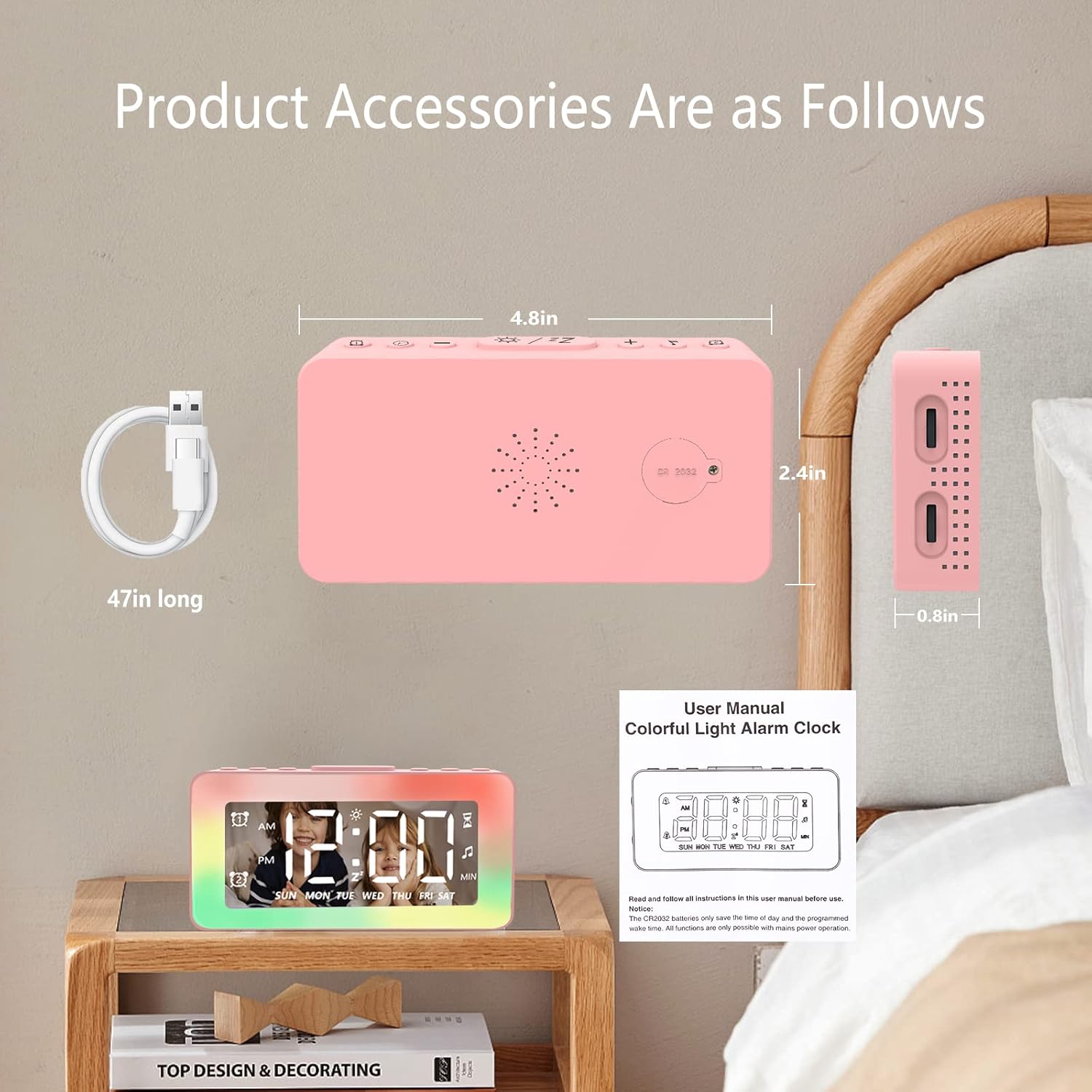
Image: The SPLITSKY NZFS Kids Alarm Clock, a USB-C power cable, and the user manual are included in the package.
3. پراڊڪٽ ختمview
Familiarize yourself with the buttons and ports on your alarm clock:

تصوير: تفصيلي view of the alarm clock's top buttons and side ports, including Alarm 1, Time Setting, Light Minus/Settings, Snooze/Light Mode Switch, Light Plus/Setup, Music Switch, Alarm 2, Volume Setting, Time Brightness Setting, USB Output Charging Port, and Type-C Input Interface.
- الارم 1 بٽڻ: Set and activate Alarm 1.
- وقت سيٽنگ بٽڻ: موجوده وقت کي ترتيب ڏيو.
- Light Minus / Settings Button: Decrease light brightness or navigate settings.
- Snooze / Light Mode Switch Button: Activate snooze, or cycle through light modes.
- Light Plus / Setup Button: Increase light brightness or confirm settings.
- Music Switch Button: Cycle through white noise sounds.
- الارم 2 بٽڻ: Set and activate Alarm 2.
- Volume Setting Wheel (Side): Adjust alarm and white noise volume.
- Time Brightness Setting Wheel (Side): ڊسپلي جي روشني کي ترتيب ڏيو.
- USB Output Charging Port (Side): Charge external devices.
- Type-C Input Interface (Side): Connect power cable to the alarm clock.
4. سيٽ اپ
4.1 پاور ڪنيڪشن
- Connect the provided USB-C power cable to the Type-C Input Interface on the side of the alarm clock.
- USB-C ڪيبل جي ٻئي ڇيڙي کي هڪ مطابقت رکندڙ USB پاور اڊاپٽر (شامل نه آهي) يا USB پورٽ ۾ لڳايو.
- ڊسپلي روشن ٿيندي، جيڪو ظاهر ڪندو ته گھڙي آن آهي.

Image: The SPLITSKY NZFS Kids Alarm Clock is shown powered on and connected via its USB-C port, also demonstrating its capability to charge a smartphone.
4.2 بيٽري جي انسٽاليشن (ميموري بيڪ اپ)
The alarm clock includes a pre-installed CR2032 battery. This battery serves as a memory backup to retain time and alarm settings during a power outage or when the main power is disconnected. It does not power the clock for regular operation.
- If the battery needs replacement, locate the battery compartment on the back of the unit.
- ڪمري کي کولڻ لاء هڪ ننڍڙو اسڪوائر استعمال ڪريو.
- صحيح پولارٽي کي يقيني بڻائي، نئين CR2032 بيٽري سان تبديل ڪريو.
- ڪمري کي محفوظ طور تي بند ڪريو.
5. آپريٽنگ هدايتون
5.1 Setting the Time (12H/24H Format)
- کي دٻايو ۽ رکو وقت سيٽنگ بٽڻ until the hour digits begin to flash.
- استعمال ڪريو Light Minus / Settings Button (هيٺ) يا Light Plus / Setup Button (up) to adjust the hour.
- کي دٻايو وقت سيٽنگ بٽڻ again to move to minute adjustment. Adjust minutes using the Light Minus/Plus buttons.
- کي دٻايو وقت سيٽنگ بٽڻ a third time to select 12-hour or 24-hour format. Adjust using the Light Minus/Plus buttons.
- کي دٻايو وقت سيٽنگ بٽڻ هڪ ڀيرو ٻيهر تصديق ڪرڻ ۽ وقت سيٽنگ موڊ مان نڪرڻ لاءِ.
5.2 Setting Alarms (Dual Alarm, Daily/Weekday/Weekend Mode)
گھڙي ٻن آزاد الارم (الارم 1 ۽ الارم 2) کي سپورٽ ڪري ٿي.
- کي دٻايو ۽ رکو الارم 1 بٽڻ (الارم 1 لاءِ) يا الارم 2 بٽڻ (for Alarm 2) until the alarm hour digits flash.
- استعمال ڪريو Light Minus / Settings Button or Light Plus / Setup Button ڪلاڪ کي ترتيب ڏيڻ لاء.
- Press the respective Alarm Button again to move to minute adjustment. Adjust minutes using the Light Minus/Plus buttons.
- Press the respective Alarm Button again to select the alarm mode:
- ڏهاڙي جو طريقو الارم هر روز وڄندو آهي.
- Weekday Mode: سومر کان جمعي تائين الارم وڄندو آهي.
- هفتيوار موڊ: ڇنڇر ۽ آچر تي الارم وڄندو آهي.
- Press the respective Alarm Button once more to confirm and exit alarm setting mode.
- To enable/disable an alarm, short press the الارم 1 بٽڻ or الارم 2 بٽڻ. ڊسپلي تي هڪ الارم آئڪن ظاهر ٿيندو/غائب ٿيندو.
5.3 اسنوز فنڪشن
When an alarm sounds, tap the Snooze / Light Mode Switch Button on top to activate snooze. The alarm will pause for 9 minutes and then sound again. This can be repeated multiple times.
5.4 Night Light (8 Modes RGB, 10-level dimming)
The alarm clock features 6 solid color lights and 2 ambient colorful lights.
- مختصر دٻايو Snooze / Light Mode Switch Button to turn on the night light and cycle through the 8 color modes.
- To adjust the brightness (10 levels), use the Light Minus / Settings Button or Light Plus / Setup Button while the night light is active.
- To turn off the night light, continue pressing the Snooze / Light Mode Switch Button جيستائين روشني بند ٿي وڃي.

Image: Multiple SPLITSKY NZFS Kids Alarm Clocks are shown, each displaying a different color from the 8 available RGB night light modes.
5.5 White Noise Sleep Aid (8 Sounds)
The clock offers 8 soothing sounds to aid sleep.
- مختصر دٻايو ميوزڪ سوئچ بٽڻ to turn on the white noise and cycle through the available sounds.
- To adjust the volume (16 levels), use the Volume Setting Wheel on the side of the clock.
- To turn off the white noise, continue pressing the ميوزڪ سوئچ بٽڻ until the sound stops.

Image: The SPLITSKY NZFS Kids Alarm Clock is displayed on a bedside table, with icons illustrating the various white noise options such as rain, cicadas, piano, bonfire, waves, birdsong, and church bells.
5.6 Sleep Timer (10-120 minutes)
The sleep timer allows you to set a duration for the white noise and/or night light to play before automatically turning off.
- While white noise or night light is active, press and hold the ميوزڪ سوئچ بٽڻ (for white noise timer) or Snooze / Light Mode Switch Button (for light timer).
- استعمال ڪريو Light Minus / Settings Button or Light Plus / Setup Button to select the desired timer duration (10, 20, 30, 60, 90, 120 minutes).
- Press the respective button again to confirm the timer setting. The timer icon will appear on the display.
5.7 روشني جي ترتيب ڏيکاريو
Adjust the brightness of the LED time display using the Time Brightness Setting Wheel on the side of the clock.
5.8 USB چارجنگ پورٽ
The USB output charging port on the side of the alarm clock can be used to charge other small electronic devices, such as smartphones. Connect your device's charging cable to this port.
6. سار سنڀال
6.1 صفائي
- پڪ ڪريو ته ڊوائيس صاف ڪرڻ کان اڳ ان پلگ ٿيل آهي.
- مٿاڇري کي نرم، سڪل ڪپڙي سان مسح ڪريو.
- گھڙڻ وارا صاف ڪندڙ، محلول، يا ڪيميائي اسپري استعمال نه ڪريو.
6.2 اسٽوريج
When not in use for extended periods, store the alarm clock in a cool, dry place, away from direct sunlight and extreme temperatures.
7. مسئلا حل ڪرڻ
If you encounter issues with your SPLITSKY NZFS Kids Alarm Clock, refer to the table below for common problems and solutions.
| مسئلو | ممڪن سبب | حل |
|---|---|---|
| گھڙيال جي ڊسپلي بند يا مدھم آهي. | Not connected to power; Time brightness set too low. | Ensure USB-C cable is securely connected to a power source. Adjust the Time Brightness Setting Wheel. |
| الارم نٿو وڄي. | Alarm not activated; Alarm volume too low. | Check if the alarm icon is displayed. If not, short press the respective Alarm Button to activate. Adjust the Volume Setting Wheel. |
| Time/settings reset after power disconnection. | CR2032 backup battery is depleted or missing. | Replace the CR2032 battery in the battery compartment. |
| Night light or white noise not working. | Function not activated; Sleep timer active. | مختصر دٻايو Snooze / Light Mode Switch Button or ميوزڪ سوئچ بٽڻ to activate. Check if a sleep timer is set. |
8. وضاحتون
| خاصيت | تفصيل |
|---|---|
| برانڊ | اسپلٽسڪي |
| ماڊل نمبر | NZFS |
| ڊسپلي جو قسم | ڊجيٽل LED |
| پيداوار جي ماپ | 3.17"W x 3.17"H (approximately 8.05 cm W x 8.05 cm H) |
| شيءِ جو وزن | 8.1 آونس (تقريبن 230 گرام) |
| طاقت جو ذريعو | Corded Electric (USB-C), Battery Powered (CR2032 for memory) |
| رات جي روشني جا طريقا | 8 (6 solid colors, 2 ambient colorful) with 10-level dimming |
| اڇو شور آواز | 8 سھڻي آواز |
| الارم ٽونز | 7 wake-up alarm tones with 16-level volume control |
| الارم خاصيتون | Dual Alarm, Daily/Weekday/Weekend modes, 9-minute Snooze |
| ٽائمر فنڪشن | 10-120 minute sleep timer for sounds and lights |
| رابطي | USB-C Input, USB-A Output (for charging external devices) |
| مواد | اڪيريلانٽنتريلي بديادي اسٽائائن |
9. وارنٽي ۽ سپورٽ
9.1 وارنٽي ڄاڻ
Please refer to the warranty information provided at the time of purchase or contact your retailer for details regarding the product warranty. Keep your proof of purchase for any warranty claims.
9.2 ڪسٽمر سپورٽ
For technical assistance, troubleshooting beyond this manual, or general inquiries, please contact the seller through the platform where you purchased the product. Provide your order number and a detailed description of the issue for prompt support.


