تعارف
This manual provides detailed instructions for the TELE System 27-inch Full HD LED TV, model palco hevc s2. Please read this manual carefully before using the product to ensure proper operation, maximize its lifespan, and understand its features. Keep this manual for future reference.
1. سيٽ اپ
1.1 کولڻ
Carefully remove the TV and all accessories from the packaging. Ensure all components are present:
- TELE System 27-inch Full HD LED TV
- ريموٽ ڪنٽرول
- پاور ڪيبل
- استعمال ڪندڙ جو دستياب (ھي دستاويز)
- ٽي وي اسٽينڊ جا حصا (جيڪڏهن قابل اطلاق هجي)
1.2 اسٽينڊ يا وال ماؤنٽنگ کي ڳنڍڻ
اسٽينڊ جي انسٽاليشن لاءِ:
- ٽي وي اسڪرين کي نرم، صاف مٿاڇري تي رکو ته جيئن ڇڪڻ کان بچي سگهجي.
- اسٽينڊ جي حصن کي ٽي وي جي تري ۾ لڳل سوراخن سان ترتيب ڏيو.
- مهيا ڪيل اسڪرو استعمال ڪندي اسٽينڊ کي محفوظ ڪريو. وڌيڪ تنگ نه ڪريو.
ڀت لڳائڻ لاء:
This TV supports wall mounting. Refer to the specific instructions provided with your wall mount kit for proper installation. Ensure the wall mount is compatible with the TV's VESA mounting pattern and weight.
1.3 ڳنڍڻ واري طاقت
Connect the power cable to the TV's power input, then plug the other end into a suitable electrical outlet. The TV will enter standby mode.
1.4 ٻاهرين ڊوائيسز کي ڳنڍڻ
Use the available ports on the TV to connect your external devices:
- HDMI: بلو-ري پليئرز، گيم ڪنسولز، يا سيٽ ٽاپ باڪس جهڙن ڊوائيسز مان هاءِ ڊيفينيشن وڊيو ۽ آڊيو لاءِ.
- USB: ميڊيا هلائڻ لاءِ USB اسٽوريج ڊوائيسز کي ڳنڍڻ لاءِ files.
- اينٽينا / ڪيبل: Connect your DVB-T2 antenna for digital terrestrial television reception.
1.5 پهريون ڀيرو سيٽ اپ
پهرين پاور آن ٿيڻ تي، ٽي وي توهان کي شروعاتي سيٽ اپ جي عمل ذريعي رهنمائي ڪندو. ان ۾ عام طور تي شامل آهن:
- Languageوليءَ جي چونڊ.
- ملڪ/علائقي جي چونڊ.
- Automatic channel scanning for DVB-T2 broadcasts.
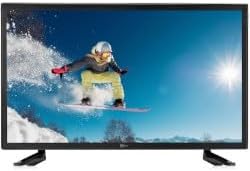
هي تصوير سامهون ڏيکاري ٿي view of the TELE System 27-inch Full HD LED TV, model palco hevc s2, with its stand attached. The screen displays a vibrant image of a snowboarder in action, highlighting the display quality.
2. آپريٽنگ هدايتون
2.1 بنيادي ڪنٽرول
Use the remote control to operate your TV. Key functions include:
- پاور بٽڻ: ٽي وي کي آن يا آف ڪري ٿو (اسٽينڊ بائي موڊ).
- حجم مٿي / ھيٺ: آواز جي سطح کي ترتيب ڏئي ٿو.
- چينل مٿي / هيٺ: ٽي وي چينلز بدلائي ٿو.
- نمبر بٽڻ (0-9): سڌو چينل چونڊ.
- خاموش: Silences the TV sound.
2.2 ان پٽ چونڊ
کي دٻايو ذريعو or INPUT button on your remote control to cycle through available input sources (e.g., HDMI1, HDMI2, USB, DVB-T2). Select the desired input for your connected device.
2.3 مينيو نيويگيشن
کي دٻايو مينيو button to access the TV's main menu. Use the arrow buttons (Up, Down, Left, Right) to navigate through options and the OK or داخل ڪريو button to confirm selections. The menu allows you to adjust picture settings, sound settings, channel settings, and more.
2.4 DVB-T2 Tuner Usage
After completing the channel scan during initial setup, you can access digital terrestrial channels. Use the Channel Up/Down buttons or direct number input to switch channels. The TV supports DVB-T2 for high-quality digital broadcast reception.
2.5 USB ميڊيا پلے بیک
Insert a USB storage device into the TV's USB port. The TV should automatically detect the device and prompt you to open the media browser. You can then navigate and play supported video, audio, and image files USB ڊوائيس تي ذخيرو ٿيل آهي.
3. سار سنڀال
3.1 Cleaning the Screen and Casing
- اسڪرين: نرم، لِنٽ کان پاڪ ڪپڙي سان اسڪرين کي نرميءَ سان صاف ڪريو. ضدي نشانن لاءِ، ٿورو ڊيampڪپڙي کي پاڻي يا خاص اسڪرين ڪلينر سان صاف ڪريو. ڪڏهن به مائع سڌو سنئون اسڪرين تي نه اسپري ڪريو.
- Casing: ٽي وي سي کي صاف ڪرڻ لاءِ نرم، سڪل ڪپڙو استعمال ڪريوasing. گھڙڻ وارا صاف ڪندڙ، موم، يا محلول استعمال ڪرڻ کان پاسو ڪريو ڇو ته اهي ختم کي نقصان پهچائي سگهن ٿا.
اهم: صفائي ڪرڻ کان اڳ هميشه ٽي وي کي پاور آئوٽليٽ مان ڪڍي ڇڏيو.
3.2 سافٽ ويئر اپڊيٽ
The TV's software may receive updates to improve performance or add new features. Check the TV's menu for a 'Software Update' or 'System Update' option. Follow the on-screen instructions carefully if an update is available. (Note: Software update guarantee information is not available for this model.)
3.3 حفاظتي احتياط
- وينٽيليشن جي افتتاح کي نه روڪيو.
- ٽي وي کي مينهن يا نمي کي بي نقاب نه ڪريو.
- ٽي وي کي سڌي سج جي روشني ۾ يا گرمي جي ذريعن جي ويجهو رکڻ کان پاسو ڪريو.
- ٽي وي نه کوليو سيasing؛ سڀني خدمتن کي قابل اهلڪارن جي حوالي ڪريو.
4. مسئلا حل ڪرڻ
سپورٽ سان رابطو ڪرڻ کان اڳ، عام مسئلن لاءِ هيٺيان حل آزمايو:
| مسئلو | ممڪن حل |
|---|---|
| ڪابه طاقت | Ensure the power cable is securely plugged into both the TV and the wall outlet. Check if the outlet is working by plugging in another device. |
| تصوير ناهي، پر آواز موجود آهي | ان پٽ سورس چيڪ ڪريو. دٻايو ذريعو button on the remote to ensure the correct input (e.g., HDMI1) is selected. |
| آواز ڪونهي، پر تصوير موجود آهي | Check the volume level and ensure the TV is not muted. If using external audio, ensure it is correctly connected and powered on. |
| ريموٽ ڪنٽرول ڪم نه ڪري رهيو آهي | ريموٽ ڪنٽرول ۾ بيٽريون تبديل ڪريو. پڪ ڪريو ته ريموٽ ۽ ٽي وي جي IR سينسر جي وچ ۾ ڪا به رڪاوٽ نه آهي. |
| Poor DVB-T2 Signal/No Channels | Check your antenna connection. Try repositioning the antenna or performing a new channel scan in the TV's menu. |
| USB Media Not Playing | Ensure the USB device is formatted correctly (e.g., FAT32) and the media files are in a supported format. Try another USB device. |
5. وضاحتون
The following are the technical specifications for the TELE System 27-inch Full HD LED TV (Model: palco hevc s2):
- ماڊل نالو: palco hevc s2
- اسڪرين جي ماپ: 27 انچ
- ڊسپلي ٽيڪنالاجي: ايل اي ڊي
- قرارداد: 1080p (مڪمل HD)
- ريفريش جي شرح: 120 هرٽز
- ٽونر ٽيڪنالاجي: DVB-T2
- هارڊويئر انٽرفيس: HDMI
- ڪل USB بندرگاهن: 1
- تناسب تناسب: 16:9
- آڊيو آئوٽ موڊ: اسٽيريو
- Surround Configuration: 2.0
- چڙهڻ جو قسم: ڀت جبل
- خاص خصوصيت: فليٽ اسڪرين
- ماڊل سال: 2010
Specifications are subject to change without notice. For the most up-to-date information, please refer to the product packaging or manufacturer's webسائيٽ.
6. وارنٽي ڄاڻ
This TELE System TV comes with a manufacturer's warranty. The specific terms and duration of the warranty may vary by region and retailer. Please retain your proof of purchase for warranty claims. For detailed warranty information, refer to the warranty card included with your product or visit the official TELE System webسائيٽ.
7. ڪسٽمر سپورٽ
If you encounter issues that cannot be resolved using the troubleshooting guide, or if you require further assistance, please contact TELE System customer support. Contact details can typically be found on the official TELE System webسائيٽ تي يا پراڊڪٽ پيڪنگنگ تي.
آن لائن سپورٽ: Visit the official TELE System webاڪثر پڇيا ويندڙ سوالن، سپورٽ آرٽيڪلز، ۽ رابطي جي فارمن لاءِ سائيٽ.
ٽيليفون سپورٽ: Check the TELE System webعلائقائي رابطي جي نمبرن لاءِ سائيٽ.


