1. تعارف
خريد ڪرڻ لاءِ مهربانيasing the FEELWORLD F6 PLUSX 5.5-inch 4K HDMI Field Monitor. This manual provides essential information for the safe and efficient operation of your device. Please read it thoroughly before use and retain it for future reference.
2. حفاظت جي ڄاڻ
- بجليءَ جي جھٽڪي يا باهه کان بچڻ لاءِ مانيٽر کي مينهن يا نمي جي سامهون نه رکو.
- مانيٽر کي سڌو سورج جي روشني ۾ يا گرمي جي ذريعن جي ويجهو رکڻ کان پاسو ڪريو.
- Use only the specified power adapter or compatible battery types.
- Do not attempt to disassemble or modify the monitor. Refer all servicing to qualified personnel.
- اسڪرين کي نرم، سڪل ڪپڙي سان صاف ڪريو. سخت ڪيميائي استعمال ڪرڻ کان پاسو ڪريو.
3. پيڪيج مواد
پڪ ڪريو ته هيٺ ڏنل سڀئي شيون توهان جي پيڪيج ۾ شامل آهن:
- FEELWORLD F6 PLUSX Monitor x1
- Micro HDMI Cable x1
- Tilt Arm x1
- Sunshade x1
- يوزر مينوئل x1

4. پراڊڪٽ ختمview
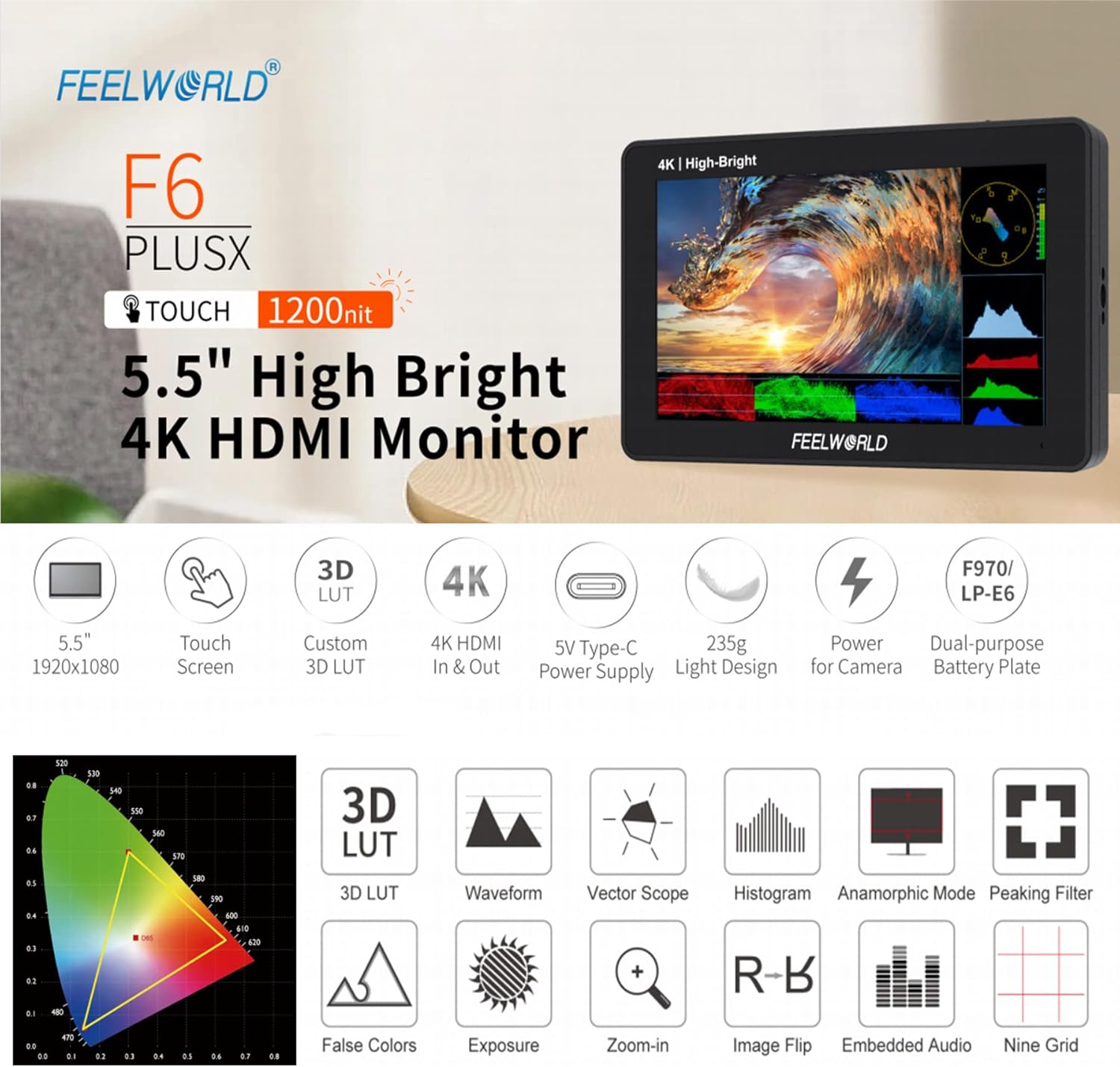
4.1 اهم خاصيتون
- 5.5-inch IPS Touchscreen Display with 1920x1080 resolution.
- 1200 nits high brightness for outdoor visibility.
- 4K HDMI Input and Loop Output.
- Support for 3D LUT import via SD card.
- HDR (High Dynamic Range) monitoring.
- Advanced monitoring functions: Waveform, Vector Scope, Histogram, False Colors, Peaking Filter, Zoom-in, Image Flip, Embedded Audio, Nine Grid, Anamorphic Mode.
- Flexible power options: DC 12V input, 5V Type-C input, and dual-purpose battery plate (F970/LP-E6).
- Lightweight design (235g).

4.2 Monitor Layout and Ports
The F6 PLUSX features multiple ports for connectivity and power:
- HDMI اندر: توهان جي ڪئميرا يا وڊيو سورس سان ڳنڍي ٿو.
- HDMI ٻاهر HDMI سگنل کي ٻئي مانيٽر يا ڊوائيس ڏانهن لوپ آئوٽ ڪري ٿو.
- ڊي سي اوٽ 8V: Provides power to compatible cameras or accessories.
- SD ڪارڊ سلاٽ: For importing 3D LUTs and firmware updates.
- ڊي سي 12V ۾: Main power input for the monitor.
- 3.5mm Ear Phone Slot: آڊيو مانيٽرنگ لاءِ.
- DC IN 5V (قسم-سي): Alternative power input, compatible with portable power banks.

4.3 ڪنٽرول
The monitor features a touchscreen interface and physical controls for navigation:
- Power Button / Touch Lock: Press and hold to power on/off. Short press to lock/unlock the touchscreen.
- Menu Scroll Wheel: مينيو کي نيويگيٽ ڪرڻ ۽ چونڊن جي تصديق ڪرڻ لاءِ استعمال ڪيو ويندو آهي.
- 1/4 Screw Holes: For mounting the monitor to various camera rigs or accessories.

5. سيٽ اپ
5.1 مانيٽر کي طاقت ڏيڻ
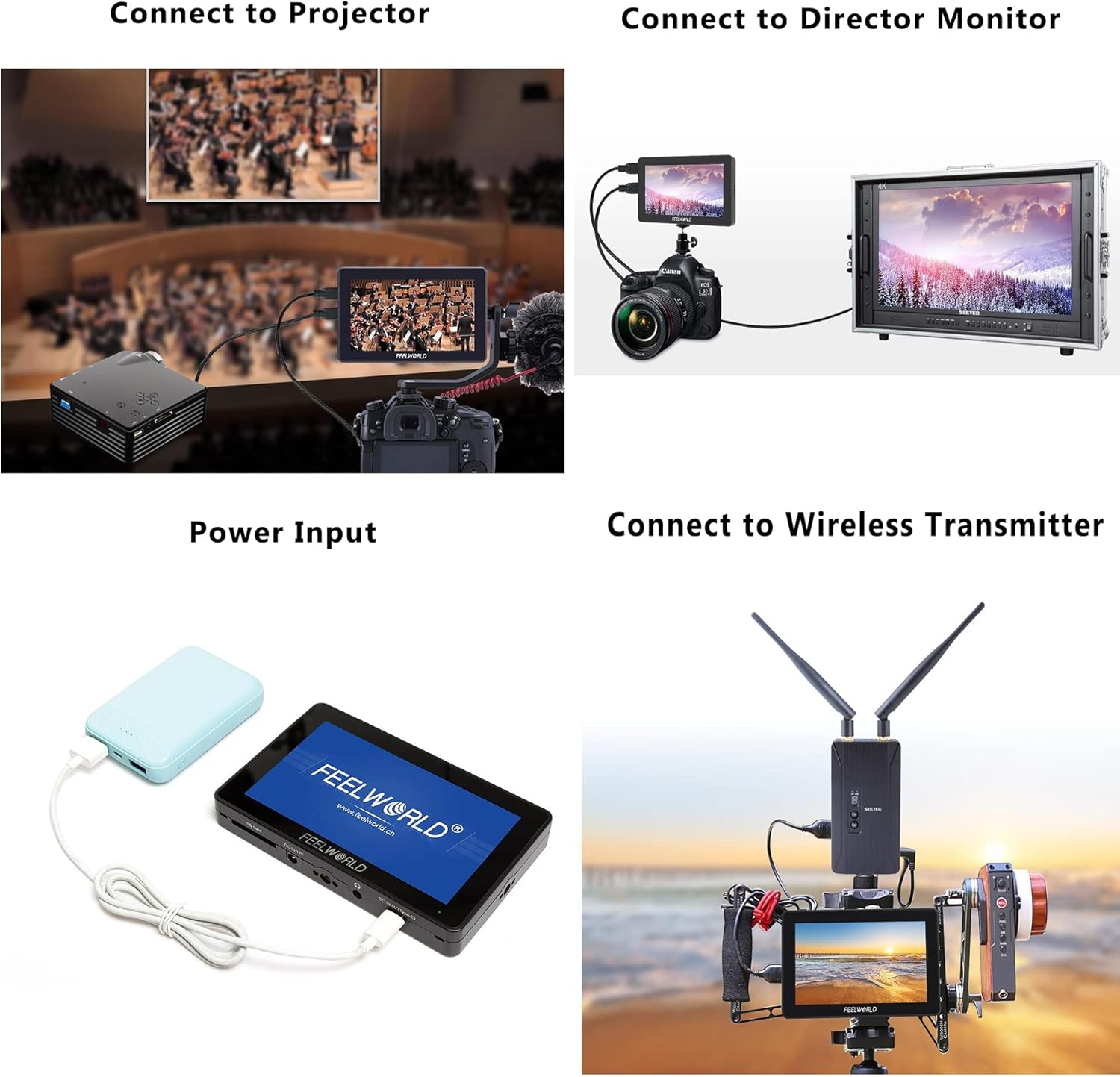
The F6 PLUSX offers several power options:
- DC 12V ان پٽ: Connect the included power adapter to the DC 12V port.
- 5V Type-C Input: Use a compatible USB Type-C cable and a 5V power source (e.g., power bank) to the DC IN 5V (Type-C) port.
- بيٽري پليٽ: Attach a compatible F970 or LP-E6 battery to the battery plate on the rear of the monitor.
5.2 ڪئميرا سان ڳنڍڻ
- Ensure both the monitor and your camera are powered off.
- Connect one end of the Micro HDMI cable to your camera's HDMI output port.
- Connect the other end of the Micro HDMI cable to the HDMI IN port on the F6 PLUSX monitor.
- Power on the monitor, then power on your camera. The camera's video feed should appear on the monitor.
5.3 مانيٽر لڳائڻ
Use the included tilt arm or other compatible mounting accessories with the 1/4 screw holes to attach the monitor to your camera, cage, or stand.
6. آپريٽنگ هدايتون
6.1 بنيادي آپريشن
- پاور آن / آف: Press and hold the power button on the top of the monitor.
- ٽچ اسڪرين ڪنٽرول: Tap icons or swipe on the screen to access and adjust settings.
- مينيو نيويگيشن: Use the menu scroll wheel to navigate through menu options and press to confirm.
- Touch Lock: Short press the power button to lock or unlock the touchscreen to prevent accidental changes.
6.2 3D LUTs استعمال ڪندي
The F6 PLUSX supports importing custom 3D LUTs to preview توهان جي فوtage with specific color grades or log conversions.
- Save your .cube format 3D LUT files هڪ SD ڪارڊ ڏانهن.
- Insert the SD card into the monitor's SD card slot.
- Access the LUT menu via the touchscreen or scroll wheel.
- Select 'Import LUT' and choose the desired LUT file SD ڪارڊ مان.
- Once imported, you can apply the LUT to your video feed for real-time preview.

6.3 Advanced Monitoring Functions
The monitor includes various tools to assist with exposure, focus, and color accuracy:
- موج: توهان جي وڊيو سگنل جي روشني ۽ ڪروميننس سطح ڏيکاري ٿو.
- ویکٹر جي گنجائش: Shows the color information of your video signal, useful for color balancing.
- False Colors: Helps set proper exposure by displaying different exposure levels as distinct colors.
- چوٽي جو فلٽر: Highlights sharp edges in the image to assist with focus.
- زوم اِن: Magnifies a portion of the image for critical focus checking.
- HDR Monitoring: چالو ڪري ٿو viewing of HDR signals for enhanced clarity and detail.
7. سار سنڀال
- صفائي: Use a soft, lint-free cloth to clean the screen and body of the monitor. For stubborn marks, slightly dampen the cloth with water. Avoid alcohol or abrasive cleaners.
- اسٽوريج: When not in use, store the monitor in a dry, cool place, away from direct sunlight and extreme temperatures.
- فرم ويئر اپڊيٽس: Periodically check the FEELWORLD official webبهترين ڪارڪردگي ۽ نئين خاصيتن تائين رسائي کي يقيني بڻائڻ لاءِ فرم ويئر اپڊيٽس لاءِ سائيٽ. فرم ويئر اپڊيٽ سان گڏ ڏنل هدايتن تي احتياط سان عمل ڪريو.
8. مسئلا حل ڪرڻ
- اسڪرين تي ڪا به تصوير ناهي:
- Ensure the monitor is powered on and receiving power.
- Check HDMI cable connections at both the camera and monitor.
- Verify the camera's HDMI output is active and configured correctly.
- هڪ مختلف HDMI ڪيبل آزمايو.
- نه آڊيو:
- Ensure headphones are properly connected to the 3.5mm jack.
- Check the audio settings on both the monitor and the camera.
- ٽچ اسڪرين غير جوابده:
- Check if the touchscreen lock is enabled (short press the power button to toggle).
- Restart the monitor.
- Monitor Overheating:
- مانيٽر جي چوڌاري مناسب هوا جي وهڪري کي يقيني بڻايو وڃي.
- سڌي سج جي روشني يا تيز گرمي پد ۾ ڊگهي استعمال کان پاسو ڪريو.
9. وضاحتون
| خاصيت | تفصيل |
|---|---|
| ڊسپلي سائيز | 5.5 انچ |
| قرارداد | 1920 x 1080 پکسلز |
| روشني | 1200 نائيٽ |
| مقابلي جي نسبت | 1000:1 |
| Viewزاويه | 160° (H/V) |
| ان پٽ پورٽس | 1 x HDMI, 1 x DC 12V, 1 x DC 5V (Type-C) |
| ٻاھرين بندرگاھن | 1 x HDMI, 1 x DC OUT 8V, 1 x 3.5mm Ear Phone |
| SD ڪارڊ سلاٽ | Yes (for 3D LUTs and firmware) |
| بجلي جو استعمال | اٽڪل. 8W |
| بيٽري جي پليٽ | F970 / LP-E6 compatible |
| طول و عرض | لڳ ڀڳ. 148mm x 93mm x 20mm |
| وزن | لڳ ڀڳ. 235 گرام |
10. وارنٽي ۽ سپورٽ
FEELWORLD products are designed and manufactured to high quality standards. For warranty information and technical support, please refer to the warranty card included with your product or visit the official FEELWORLD webسائيٽ. وارنٽي دعوائن لاءِ خريداري جي ثبوت طور پنهنجي خريداري جي رسيد رکو.


