1. تعارف
The XOSS G+ Gen2 is an advanced GPS bike computer designed to provide comprehensive cycling data. It features a large 2.2-inch LCD screen, long battery life, and supports ANT+/Bluetooth connectivity for external sensors. This manual will guide you through the setup, operation, maintenance, and troubleshooting of your device.

Image: The XOSS G+ Gen2 GPS Bike Computer, showcasing its display and connectivity with the XOSS mobile application.
اهم خاصيتون:
- رچ اسڪرين ڊيٽا ڊسپلي: Offers up to 24 data points, with 10 data points viewable on a single screen, providing comprehensive real-time cycling metrics.
- Heart Rate and Cadence Support: Compatible with external heart rate monitors and cadence sensors (sold separately) via ANT+ and Bluetooth.
- وڌايل بيٽري جي زندگي: Equipped with a 500mAh rechargeable lithium battery, providing up to 28 hours of usage.
- USB-C انٽرفيس: Modern USB-C port for convenient and fast charging.
- STRAVA Synchronization: Automatically records data and allows seamless upload to the XOSS app, with direct synchronization to STRAVA.
- IPX7 پنروڪ: Designed to withstand various weather conditions, ensuring reliable performance even in rain.

Image: A comparison chart highlighting the enhancements of the G+ Gen2 model over its predecessor, including increased screen size, more data per page, and improved battery life.
2. سيٽ اپ گائيڊ
2.1. پيڪيج مواد
Before proceeding, ensure all components are present in your package:
- 1 x XOSS G+ Gen2 مين يونٽ
- 1 x USB-C چارجنگ ڪيبل
- 1 x هينڊل بار جبل
- 1 x Mount Rubber Pad
- 2 x رٻڙ جا رنگ
- 1 x استعمال ڪندڙ دستياب (هي دستاويز)

Image: An illustration of the XOSS G+ Gen2 package contents, including the main unit, mounting accessories, and charging cable.
2.2. ڊوائيس کي چارج ڪرڻ
The XOSS G+ Gen2 comes with a built-in rechargeable battery. For optimal performance, fully charge the device before first use.
- Locate the USB-C port on the back of the device.
- Open the protective rubber cover over the USB-C port.
- Connect the provided USB-C cable to the device and the other end to a USB power adapter (not included) or a computer's USB port.
- The battery indicator on the screen will show charging status. A full charge typically takes approximately 2-3 hours.
- Once fully charged, disconnect the cable and ensure the rubber cover is securely closed to maintain IPX7 waterproof rating.
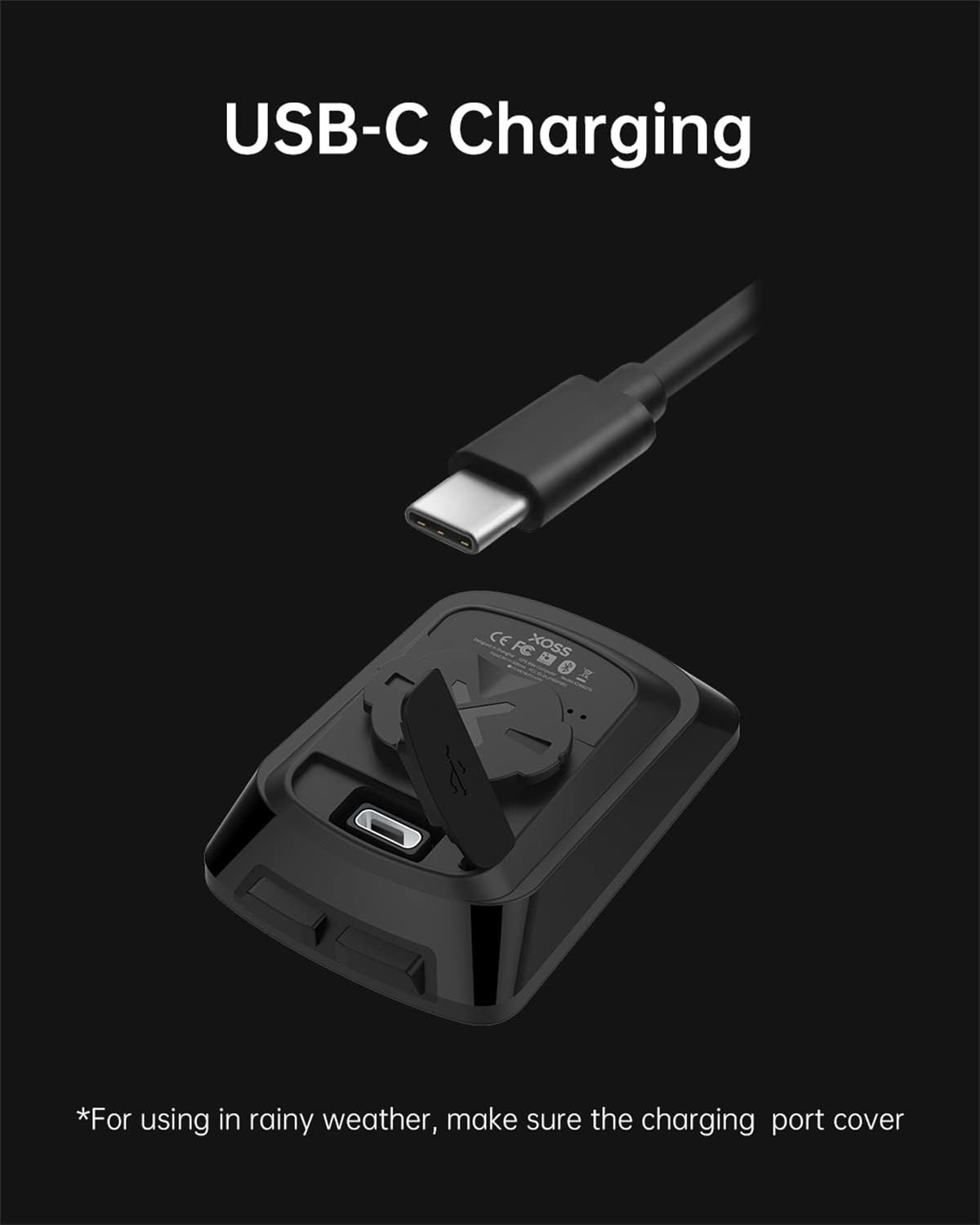
Image: The USB-C charging port of the XOSS G+ Gen2, demonstrating how to connect the charging cable. Remember to close the port cover for waterproofing.
2.3. Mounting the Bike Computer
The XOSS G+ Gen2 can be easily mounted on your bicycle's handlebar or stem.
- Place the rubber pad on your handlebar or stem at the desired mounting location. This helps prevent slippage and protects your bike's surface.
- Position the mount on top of the rubber pad.
- Secure the mount and rubber pad to your handlebar/stem using the provided rubber rings. Thread the rings through the mount and around the handlebar/stem, then hook them securely.
- Align the back of the XOSS G+ Gen2 unit with the mount.
- Twist the unit clockwise until it clicks securely into place.
3. آپريٽنگ هدايتون
3.1. پاور آن/آف
- پاور آن: Press and hold the right button (power icon) for 3 seconds. The device will power on and begin searching for GPS signals.
- بجلي بند: Press and hold the right button (power icon) for 3 seconds. The device will power off.
3.2. GPS Signal Acquisition
Upon powering on, the device will automatically search for GPS signals. Ensure you are in an open outdoor area for faster acquisition. The GPS signal strength indicator will show connection status.

Image: Visual representation of the high-sensitivity GPS feature, which enables quick and accurate tracking of speed and distance.
3.3. Displaying Data
The XOSS G+ Gen2 can display up to 10 data points on a single screen, with a total of 24 available data types. Press the left button (play/pause icon) to cycle through different data screens.

Image: The XOSS G+ Gen2 display, illustrating the various data fields available, such as speed, time, distance, heart rate, and more.

Image: The XOSS G+ Gen2 mounted on a bicycle, demonstrating its clear and comprehensive data display during a ride.
3.4. Connecting External Sensors (ANT+/Bluetooth)
The XOSS G+ Gen2 supports ANT+ and Bluetooth (5.0 and later) devices simultaneously, allowing connection to heart rate monitors, cadence sensors, and speed sensors.
- Ensure your external sensor is powered on and in pairing mode.
- On the XOSS G+ Gen2, navigate to the sensor pairing menu (refer to the on-screen prompts or specific button combinations for your device).
- Select the sensor type you wish to pair.
- The device will search for nearby sensors. Select your sensor from the list to connect.
- Once connected, data from the sensor will be displayed on the relevant data fields.

Image: The XOSS G+ Gen2 alongside an external sensor, illustrating its capability to connect with heart rate and cadence sensors for more detailed data.

Image: A graphic illustrating the Fusion PROTO Connection, highlighting the device's ability to support both ANT+ and Bluetooth devices simultaneously.
3.5. Using the XOSS App and STRAVA Synchronization
The XOSS app (available on Google Play and Apple App Store) enhances your cycling experience by allowing data analysis and synchronization with STRAVA.
- Download and install the XOSS app on your smartphone.
- اڪائونٽ ٺاهيو يا لاگ ان ٿيو.
- Pair your XOSS G+ Gen2 with the app via Bluetooth.
- After a ride, open the XOSS app to automatically upload your ride data from the device.
- Within the XOSS app settings, you can link your STRAVA account for automatic ride synchronization.

Image: A collage of smartphone screens displaying the XOSS app's capabilities for professional ride data analysis, device management, and workout tracking.

Image: The XOSS G+ Gen2 and a smartphone showing the XOSS app, illustrating the seamless synchronization of ride data with platforms like STRAVA.

Image: The XOSS G+ Gen2 paired with a smartphone displaying a 3D video of a cycling route, offering an immersive review of your ride.
4. سار سنڀال
4.1. صفائي
To ensure the longevity and proper functioning of your XOSS G+ Gen2, follow these cleaning guidelines:
- ڊوائيس کي نرم سان مسح ڪريو، ڊيamp cloth after each use, especially if it has been exposed to sweat, dirt, or rain.
- Do not use abrasive cleaners, solvents, or chemical sprays, as these can damage the device's casinجي يا اسڪرين.
- Ensure the USB-C port cover is securely closed before cleaning or exposing the device to water.

Image: The XOSS G+ Gen2 covered in water droplets, illustrating its IPX7 waterproof design, suitable for use in various weather conditions.
4.2. بيٽري جي سنڀال
بيٽري جي زندگي ۽ ڪارڪردگي کي وڌائڻ لاءِ:
- Charge the device regularly, avoiding complete discharge.
- جڏهن استعمال ۾ نه هجي ته ڊوائيس کي ٿڌي، سڪل جڳهه ۾ ذخيرو ڪريو.
- Avoid exposing the device to extreme temperatures (hot or cold) for prolonged periods.

Image: The XOSS G+ Gen2 on a bicycle, highlighting its impressive 28-hour battery life, ideal for long rides.
5. مسئلا حل ڪرڻ
If you encounter issues with your XOSS G+ Gen2, refer to the following common problems and solutions:
| مسئلو | ممڪن سبب | حل |
|---|---|---|
| ڊوائيس تي طاقت نه آهي. | گھٽ بيٽري. | مهيا ڪيل USB-C ڪيبل استعمال ڪندي ڊوائيس کي چارج ڪريو. |
| GPS سگنل حاصل نه ٿو ڪري سگھجي. | Indoors or obstructed view of sky; initial signal acquisition can take longer. | Move to an open outdoor area. Wait a few minutes for the device to connect. |
| Inaccurate speed/distance readings. | Weak GPS signal; device not calibrated (if using wheel sensor); slow movement. | صاف صاف کي يقيني بڻائي view of sky. If using a wheel sensor, ensure it's properly installed and calibrated. Note that at very low speeds, GPS accuracy can be limited. |
| External sensors (HR/Cadence) not connecting. | Sensor not powered on or in pairing mode; sensor battery low; device not searching for sensors. | Check sensor battery and power. Put sensor in pairing mode. Ensure XOSS G+ Gen2 is in sensor pairing menu. |
| XOSS App not syncing data. | Bluetooth not enabled on phone/device; app not open; device not paired with app. | Ensure Bluetooth is on for both devices. Open the XOSS app. Re-pair the device with the app if necessary. |
| Elevation displayed in meters when imperial units selected. | Known software bug (as per customer reviews). | This is a known display issue. The data should sync correctly to the XOSS app. Check for firmware updates from XOSS. |
6. وضاحتون
| خاصيت | تفصيل |
|---|---|
| برانڊ | XOSS |
| ماڊل نالو | ايڪس او ايس ايس جي + جين 2 |
| رنگ | ڪارو |
| شيءِ جو وزن | 42 گرام |
| اسڪرين جي ماپ | 2.2 انچ |
| ڊسپلي جو قسم | ايل سي ڊي |
| بيٽري جي زندگي | Up to 28 Hours (500mAh rechargeable lithium battery) |
| سينسر جو قسم | سائيڪلنگ ڪمپيوٽر |
| رابطي ٽيڪنالاجي | USB (USB-C), ANT+, Bluetooth 5.0 |
| شامل اجزاء | 1 main unit, 1 USB-C cable, 2 rubber rings, 1 yardstick holder, 1 protective rubber pad, and 1 user manual |
| بين الاقوامي تحفظ جي درجه بندي | IPX7 (پنروڪ) |
| چڙهڻ جو قسم | هينڊل بار جبل |
| انساني انٽرفيس ان پٽ | بٽڻ |
| مواد | پلاسٽڪ |
7. وارنٽي ۽ سپورٽ
7.1. وارنٽي ڄاڻ
The XOSS G+ Gen2 GPS Bike Computer comes with a هڪ سال وارنٽي خريداري جي تاريخ کان. هي وارنٽي عام استعمال هيٺ پيداوار جي خرابين ۽ خرابين کي ڍڪيندي آهي. اهو غلط استعمال، حادثن، غير مجاز ترميمن، يا نامناسب سار سنڀال جي ڪري ٿيندڙ نقصان کي ڍڪي نه ٿو ڏئي.
مھرباني ڪري وارنٽي دعوائن لاءِ خريد ڪرڻ جو پنھنجو ثبوت رکو.
7.2. ڪسٽمر سپورٽ
For further assistance, technical support, or warranty inquiries, please visit the official XOSS store or contact their customer service through the details provided on their official website or the XOSS app.
Official XOSS Store: XOSS Amazon Store


