1. تعارف
This manual provides essential instructions for the safe and efficient use of your SONY VAIO Pro PK VJPK11 laptop. Please read this manual thoroughly before operating your device and retain it for future reference. It covers setup, operation, maintenance, and troubleshooting to ensure optimal performance and longevity of your laptop.
2. پراڊڪٽ ختمview
The SONY VAIO Pro PK VJPK11 is a portable computing device designed for productivity and multimedia. Familiarize yourself with its components and features.

شڪل 2.1: سامهون view of the SONY VAIO Pro PK VJPK11 laptop. This image displays the laptop open, revealing the screen, keyboard, and touchpad. The VAIO logo is visible on the screen, and an Intel Core i5 sticker is on the palm rest.
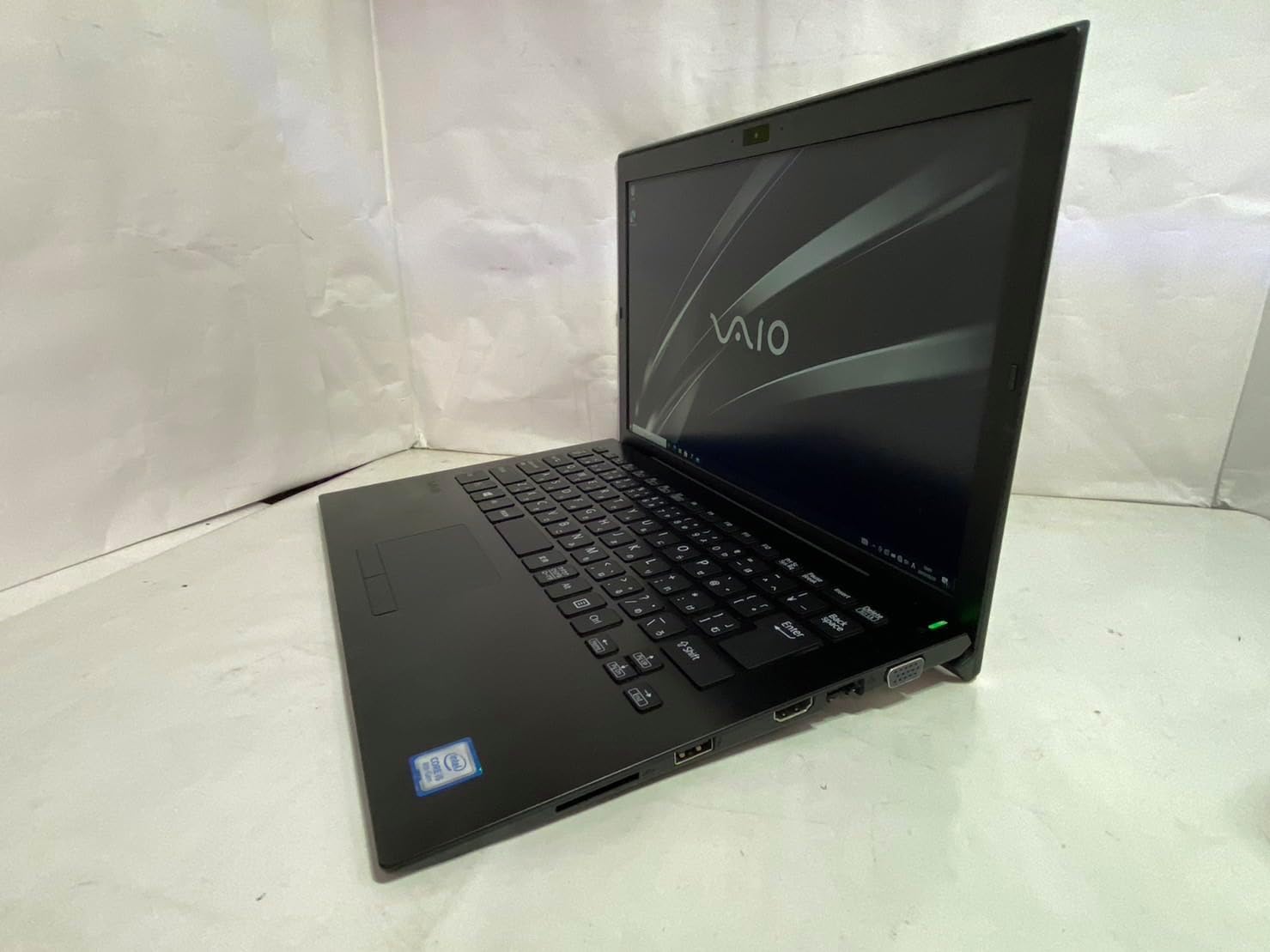
شڪل 2.2: کاٻي پاسي view of the SONY VAIO Pro PK VJPK11 laptop. This image shows the left side of the laptop, highlighting various ports such as USB, HDMI, and a VGA port, along with a ventilation grille.

شڪل 2.3: مٿو view of the SONY VAIO Pro PK VJPK11 laptop with the lid closed. This image displays the sleek black finish of the laptop's lid, featuring the prominent silver VAIO logo in the center.
3. سيٽ اپ
3.1 کولڻ
Carefully remove the laptop and all accessories from the packaging. Ensure all components are present:
- SONY VAIO Pro PK VJPK11 Laptop
- AC اڊاپٽر ۽ پاور ڪارڊ
- دستاويز (هي دستور، وارنٽي جي معلومات)
3.2 پاور سان نڻ
- پنهنجي ليپ ٽاپ تي AC اڊاپٽر کي پاور ان پٽ پورٽ سان ڳنڍيو.
- پاور ڪنڊ کي AC اڊاپٽر ۾ لڳايو.
- پاور ڪنڊ کي گرائونڊ ٿيل اليڪٽريڪل آئوٽليٽ ۾ داخل ڪريو.
- Allow the battery to charge fully before initial use, or use the laptop while connected to power.
3.3 Initial Boot-Up and Windows Setup
Press the power button to turn on the laptop. Follow the on-screen instructions to complete the Windows 10 Pro setup process. This typically involves selecting your region, language, accepting license agreements, and creating a user account.
4. آپريٽنگ هدايتون
4.1 پاور آن/آف
- پاور آن ڪرڻ: ليپ ٽاپ تي موجود پاور بٽڻ کي دٻايو.
- بند ڪرڻ لاء: شروع بٽڻ تي ڪلڪ ڪريو، پوءِ پاور، ۽ 'شٽ ڊائون' چونڊيو.
- ٻيهر شروع ڪرڻ لاء: شروع بٽڻ تي ڪلڪ ڪريو، پوءِ پاور، ۽ 'ٻيهر شروع ڪريو' چونڊيو.
- سمهڻ لاءِ: Click the Start button, then Power, and select 'Sleep', or close the laptop lid.
4.2 ڪي بورڊ ۽ ٽچ پيڊ
The laptop features a standard QWERTY keyboard and a multi-touch touchpad. Use the touchpad for cursor control and gestures. Refer to Windows settings for customizing touchpad sensitivity and gestures.
4.3 پردي کي ڳنڍڻ
- USB ڊوائيسز: Connect USB devices (e.g., mouse, external drive) to the available USB 3.0 ports.
- Disاهرين ڊسپلي: Use the HDMI or VGA port to connect an external monitor or projector. Press ونڊوز ڪي + پي to manage display modes.
- وائرڊ نيٽورڪ (LAN): Connect an Ethernet cable to the LAN port for a wired internet connection.
- SD ڪارڊ: Insert an SD card into the dedicated SD card slot for data transfer.
4.4 استعمال ڪندي Webcam and Bluetooth
- Webڪيمرا: ضم ٿيل webcam can be used for video calls and conferencing. Access it through applications like Camera or communication software.
- بلوٽوٿ: Enable Bluetooth in Windows settings to connect wireless devices such as headphones, speakers, or mice.
5. سار سنڀال
5.1 ليپ ٽاپ کي صاف ڪرڻ
نرم، لِنٽ کان خالي ڪپڙو استعمال ڪريو ٿورڙو ڊيampened with water or a screen cleaner to clean the display and exterior surfaces. Avoid harsh chemicals or abrasive materials. Ensure the laptop is powered off and unplugged before cleaning.
5.2 بيٽري جي سنڀال
To prolong battery life, avoid extreme temperatures. If storing the laptop for an extended period, ensure the battery is charged to approximately 50%.
5.3 سافٽ ويئر اپڊيٽ
Regularly check for and install Windows updates and driver updates from the SONY support webسسٽم جي استحڪام ۽ سيڪيورٽي کي يقيني بڻائڻ لاءِ سائيٽ.
5.4 ڊيٽا بيڪ اپ
ڊيٽا جي نقصان کي روڪڻ لاءِ وقت بوقت پنهنجي اهم ڊيٽا جو بيڪ اپ ڪنهن ٻاهرين ڊرائيو يا ڪلائوڊ اسٽوريج ۾ رکو.
6. مسئلا حل ڪرڻ
This section addresses common issues you might encounter with your SONY VAIO Pro PK VJPK11.
6.1 پاور ناهي
- پڪ ڪريو ته AC اڊاپٽر محفوظ طور تي ليپ ٽاپ ۽ ڪم ڪندڙ پاور آئوٽليٽ سان ڳنڍيل آهي.
- ٻئي ڊوائيس ۾ پلگ ان ڪندي پڪ ڪريو ته پاور آئوٽليٽ ڪم ڪري رهيو آهي.
- جيڪڏهن بيٽري مڪمل طور تي ختم ٿي وئي آهي، ته ان کي پاور آن ڪرڻ جي ڪوشش ڪرڻ کان پهريان ڪجهه منٽن لاءِ چارج ٿيڻ ڏيو.
6.2 ڊسپلي مسئلا
- If the screen is blank, try adjusting the display brightness using the function keys.
- If an external monitor is connected, ensure the correct display output mode is selected (Windows key + P).
- ليپ ٽاپ کي ٻيهر شروع ڪريو.
6.3 وائي فائي ڪنيڪشن جا مسئلا
- پڪ ڪريو ته ونڊوز سيٽنگز ۾ وائي فائي فعال آهي.
- پنهنجو روٽر ۽ موڊيم ٻيهر شروع ڪريو.
- چيڪ ڪريو ته ڇا ٻيا ڊوائيس ساڳئي وائي فائي نيٽ ورڪ سان ڳنڍجي سگهن ٿا.
- پنھنجي وائرليس نيٽ ورڪ ڊرائيورز کي اپڊيٽ ڪريو.
6.4 ليپ ٽاپ سست هلندڙ
- پس منظر ۾ هلندڙ غير ضروري ايپليڪيشنون بند ڪريو.
- ٽاسڪ مئنيجر کي چيڪ ڪريو ته ڇا عمل وڌيڪ سي پي يو يا ريم استعمال ڪن ٿا.
- ڊسڪ ڪلين اپ ۽ ڊيفراگمينٽيشن هلايو (HDD لاءِ، SSD لاءِ ضروري ناهي).
- پڪ ڪريو ته ونڊوز ۽ ڊرائيور اپ ٽو ڊيٽ آهن.
7. وضاحتون
Key technical specifications for the SONY VAIO Pro PK VJPK11 laptop:
| خاصيت | تفصيل |
|---|---|
| ماڊل | SONY VAIO Pro PK VJPK11 (VJPK11C11N) |
| پروسيسر | انٽيل ڪور i5-8250U (1.60GHz) |
| رام | 8.00GB DDR3 SDRAM |
| ذخيرو | 256GB SSD (SATA) |
| ڏيکاريو | 14.0-inch Wide (1920x1080 pixels) |
| گرافڪس | انٽيل انٽيگريٽيڊ گرافڪس |
| آپريٽنگ سسٽم | ونڊوز 10 پرو 64bit |
| بندرگاهن | VGA, HDMI, USB 3.0, LAN, SD Card Slot |
| رابطي | LAN، بلوٽوت |
| Webڪئميرا | ضم ٿيل Webڪئميرا |
8. وارنٽي ۽ سپورٽ
For information regarding your product's warranty, please refer to the warranty card included with your purchase or visit the official SONY support website. For technical assistance, contact SONY customer support or your authorized dealer.
آن لائن سپورٽ: https://www.sony.com/electronics/support


