1. تعارف
This manual provides detailed instructions for the installation, operation, and maintenance of your Turing TP-MMD4MV2 Smart Series TwilightVision 4MP IR Zoom Dome IP Camera. This advanced surveillance camera features a 2.7-13.5mm motorized varifocal lens, Smart IR illumination up to 40m (131ft), and TwilightVision technology for optimal image clarity in low-light conditions. It supports up to a 256GB MicroSD card for edge storage and is designed for outdoor use with IP67 weather resistance and IK10 vandal resistance. Please read this manual thoroughly before using the product to ensure proper setup and functionality.
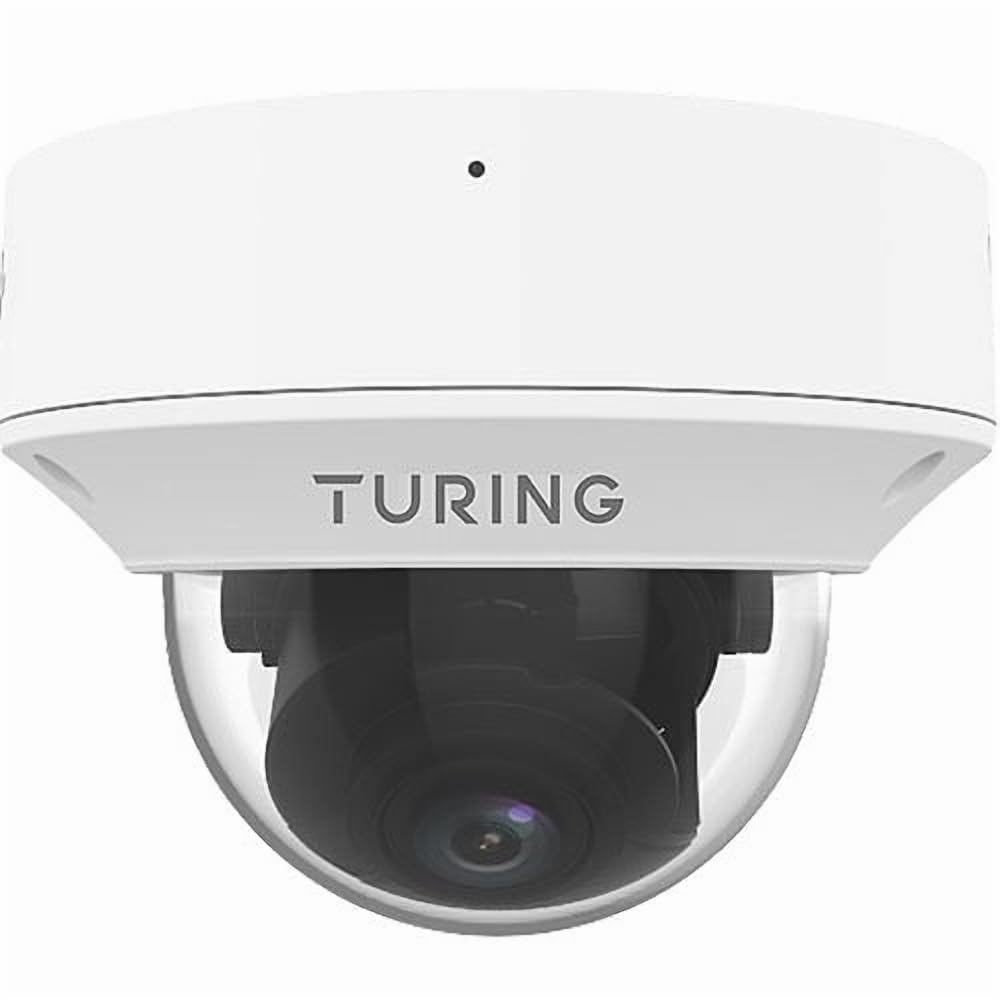
Figure 1: Turing TP-MMD4MV2 Smart Series TwilightVision 4MP IR Zoom Dome IP Camera. This image shows the white dome camera with its protective casing.
2. حفاظت جي ڄاڻ
پراڊڪٽ کي نقصان يا زخم کان بچڻ لاءِ مھرباني ڪري ھيٺ ڏنل حفاظتي احتياطي تدبيرن تي عمل ڪريو:
- برقي حفاظت: Ensure power supply meets the camera's requirements (DC 12V+/-25% or PoE IEEE 802.3af). Do not overload power outlets.
- تنصيب: Installation should be performed by qualified personnel. Mount the camera securely to prevent it from falling.
- ماحول: Do not expose the camera to extreme temperatures, humidity, or corrosive environments beyond its specified operating conditions.
- صفائي: صفائي لاءِ نرم، سڪل ڪپڙو استعمال ڪريو. مضبوط ڊٽرجنٽ يا رگڙيندڙ مواد استعمال نه ڪريو.
- خارج ٿيڻ: ڪئميرا کي ڌار ڪرڻ يا تبديل ڪرڻ جي ڪوشش نه ڪريو. اهو وارنٽي کي رد ڪري ڇڏيندو ۽ نقصان پهچائي سگھي ٿو.
3. پيڪيج مواد
پڪ ڪريو ته سڀئي شيون توهان جي پيڪيج ۾ موجود آهن:
- Turing TP-MMD4MV2 IP Dome Camera
- ماؤنٽنگ اسڪرو ڪٽ (اسڪرو، وال اينڪرز)
- ايٿرنيٽ ڪيبل لاءِ پنروڪ ڪنيڪٽر
- ڊرل سانچو
- تڪڙي شروعات جي ھدايت / استعمال ڪندڙ دستور (هي دستاويز)
Note: A MicroSD card and DC 12V power adapter are not included and must be purchased separately if not using Power over Ethernet (PoE).
4. پراڊڪٽ ختمview
The TP-MMD4MV2 camera is designed for robust outdoor surveillance, offering high-resolution imaging and intelligent features.
4.1 اهم خاصيتون
- 4 Megapixel Resolution: Captures video at 2688x1520 pixels at 30/25fps.
- Motorized Varifocal Lens: 2.7-13.5mm lens with auto-focus for flexible viewing angles.
- TwilightVision Technology: Enhances image clarity in extremely low-light conditions (down to 0.002 Lux).
- سمارٽ IR: Infrared illumination up to 40 meters (131 feet) for clear night vision.
- People and Vehicle Search: Advanced analytics when used with Turing SMART series NVRs and Turing Vision Cloud.
- بلٽ ان مائڪروفون: آڊيو مانيٽرنگ لاءِ.
- ايج اسٽوريج: Supports up to 256GB MicroSD card (not included).
- پائيدار ڊيزائن: IP67 weather-rated and IK10 vandal-resistant.
- پاور جا اختيار: Supports Power over Ethernet (PoE) and DC 12V.
4.2 ڪئميرا جا حصا
The camera consists of the main dome unit, a mounting base, and various ports. While a specific diagram is not provided, typical components include:
- گنبد جو ڍڪ: Protective, vandal-resistant casing.
- ڪئميرا ماڊل: Contains the lens, image sensor, and IR LEDs.
- ايٿرنيٽ پورٽ (RJ45): For network connection and PoE.
- ڊي سي پاور ان پٽ: For optional 12V DC power supply.
- ري سيٽ بٽڻ: فيڪٽري ڊفالٽ سيٽنگون بحال ڪرڻ لاءِ.
- مائڪرو ايس ڊي ڪارڊ سلاٽ: Located internally, accessible by removing the dome cover.
Figure 2: Illustrative diagram of camera components (image not available). This diagram would typically show the external parts of the dome camera, including the lens, IR LEDs, and the location of the cable connections and reset button.
5. سيٽ اپ ۽ تنصيب
Follow these steps for proper installation of your camera.
5.1 ڪئميرا لائڻ
- جڳھ چونڊيو: Select a suitable outdoor location for wall mounting, ensuring a clear field of view and within range of your network cable. The camera is IP67 and IK10 rated for outdoor use.
- سطح تيار ڪريو: Use the provided drill template to mark the screw holes on the mounting surface. Drill pilot holes as indicated.
- بنياد کي محفوظ ڪريو: Attach the camera's mounting base to the surface using the supplied screws and wall anchors.
- ڪيبل جو انتظام: Route the Ethernet cable through the mounting base or side cable entry point. Use the waterproof connector for outdoor installations to protect the RJ45 connection.
Figure 3: Illustrative diagram of camera mounting (image not available). This diagram would show the steps for securing the camera base to a wall or ceiling, including drilling and cable routing.
5.2 ڪئميرا کي طاقت ڏيڻ
ڪئميرا ٻن طريقن سان هلائي سگهجي ٿو:
- پاور اوور ايٿرنيٽ (PoE): هڪ ايٿرنيٽ ڪيبل کي PoE-فعال سوئچ يا NVR کان ڪئميرا جي RJ45 پورٽ سان ڳنڍيو. هي پاور ۽ ڊيٽا ٻئي فراهم ڪري ٿو.
- DC 12V Power Adapter: If PoE is not available, connect a 12V DC power adapter (not included) to the camera's DC power input. Then, connect an Ethernet cable for data transmission.
5.3 نيٽورڪ ڪنيڪشن
Connect the camera to your network via an Ethernet cable. The camera supports Ethernet connectivity. While 'Wireless Communication Technology: Wi-Fi' is listed in some specifications, the primary and most robust connection method for this model is wired Ethernet, especially for PoE. For initial setup, a wired connection is recommended.
5.4 مائڪرو ايس ڊي ڪارڊ جي انسٽاليشن
To install a MicroSD card for local storage (up to 256GB):
- بجلي بند: Disconnect power from the camera before proceeding.
- Remove Dome Cover: Carefully twist and remove the outer dome cover to access the internal components.
- مائڪرو ايس ڊي ڪارڊ داخل ڪريو: Locate the MicroSD card slot and gently insert the card until it clicks into place.
- Replace Dome Cover: Reattach the dome cover, ensuring it is securely sealed to maintain weather resistance.
Figure 4: Illustrative diagram of MicroSD card slot location (image not available). This diagram would show the internal view of the camera with the dome cover removed, highlighting the MicroSD card slot.
6. ڪئميرا کي هلائڻ
Once installed and powered, the camera can be accessed and configured.
6.1 شروعاتي رسائي ۽ ترتيب
The camera is designed to integrate with Turing SMART NVRs (TR-MR(P) models) and the Turing Vision Cloud for full functionality, including People and Vehicle Search. Refer to your NVR's manual or Turing Vision Cloud documentation for specific integration steps.
- Network Discovery: Use Turing's network discovery tool to find the camera's IP address on your network.
- Web انٽرفيس: ڪئميرا تائين رسائي حاصل ڪريو web انٽرفيس ذريعي a web browser using its IP address. Log in with default credentials (refer to the Quick Start Guide for defaults).
- پاسورڊ تبديل ڪريو: For security, immediately change the default password upon first login.
- نيٽ ورڪ سيٽنگون: Configure IP address, subnet mask, and gateway if necessary.
6.2 Adjusting the Motorized Lens
The 2.7-13.5mm motorized varifocal lens allows you to remotely adjust the zoom and focus:
- ڪئميرا جي لائيو تائين رسائي حاصل ڪريو view through the NVR interface or web برائوزر.
- Locate the zoom and focus controls.
- Adjust the zoom to achieve the desired field of view. The camera will automatically adjust focus (AF).
6.3 Smart IR and TwilightVision
The camera automatically switches between day and night modes. Smart IR adjusts the intensity of the infrared LEDs to prevent overexposure of close-up objects, ensuring balanced illumination up to 40m (131ft). TwilightVision technology provides enhanced color images in extremely low-light conditions before switching to IR mode.
6.4 رڪارڊنگ ۽ اسٽوريج
- اين وي آر رڪارڊنگ: Configure recording schedules and motion detection settings on your Turing SMART NVR.
- مائڪرو ايس ڊي ڪارڊ رڪارڊنگ: If a MicroSD card is installed, configure event-triggered or continuous recording via the camera's web انٽرفيس.
- وڊيو انڪوڊنگ: The camera supports Ultra 265, H.265, H.264, and MJPEG video encoding formats.
6.5 آڊيو مانيٽرنگ
The built-in microphone captures audio. Ensure audio recording is enabled in the camera's settings if desired. Audio compression uses G.711.
7. سار سنڀال
باقاعده سار سنڀال توهان جي ڪئميرا جي بهترين ڪارڪردگي ۽ ڊگهي عمر کي يقيني بڻائي ٿي.
- صفائي: Periodically clean the dome cover with a soft, damp cloth to remove dust, dirt, or water spots that may affect image quality. Do not use harsh chemicals.
- فرم ويئر اپڊيٽس: Check the Turing website for the latest firmware updates. Regularly updating firmware can improve performance, add features, and enhance security. Follow the provided instructions carefully during updates.
- ڪيبل جي چڪاس: Periodically inspect all cables and connections for wear, damage, or corrosion, especially for outdoor installations.
- ماحولياتي چڪاس: Ensure the camera's environment remains within its operating temperature and humidity ranges.
8. مسئلا حل ڪرڻ
عام مسئلن ۽ انهن جي حل لاءِ هيٺ ڏنل جدول جو حوالو ڏيو.
| مسئلو | ممڪن سبب | حل |
|---|---|---|
| ڪئميرا جي طاقت ناهي | Incorrect power supply; PoE not active; loose connection | Verify 12V DC power or PoE source. Check all cable connections. |
| ڪابه وڊيو فيڊ | Network issue; incorrect IP address; camera not configured | Check network cable. Ensure camera is powered. Verify IP address and network settings. Restart camera. |
| خراب تصوير جو معيار | Dirty lens/dome; improper focus; low light conditions | Clean the dome cover. Adjust focus via the motorized lens controls. Ensure sufficient lighting or proper IR operation. |
| نيٽ ورڪ ذريعي ڪئميرا تائين رسائي نه ٿي سگهي | IP address conflict; firewall blocking; incorrect network settings | Use network discovery tool. Check network configuration. Temporarily disable firewall for testing. Reset camera to factory defaults if necessary. |
| مائڪرو ايس ڊي ڪارڊ رڪارڊ نه ٿي رهيو آهي | Card full; card not formatted; recording schedule not set | Check card status in settings. Format card if needed. Configure recording schedule. Ensure card is properly inserted. |
9. وضاحتون
Detailed technical specifications for the Turing TP-MMD4MV2 camera:
| خاصيت | تفصيل |
|---|---|
| ماڊل نمبر | TP-MMD4MV2 |
| تصويري سينسر | 1/3-inch, 4.0 megapixel, progressive scan, CMOS |
| وڌ. قرارداد | 4MP (2688x1520) at 30/25fps |
| لينس | 2.7-13.5mm motorized varifocal, AF automatic focusing |
| اينگل جو View | H: 98.26 - 31.35 degrees; V: 54.76 - 18.55 degrees; D: 127.74 - 36.99 degrees |
| گھٽ ۾ گھٽ روشني | Color: 0.002 Lux (F1.2, AGC on); 0 Lux with IR on |
| آئي آر رينج | Smart IR up to 40m (131ft) |
| وڊيو ڪمپريشن | الٽرا 265، H.265، H.264، MJPEG |
| آڊيو کمپريشن | G.711 |
| ڊجيٽل شور جي گھٽتائي | 2D and 3D DNR |
| ايج اسٽوريج | MicroSD ڪارڊ، 256 GB تائين (شامل نه آهي) |
| بجلي جي فراهمي | DC 12V+/-25%, PoE (IEEE 802.3af) |
| بجلي جو استعمال | وڌ ۾ وڌ 7.0W |
| داخل ٿيڻ جي حفاظت | IP67 |
| وينڊل مزاحمت | IK10 |
| طول و عرض (D x H) | 5.88 x 4.4 انچ (149.35 x 111.76 ملي ميٽر) |
| وزن | 2.03 پائونڊ (0.92 ڪلوگرام) |
| آپريٽنگ جي درجه حرارت | Refer to manufacturer's official specifications for exact range |
| ڪنيڪشن پروٽوڪول | ايٿرنيٽ |
| Supported NVR | Turing SMART NVR: TR-MR(P) ماڊل |
10. وارنٽي ڄاڻ
Turing products are covered by a limited warranty. For specific warranty terms, conditions, and duration, please refer to the official Turing webسائيٽ يا توهان جي پراڊڪٽ سان گڏ وارنٽي ڪارڊ. وارنٽي دعوائن لاءِ خريداري جو ثبوت رکو.
11. ڪسٽمر سپورٽ
If you encounter any issues or have questions not covered in this manual, please contact Turing customer support:
- Webسائيٽ: Visit the official Turing webسوالن، سپورٽ وسيلن، ۽ رابطي جي معلومات لاءِ سائيٽ.
- ٽيڪنيڪل سپورٽ: Contact details for technical assistance can typically be found on the manufacturer's webسائيٽ تي يا توهان جي پراڊڪٽ جي پيڪنگنگ ۾.
12. پراڊڪٽ وڊيوز
هن دستور ۾ شامل ڪرڻ لاءِ پراڊڪٽ ڊيٽا ۾ وڪرو ڪندڙ کان ڪا به سرڪاري پراڊڪٽ وڊيوز مهيا نه ڪئي وئي.


