1. تعارف
Thank you for choosing the AVATTO Smart ZigBee Light Switch ZTS02-EU-W2. This device integrates seamlessly into your smart home ecosystem, offering convenient control over your lighting. This manual provides essential information for the safe installation, operation, and maintenance of your new smart light switch. Please read it thoroughly before installation and keep it for future reference.
2. پراڊڪٽ ختمview
The AVATTO Smart ZigBee Light Switch ZTS02-EU-W2 is a modern, touch-sensitive light switch designed for smart home integration. It utilizes ZigBee technology for reliable wireless communication and is compatible with the TUYA Smart App, allowing for remote control, scheduling, and automation of your lighting. This 2-way switch offers both manual touch control and smart functionality.
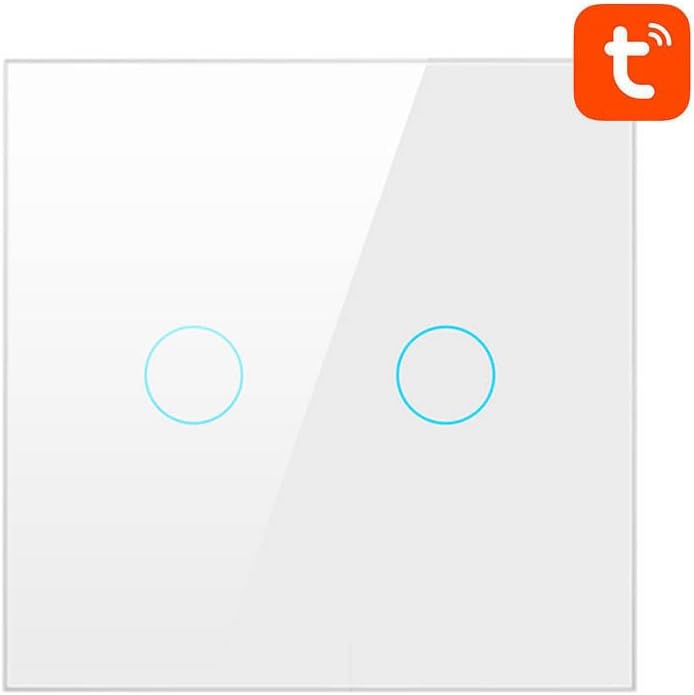
تصوير 1: سامهون view of the AVATTO Smart ZigBee Light Switch ZTS02-EU-W2. It is white with two circular touch-sensitive areas, and the Tuya logo is visible in the top right corner, indicating its smart home compatibility.
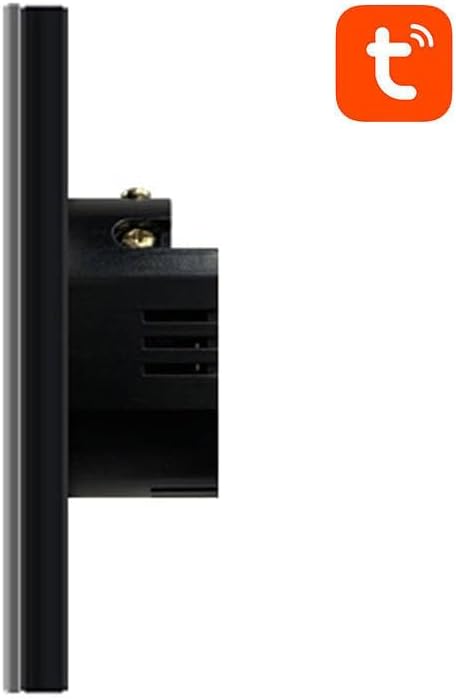
تصوير 2: پاسي پروfile of the AVATTO Smart ZigBee Light Switch ZTS02-EU-W2, showing its depth and the wiring terminals on the back for electrical connection. The Tuya logo is also visible in the top right corner.
3. حفاظت جي ڄاڻ
- برقي خطرو: Installation must be performed by a qualified electrician or a person with a thorough understanding of electrical systems.
- بجلي بند: Always disconnect power at the circuit breaker before installing, removing, or servicing the switch.
- جلدtage: سوئچ جي وول کي يقيني بڻايوtage rating matches your electrical system.
- صرف اندروني استعمال: This device is designed for indoor use in dry locations. Avoid exposure to moisture or extreme temperatures.
- اوور لوڊ: سوئچ جي وڌ ۾ وڌ لوڊ ريٽنگ کان وڌيڪ نه ڪريو.
4. پيڪيج مواد
مھرباني ڪري ھيٺ ڏنل شين لاءِ پيڪيج چيڪ ڪريو:
- AVATTO Smart ZigBee Light Switch (ZTS02-EU-W2)
- استعمال ڪندڙ دستي
- چڙهڻ اسڪرو
5. سيٽ اپ
5.1. برقي تنصيب
- پاور بند ڪريو: Locate your circuit breaker and turn off the power to the switch box you are working on. Verify power is off using a voltagاي جاچ ڪندڙ.
- پراڻو سوئچ هٽايو: احتياط سان موجوده وال پليٽ کي هٽايو ۽ وال باڪس مان پراڻي سوئچ کي کوليو. تارن کي ڌار ڪريو.
- تارن جي سڃاڻپ ڪريو: Identify the Live (L), Load (L1/L2), and Neutral (N) wires. A Neutral wire is required for this smart switch. If you do not have a Neutral wire, consult a qualified electrician.
- سمارٽ سوئچ کي وائر ڪريو: Connect the wires to the corresponding terminals on the AVATTO Smart ZigBee Light Switch. Typically:
- Live wire to 'L' terminal.
- Load wire(s) to 'L1' and/or 'L2' terminals.
- Neutral wire to 'N' terminal.
- سوئچ کي نصب ڪريو: Gently push the wired switch into the wall box and secure it with the provided screws. Attach the new wall plate.
- پاور بحال ڪريو: Turn the power back on at the circuit breaker. The indicator light on the switch should illuminate.
5.2. App Pairing (TUYA Smart App)
To enable smart features, you need a ZigBee gateway (sold separately) and the TUYA Smart App.
- ايپ ڊائون لوڊ ڪريو Download the 'TUYA Smart' or 'Smart Life' app from your smartphone's app store (iOS/Android).
- رجسٽر/لاگ ان: ايپ کوليو ۽ نئين اڪائونٽ لاءِ رجسٽر ٿيو يا موجوده اڪائونٽ سان لاگ ان ٿيو.
- Add ZigBee Gateway: If you haven't already, add your ZigBee gateway to the TUYA Smart App. Follow the gateway's specific instructions for pairing.
- پيئرنگ موڊ داخل ڪريو: On the AVATTO Smart ZigBee Light Switch, press and hold one of the touch buttons for approximately 5-10 seconds until the indicator light starts blinking rapidly. This indicates it's in pairing mode.
- ايپ ۾ ڊوائيس شامل ڪريو: In the TUYA Smart App, select your ZigBee gateway, then tap 'Add sub-device' or 'Add new device'. The app will scan for nearby ZigBee devices.
- جوڙي جي تصديق ڪريو: Once the switch is discovered, confirm its addition in the app. You can then rename the switch and assign it to a room.
6. آپريٽنگ هدايتون
6.1. دستي ڪنٽرول
- آن/بند ڪريو: Lightly touch the circular touch area on the switch panel to toggle the connected light(s) on or off.
6.2. Smart Control (via TUYA Smart App)
- ريموٽ ڪنٽرول: Open the TUYA Smart App on your smartphone to remotely turn the light(s) on or off from anywhere with an internet connection.
- شيڊيولنگ: Set schedules or timers for your lights to turn on or off automatically at specific times.
- خودڪار: Create smart scenes and automations, such as turning lights on when motion is detected (requires compatible sensors) or when you arrive home.
- وائس ڪنٽرول: Integrate with voice assistants like Amazon Alexa or Google Assistant (requires compatible smart speaker and app integration) for hands-free control.
7. سار سنڀال
- صفائي: To clean the switch, ensure power is off at the circuit breaker. Use a soft, damp ڪپڙو. استعمال نه ڪريو abrasive cleaners يا solvents.
- ڪوبه استعمال ڪندڙ قابل خدمت حصا: The switch contains no user-serviceable parts. Do not attempt to disassemble or repair the device yourself.
8. مسئلا حل ڪرڻ
- سوئچ جواب نه ڏئي رهيو آهي:
- چيڪ ڪريو ته سرڪٽ بريڪر آن آهي يا نه.
- Ensure wiring is correct and secure.
- Verify the light bulb is working.
- ايپ سان جوڙي نه ٿو سگهجي:
- Ensure you have a ZigBee gateway and it is powered on and connected to your network.
- Make sure the switch is in pairing mode (indicator light blinking rapidly).
- Bring the switch closer to the ZigBee gateway during pairing.
- Reset the switch by holding the touch button for 10-15 seconds until the indicator light blinks differently, then try pairing again.
- روشنيون ٽمٽار:
- Ensure the connected lights are compatible with smart switches (e.g., dimmable LEDs may require specific compatibility).
- ڍلو وائرنگ ڪنيڪشن جي جانچ ڪريو.
9. وضاحتون
- ماڊل: ZTS02-EU-W2
- طول و عرض: 16.8 x 8.6 x 3 سينٽي
- وزن: 1 ڪلو
- رابطي: زيگ بي
- مطابقت: TUYA Smart App / Smart Life App
- انٽ واليمtage: AC 100-240V (Typical for EU/Global smart switches, specific value not provided)
- وڌ ۾ وڌ لوڊ: (Specific value not provided, refer to product packaging for exact rating)
10. وارنٽي ۽ سپورٽ
AVATTO products are designed for reliability and performance. This product comes with a standard manufacturer's warranty. For specific warranty terms and conditions, please refer to the warranty card included with your purchase or contact AVATTO customer support. If you encounter any issues or have questions regarding your AVATTO Smart ZigBee Light Switch, please contact our customer service team for assistance.


