1. تعارف
This manual provides detailed instructions for the installation, operation, maintenance, and troubleshooting of your XPG CORE Reactor II VE 650W Power Supply Unit (PSU). Please read this manual thoroughly before using the product to ensure proper functionality and safety.
2. حفاظت جي ڄاڻ
- Always disconnect the power cord from the wall outlet before installing, removing, or cleaning the PSU.
- پي ايس يو سي نه کوليوasinج. هاءِ وولٽtages are present inside, which can cause electric shock. The warranty will be void if the casing کوليو ويو آهي.
- Install the PSU in a well-ventilated area, away from heat sources, direct sunlight, and moisture.
- Ensure all cables are securely connected. Loose connections can cause damage to components.
- Use only the modular cables provided with this PSU. Using third-party cables may cause damage and void the warranty.
- This product is designed for use in computer systems only. Do not use it for any other purpose.
3. پيڪيج مواد
تصديق ڪريو ته هيٺ ڏنل سڀئي شيون توهان جي پراڊڪٽ پيڪيج ۾ موجود آهن:
- XPG CORE Reactor II VE 650W Power Supply Unit
- ماڊيولر ڪيبل سيٽ (12V-2x6 ڪيبل سميت)
- اي سي پاور ڪارڊ
- چڙهڻ اسڪرو
- تڪڙو شروع ھدايت

Image: The XPG CORE Reactor II VE 650W power supply unit shown with its retail box, modular cables, AC power cord, and quick start guide.
4. پراڊڪٽ ختمview
The XPG CORE Reactor II VE 650W is an 80 PLUS Gold certified power supply compliant with Intel's ATX 3.1 specifications. It features a fully modular design and an FDB (Fluid Dynamic Bearing) fan for efficient and quiet operation.

تصوير: هڪ سامهون وارو پاسو view of the XPG CORE Reactor II VE 650W power supply, showcasing its fan grille and XPG branding.

Image: The rear panel of the XPG CORE Reactor II VE 650W power supply, featuring the AC power inlet and the main power switch.

Image: A close-up of the modular cable connection panel on the XPG CORE Reactor II VE 650W PSU, showing labeled ports for Motherboard, CPU & VGA, 12V-2x6, and SATA & Molex connectors.
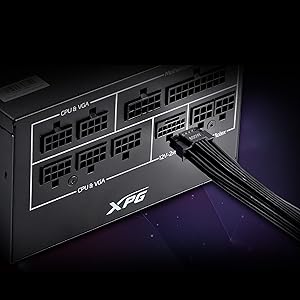
تصوير: هڪ تفصيلي view of the 12V-2x6 connector port on the XPG CORE Reactor II VE 650W PSU, designed for next-generation graphics cards.
5. سيٽ اپ ۽ تنصيب
Follow these steps to properly install your XPG CORE Reactor II VE 650W PSU into your computer system:
- پنهنجو نظام تيار ڪريو: پڪ ڪريو ته توهان جو ڪمپيوٽر مڪمل طور تي بند آهي ۽ وال آئوٽليٽ کان ان پلگ ٿيل آهي. پنهنجو ڪمپيوٽر ڪيس کوليو.
- پراڻي PSU کي هٽايو (جيڪڏهن قابل اطلاق هجي): Disconnect all cables from your old PSU and remove it from the case.
- نئون PSU لڳايو: Insert the XPG CORE Reactor II VE 650W PSU into the designated PSU bay in your computer case. Secure it with the provided mounting screws.
- ضروري ڪيبل ڳنڍيو:
- 24-پن ATX ڪيبل کي پنهنجي مدر بورڊ سان ڳنڍيو.
- Connect the 4+4-pin or 8-pin EPS/CPU cable(s) to your motherboard's CPU power connector(s).
- Connect the appropriate PCI-E (6+2-pin) or 12V-2x6 cable(s) to your graphics card(s).
- SATA پاور ڪيبلز کي پنهنجي اسٽوريج ڊرائيوز (HDDs، SSDs) ۽ آپٽيڪل ڊرائيوز سان ڳنڍيو.
- Connect Molex cables to any peripherals requiring them.
Ensure all modular cables are firmly seated into both the PSU and the respective components.
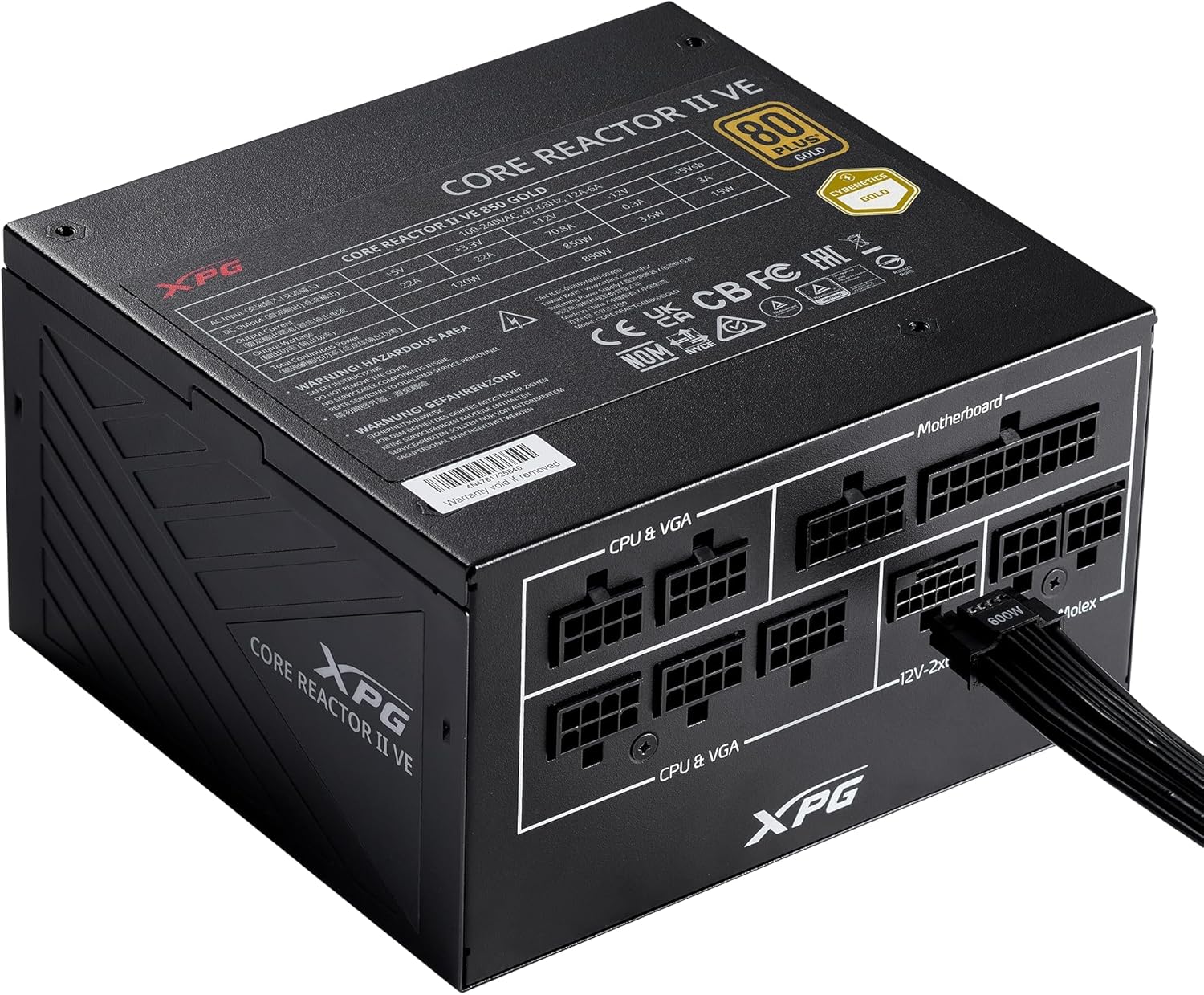
Image: The XPG CORE Reactor II VE 650W power supply with a 12V-2x6 cable connected to its modular port, illustrating a typical cable connection.
- ڪيبل جو انتظام: پنهنجي ڪيس ۾ هوا جي وهڪري ۽ جمالياتيات کي بهتر بڻائڻ لاءِ ڪيبلن کي صاف سٿرو ڪريو.
- ڪيس بند ڪريو ۽ پاور ڳنڍيو: Close your computer case. Connect the AC power cord to the PSU's inlet and then to a wall outlet.
- پاور آن: PSU جي پوئين پاسي واري پاور سوئچ کي 'آن' پوزيشن تي ڦيرايو ۽ پنهنجي ڪمپيوٽر کي پاور ڏيو.
6. آپريٽنگ هدايتون
The XPG CORE Reactor II VE 650W PSU operates automatically once installed and powered on. It features an FDB fan with intelligent fan control, which adjusts its speed based on the PSU's temperature and load to maintain optimal cooling and minimize noise.
The PSU is designed to provide stable and reliable power to your system. No user intervention is typically required during normal operation.
7. سار سنڀال
To ensure the longevity and optimal performance of your XPG CORE Reactor II VE 650W PSU, consider the following maintenance tips:
- مٽي هٽائڻ: Periodically clean the fan grille and the interior of your computer case to prevent dust buildup. Dust can impede airflow and lead to overheating. Use compressed air for this purpose, ensuring the system is powered off and unplugged.
- ڪيبل چيڪ: ڪڏهن ڪڏهن سڀني ماڊيولر ڪيبل ڪنيڪشن کي چيڪ ڪريو ته جيئن اهي محفوظ رهن.
- ماحول: Operate the PSU in a clean, dry, and well-ventilated environment.
8. مسئلا حل ڪرڻ
If you encounter issues with your XPG CORE Reactor II VE 650W PSU, refer to the following common troubleshooting steps:
- طاقت ناهي:
- پڪ ڪريو ته AC پاور ڪنڊ PSU ۽ وال آئوٽليٽ ٻنهي سان محفوظ طور تي ڳنڍيل آهي.
- چيڪ ڪريو ته PSU جي پوئين پاسي وارو پاور سوئچ 'آن' پوزيشن ۾ آهي.
- ٻئي ڊوائيس ۾ پلگ ان ڪندي تصديق ڪريو ته وال آئوٽليٽ ڪم ڪري رهيو آهي.
- Confirm that the 24-pin ATX and 4+4-pin/8-pin EPS/CPU cables are correctly and firmly connected to the motherboard.
- سسٽم جي عدم استحڪام/ بي ترتيب بندش:
- Ensure all power cables to components (motherboard, CPU, GPU, drives) are securely connected.
- Check for proper ventilation within your computer case. Overheating can cause instability.
- If you have recently added new components, ensure the 650W output is sufficient for your total system load.
- نه ڦرندڙ پنکڙو:
- The FDB fan features intelligent control and may not spin at low loads or temperatures. This is normal operation.
- If the fan does not spin under heavy load and the PSU feels excessively hot, contact support.
- غير معمولي آواز:
- A slight coil whine can sometimes occur under specific loads; this is generally not indicative of a fault.
- If you hear grinding or scraping noises, power off the system immediately and contact support.
جيڪڏهن اهي قدم توهان جي مسئلي کي حل نه ٿا ڪن، ته مهرباني ڪري وڌيڪ مدد لاءِ وارنٽي ۽ سپورٽ سيڪشن جو حوالو ڏيو.
9. وضاحتون
Key technical specifications for the XPG CORE Reactor II VE 650W PSU:
| خاصيت | تفصيل |
|---|---|
| ماڊل نمبر | COREREACTORIIVE650G-BKCUS |
| آئوٽ پٽ واٽtage | 650 واٽ |
| ڪارڪردگي جي تصديق | 80 PLUS Gold, CYBENETICS Gold |
| اي ٽي ايڪس معياري | ATX 3.1 / EPS v2.92 |
| فارم فيڪٽر | اي ٽي ايڪس |
| کولڻ جو طريقو | Air (FDB 120mm Fan) |
| پاور سپلائي ڊيزائن | مڪمل ماڊلر |
| پيداوار جي ماپ (L x W x H) | 5.86 x 5.9 x 3.38 انچ (140x150x86mm) |
| شيءِ جو وزن | 5.07 پائونڊ |
| ڪنيڪٽر جا قسم | ATX, Molex, PCI Express, SATA, 12V-2x6 |
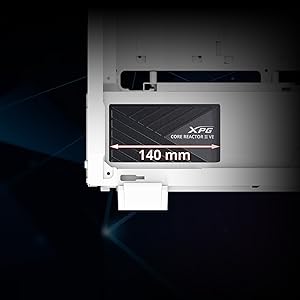
Image: A diagram illustrating the compact 140mm length of the XPG CORE Reactor II VE power supply, highlighting its compatibility with various PC cases.

Image: Visual representation of the multiple protection mechanisms integrated into the PSU, including OPP (Over Power Protection), OVP (Over Voltage Protection), SIP (Surge & Inrush Protection), SCP (Short Circuit Protection), UVP (Under Voltage Protection), OCP (Over Current Protection), OTP (Over Temperature Protection), and NLO (No Load Operation).
10. وارنٽي ۽ سپورٽ
For warranty information, technical support, or service inquiries regarding your XPG CORE Reactor II VE 650W PSU, please visit the official XPG website or contact their customer support directly. Details can typically be found on the product packaging or the manufacturer's official support pages.
وارنٽي دعويٰ لاءِ خريداري جو ثبوت رکو.


