تعارف
This manual provides instructions for the setup, operation, and maintenance of your OttLite Wake Up Light with White Noise Sound Machine. This device combines a sunrise simulation alarm clock, a white noise sound machine, and a versatile color-changing light to enhance your daily routine.
حفاظت جي ڄاڻ
- استعمال ڪرڻ کان اڳ سڀ هدايتون پڙهو.
- هي پراڊڪٽ صرف اندروني استعمال لاء ٺهيل آهي.
- صرف مهيا ڪيل پاور اڊاپٽر استعمال ڪريو.
- ڊوائيس کي پاڻي يا گهڻي نمي جي سامهون نه رکو.
- ٻارن جي پهچ کان پري رکو.
- يونٽ کي پاڻ ڌار ڪرڻ يا مرمت ڪرڻ جي ڪوشش نه ڪريو. قابل سروس اهلڪارن سان رابطو ڪريو.
پيڪيج مواد
- OttLite Wake Up Light with White Noise Sound Machine
- USB پاور ڪيبل
- استعمال ڪندڙ دستي
پيداوار ختمview
Familiarize yourself with the components of your OttLite Wake Up Light.

تصوير: سامهون view of the OttLite Wake Up Light, displaying the time and connected to a USB charging pad.

تصوير: پاسي view of the OttLite Wake Up Light, showing the various control buttons and the USB port.
اهم ڪنٽرول:
- وقت ڏيکاري: ڊجيٽل ڪلاڪ ڊسپلي.
- نور پينل: Provides white and color-changing illumination.
- ڪنٽرول بٽڻ: Located on the side for setting time, alarms, light modes, and sounds.
- USB چارجنگ پورٽ: ٻاهرين ڊوائيسز کي چارج ڪرڻ لاءِ.
سيٽ اپ ڪريو
- پيڪ ڪريو: احتياط سان پيڪنگنگ مان سڀني اجزاء کي هٽايو.
- پاور ڪنيڪشن: Connect the provided USB power cable to the device and plug the adapter into a standard wall outlet. The device will power on and the time display will activate.
- لڳائڻ: Place the Wake Up Light on a stable, flat surface, such as a bedside table, ensuring it is within reach of a power outlet.
آپريٽنگ هدايتون
1. ڪلاڪ کي جوڙڻ
- Press the 'Time Set' button (often indicated by a clock icon).
- ڪلاڪ ۽ منٽ کي ترتيب ڏيڻ لاءِ '+' ۽ '-' بٽڻ استعمال ڪريو.
- Press 'Time Set' again to confirm each setting.
- Toggle between 12-hour and 24-hour format using the dedicated button or by cycling through time settings.
2. Wake-Up Light & Alarm Function
The sunrise simulation gradually increases light intensity before your set alarm time.

Image: A user interacting with the Wake Up Light as it emits a warm, sunrise-like glow.
- الارم مقرر ڪريو: Press the 'Alarm Set' button (bell icon). Use '+' and '-' to set the desired wake-up time.
- سج اڀرڻ سموليشن: The light will begin to brighten 30 minutes before the set alarm time, gradually increasing to full brightness.
- Wake-Up Sounds: Choose from 7 pre-set sounds (nature sounds, FM radio, traditional alarm) by pressing the 'Sound' button. Adjust volume with '+' and '-'.
- سست جو ڪم: Press the 'Snooze' button (often a large button on top or front) to temporarily pause the alarm for a few minutes.
3. Sleep Aid & Sunset Simulation
Utilize the white noise and sunset simulation for a calming environment.
- اڇو شور: Activate the white noise sound machine by pressing the 'White Noise' button. Adjust volume as needed.
- سج اڀرڻ جو نمونو: Set the light to gradually dim over 15, 30, or 60 minutes. Refer to the specific button for 'Sunset' or 'Sleep Timer' and cycle through options.
4. روشني جا ڪم
The device offers various lighting options for ambiance and utility.
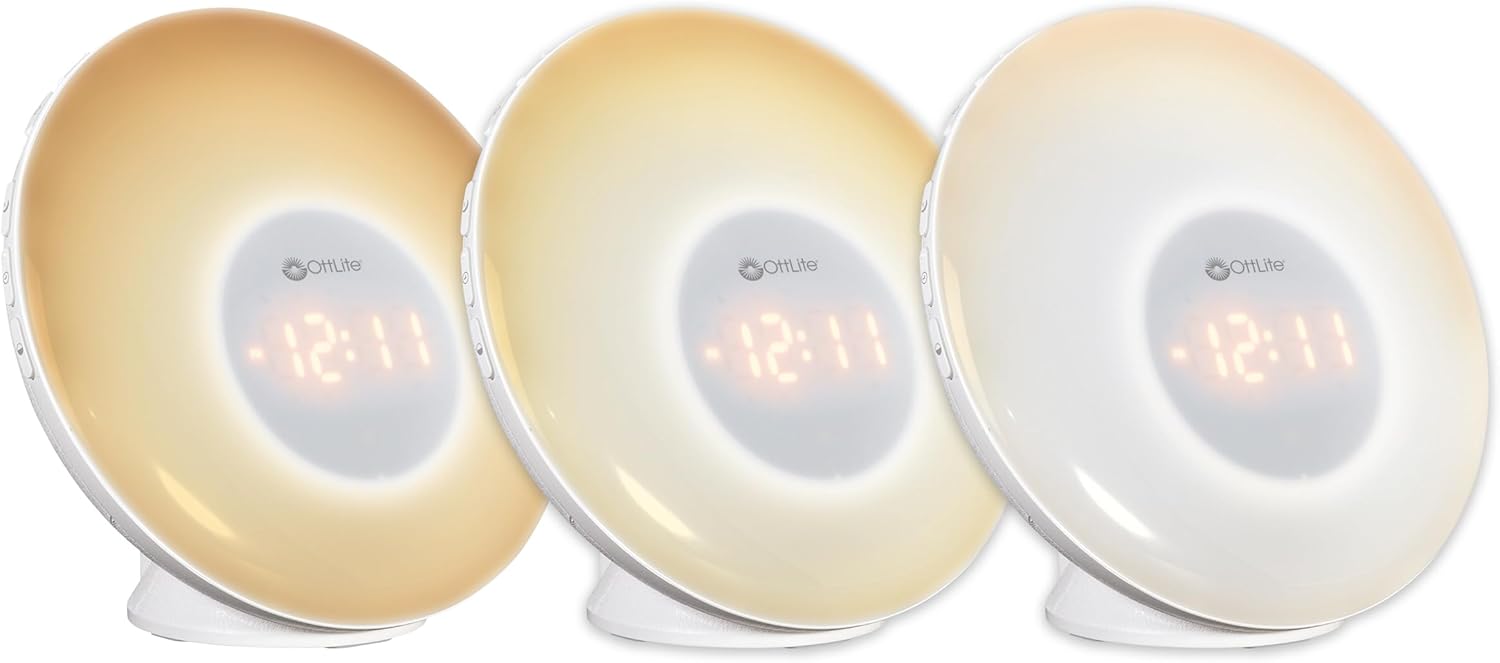
Image: Three units demonstrating the adjustable white light temperatures.

Image: Multiple units showcasing the range of color-changing options.
- سفيد روشني: Press the 'Light' button to activate soft white light. Adjust brightness using '+' and '-' buttons (three brightness levels available).
- رنگ تبديل ڪرڻ: Press the 'RGB' button to cycle through a spectrum of colors.
- مقرر رنگ: While in color-changing mode, press the 'RGB' button again to pause on your desired color.
5. يو ايس بي چارجنگ پورٽ
A convenient USB port is integrated for charging your devices.

Image: A smartphone being charged via the USB port on the Wake Up Light.
- Locate the USB port (5V, 1A output) on the side or back of the unit.
- Connect your device's USB charging cable to this port.
- Ensure the Wake Up Light is powered on for the USB port to function.
سار سنڀال
- صفائي: Disconnect the power before cleaning. Wipe the device with a soft, dry cloth. Do not use abrasive cleaners or solvents.
- اسٽوريج: جڏهن گهڻي عرصي تائين استعمال ۾ نه هجي، ته ڊوائيس کي سڌي سج جي روشني کان پري ٿڌي، سڪل جاءِ تي رکو.
مشڪلاتون
| مسئلو | ممڪن سبب | حل |
|---|---|---|
| ڊوائيس تي طاقت نه آهي. | Power cable not connected properly or power outlet is not active. | Ensure the power cable is securely connected to the device and the wall outlet. Test the outlet with another device. |
| Alarm does not sound or light does not activate. | الارم سيٽ نه ٿيو آهي يا آواز تمام گهٽ آهي. | Verify alarm settings and ensure the alarm is activated. Increase alarm volume. |
| High-pitched buzzing sound when light is on. | Potential internal component noise at certain brightness levels. | Try adjusting the brightness level. If the issue persists and is disruptive, contact customer support. |
| Difficulty setting the alarm or other functions. | Unfamiliarity with button layout or sequence. | Refer to the 'Operating Instructions' section carefully. Practice setting functions when not under time pressure. |
| USB چارجنگ پورٽ ڪم نه ڪري رهيو آهي. | Device not powered on or cable issue. | Ensure the Wake Up Light is powered on. Try a different USB cable or device to rule out cable/device issues. |
وضاحتون
| خاصيت | تفصيل |
|---|---|
| ماڊل نمبر | WU300Z-SHPR |
| پيداوار جي ماپ | 4"ڊي x 6.75"ڊي x 6.7"ايڇ |
| شيءِ جو وزن | 1.23 پائونڊ |
| طاقت جو ذريعو | تار ٿيل اليڪٽرڪ (120 وولٽ اي سي) |
| روشني جو ذريعو قسم | ايل اي ڊي |
| خاص خاصيتون | Color Changing, Dimmable, Sunrise Simulation, Sunset Simulation, White Noise, USB Charging Port |
| يو ايس بي آئوٽ | 5V، 1A |
| مواد | پلاسٽڪ |
| اندروني / ٻاهران استعمال | صرف اندروني استعمال |
وارنٽي ۽ سپورٽ
OttLite products are designed for quality and durability. For warranty information or technical support, please refer to the warranty card included with your purchase or visit the official OttLite webسائيٽ. وارنٽي جي دعوي لاء توهان جي خريداري جي رسيد رکو.
وڌيڪ مدد لاءِ، مھرباني ڪري OttLite ڪسٽمر سروس سان رابطو ڪريو.


