1. اھم حفاظتي ھدايتون
مھرباني ڪري ھن اوزار کي استعمال ڪرڻ کان پھريان سڀ ھدايتون احتياط سان پڙھو. مستقبل جي حوالي لاءِ ھي دستوري رکو.
- هي اوزار صرف گھر جي استعمال لاء ٺهيل آهي.
- اوزار کي پاڻي يا ٻين مائع ۾ نه وجھو.
- Keep the appliance away from water sources, especially when charging.
- جيڪڏهن تار يا پلگ خراب ٿي وڃي ته اوزار استعمال نه ڪريو. مرمت لاءِ ڪسٽمر سپورٽ سان رابطو ڪريو.
- Always ensure the appliance is switched off before cleaning or performing maintenance.
- Keep out of reach of children. This appliance is not a toy.
- هلندڙ حصن سان رابطي کان پاسو ڪريو.
- خارش واري چمڙي يا کليل زخمن تي ٽرمر استعمال نه ڪريو.
- Only use the charging adapter supplied with the appliance.
2. پراڊڪٽ ختمview
The HTC AT-206A is a rechargeable hair trimmer designed for precise grooming tasks such as edging, outlining, dry shaving, and light shaping around areas like the neck, ears, and sideburns.

Image 2.1: HTC AT-206A Trimmer and its retail packaging, showing the device and included accessories.
اجزاء:
- Trimmer Unit (HTC AT-206A)
- چارج ڪيبل
- صفائي برش
- لوڻ واري تيل جي بوتل
- منسلڪ ڳنيل
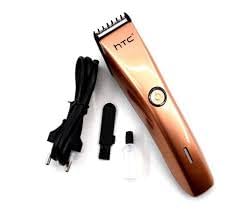
Image 2.2: The HTC AT-206A trimmer displayed with its charging cable, cleaning brush, oil bottle, and comb attachment.
3. سيٽ اپ ۽ چارج ڪرڻ
3.1 شروعاتي چارجنگ
- Before first use, fully charge the trimmer for approximately 8-10 hours.
- پڪ ڪريو ته ٽرمر کي بند ڪيو ويو آهي.
- Connect the charging cable to the trimmer's charging port.
- Plug the adapter into a suitable electrical outlet.
- The charging indicator light (if present) will illuminate to show charging is in progress.
- Once fully charged, disconnect the charger from the outlet and the trimmer.
3.2 Attaching the Comb Attachment
- پڪ ڪريو ته ٽرمر کي بند ڪيو ويو آهي.
- Align the comb attachment with the trimmer blade.
- Gently push the comb attachment onto the blade until it clicks into place.
- To remove, gently pull the comb attachment away from the blade.
4. آپريٽنگ هدايتون
4.1 بنيادي آپريشن
- پڪ ڪريو ته ٽرمر چارج ٿيل آهي.
- Press the power button to turn the trimmer on.
- Press the power button again to turn the trimmer off.
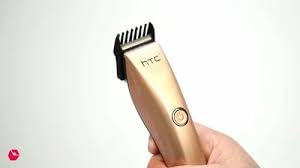
Image 4.1: The HTC AT-206A trimmer held in hand, demonstrating its ergonomic design for ease of use.
4.2 ٽرمنگ ٽيڪنڪس
- For best results, use the trimmer on clean, dry hair.
- Hold the trimmer at a slight angle against the skin.
- ٽرمر کي وارن جي واڌ جي هدايت جي خلاف آهستي ۽ مستقل طور تي هلايو.
- Use the comb attachment for longer hair lengths (0.5mm-13mm).
- For edging and outlining, use the trimmer without the comb attachment for a closer trim.
- Stretch the skin taut with your free hand to ensure a smooth surface for trimming.
5. سار سنڀال ۽ صفائي
Regular cleaning and maintenance will ensure optimal performance and extend the life of your trimmer.
5.1 بليڊن جي صفائي
- Ensure the trimmer is switched off and disconnected from the charger.
- Use the provided cleaning brush to remove any loose hairs from the blades.
- For a more thorough clean, you may carefully detach the blade head (refer to specific instructions if provided with your model for blade removal).
- Do not rinse the entire trimmer under water unless explicitly stated as waterproof.
5.2 بليڊن کي تيل لڳائڻ
- After cleaning, apply 1-2 drops of the provided lubricating oil onto the blades.
- ٽرمر کي ڪجهه سيڪنڊن لاءِ آن ڪريو ته جيئن تيل هڪجهڙائي سان ورهائجي.
- ڪنهن به اضافي تيل کي نرم ڪپڙي سان صاف ڪريو.
- Oiling the blades regularly (e.g., after every few uses) helps maintain cutting efficiency and prevents rust.
5.3 اسٽوريج
Store the trimmer in a cool, dry place, away from direct sunlight and moisture. Ensure it is fully charged before storing for extended periods.
6. مسئلا حل ڪرڻ
If you encounter any issues with your trimmer, refer to the following common problems and solutions:
- ٽرمر آن نٿو ٿئي:
Ensure the trimmer is fully charged. Check if the charging cable is properly connected and the power outlet is functional. - Poor trimming performance / pulling hair:
The blades may be dull or clogged with hair. Clean and oil the blades as described in the Maintenance section. Ensure the trimmer is adequately charged. - بيٽري چارج نه رکڻ:
Ensure the trimmer is charged for the recommended duration. If the issue persists, the battery may need replacement. Contact customer support. - تمام گهڻو شور يا وائبريشن:
The blades might be misaligned or require oiling. Clean and oil the blades. If the problem continues, discontinue use and contact customer support.
7. وضاحتون
| خاصيت | تفصيل |
|---|---|
| ماڊل نمبر | AT-206A (SA-144) |
| طاقت جو ذريعو | Rechargeable بيٽري |
| بليڊ مواد | Stainless Steel (Metal) |
| Cutting Length Range | 0.5mm - 13mm (with comb attachment) |
| طول و عرض (L x W x H) | 18.7 x 4.9 x 11.2 سينٽي |
| تجويز ڪيل استعمال | Dry Shaving, Edging, Light Shaping, Outlining (Neck, Ears, Sideburns, Face) |
| رنگ | ڪارو |
| ٺاهيندڙ | چين |
8. وارنٽي ۽ سپورٽ
This product is covered by a standard manufacturer's warranty. Please refer to the product packaging or contact your retailer for specific warranty terms and conditions.
For technical support, troubleshooting assistance, or warranty claims, please contact the retailer or manufacturer directly. Keep your proof of purchase for any warranty-related inquiries.


