تعارف
Thank you for choosing the HOCO EQ3 True Wireless Earbuds. This manual provides essential information for setting up, operating, and maintaining your earbuds to ensure optimal performance and longevity. The EQ3 earbuds feature Bluetooth 5.3 for stable connectivity, touch controls, clear stereo sound with high bass, and a water-resistant design.
دٻي ۾ ڇا آهي
- HOCO EQ3 True Wireless Earbuds
- چارج ڪيس
- USB-C چارجنگ ڪيبل
- ڪن جا کشن (ڪيترن ئي سائزن جا)
- حفاظتي ڪيس
پيداوار ختمview
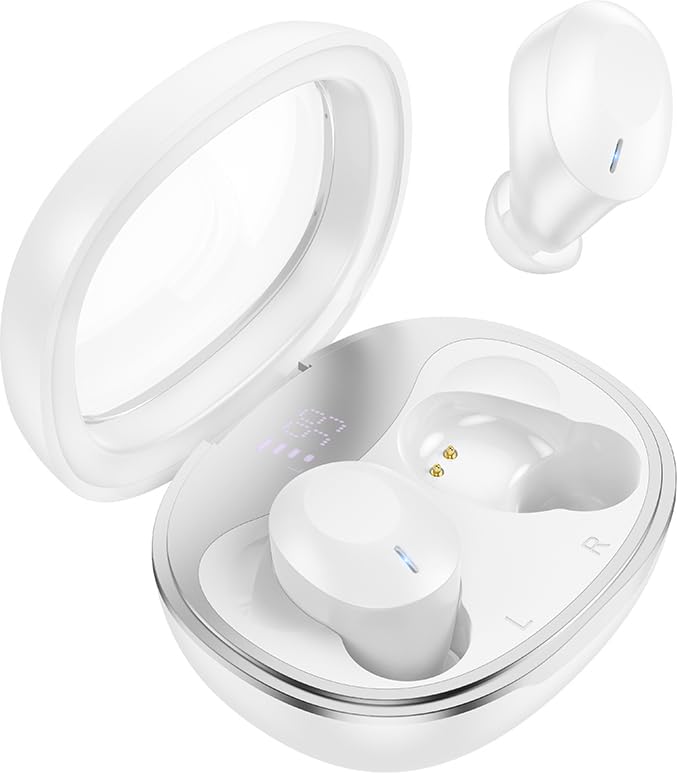
The HOCO EQ3 True Wireless Earbuds are housed in a compact, transparent charging case, designed for portability and convenience.

This infographic highlights key features such as extended battery life, high-fidelity sound quality, Bluetooth 5.3 connectivity, and intuitive touch controls.
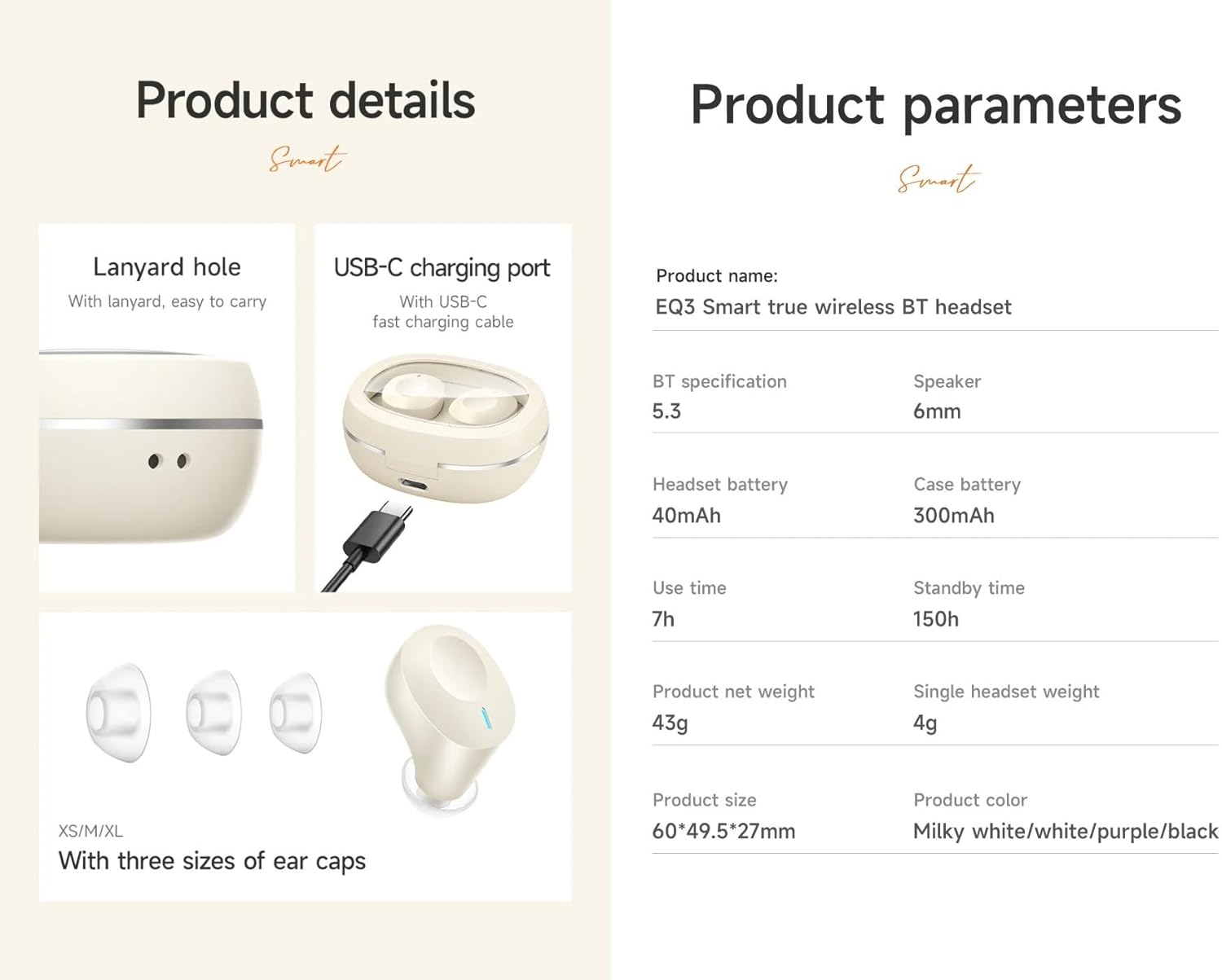
تفصيلي view of the earbuds' design, including the USB-C charging port, lanyard hole, and available ear cap sizes for a customized fit. Product parameters are also listed.
سيٽ اپ ڪريو
1. ائربڊس ۽ ڪيس کي چارج ڪرڻ
Before first use, fully charge the earbuds and the charging case. Connect the provided USB-C cable to the charging port on the case and to a power source. The LED digital display on the case will indicate the charging status. The earbuds charge automatically when placed inside the case.
2. هڪ ڊوائيس سان جوڙڻ
- پڪ ڪريو ته چارجنگ ڪيس ۾ ڪافي طاقت آهي ۽ ائربڊس اندر آهن.
- Open the lid of the charging case. The earbuds will automatically enter pairing mode, indicated by a flashing light (if applicable).
- پنهنجي ڊوائيس (اسمارٽ فون، ٽيبليٽ، وغيره) تي، بلوٽوٿ کي فعال ڪريو ۽ موجود ڊوائيسز جي ڳولا ڪريو.
- Select "HOCO EQ3" from the list of devices.
- Once connected, the earbuds will indicate successful pairing, and the LED light will stop flashing.
The earbuds support master-slave switching, allowing either earbud to be used independently after initial pairing.

The earbuds connect automatically to your paired device when the charging case is opened.
3. ائربڊس پائڻ
Select the ear cushions that provide the most comfortable and secure fit for your ears. The HOCO EQ3 earbuds are designed for a semi-in-ear fit, ensuring comfort during extended use.

The semi-in-ear design ensures a light and comfortable fit for prolonged listening.
ائربڊس هلائڻ
ٽچ ڪنٽرول
The HOCO EQ3 earbuds feature intuitive touch controls on each earbud. The functions are as follows:
- سنگل ٽيپ (L/R): موسيقي کي هلايو / روڪيو.
- Double Tap (L/R): ايندڙ ٽريڪ.
- Triple Tap (L/R): اڳوڻو رستو.
- Long Press (L/R) for 2 seconds: وائيس اسسٽنٽ کي چالو ڪريو (مثال طور، سري).

Detailed guide to the touch control functions on the HOCO EQ3 earbuds.
ڪالون ڪرڻ
The earbuds support clear calls with stereo sound. Use the touch controls to manage calls:
- سنگل ٽيپ: Answer/End a call.
- ڊگهي پريس: اچڻ واري ڪال کي رد ڪريو.
وائس اسسٽنٽ
Activate your device's voice assistant by long-pressing either earbud for 2 seconds. This allows for hands-free control of your device.
سار سنڀال
صفائي
Regularly clean your earbuds and charging case to maintain optimal performance and hygiene. Use a soft, dry, lint-free cloth. For ear tips, gently remove them and clean with a mild soap solution, then rinse and dry thoroughly before reattaching. Do not use harsh chemicals or abrasive materials.
ذخيرو
جڏهن استعمال ۾ نه هجي، ته ائربڊس کي انهن جي چارجنگ ڪيس ۾ رکو ته جيئن انهن کي مٽي، نقصان کان بچائي سگهجي، ۽ انهن کي چارج رکيو وڃي. ڪيس کي سڌي سج جي روشني ۽ انتهائي گرمي پد کان پري ٿڌي، سڪل جاءِ تي رکو.
مشڪلاتون
- ائربڊس جوڙو نه پيا لڳن: Ensure both earbuds are charged. Place them back in the case, close the lid, wait a few seconds, then open the lid to re-enter pairing mode. Delete "HOCO EQ3" from your device's Bluetooth list and try pairing again.
- صرف هڪ ائربڊ ڪم ڪري رهيو آهي: Ensure both earbuds are charged. Try placing both earbuds back in the case, closing the lid, and then reopening it. This often resets the connection between the two earbuds.
- آواز ڪونهي: پنهنجي ڳنڍيل ڊوائس تي واليوم ليول چيڪ ڪريو. پڪ ڪريو ته ائربڊس صحيح طرح سان جوڙيل آهن ۽ آڊيو آئوٽ پٽ طور چونڊيا ويا آهن.
- چارج ڪرڻ جا مسئلا: Verify the USB-C cable is securely connected to both the charging case and the power source. Ensure the charging contacts on the earbuds and inside the case are clean and free of debris.
- Voice assistant not responding: Ensure the earbuds are connected to your device and that the voice assistant feature is enabled on your device.
وضاحتون
| ماڊل نالو | EQ3 |
| بلوٽوت ورزن | 5.3 |
| بلوٽوت چپ | JL AC6983D2 |
| چارج ڪيس جي بيٽري جي گنجائش | 300mAh |
| هيڊ سيٽ جي بيٽري جي صلاحيت | 40mAh |
| Single Headset Use Time | 7 ڪلاڪ تائين |
| Total Use Time (with charging case) | 28 ڪلاڪ تائين |
| اسٽينڊ بائي ٽائيم | 150 ڪلاڪ |
| چارج ڪرڻ واري ڪيس جي ماپ | 60 x 49.5 x 27 ملي ميٽر |
| ڪُل وزن (ڪيس + ائربڊس) | 43 جي |
| Single Headset Weight | 4g |
| اسپيڪر سائيز | 6mm |
| پاڻي جي مزاحمت جي سطح | پاڻي مزاحمتي |
| ڪنٽرول جو طريقو | ڇڪڻ |
| شور ڪنٽرول | فعال شور منسوخي |
وارنٽي ڄاڻ
HOCO products are covered by a limited warranty against manufacturing defects. Please refer to the warranty policy provided at the time of purchase or visit the official HOCO webتفصيلي شرطن ۽ ضابطن لاءِ سائيٽ. وارنٽي دعوائن لاءِ خريداري جو ثبوت رکو.
ڪسٽمر سپورٽ
For further assistance, technical support, or inquiries regarding your HOCO EQ3 True Wireless Earbuds, please contact HOCO customer service through their official webسائيٽ يا توهان جي پراڊڪٽ پيڪنگنگ سان مهيا ڪيل رابطي جي معلومات.


