تعارف
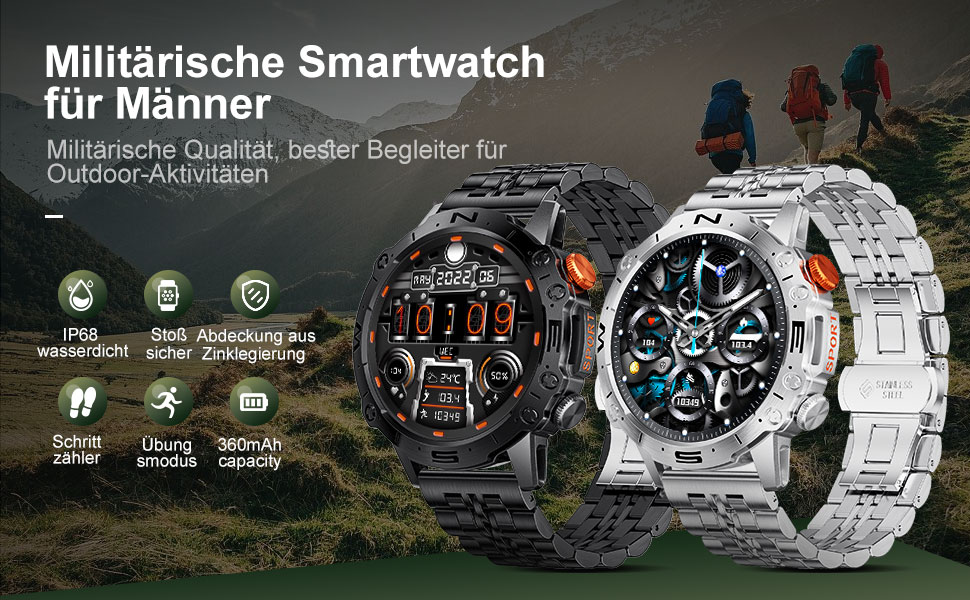
This manual provides detailed instructions for the setup, operation, and maintenance of your LIGE ST19-A Smartwatch. Designed for durability and functionality, this smartwatch features a 1.43-inch AMOLED touchscreen, Bluetooth calling, comprehensive health monitoring, and multiple sports modes. Please read this manual carefully to ensure proper use and to maximize your device's potential.
1. سيٽ اپ
1.1 اسمارٽ واچ کي چارج ڪرڻ
Before first use, fully charge your LIGE ST19-A Smartwatch. Use the provided magnetic charging cable.
- Connect the magnetic end of the charging cable to the charging contacts on the back of the smartwatch.
- Connect the USB end of the cable to a standard USB power adapter (5V/1A recommended) or a computer's USB port.
- The watch display will indicate charging status. A full charge typically takes 2-3 hours.
- Once fully charged, the watch offers approximately 3-7 days of working time and up to 30 days of standby time.
1.2 ايپ انسٽاليشن ۽ ڊوائيس جوڙڻ
To unlock the full functionality of your smartwatch, you need to install the companion application on your smartphone and pair the devices.
- بلوٽوت کي فعال ڪريو: On your smartphone, go to settings and ensure Bluetooth is turned on.
- ايپ ڊائون لوڊ ڪريو: Scan the QR code provided in the watch's packaging or search for "FitCloudPro" in your smartphone's app store (Google Play Store for Android, Apple App Store for iOS). Alternatively, you can visit هي لنڪ for download options.
- انسٽال ڪريو ۽ کوليو: Install the "FitCloudPro" app and open it.
- ڊوائيس شامل ڪريو: In the app, navigate to the "Device" or "Add Device" section. The app will search for available devices. Select "ST19-A" from the list to initiate pairing.
- جوڙي جي تصديق ڪريو: Follow the on-screen prompts on both your phone and smartwatch to confirm the pairing request.
- اطلاعن کي فعال ڪريو: Grant the necessary permissions for the app to display notifications from your phone on the smartwatch.
- بلوٽوٿ ڪال فنڪشن: After successful connection, you can enable or disable the call function on the watch. If the connection is successful, you can add/answer calls and play music.

2. آپريٽنگ هدايتون
2.1 بنيادي نيويگيشن
- ٽچ اسڪرين: مينيو ۽ خاصيتن ذريعي نيويگيٽ ڪرڻ لاءِ کاٻي، ساڄي، مٿي، يا هيٺ سوائپ ڪريو. چونڊڻ لاءِ ٽيپ ڪريو.
- پاسي جا بٽڻ: The smartwatch features physical buttons for quick access to functions or to return to the home screen. Refer to the watch's interface for specific button assignments.
2.2 بلوٽوت ڪالنگ
هڪ دفعو توهان جي اسمارٽ فون سان جوڙو ٺهڻ کان پوءِ، توهان سڌو سنئون پنهنجي اسمارٽ واچ مان ڪال ڪري ۽ وصول ڪري سگهو ٿا.
- ڪال ڪرڻ: Access the dialer on your watch or select a contact from your synced phonebook.
- ڪال وصول ڪرڻ: When a call comes in, the watch will display the caller ID. You can answer or decline the call directly from your wrist.
- The watch includes a microphone and speaker for hands-free communication.

2.3 سمارٽ نوٽيفڪيشن
Receive instant notifications for incoming calls, text messages, and alerts from various social media applications directly on your wrist.
- Ensure notification permissions are granted in the "FitCloudPro" app for desired applications.
- Supported apps include Line, Messenger, Facebook, Twitter, Kakao Talk, Skype, and WhatsApp.

2.4 صحت جي ٽريڪنگ
The smartwatch provides 24-hour real-time monitoring of various health metrics.
- دل جي شرح جي نگراني: Tracks your heart rate continuously throughout the day.
- بلڊ پريشر جو مقدار: بلڊ پريشر ريڊنگ فراهم ڪري ٿو.
- رت جي آڪسيجن (SpO2) جي نگراني: توهان جي رت جي آڪسيجن جي سنترپتي جي سطح کي ماپي ٿو.
- سمهڻ جي نگراني: توهان جي ننڊ جي نمونن جو تجزيو ڪري ٿو، جنهن ۾ گهري ننڊ، هلڪي ننڊ، ۽ جاڳڻ جا وقت شامل آهن.
- پيڊٽر Counts your daily steps, distance, and estimated calorie burn.
- سانس جي تربيت: دٻاءُ کي منظم ڪرڻ ۾ مدد لاءِ رهنمائي ڪيل سانس جون مشقون.
Note: Health data provided by this device is for reference only and should not be used for medical diagnosis or treatment. Consult a medical professional for health concerns.

2.5 راندين جا طريقا
The smartwatch supports over 100 sports modes to track your workout data accurately.
- Select your desired sport mode from the watch's menu to begin tracking.
- The watch records data such as duration, distance, calories burned, and heart rate during your activity.
- Examples of supported activities include walking, running, cycling, swimming, and various gym exercises.

2.6 اضافي خاصيتون
- موسم جو ڏيک: Get real-time weather updates directly on your watch face.
- موسيقي ڪنٽرول: Control music playback on your smartphone (play, pause, skip tracks) from your wrist.
- Always On Display (AOD): The 1.43-inch AMOLED screen supports an Always On Display feature, providing continuous time visibility.
- اي آءِ وائيس اسسٽنٽ: Interact with your smartwatch using voice commands for various tasks.


3. سار سنڀال
- صفائي: Regularly wipe the watch screen and strap with a soft, dry cloth. If necessary, use a slightly damp ڪپڙو وجھو ۽ پوءِ چڱيءَ طرح سڪايو. سخت ڪيميڪلز يا رگڙيندڙ مواد کان پاسو ڪريو.
- پاڻي جي مزاحمت: The LIGE ST19-A Smartwatch is IP68 rated, meaning it is resistant to dust and can withstand immersion in water up to 1.5 meters for 30 minutes. It is suitable for daily use, hand washing, and rain exposure. However, it is not recommended for hot showers, saunas, or diving, as steam and hot water can compromise the seals.
- بيٽري جي سنڀال: بيٽري جي زندگي کي وڌائڻ لاءِ، گھڙي کي بار بار مڪمل طور تي چارج ڪرڻ کان پاسو ڪريو. ان کي چارج ڪريو جڏهن بيٽري جي سطح گهٽ هجي. گھڻي عرصي تائين استعمال ۾ نه هجڻ تي گھڙي کي ٿڌي، سڪل جاءِ تي رکو.
- انتهائي گرمي پد کان بچاء: Do not expose the watch to extreme hot or cold temperatures, as this can damage the battery and internal components.
4. مسئلا حل ڪرڻ
| مسئلو | ممڪن حل |
|---|---|
| واچ آن نٿي ٿئي | پڪ ڪريو ته گھڙي مڪمل طور تي چارج ٿيل آهي. ان کي گهٽ ۾ گهٽ 30 منٽن لاءِ چارجر سان ڳنڍيو. |
| اسمارٽ فون سان جوڙو نه ٿو ٺاهي سگهجي |
|
| ڪابه اطلاع نه ملي |
|
| صحت جي ڊيٽا جي غلط معلومات |
|
| مختصر بيٽري جي زندگي |
|
5. وضاحتون
| خاصيت | تفصيل |
|---|---|
| ماڊل نالو | ST19-A |
| برانڊ | LIGE |
| اسڪرين جي ماپ | 1.43 انچ |
| ڊسپلي جو قسم | AMOLED ٽچ اسڪرين |
| رابطي ٽيڪنالاجي | بلوٽوٿ |
| بيٽري جي گنجائش | 360 ايم اي ايڇ (ليٿيم-آئن) |
| عام استعمال جو وقت | 3-7 ڏينهن |
| اسٽينڊ بائي ٽائيم | لڳ ڀڳ. 30 ڏينهن |
| پاڻي جي مزاحمت | IP68 (Dustproof, Water resistant up to 1.5m for 30 min) |
| خاص خاصيتون | Voice Call, Music Player, Heart Rate Monitor, Activity Tracker, Blood Pressure Monitor, Blood Oxygen Monitor, Sleep Monitor, GPS (integrated) |
| مطابقت | Android، iOS |
| وزن | 290 جي |
6. وارنٽي ۽ سپورٽ
LIGE prioritizes customer satisfaction. Your LIGE ST19-A Smartwatch comes with the following support:
- 30 ڏينهن جي واپسي: If any issues arise during use, you are eligible for a refund within 30 days of purchase.
- 2 سالن جي مرمت جي خدمت: A 2-year repair service is provided after the sale for manufacturing defects.
- For any problems or inquiries, please contact LIGE customer support. Your satisfaction is important to us.


