1. تعارف
This manual provides instructions for the installation, operation, and maintenance of your STRONG SW8000M 8-Port Gigabit Desktop Switch. This device is designed to expand your network connectivity with high-speed Gigabit Ethernet ports, suitable for home and office environments.
2. مصنوعات جون خاصيتون
- گيگابٽ اسپيڊ: Provides 10/100/1000 Mbps for fast network connections.
- 8-Port Connectivity: Expands network with 8 Gigabit Ethernet ports.
- پلگ ۽ راند: No software or configuration required for basic operation.
- Robust Metal Design: Durable metal housing for longevity.
- لچڪدار چڙهڻ: Supports desktop placement or wall mounting.
- پنن کان سواءِ آپريشن: Ensures quiet performance, ideal for noise-sensitive areas.
- Optimized Data Traffic: Supports QoS, IGMP, and VLAN functions.
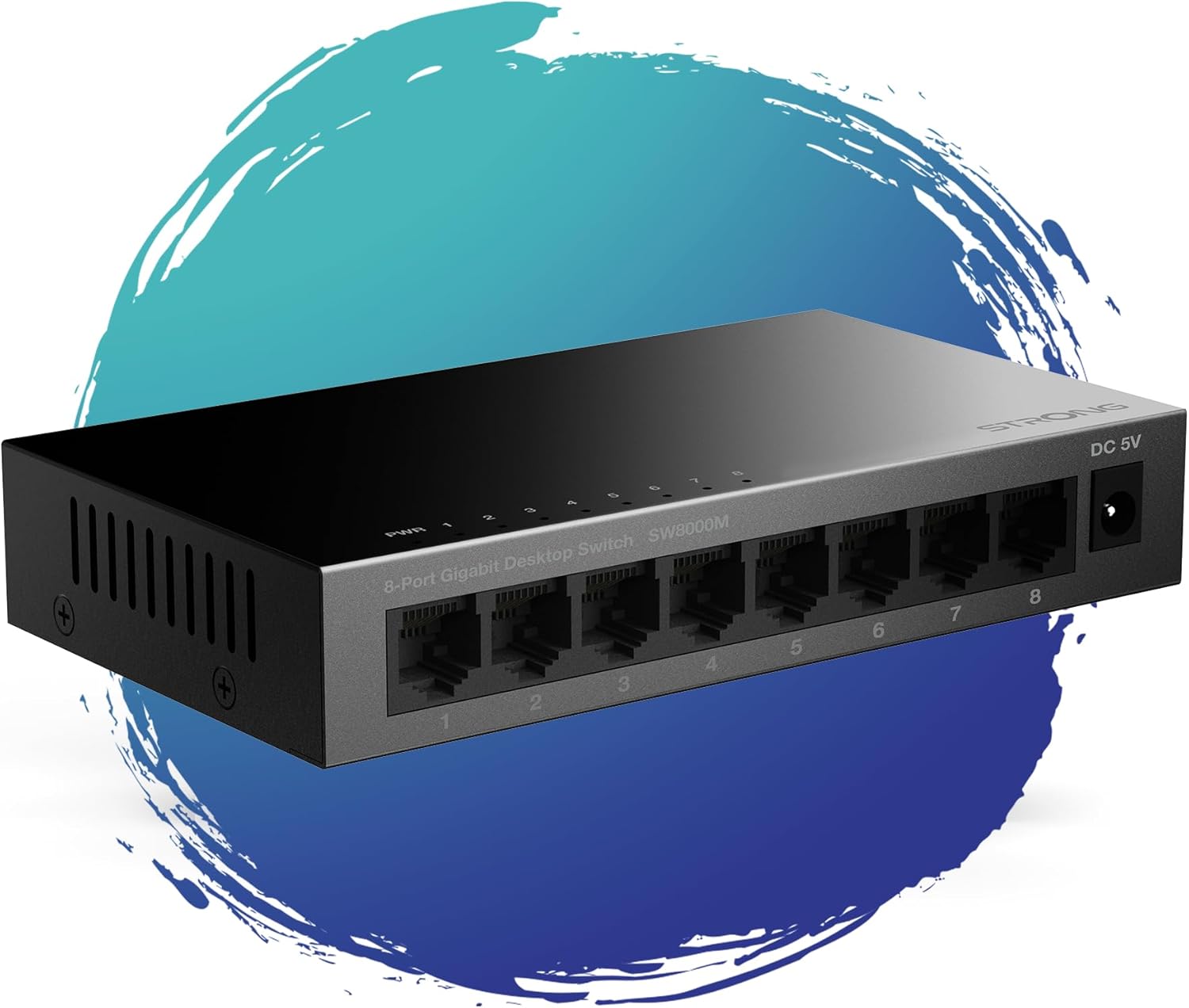
شڪل 1: سامهون view of the STRONG SW8000M 8-Port Gigabit Desktop Switch, highlighting its compact design and 8 RJ45 ports.
3. پيڪيج مواد
پڪ ڪريو ته سڀئي شيون پيڪيج ۾ موجود آهن:
- STRONG SW8000M 8-Port Gigabit Desktop Switch
- Power Adapter (Mains plug)
- تنصيب جون هدايتون (هي دستور)
- وارنٽي ڪارڊ
4. سيٽ اپ ۽ تنصيب
4.1 جسماني جڳهه
The SW8000M switch can be placed on a desktop or mounted on a wall. Ensure the location is well-ventilated and away from direct heat sources or moisture.
- ڊيسڪ ٽاپ جي جڳھ: سوئچ کي فليٽ، مستحڪم سطح تي رکو.
- ڀت لڳائڻ: Use the provided mounting options (if applicable) to secure the switch to a wall.

Figure 2: Illustrates the switch's advanced features like QoS, traffic optimization, and IEEE 802.3x flow control.
4.2 سوئچ کي ڳنڍڻ
- Connect the power adapter to the DC 5V port on the switch and then plug it into a power outlet. The Power LED (PWR) on the switch will illuminate.
- Connect your network devices (e.g., computers, printers, network-attached storage, routers) to any of the 8 Gigabit RJ45 ports using standard Ethernet cables.
- The corresponding LED indicator for each connected port will light up, indicating an active connection. A blinking LED indicates data activity.

شڪل 3: پوئتي view of the switch, detailing the 8 Gigabit RJ45 ports and the DC 5V power input.
5. سوئچ هلائڻ
The STRONG SW8000M is a plug-and-play device. Once connected, it automatically detects the speed and duplex mode of connected devices, providing optimal performance without manual configuration.
- LED اشارا: Each port has an LED indicator. A solid light indicates a link, and a blinking light indicates data transmission. The PWR LED indicates the device is powered on.
- ڊيٽا فلو: The switch intelligently manages data traffic to ensure smooth and efficient communication between all connected devices.
6. سار سنڀال
- صفائي: سوئچ جي ٻاهرين حصي کي صاف ڪرڻ لاءِ نرم، سڪل ڪپڙو استعمال ڪريو. مائع يا ايروسول ڪلينر استعمال نه ڪريو.
- وينٽيليشن: Ensure that the ventilation openings on the sides of the switch are not blocked to prevent overheating.
- بي ترتيب ڊيزائن: The fanless design reduces dust accumulation and eliminates operational noise, requiring minimal internal maintenance.
7. مسئلا حل ڪرڻ
- طاقت ناهي: Ensure the power adapter is securely connected to the switch and a working power outlet. Check if the PWR LED is illuminated.
- ڪابه لنڪ لائيٽ ناهي: Verify that the Ethernet cables are properly connected to both the switch and the network device. Try a different port or cable. Ensure the connected device is powered on.
- Slow Connection: Ensure all connected devices and cables support Gigabit Ethernet for optimal speed. Check for excessive network traffic or faulty cables.
- وقتي ڪنيڪشن: Check cable connections. Ensure the switch is placed in a stable environment, free from strong electromagnetic interference.
8. وضاحتون
| خاصيت | وصف |
|---|---|
| ماڊل | SW8000M |
| بندرگاهن جو تعداد | 8 x RJ45 Gigabit Ethernet |
| ڊيٽا جي منتقلي جي شرح | 10/100/1000 Mbps |
| انٽرفيس جو قسم | آر جي 45 |
| پاور ان پٽ | 5 وولٽ، 1 Amp |
| ڪيس جو مواد | ڌاتو |
| پيداوار جي ماپ (L x W x H) | 3.07" x 0.98" x 5.43" |
| شيءِ جو وزن | 240 گرام (8.5 آونس) |
| آپريٽنگ جي درجه حرارت | 50 درجا سينس تائين |
| شامل اجزاء | Switch, Power Adapter, Manual, Warranty Card |
9. وارنٽي ۽ سپورٽ
The STRONG SW8000M switch comes with a manufacturer's warranty. Please refer to the included Warranty Card for specific terms and conditions. For technical support or further assistance, please visit the official Strong webسائيٽ يا انهن جي ڪسٽمر سروس سان رابطو ڪريو.
EU اسپيئر پارٽ جي دستيابي جو مدو: 2 سال


