1. تعارف
This manual provides comprehensive instructions for the KZ AZ20 IEM True Wireless Adapter. It covers setup, operation, maintenance, and troubleshooting to ensure optimal performance and longevity of your device. The KZ AZ20 is designed to convert compatible in-ear monitors (IEMs) into true wireless earphones, utilizing advanced Bluetooth technology for high-fidelity audio.
2. پراڊڪٽ ختمview
The KZ AZ20 True Wireless Adapter consists of two ear hooks and a charging case. Each ear hook features a 0.78mm 2PIN connector for attaching to your IEMs, integrated controls, and a microphone. The charging case provides portable power and protection for the ear hooks.
2.1 دٻي ۾ ڇا آهي
- KZ AZ20 True Wireless Adapter (Left and Right Ear Hooks)
- چارج ڪيس
- USB-C چارجنگ ڪيبل
- استعمال ڪندڙ دستي

Image: KZ AZ20 True Wireless Adapter ear hooks in their charging case. The ear hooks are black with blue indicator lights, and the charging case has a green indicator light.
3. سيٽ اپ
3.1 Attaching IEMs
Carefully align the 0.78mm 2PIN connector on each KZ AZ20 ear hook with the corresponding ports on your compatible IEMs. Gently push until a secure connection is established. Ensure the left ear hook is connected to the left IEM and the right to the right IEM.
3.2 شروعاتي چارج
Before first use, place both ear hooks into the charging case and connect the case to a power source using a USB-C cable. The indicator lights will show charging status. Ensure the device is fully charged for optimal performance.
3.3 بلوٽوٽ جوڙي
- چارجنگ ڪيس کوليو. ڪن جا ٿلها خودڪار طريقي سان پيئرنگ موڊ ۾ داخل ٿيندا، جيڪي چمڪندڙ بتين سان ظاهر ٿيندا.
- On your audio device (smartphone, tablet, etc.), navigate to the Bluetooth settings.
- ڳولھيو available devices and select 'KZ AZ20' from the list.
- Once connected, the indicator lights on the ear hooks will change, typically to a solid blue or off, depending on the status.

Image: A person wearing the KZ AZ20 adapter with an in-ear monitor, demonstrating the ergonomic fit. The adapter hooks over the ear, holding the IEM securely.
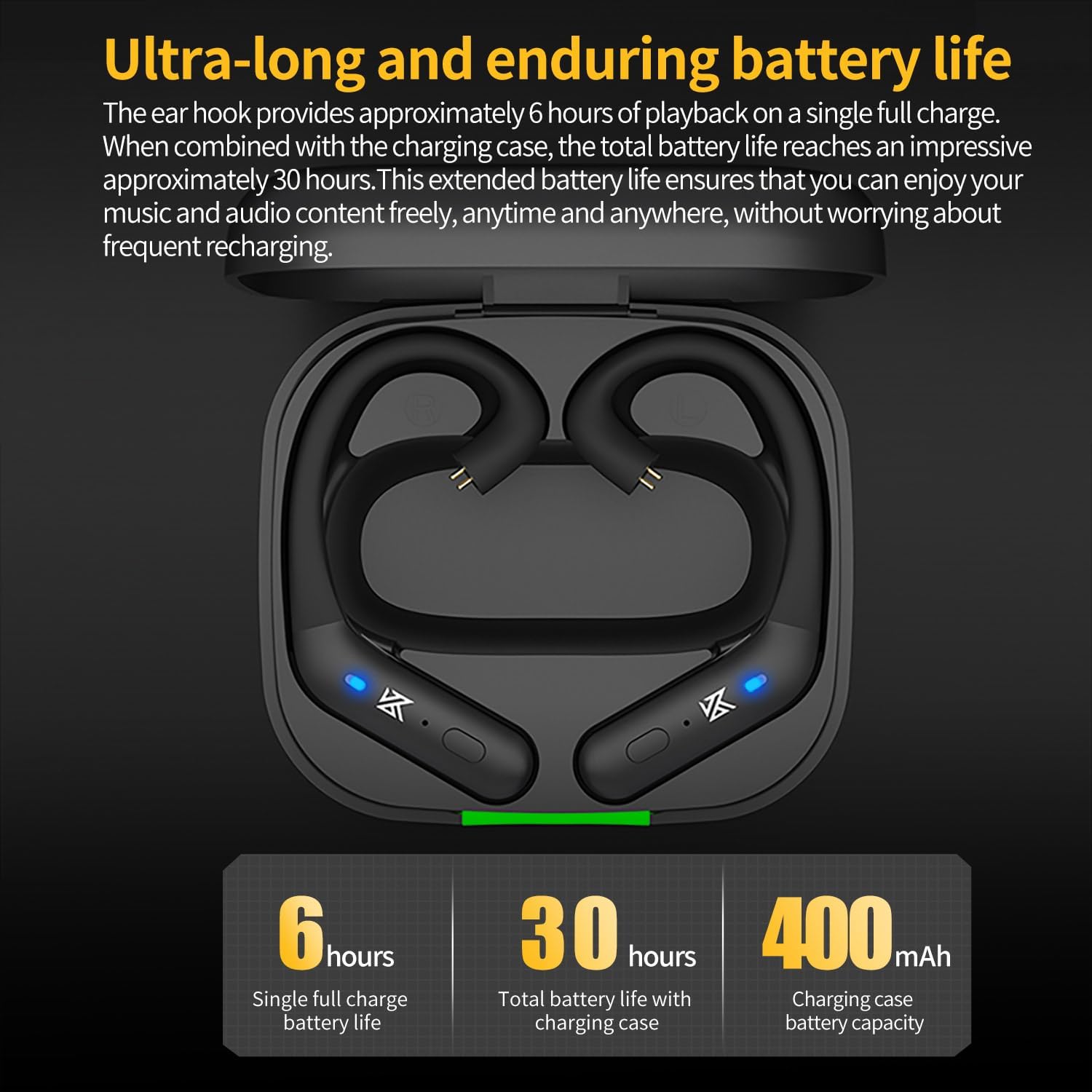
Image: A smartphone screen displaying Bluetooth settings, with 'AZ20' selected for pairing, illustrating the connection process.
4. آپريٽنگ هدايتون
The KZ AZ20 features touch controls on each ear hook for managing playback, calls, and other functions.
4.1 پاور آن/آف
The ear hooks power on automatically when removed from the charging case and power off when returned to the case. Manual power on/off may be available via a long press on the touch control area.
4.2 ميوزڪ پلے بیک
- هڪ ڀيرو ٽيپ ڪريو on either ear hook to Play/Pause music.
- ڊبل ٽيپ ڪريو the right ear hook for Next Track.
- ڊبل ٽيپ ڪريو the left ear hook for Previous Track.
4.3 ڪال مئنيجمينٽ
- هڪ ڀيرو ٽيپ ڪريو on either ear hook to Answer/End a call.
- ڊگهو پريس on either ear hook to Reject a call.
4.4 وائس اسسٽنٽ
ٽي ڀيرا ٽيپ ڪريو on either ear hook to activate your device's voice assistant.
4.5 آواز جا طريقا
The KZ AZ20 may offer different sound modes. Refer to the product's specific touch control guide for switching between modes, such as 'Extended Sound' mode mentioned in some user feedback.

Image: Close-up of the KZ AZ20 ear hook showing the button control area and illustrating the flexible ear hook design for a comfortable fit.
5. چارجنگ ۽ بيٽري جي زندگي
The KZ AZ20 ear hooks provide extended playback time, supported by a portable charging case.
- Ear Hook Battery Life: Each ear hook offers approximately 6 hours of continuous playback on a single full charge.
- چارج ڪيس: The 800mAh charging case can recharge the ear hooks multiple times, extending the total listening time up to 54 hours.
- چارج ڪرڻ وارو عمل: Place the ear hooks into the charging case. Connect the charging case to a USB power adapter using a USB-C cable. Indicator lights on the case and ear hooks will show charging status. A full charge for the case typically takes a few hours.

Image: Graphic illustrating the battery life: 6 hours for single ear hook playback, 54 hours total with the charging case, and 800mAh charging case capacity.
6. مطابقت
The KZ AZ20 is designed with a 0.78mm 2PIN connector for wide compatibility with various in-ear monitors.
6.1 Compatible IEMs include:
- ZAR, AS24, AST, ZAS, ZSN, ZSN PRO, ZS10 PRO, AS16, AS12, ZSX, ZSN PRO-X, ZAX, ASF, ASX, DQ6, EDX PRO, EDS, DQ6S, ZES, EDA, EDX, and other 0.78mm 2PIN interface headphones.
7. سار سنڀال
Proper care ensures the longevity and performance of your KZ AZ20 adapter.
- صفائي: Gently wipe the ear hooks and charging case with a soft, dry cloth. Avoid using harsh chemicals or abrasive materials. Ensure the 2PIN connectors are clean and free of debris.
- ذخيرو: When not in use, store the ear hooks in their charging case to protect them and keep them charged.
- پاڻي جي مزاحمت: The KZ AZ20 features water resistance. However, it is not waterproof. Avoid submerging the device in water or exposing it to heavy rain. Dry thoroughly if exposed to moisture.
8. مسئلا حل ڪرڻ
If you encounter issues with your KZ AZ20, refer to the following common solutions.
8.1 No Power/Not Charging
- Ensure the charging case and ear hooks are properly seated and making contact with the charging pins.
- پڪ ڪريو ته USB-C ڪيبل ۽ پاور اڊاپٽر صحيح طريقي سان ڪم ڪري رهيا آهن.
- Check for any debris in the charging ports.
8.2 Cannot Pair/Connect
- Ensure Bluetooth is enabled on your device and the KZ AZ20 is in pairing mode.
- Move the KZ AZ20 closer to your device and away from potential interference sources.
- Try forgetting 'KZ AZ20' from your device's Bluetooth list and re-pairing.
- Ensure the ear hooks are sufficiently charged.
8.3 Sound Issues (No Sound, Low Volume, Disconnections)
- Check the volume levels on both your connected device and the KZ AZ20.
- Ensure the IEMs are securely connected to the ear hooks.
- Verify that no other devices are connected to the KZ AZ20.
- Restart your connected device and the KZ AZ20 (by placing them in the case and taking them out).
- Ensure the ear hooks are within the effective Bluetooth range of your device.
8.4 Controls Not Responding
- ٽچ ڪنٽرول استعمال ڪندي پڪ ڪريو ته توهان جون آڱريون صاف ۽ سڪل آهن.
- Try restarting the ear hooks.
9. وضاحتون
Technical specifications for the KZ AZ20 IEM True Wireless Adapter.
- ماڊل نالو: AZ20
- رابطي ٽيڪنالاجي: بلوٽوٽ
- وائرليس ڪميونيڪيشن ٽيڪنالاجيبلوٽوٿ 5.3
- بلوٽوت چپ: Qualcomm QCC5171
- آڊيو ڪوڊيڪس: AptX Adaptive, AptX, SBC, AAC
- شور ڪنٽرول: آواز جي الڳ ٿيڻ
- ڪن جي جڳهه: Over Ear
- فارم فيڪٽر: سچو وائرليس
- ڪنٽرول جو طريقو: ڇهو
- مواد: Silicone (ear hooks)
- چارج ڪيس جي بيٽري جي گنجائش: 800mAh
- Ear Hook Playback Time: Approximately 6 hours (single charge)
- ڪُل پلے بیک وقت (ڪيس سان): 54 ڪلاڪ تائين
- ڪنيڪٽر جو قسم: 0.78mm 2PIN
- چارجنگ پورٽ: USB-C
- شيءِ جو وزن: 6.7 ounces (0.19 Kilograms)
- خاص خصوصيت: پاڻي مزاحمتي
- ٺاهيندڙ: yuanze
- تاريخ پهرين دستياب: آگسٽ 1، 2023

Image: Diagram illustrating the 'Pro high-end DAC' feature, highlighting the Qualcomm QCC5171 chip's capability for 24-bit 384kHz audio processing compared to other 24-bit 96kHz chips.

Image: A comparison table of Bluetooth chips, showing the Qualcomm QCC5171's superior power consumption, transmission bitrate, protocols, call noise reduction, and Bluetooth version (5.3).
10. وارنٽي ۽ سپورٽ
KZ products are manufactured to high-quality standards. For warranty information or technical support, please refer to the documentation included with your purchase or visit the official KZ webسائيٽ. وارنٽي دعوائن لاءِ خريداري جو ثبوت رکو.