1. تعارف
This manual provides detailed instructions for the setup, operation, and maintenance of your Logitech POP Mouse. The POP Mouse is a compact, wireless mouse designed for multi-device use with customizable features.

Image: The Logitech POP Mouse in Graphite, showcasinان جي ڪمپيڪٽ ۽ ايرگونومڪ ڊيزائن جي ڪري.
2. پيڪيج مواد
- Logitech POP Wireless Mouse
- 1x AA Battery (pre-installed)
- استعمال ڪندڙ دستاويز

Image: The Logitech POP Mouse and a single AA battery, representing the items included in the product package.
3. سيٽ اپ جون هدايتون
3.1. بيٽري لڳائڻ
- Gently remove the top cover of the mouse. The cover is magnetically attached.
- Insert the included AA battery, ensuring correct polarity (+/-).
- Replace the top cover, ensuring it snaps securely into place.
3.2. بلوٽوت ذريعي ڳنڍڻ
- هيٺئين پاسي موجود پاور سوئچ استعمال ڪندي ماؤس کي آن ڪريو.
- Press and hold one of the Easy-Switch buttons (1, 2, or 3) on the bottom of the mouse until the LED indicator starts blinking rapidly. This indicates pairing mode.
- On your device (computer, tablet, or phone), open Bluetooth settings.
- Select "Logitech POP Mouse" from the list of available devices to complete the pairing process.
- The LED indicator will glow solid for a few seconds, then turn off, confirming a successful connection.

Image: The underside of the POP Mouse, highlighting the Easy-Switch buttons for multi-device pairing.
4. آپريٽنگ هدايتون
4.1. بنيادي ڪم
- کاٻي ڪلڪ ڪريو: بنيادي چونڊ ۽ رابطو.
- ساڄي ڪلڪ ڪريو: لاڳاپيل مينيو تائين رسائي حاصل ڪري ٿو.
- اسڪرول ويل: Navigates vertically through documents and web صفحا.
4.2. SilentTouch Technology
The POP Mouse features SilentTouch Technology, which significantly reduces click noise, providing a quieter user experience without compromising tactile feedback.

Image: A hand operating the POP Mouse, illustrating the quiet operation provided by SilentTouch Technology.
4.3. اسمارٽ ويل اسڪرولنگ
اسمارٽ ويل پاڻمرادو ٻن طريقن جي وچ ۾ سوئچ ڪري ٿو:
- درستي موڊ: For detailed, line-by-line navigation.
- Speed Scroll Mode: For rapid scrolling through long documents or web صفحا.

Image: A user's hand demonstrating the use of the SmartWheel for efficient navigation.
5. حسب ضرورت
5.1. Customizable Top Button (Emoji Button)
The top button, located below the scroll wheel, is customizable. By default, it can be configured to open an emoji menu or assign other shortcuts.
- Download and install the Logitech Options+ Software from the official Logitech webسائيٽ (logitech.com/optionsplus).
- Open the Logitech Options+ Software.
- Select your POP Mouse from the detected devices.
- Navigate to the button customization settings.
- Assign your desired function to the top button, such as an emoji shortcut, Snip Screen, Mic Mute, or Voice-to-Text.
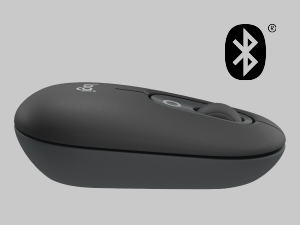
Image: A visual representation of the customizable top button on the POP Mouse, showing its function to access an emoji menu on a connected computer.
6. ملٽي-ڊوائيس ڪنيڪٽوٽي
The Logitech POP Mouse can connect to up to three different devices simultaneously using Bluetooth. You can easily switch between these devices.
6.1. سوئچنگ ڊوائيسز
To switch between paired devices, press the Easy-Switch button (1, 2, or 3) on the bottom of the mouse corresponding to the desired device. The LED indicator will briefly light up to confirm the selected channel.
6.2. Logitech FLOW (Advanced Feature)
For seamless control across multiple computers, install Logitech Options+ Software on all devices. With Logitech FLOW enabled, you can move your mouse cursor across screens as if they were a single desktop, even copying and pasting text, images, and fileانهن جي وچ ۾.
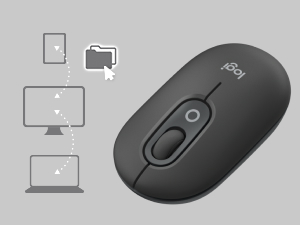
Image: A diagram showing how the POP Mouse can control multiple devices, illustrating the FLOW feature for cross-device interaction.
7. سار سنڀال
7.1. بيٽري مٽائڻ
The POP Mouse operates on a single AA battery with an estimated life of up to 24 months. When the battery is low, the LED indicator on the bottom of the mouse may flash. Replace the battery by following the steps in Section 3.1.
7.2. صفائي
To clean your mouse, use a soft, lint-free cloth. For stubborn dirt, slightly dampڪپڙو پاڻي سان ڍڪيو. سخت ڪيميڪل يا رگڙيندڙ مواد استعمال ڪرڻ کان پاسو ڪريو.
8. مسئلا حل ڪرڻ
| مسئلو | حل |
|---|---|
| مائوس آن نٿو ٿئي. | Ensure the power switch on the bottom of the mouse is in the 'ON' position. Check and replace the AA battery if necessary. |
| ماؤس بلوٽوٿ ذريعي ڳنڍي نه رهيو آهي. |
|
| ڪرسر جي حرڪت بي ترتيب يا غير جوابده آهي. |
|
| Custom button not working. | Ensure Logitech Options+ Software is installed and running on your computer, and the button is correctly configured. |
9. وضاحتون
| خاصيت | تفصيل |
|---|---|
| ماڊل نمبر | 910-007165 |
| رابطي | بلوٽوٿ 5.1 |
| وائرلیس رينج | 10 ميٽر (32.81 فوٽ) تائين |
| سينسر ٽيڪنالاجي | Logitech High Precision Optical Tracking |
| بٽڻ جو تعداد | 4 (Left/Right click, Scroll wheel click, Top customizable button) |
| بيٽري جو قسم | 1 x AA بيٽري |
| بيٽري جي زندگي | 24 مهينن تائين (استعمال جي بنياد تي مختلف ٿي سگهن ٿا) |
| طول و عرض (LxWxH) | 14.12 x 2.34 x 1.38 انچ (35.86 x 5.94 x 3.51 سينٽي) |
| وزن | 2.89 ounces (82g with battery) |
| آپريٽنگ سسٽم مطابقت | Windows 10 or later, macOS 10.15 or later, iPadOS, Chrome OS, Android |

Image: Technical drawing displaying the length, width, and height measurements of the Logitech POP Mouse.
10. وارنٽي ۽ سپورٽ
وارنٽي جي معلومات ۽ ٽيڪنيڪل سپورٽ لاءِ، مھرباني ڪري سرڪاري Logitech سپورٽ جو دورو ڪريو. website or refer to the user documentation included in your product package.
- آن لائن سپورٽ: support.logi.com
- پيداوار جي رجسٽريشن: Registering your product can help you receive faster support and updates.


