تعارف
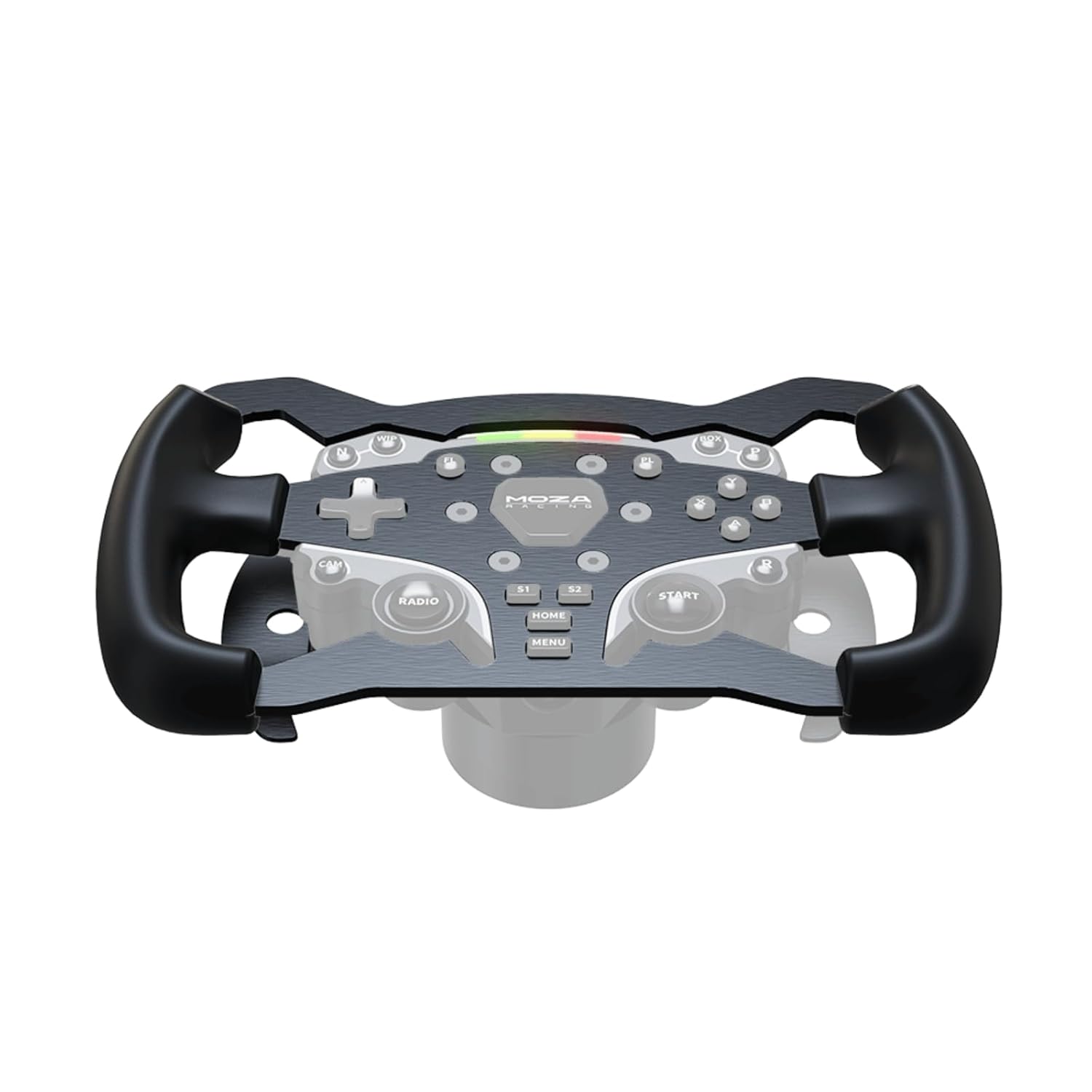
The MOZA ES Formula Wheel Mod is an accessory designed to enhance the MOZA ES wheel, transforming its functionality and ergonomics for a formula-style racing experience. This mod features a 280mm diameter, an aviation-grade aluminum body, and rubber grips for improved handling and durability.
This manual provides essential information for the proper installation, operation, and maintenance of your MOZA ES Formula Wheel Mod.
پيڪيج مواد
- MOZA ES Formula Wheel Mod (280mm)
- Mounting Hardware (screws, if applicable)
سيٽ اپ ڪريو
Follow these steps to properly install the MOZA ES Formula Wheel Mod onto your MOZA ES wheel base.
- تياري: Ensure your MOZA ES wheel base is powered off and disconnected from your computer. Place the wheel base on a stable surface.
- Remove Original Wheel Rim (if applicable): If your MOZA ES wheel currently has a removable rim, carefully detach it according to the MOZA ES wheel's original instructions. This typically involves unscrewing retaining bolts or disengaging a quick-release mechanism.
- Attach Formula Wheel Mod: Align the MOZA ES Formula Wheel Mod with the mounting points on the MOZA ES wheel's hub. Ensure the connectors (if any) are properly seated.
- Secure the Mod: Use the provided mounting hardware (e.g., screws) to firmly attach the Formula Wheel Mod to the wheel hub. Tighten screws evenly to ensure a secure fit without over-tightening.
- PC سان ڳنڍيو: Reconnect your MOZA ES wheel base to your computer and power it on.

آپريٽنگ هدايتون
After successful installation, follow these steps to operate your MOZA ES Formula Wheel Mod:
- سافٽ ويئر جي سڃاڻپ: Launch the MOZA Pit House software on your PC. The software should automatically detect the MOZA ES wheel with the newly attached Formula Wheel Mod. Ensure your MOZA Pit House software is updated to the latest version.
- حساب ڪتاب: The wheel may perform an automatic calibration upon startup. If manual calibration is required, follow the prompts within the MOZA Pit House software.
- بٽڻ ميپنگ: Utilize the MOZA Pit House software to customize the functions of the various buttons and switches on the Formula Wheel Mod. You can assign specific in-game actions to each control.
- Game Configuration: Within your racing simulation game, ensure the MOZA ES wheel is selected as the primary controller. Adjust in-game force feedback and control settings as desired.
سار سنڀال
Proper maintenance ensures the longevity and optimal performance of your MOZA ES Formula Wheel Mod.
- صفائي: Use a soft, dry, lint-free cloth to clean the surface of the wheel mod. Avoid using abrasive cleaners, solvents, or harsh chemicals, as these can damage the finish and rubber grips.
- اسٽوريج: When not in use, store the wheel mod in a clean, dry environment away from direct sunlight and extreme temperatures.
- چڪاس: Periodically inspect the mounting hardware for tightness and the grips for any signs of wear or damage.
مشڪلاتون
If you encounter issues with your MOZA ES Formula Wheel Mod, refer to the following common troubleshooting steps:
- Mod Not Recognized:
- Ensure the MOZA ES wheel base is properly connected to your PC and powered on.
- Verify that the Formula Wheel Mod is securely attached to the MOZA ES wheel hub.
- Update your MOZA Pit House software and wheel base firmware to the latest versions.
- Try connecting the wheel base to a different USB port on your PC.
- جواب نه ڏيڻ وارا بٽڻ:
- Check the button assignments within the MOZA Pit House software.
- پڪ ڪريو ته ڦيٿي صحيح طرح سان ڪيليبريٽ ٿيل آهي.
- Test the buttons in a different game or within the MOZA Pit House software's test utility.
- جسماني عدم استحڪام:
- Re-check all mounting screws to ensure they are tightened appropriately.
- Ensure the MOZA ES wheel base itself is securely mounted to your rig or desk.
For further assistance, please refer to the official MOZA Racing support resources.
وضاحتون
| خاصيت | تفصيل |
|---|---|
| ماڊل | ES Formula Wheel Mod |
| قطر | 280mm |
| جسماني مواد | Aviation Grade Aluminum |
| گرفت جو مواد | رٻڙ |
| شيءِ جو وزن | 1.5 پائونڊ (تقريبن 0.68 ڪلوگرام) |
| پيڪيج جي ماپ | 12.68 x 7.83 x 2.13 انچ |
| ASIN | B0CDFRMFS1 |
| تاريخ پهرين دستياب | آگسٽ 2، 2023 |
وارنٽي ۽ سپورٽ
For information regarding warranty coverage, technical support, or to access additional resources, please visit the official MOZA Racing webسائيٽ تي وڃو يا انهن جي ڪسٽمر سروس ڊپارٽمينٽ سان رابطو ڪريو. وارنٽي دعوائن لاءِ خريداري جي ثبوت طور پنهنجي خريداري جي رسيد رکو.
MOZA Racing Official Webسائيٽ: www.mozaracing.com


