1. تعارف
Thank you for choosing the MOFII Wired Retro Typewriter Keyboard. This manual provides essential information for the proper setup, operation, and maintenance of your new keyboard. Please read these instructions carefully before use and retain them for future reference.
2. حفاظت جي ڄاڻ
- ڪيبورڊ کي مائعات يا گھڻي نمي کي بي نقاب نه ڪريو.
- انتهائي گرمي پد کان بچاء.
- ڪيبورڊ کي پاڻ ڌار ڪرڻ يا مرمت ڪرڻ جي ڪوشش نه ڪريو. ضرورت هجي ته قابل سروس اهلڪارن سان رابطو ڪريو.
- ٻارن جي پهچ کان پري رکو.
3. پيڪيج مواد
پڪ ڪريو ته سڀئي شيون توهان جي پيڪيج ۾ موجود آهن:
- MOFII Wired Retro Typewriter Keyboard
- صفائي برش
4. سيٽ اپ
4.1 ڪي بورڊ کي ڳنڍڻ
The MOFII Wired Keyboard features a simple plug-and-play design, requiring no additional drivers for most operating systems.
- Locate an available USB-A port on your computer (PC, Laptop, Desktop, Chromebook).
- Plug the USB-A cable from the keyboard into the USB-A port on your computer.
- The keyboard should be automatically recognized and ready for use within a few seconds.

Image: The keyboard connected to a laptop via its USB cable, demonstrating the plug-and-play functionality.
4.2 ڪي بورڊ جي زاويه کي ترتيب ڏيڻ
For enhanced typing comfort, the keyboard includes foldable feet to adjust its tilt angle.
- To raise the keyboard, gently pull out the two foldable feet located on the underside of the keyboard.
- To return the keyboard to a flat position, fold the feet back into their recessed slots.

تصوير: هڪ پاسي view of the keyboard demonstrating the adjustable tilt angle provided by its foldable feet.
4.3 مطابقت
The MOFII Wired Keyboard is compatible with a wide range of operating systems:
- Windows XP/Vista/7/8/10/11
- Mac OS (Note: Some multimedia functions may not be available with Mac OS)
5. آپريٽنگ هدايتون
5.1 بنيادي ٽائپنگ
The keyboard features a standard 104-key full-size layout with round, retro-style keycaps. Simply begin typing after connecting the keyboard to your computer.
5.2 ملٽي ميڊيا فنڪشن
The keyboard includes 11 multimedia shortcut combinations accessible via the Fn key. Press and hold the Fn key, then press the corresponding F-key (F1-F12) to activate the desired function.
| ميلاپ | فنڪشن |
|---|---|
| Fn + F1 | ميڊيا پليئر |
| Fn + F2 | حجم ھيٺ |
| Fn + F3 | حجم مٿي |
| Fn + F4 | گونگا |
| Fn + F5 | Play / Suspend |
| Fn + F6 | اڳيون ٽريڪ |
| Fn + F7 | راند / روڪيو |
| Fn + F8 | ايندڙ ٽريڪ |
| Fn + F9 | اي ميل |
| Fn + F10 | Web گهر |
| Fn + F11 | اسڪرين لاڪ |
| Fn + W | WASD and Arrow Key Swapping |
| Fn+Win | Lock/Unlock Windows Key and APP Key |

Image: Visual representation of the multimedia function keys and their corresponding actions.
5.3 اشارو روشنيون
The keyboard features indicator lights for various statuses:
- ڪي پيڊ لاڪ اشارو: Illuminates when the numeric keypad is active.
- Caps Lock اشارو: Illuminates when Caps Lock is active.
- Win Lock اشارو: جڏهن ونڊوز ڪي لاڪ ٿيل هوندي آهي ته روشني ٿيندي آهي.

تصوير: هڪ تفصيلي view highlighting the three indicator lights on the keyboard.
6. سار سنڀال
6.1 ڪي بورڊ صاف ڪرڻ
To maintain optimal performance and appearance, regularly clean your keyboard.
- Use the included cleaning brush to remove dust, crumbs, and other debris from between the keycaps.
- مٿاڇري جي صفائي لاءِ، نرميءَ سان ڪي ڪيپس ۽ ڪي بورڊ باڊي کي نرم، ڊي سان صاف ڪريوamp ڪپڙو. سخت ڪيميائي کان بچاء.

Image: The keyboard with a few keycaps detached, illustrating the removable keycap design and the cleaning brush for maintenance.
7. مسئلا حل ڪرڻ
7.1 ڪي بورڊ جواب نه ڏئي رهيو آهي
- پڪ ڪريو ته USB ڪيبل ڪيبورڊ ۽ ڪمپيوٽر جي USB پورٽ ٻنهي ۾ محفوظ طور تي لڳل آهي.
- پنهنجي ڪمپيوٽر تي ڪيبورڊ کي ڪنهن ٻئي USB پورٽ ۾ لڳائڻ جي ڪوشش ڪريو.
- پنهنجي ڪمپيوٽر کي ٻيهر شروع ڪريو.
7.2 ملٽي ميڊيا ڪيز Mac OS تي ڪم نه ڪري رهيون آهن
As noted in the compatibility section, some multimedia functions may not be fully supported on Mac OS due to system differences. This is expected behavior.
7.3 Erratic Key Input
If you experience incorrect key input or keys getting stuck internally, especially after reconnecting the cable:
- Disconnect the keyboard's USB cable from the computer.
- Wait a few seconds, then reconnect the USB cable firmly. This often resolves temporary communication issues.
8. وضاحتون
| خاصيت | تفصيل |
|---|---|
| برانڊ | MOFII |
| ماڊل | Wired Keyboard (B0CDWQCVGG) |
| رابطي ٽيڪنالاجي | USB-A |
| ڪي بورڊ جي وضاحت | Multimedia, Full-Size with Numeric Keypad |
| خاص خصوصيت | Round Key, Retro Style |
| رنگ | Pink Colorful |
| مواد | سليڪون |
| مطابقت رکندڙ ڊوائيسز | PC, Laptop, Desktop, Chromebook |
| شيءِ جو وزن | 1.85 پائونڊ |
| پيڪيج جي ماپ | 17.95 x 6.38 x 1.81 انچ |
| USB ڪيبل ڊگھائي | 65 انچ (تقريبن 5.4 فوٽ) |
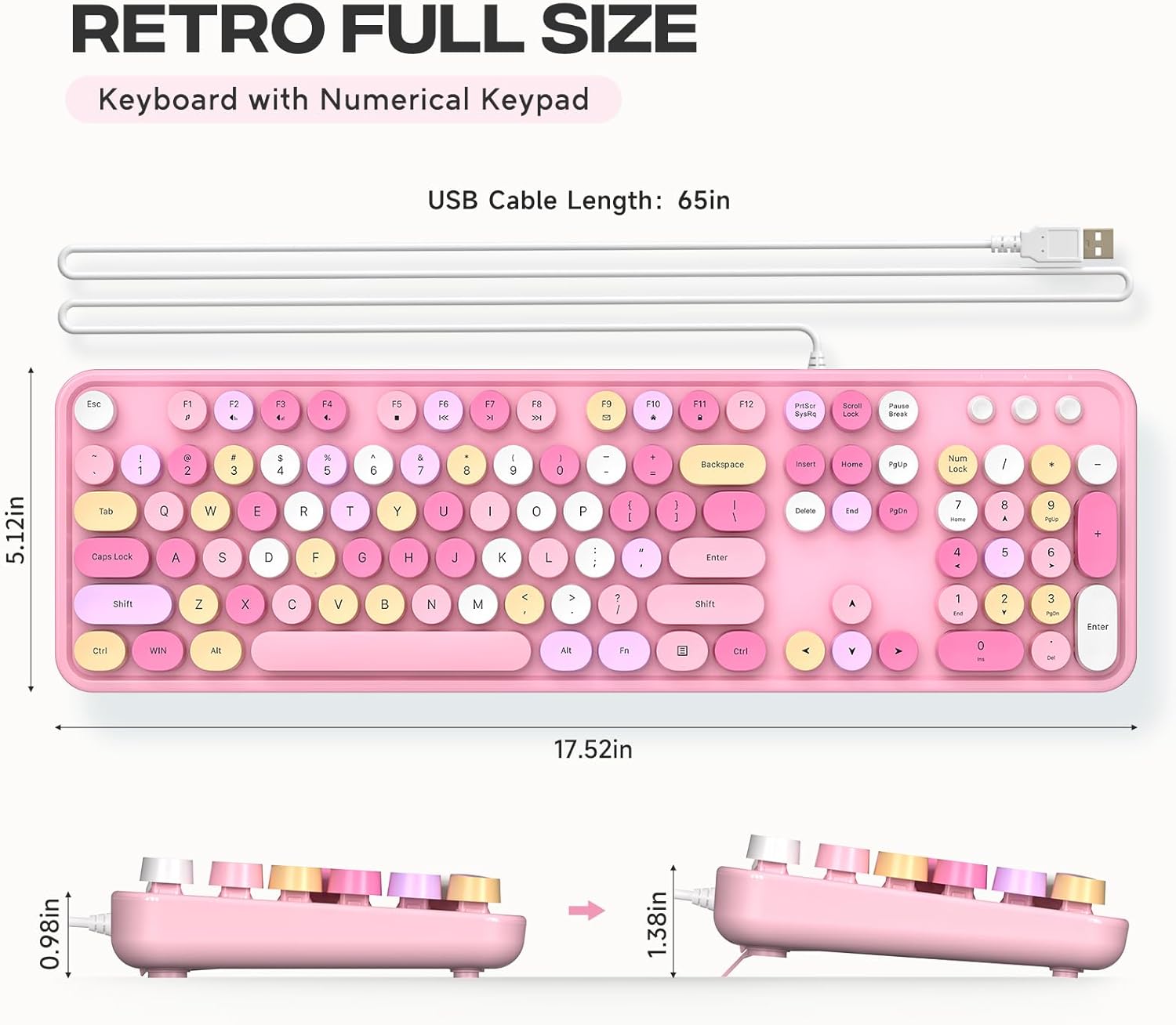
Image: Detailed measurements of the keyboard, including its length, width, and height in both flat and tilted positions.
9. وارنٽي ۽ سپورٽ
MOFII products are designed for reliability and performance. For specific warranty details and support inquiries, please refer to the product packaging or contact MOFII customer service directly through their official webسائيٽ يا پرچون ڪندڙ جتي پراڊڪٽ خريد ڪئي وئي هئي.
Please have your product model (B0CDWQCVGG) and purchase information ready when contacting support.


