1. تعارف
This manual provides detailed instructions for the installation, operation, and maintenance of your COMMAX CDV-77M 7-inch Fine View Monitor. Please read this manual thoroughly before using the product to ensure proper function and safety. Keep this manual for future reference.
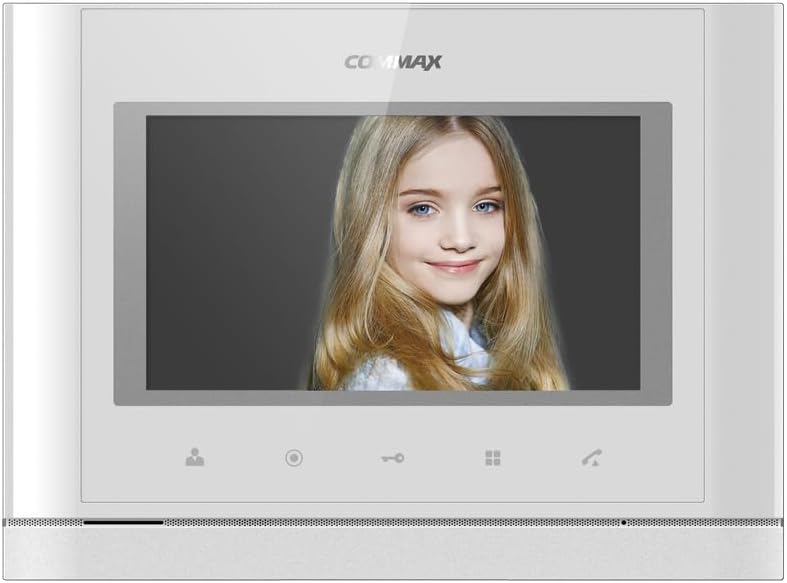
سامهون view of the COMMAX CDV-77M monitor, showcasing its 7-inch TFT LCD screen and sleek design. The screen is active, displaying an image.
2. مصنوعات جون خاصيتون
- 7-inch TFT LCD screen for clear video display.
- Supports video communication and door lock release functions.
- Expandable system: Connects with up to 2 door cameras, 2 additional monitors, and 2 interphones.
- PAL/NTSC video format conversion capability.
- Hand-free operation for convenience.
- Wall-mounted design for easy installation.
3. حفاظت جي ڄاڻ
پراڊڪٽ کي نقصان کان بچائڻ ۽ استعمال ڪندڙ جي حفاظت کي يقيني بڻائڻ لاءِ مھرباني ڪري ھيٺ ڏنل حفاظتي احتياطي تدبيرن تي عمل ڪريو:
- يونٽ کي پاڻي يا گهڻي نمي جي سامهون نه آڻيو.
- يونٽ کي سڌي سج جي روشني ۾ يا گرمي جي ذريعن جي ويجهو رکڻ کان پاسو ڪريو.
- يونٽ کي پاڻ کولڻ يا مرمت ڪرڻ جي ڪوشش نه ڪريو. سڀني سروسنگ کي قابل اهلڪارن جي حوالي ڪريو.
- Ensure the power source matches the specified voltage (AC 100-240V, 50/60Hz).
- يونٽ کي مضبوط مقناطيسي شعبن کان پري رکو.
- Operate within the specified temperature range of 0℃ to 40℃.
4. تنصيب
4.1 پيڪيج مواد
پڪ ڪريو ته سڀئي جزا موجود آهن:
- COMMAX CDV-77M Monitor Unit
- ڀت تي چڙهڻ واري لهر
- چڙهڻ اسڪرو ۽ لنگر
- استعمال ڪندڙ جو دستياب (ھي دستاويز)
- پاور ڪيبل
4.2 مانيٽر لڳائڻ
The CDV-77M monitor is designed for wall-mounted installation. Choose a suitable location indoors, away from direct sunlight and moisture.
- Secure the wall mounting bracket to the desired location using the provided screws and anchors.
- Ensure the bracket is level and securely fastened.
- Refer to the dimensions diagram for proper spacing and fit:

Technical drawing showing the dimensions of the COMMAX CDV-77M monitor: 244 mm width and 180 mm height.
4.3 وائرنگ ڪنيڪشن
Before making any connections, ensure the power supply is disconnected.
- Door Camera Connection: Connect the door camera using a 4-wire cable. The maximum recommended distance is 28 meters (using 0.5Ø wire).
- Interphone Connection: Connect the interphone unit using a 4-wire cable.
- Additional Monitor Connection: If connecting additional monitors, refer to the specific wiring diagram provided with your system.
- پاور ڪنيڪشن: Connect the AC 100-240V, 50/60Hz power cable to the monitor and a suitable power outlet.
After all connections are made, carefully attach the monitor unit to the wall mounting bracket.
5. آپريٽنگ هدايتون
Familiarize yourself with the monitor's controls:

Detailed diagram illustrating the front panel of the COMMAX CDV-77M monitor, with labels for the TFT LCD, Speaker, Microphone, Power Switch, and control buttons: Monitoring, Interphone, Door Release, Menu, and Talk.
- پاور آن / آف: Use the Power Switch located on the side/bottom of the unit.
- ڪال وصول ڪرڻ: When a visitor calls from the door camera, the monitor will display their image and ring. Press the ڳالهين جو بٽڻ to communicate.
- نگراني: کي دٻايو مانیٹرنگ بٽن جي طرف view the feed from the connected door camera at any time.
- دروازو ڇڏڻ: ڪال دوران يا نگراني دوران، دٻايو دروازو ڇڏڻ جو بٽڻ to unlock the connected door.
- انٽرفون ڪميونيڪيشن: کي دٻايو Interphone Button to initiate communication with another connected interphone or monitor.
- مينيو نيويگيشن: استعمال ڪريو مينيو بٽڻ to access settings and adjustments for the monitor.
6. سار سنڀال
- صفائي: Use a soft, dry cloth to clean the monitor screen and casing. گھڙڻ وارا صاف ڪندڙ يا محلول استعمال نه ڪريو.
- مٽي هٽائڻ: Regularly dust the unit to prevent accumulation, especially around ventilation areas.
- مائع کان بچاء: Do not spray liquids directly onto the monitor.
7. مسئلا حل ڪرڻ
| مسئلو | ممڪن سبب | حل |
|---|---|---|
| مانيٽر کي بجلي ناهي. | Power cable disconnected; power outlet faulty; power switch off. | Check power cable connection; test outlet with another device; ensure power switch is on. |
| No video from door camera. | Camera cable loose or damaged; camera faulty. | Check camera wiring connections; ensure camera is powered and functioning. |
| رابطي دوران ڪو به آواز نه آهي. | Microphone/speaker faulty; wiring issue. | Check audio wiring; ensure volume settings are appropriate. |
| دروازي جو تالو لاڳاپيل نه آهيasing. | Door lock wiring issue; lock mechanism faulty. | Verify door lock wiring; test door lock mechanism independently. |
جيڪڏهن انهن حلن جي ڪوشش ڪرڻ کان پوءِ به مسئلو برقرار رهي، مهرباني ڪري ڪسٽمر سپورٽ سان رابطو ڪريو.
8. وضاحتون
| خاصيت | تفصيل |
|---|---|
| ماڊل | سي ڊي وي-77 ايم |
| اسڪرين جي ماپ | 7 انچ TFT LCD |
| طاقت جو ذريعو | AC 100-240V، 50/60Hz |
| جبل جو قسم | ديوار تي ل mountedل قسم |
| آپريٽنگ جي درجه حرارت | 0 ℃ ~ 40 ℃ |
| Wiring (Door Camera) | 4 wires (Distance: 28m with 0.5Ø wire) |
| Wiring (Interphone) | 4 تار |
| وڌ. ڪنيڪشن | 2 Cameras, 2 Monitors, 2 Interphones |
| واپرائڻ | Max. 15W / Standby 3W |
| طول و عرض (W×H×D) | 244mm × 180mm × 18mm |
| وڊيو فارميٽ | PAL/NTSC convertible |
9. وارنٽي ۽ سپورٽ
For warranty information, please refer to the warranty card included with your product or contact your local COMMAX distributor. For technical support or service inquiries, please visit the official COMMAX webسائيٽ يا انهن جي ڪسٽمر سروس کاتي سان رابطو ڪريو.
ٺاهيندڙ: COMMAX
تاريخ پهرين دستياب: 7 آگسٽ 2023


