تعارف
The Phrozen Cure Mega S is an advanced resin curing station designed for post-processing 3D printed models. It features both drying and UV curing functions, a 360-degree transparent turntable, and dual high-speed fans to ensure efficient and uniform curing of large and small models. This manual provides essential information for the safe and effective operation, setup, and maintenance of your Phrozen Cure Mega S.
حفاظت جي ڄاڻ
زخم يا نقصان کان بچڻ لاءِ ڊوائيس هلائڻ کان اڳ مھرباني ڪري سڀ حفاظتي هدايتون احتياط سان پڙھو.
- Always wear appropriate personal protective equipment (PPE), such as gloves and eye protection, when handling uncured resin or models that have not been fully cured.
- Ensure the device is placed on a stable, level surface away from direct sunlight and flammable materials.
- Do not look directly at the UV light source during operation.
- بجليءَ جي جھٽڪي کان بچڻ لاءِ ڊوائيس کي پاڻي يا ٻين مائعات کان پري رکو.
- صفائي ڪرڻ يا ڪا به سار سنڀال ڪرڻ کان اڳ ڊوائيس کي پاور آئوٽليٽ مان ان پلگ ڪريو.
- ٻارن ۽ پالتو جانورن جي پهچ کان پري رکو.
پيداوار ختمview
The Phrozen Cure Mega S is a robust curing station designed for large-scale and high-volume post-processing. Its intuitive design allows for easy access and efficient operation.

تصوير: سامهون view of the Phrozen Cure Mega S curing station, showcasing its compact, black enclosure with a transparent orange-tinted door.
اهم اجزاء
- Main Curing Chamber: The enclosed space where models are dried and cured.
- Transparent Turntable: Rotates models 360 degrees for even curing.
- UV لائيٽ جو ذريعو: Emits 405nm UV light for resin solidification.
- High-Speed Fans: Two fans for efficient drying of models.
- ٽچ پينل: User interface for controlling drying and curing settings.
- هٽائڻ وارو ريڪ: Allows for flexible curing of various model sizes.
- Side-Swing Door: Provides easy access to the curing chamber.
- Built-In Interior Light: Illuminates the chamber for monitoring progress.

Image: Visual representation of the Phrozen Cure Mega S's smart design, highlighting the side-swing door, interior lighting, and the touch panel interface.
سيٽ اپ ڪريو
Follow these steps for the initial setup of your Phrozen Cure Mega S.
- ڊوائيس کوليو: Carefully remove the Phrozen Cure Mega S from its packaging. Retain all packaging materials for future transport or storage.
- جڳھ چونڊيو: Place the curing station on a flat, stable, and heat-resistant surface in a well-ventilated area. Ensure there is sufficient space around the unit for air circulation.
- پاور Connectنيو: Plug the power cord into the power input port on the back of the unit, then plug the other end into a grounded electrical outlet.
- Install Turntable: Place the transparent turntable securely onto the rotating mechanism inside the curing chamber.
- Optional Rack Installation: If curing smaller or multiple models, install the removable rack at the desired height within the chamber.
- پاور آن: Press the power button on the touch panel to turn on the device.
آپريشن
The Phrozen Cure Mega S offers versatile drying and curing options for your 3D printed models.
Drying and Curing Functions
The device allows you to select between drying, curing, or a combined dry and cure cycle.
- سڪل موڊ: Utilizes dual high-speed fans (1700 RPM) to quickly dry models, removing residual alcohol or moisture after washing.
- Curing Mode: Activates the 405nm UV light source to solidify resin models, enhancing their hardness and durability. The 360-degree light source and rotating turntable ensure uniform exposure.
- Dry & Cure Mode: Performs a drying cycle followed by a curing cycle automatically, streamlining the post-processing workflow.

Image: Depicts the Phrozen Cure Mega S in operation, highlighting its dual-action drying (1700 RPM) and 360-degree curing capabilities.
ٽچ پينل استعمال ڪندي
The touch panel provides intuitive control over the device's functions.
- موڊ چونڊيو: On the main screen, tap the desired mode: Fan + Cure (Dry & Cure), UV Cure، يا پرستار (Drying).
- مقرر وقت: Use the '+' and '-' buttons to adjust the duration for the selected mode. Recommended curing times vary based on resin type and model size.
- سائيڪل شروع ڪريو: Press the 'Start' button to begin the process. The interior light will activate, and the turntable will begin to rotate.
- مانيٽر ترقي: Use the built-in interior light to observe the drying or curing state of your models through the transparent door.
- آخري چڪر: The device will automatically stop once the set time has elapsed. You can also manually stop the cycle by pressing the 'Stop' button.
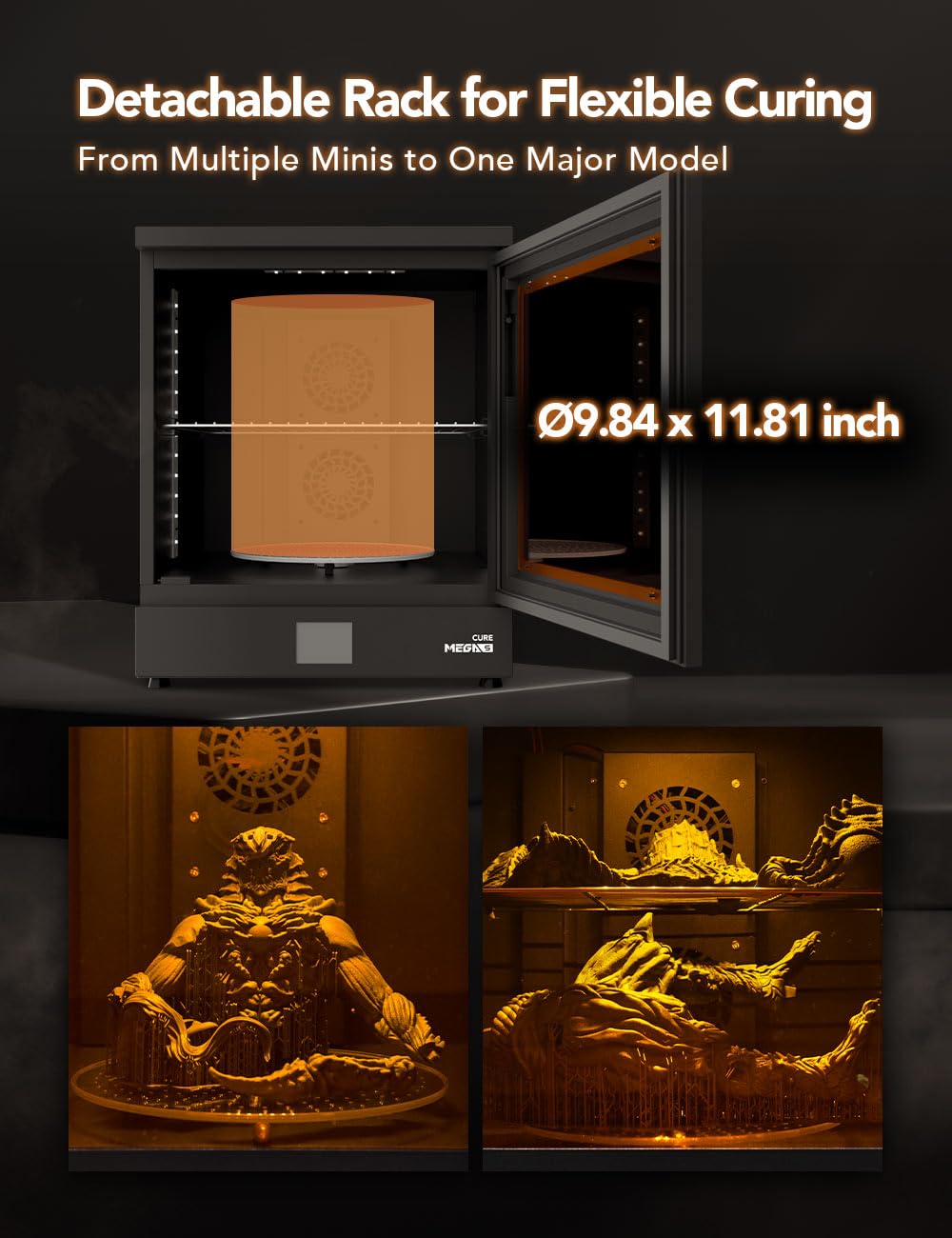
Image: Illustrates the detachable rack feature, showing how it accommodates both large single models and multiple smaller models for flexible curing.
سار سنڀال
Regular maintenance ensures optimal performance and longevity of your Phrozen Cure Mega S.
- ڪمري جي صفائي: After each use, especially if resin spills occur, wipe down the interior of the curing chamber with a soft cloth dampened with isopropyl alcohol (IPA). Ensure the device is unplugged.
- ٽرن ٽيبل جي صفائي: Remove the turntable and clean it with IPA. Ensure it is completely dry before placing it back into the unit.
- ٻاهرين صفائي: ٻاهرين سطحن کي نرم، سڪل ڪپڙي سان صاف ڪريو. رگڙيندڙ صاف ڪندڙ يا محلول استعمال ڪرڻ کان پاسو ڪريو.
- UV لائيٽ جو ذريعو: Periodically check the UV LEDs for any dust or residue and gently clean them with a soft, dry cloth if necessary.
- اسٽوريج: جڏهن گهڻي عرصي تائين استعمال ۾ نه هجي، ته ڊوائيس کي ٿڌي، سڪل جاءِ تي، سڌي سج جي روشني کان پري رکو.
مشڪلاتون
This section addresses common issues you might encounter with your Phrozen Cure Mega S.
| مسئلو | ممڪن سبب | حل |
|---|---|---|
| ڊوائيس تي طاقت نه آهي. | بجلي جي تار صحيح طرح سان ڳنڍيل نه آهي؛ آئوٽليٽ مان بجلي ناهي. | پاور ڪنڊ ڪنيڪشن چيڪ ڪريو. ٻئي ڊوائيس سان آئوٽليٽ جي جانچ ڪريو. |
| UV light not activating. | Curing mode not selected; door not fully closed. | Ensure 'UV Cure' or 'Fan + Cure' mode is selected. Close the door securely. |
| ٽرن ٽيبل نه ٿو ڦري. | Turntable not properly seated; obstruction. | Re-seat the turntable. Check for any debris obstructing rotation. |
| Models not curing evenly. | Insufficient curing time; models too close together. | Increase curing time. Ensure models are spaced adequately on the turntable. |
| Models not drying effectively. | Drying mode not selected; fans obstructed. | Ensure 'Fan' or 'Fan + Cure' mode is selected. Check for obstructions near fan vents. |
وضاحتون
Technical specifications for the Phrozen Cure Mega S.
| خاصيت | تفصيل |
|---|---|
| ماڊل نمبر | CUREMEGAS00US |
| پيداوار جي ماپ | 15.6"D x 18.7"W x 19.1"H (39.5cm W x 47.5cm D x 48.6cm H) |
| شيءِ جو وزن | 15 ڪلوگرام (33.07 پائونڊ) |
| مواد | ڌاتو |
| Curing Wavelength | 405nm UV Light |
| فين جي رفتار | 1700 RPM (Dual Fans) |
| Turntable Rotation | 360 درجا |
| ٺاهيندڙ | PHROZEN TECH CO., LTD. |
| پهرين دستياب تاريخ | آگسٽ 9، 2023 |

Image: Diagram showing the physical dimensions of the Phrozen Cure Mega S: 47.5cm depth, 39.5cm width, and 48.6cm height.
وارنٽي ۽ سپورٽ
For warranty information, technical support, or service inquiries, please contact Phrozen customer support through their official webسائيٽ يا پرچون ڪندڙ جتي پراڊڪٽ خريد ڪئي وئي هئي.
آن لائين وسيلا: Visit the official Phrozen website for FAQs, updated drivers, and additional support materials.
رابطي جي ڄاڻ: Refer to your purchase documentation or the Phrozen webمخصوص رابطي جي تفصيل لاءِ سائيٽ.


