تعارف
This manual provides essential information for setting up, operating, and maintaining your DOOGEE T10 Pro Android Tablet. Designed for both productivity and entertainment, the T10 Pro features a 10.1-inch FHD+ display, Unisoc T606 Octa-Core processor, 15GB RAM, 256GB ROM, and an 8580mAh battery. Please read this manual thoroughly to ensure optimal performance and longevity of your device.
دٻي ۾ ڇا آهي
پيڪيج کولڻ تي، تصديق ڪريو ته هيٺ ڏنل سڀئي شيون موجود آهن:
- 1 x DOOGEE T10 Pro Tablet
- Tablet with 15GB RAM and 256GB ROM (internal memory)
- چارجر
- چارج ڪيبل
- Card Removal Needle (SIM ejector tool)
- استعمال ڪندڙ دستي
Official unboxing video for the DOOGEE T10 Pro tablet, demonstrating the contents of the package.
پيداوار ختمview
The DOOGEE T10 Pro is designed with a sleek profile and premium build quality, offering a comfortable grip and a modern aesthetic. Key features include a vibrant display, powerful processing capabilities, and robust connectivity options.

اڳيان ۽ پوئتي view of the DOOGEE T10 Pro tablet, showcasing its design and key memory specifications.
اهم خاصيتون:
- ڏيکاريو: 10.1" FHD+ IPS display with 1200x1920 resolution and TÜV SÜD Blue Light Certification for eye protection.
- ڪارڪردگي: Unisoc T606 Octa-Core processor (up to 1.6GHz) and Android 12 operating system.
- ياداشت ۽ ذخيرو: 15GB RAM (8GB physical + 7GB extended) and 256GB internal storage, expandable up to 1TB via TF card.
- بيٽري: Large 8580mAh battery with 18W fast charging support.
- ڪئميرا: 13MP rear camera and 8MP front camera, both supporting 2K video recording.
- رابطي: Dual SIM support, 4G LTE, 2.4G/5G WiFi, and Bluetooth 5.0.
- آڊيو ۽ وڊيو: Widevine L1 support for Full HD streaming and Dolby Audio for immersive sound.

هڪ اوورview of the DOOGEE T10 Pro's core features, including its operating system, processor, memory, and connectivity.
سيٽ اپ ڪريو
1. شروعاتي چارجنگ
Before first use, fully charge your DOOGEE T10 Pro tablet using the provided charger and charging cable. The 18W fast charging allows for a quick power-up.
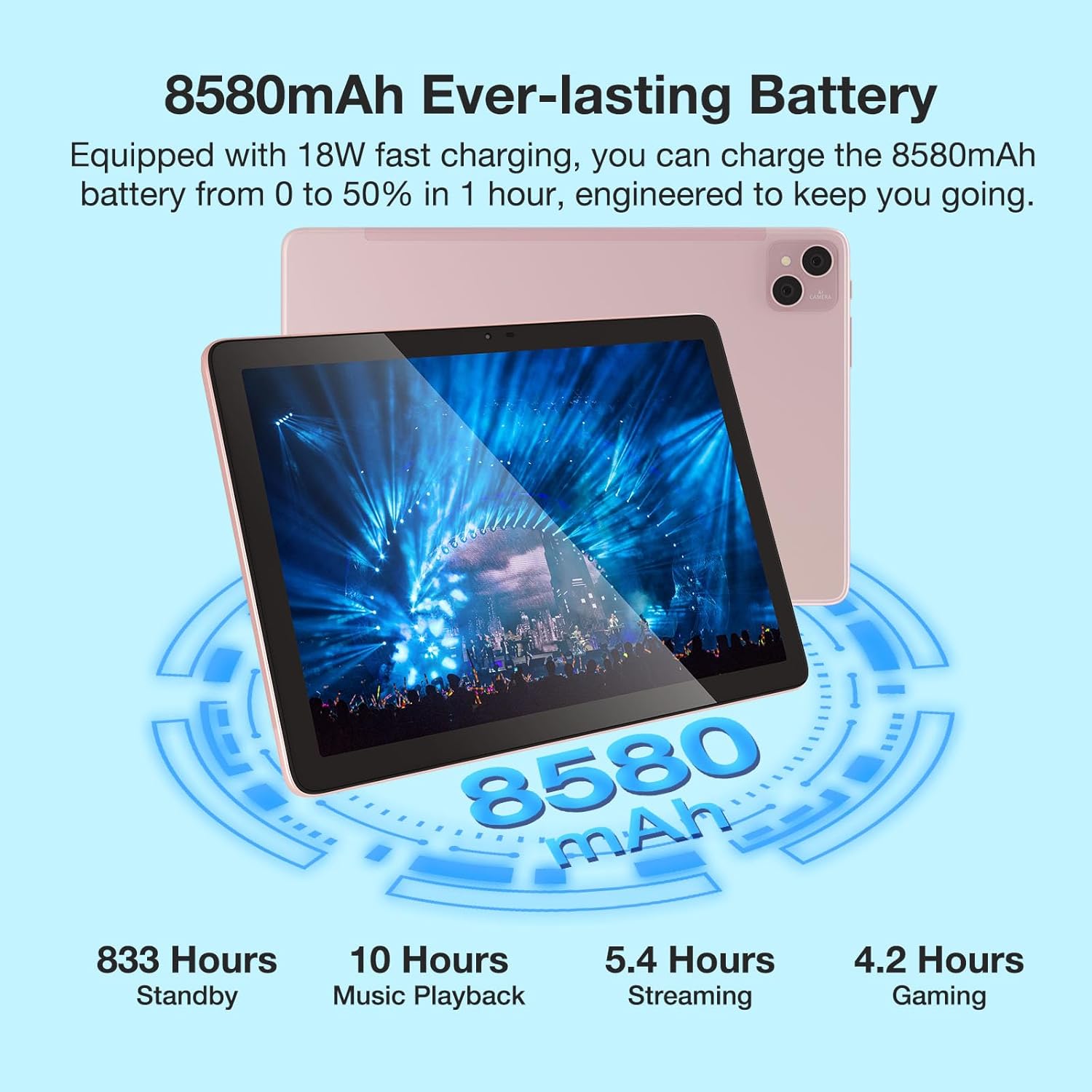
Visual representation of the 8580mAh battery and its estimated usage times for various activities.
2. پاور آن/آف
- To power on: Press and hold the Power button until the DOOGEE logo appears.
- پاور آف ڪرڻ لاءِ: پاور بٽڻ کي دٻايو ۽ رکو، پوءِ اختيارن مان "پاور آف" چونڊيو.
- To restart: Press and hold the Power button, then select "Restart" from the options.
3. سم/ٽي ايف ڪارڊ داخل ڪرڻ
Locate the SIM/TF card slot on the side of the tablet. Use the provided card removal needle to gently eject the tray. Insert your Nano-SIM cards (up to two) and/or a TF (microSD) card into the designated slots, ensuring correct orientation. Gently push the tray back into the tablet until it clicks into place.

The tablet's connectivity features, including Dual SIM 4G and dual-band WiFi, enabling communication and internet access.
آپريٽنگ هدايتون
1. بنيادي نيويگيشن
- ڇڪڻ جا اشارا: ٽيپ، سوائپ، زوم ڪرڻ لاءِ پنچ ڪرڻ معياري اينڊرائيڊ اشارو آهن.
- گھر جي اسڪرين: ويجيٽس ۽ ايپ شارٽ ڪٽس سان ترتيب ڏيو.
- نوٽيفڪيشن: اطلاعن ۽ تڪڙي سيٽنگن تائين رسائي حاصل ڪرڻ لاءِ اسڪرين جي چوٽي کان هيٺ سوائپ ڪريو.
2. وائي فائي سان ڳنڍڻ
- ڏانهن وڃو سيٽنگون > نيٽ ورڪ ۽ انٽرنيٽ > وائي فائي.
- وائي فائي کي ٽوگل ڪريو On.
- فهرست مان پنھنجو گهربل نيٽ ورڪ چونڊيو ۽ جيڪڏھن چيو وڃي ته پاسورڊ داخل ڪريو.
3. ڪئميرا استعمال ڪندي
The tablet features a 13MP main camera and an 8MP front camera. Open the Camera app to capture photos and record 2K videos. Switch between front and rear cameras as needed for selfies or video calls.

Details on the tablet's camera specifications and examples of captured moments.
4. وائڊ وائن L1 سپورٽ
The DOOGEE T10 Pro supports Widevine L1, enabling you to stream high-definition content (1080P and above) from popular streaming services like Netflix, Amazon Prime Video, Disney+, and Hulu. Ensure you have a stable internet connection for the best viewتجربو.

The tablet's Widevine L1 capability for high-quality video streaming.
5. پي سي موڊ
The tablet supports a PC Mode, allowing for a desktop-like experience when connected to an external keyboard and mouse (accessories sold separately). This mode enhances productivity for tasks such as document editing and multi-window multitasking.
Promotional video for the T10 Pro, showcasing its features including PC Mode and multimedia capabilities.
سار سنڀال
1. بيٽري جي سنڀال
- انتهائي گرمي پد (گرم يا ٿڌو) کان پاسو ڪريو ڇو ته اهي بيٽري جي زندگي کي خراب ڪري سگهن ٿا.
- بيٽري کي باقاعدي طور تي مڪمل طور تي ڊسچارج نه ڪريو. ان کي 20 سيڪڙو کان گهٽ ٿيڻ کان اڳ چارج ڪريو.
- صرف اصل يا تصديق ٿيل چارجنگ لوازمات استعمال ڪريو.
2. صفائي
ٽيبليٽ جي اسڪرين ۽ باڊي کي صاف ڪرڻ لاءِ نرم، لِنٽ فري ڪپڙو استعمال ڪريو. ضدي داغن لاءِ، ٿورو ڊيampڪپڙي کي پاڻي يا اسڪرين ڪلينر سان ڌوئڻ. سخت ڪيميڪلز يا رگڙيندڙ مواد استعمال ڪرڻ کان پاسو ڪريو.
3. اسٽوريج
When storing the tablet for extended periods, ensure it is charged to about 50-60% and powered off. Store it in a cool, dry place away from direct sunlight.
مشڪلاتون
| مسئلو | ممڪن سبب | حل |
|---|---|---|
| ٽيبليٽ آن نه ٿيندو | گهٽ بيٽري؛ سسٽم حادثو | ٽيبليٽ کي گهٽ ۾ گهٽ 30 منٽن لاءِ چارج ڪريو. زبردستي ٻيهر شروع ڪرڻ لاءِ پاور بٽڻ کي 10-15 سيڪنڊن لاءِ دٻايو ۽ رکو. |
| وائي فائي ڪنيڪشن جا مسئلا | غلط پاسورڊ؛ روٽر جو مسئلو؛ سگنل ۾ مداخلت | Verify Wi-Fi password. Restart your router. Move closer to the router or away from interference sources. |
| ايپس جو ڪريش ٿيڻ يا منجمد ٿيڻ | Insufficient RAM; App bug; Outdated app | Close background apps. Clear app cache/data (Settings > Apps). Update the app from Google Play Store. |
| سست ڪارڪردگي | Too many apps running; Low storage; System updates needed | Close unused apps. Free up storage space. Check for system updates (Settings > System > System update). |
| سم ڪارڊ نه مليو | Improper insertion; Damaged SIM card | Re-insert the SIM card correctly. Try another SIM card to check if the issue is with the card itself. |
وضاحتون
| خاصيت | تفصيل |
|---|---|
| ماڊل نالو | DOOGEE T10 PRO |
| آپريٽنگ سسٽم | Android 12 |
| اسڪرين جي ماپ | 10.1 انچ |
| اسڪرين جي قرارداد | 1200 x 1920 (ايف ايڇ ڊي+) |
| پروسيسر | Unisoc T606 Octa-Core (1.6GHz) |
| رام | 15 GB (8GB physical + 7GB extended) |
| Flash Memory Size (ROM) | 256 جي بي |
| وسعت وارو اسٽوريج | TF ڪارڊ ذريعي 1TB تائين |
| بيٽري جي گنجائش | 8580mAh |
| ريڙهه Webڪئميرا جي قرارداد | 13 ايم پي |
| سامهون Webڪئميرا جي قرارداد | 8 ايم پي |
| وائرليس جو قسم | 802.11n (2.4G/5G WiFi) |
| رابطي | Dual SIM 4G, Bluetooth 5.0 |
| شيءِ جو وزن | 2.59 پائونڊ |
| پيداوار جي ماپ | 9.5 x 6.34 x 3.3 انچ |
| رنگ | گلابي |
وارنٽي ۽ سپورٽ
For warranty information and technical support, please refer to the official DOOGEE webسائيٽ تي وڃو يا سڌو سنئون انهن جي ڪسٽمر سروس سان رابطو ڪريو. وارنٽي دعوائن لاءِ خريداري جي ثبوت طور پنهنجي خريداري جي رسيد رکو.
You can visit the official DOOGEE Store on Amazon for more information: DOOGEE Store


