1. تعارف
This manual provides comprehensive instructions for the setup, operation, and maintenance of your Xprinter XP-Q801K Thermal Receipt Printer. This printer is designed for efficient and reliable receipt printing in various business environments, featuring high-speed direct thermal printing and a USB interface for easy connectivity.

شڪل 1: سامهون view of the Xprinter XP-Q801K Thermal Receipt Printer, showing the paper output slot and control buttons.
2. سيٽ اپ
2.1 کولڻ
احتياط سان پرنٽر ۽ سڀني لوازمات کي پيڪنگ مان هٽايو. پڪ ڪريو ته سڀئي اجزا موجود آهن:
- Xprinter XP-Q801K Thermal Receipt Printer
- پاور اڊاپٽر
- USB ڪيبل
- Paper Roll (starter)
- استعمال ڪندڙ جو دستياب (ھي دستاويز)
2.2 پرنٽر کي ڳنڍڻ
Before connecting, ensure the printer is powered off. Locate the ports on the rear of the printer.
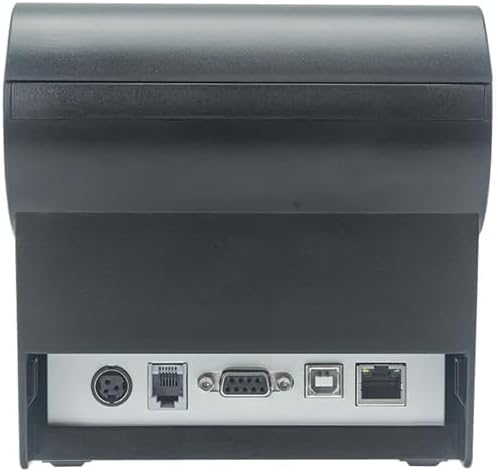
شڪل 2: پوئتي view of the printer, highlighting the power, USB, and other interface ports.
- پاور Connectنيو: Insert the power adapter cable into the printer's power input port (DC 24V/2.5A) and plug the adapter into a suitable electrical outlet (AC 100-240V, 50-60Hz).
- USB کي ڳنڍيو: Connect one end of the provided USB cable to the USB port on the printer and the other end to an available USB port on your computer.
- Cash Drawer (Optional): If using a cash drawer, connect its cable to the cash drawer port (DC 24V/1A) on the printer.
2.3 Loading the Paper Roll
The printer uses 80mm wide thermal paper rolls.
- Open the paper cover by pushing the cover open button (usually located on the side or front).
- Insert the thermal paper roll with the printing surface facing the print head. Ensure the roll is seated correctly in the paper compartment.
- ڪٽر جي ڀرسان ٿوري مقدار ۾ ڪاغذ ڪڍو.
- ڪاغذ جي ڍڪ کي مضبوطيءَ سان بند ڪريو جيستائين اهو جاءِ تي نه اچي.
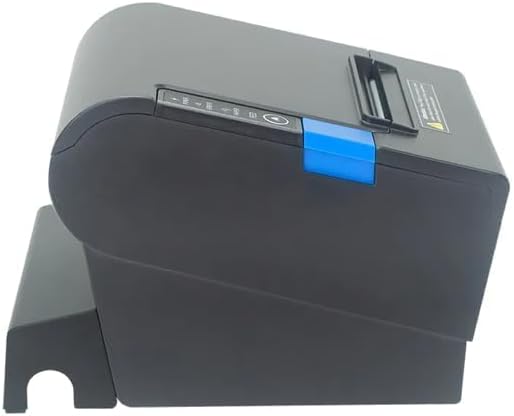
شڪل 3: پاسي view of the printer, illustrating the paper cover mechanism.
2.4 ڊرائيور لڳائڻ
The printer requires a driver to communicate with your computer. Drivers are typically available for Windows, Linux, Android, and Mac operating systems.
- For Windows users, the printer often supports plug-and-play installation or requires a specific Windows driver.
- For Linux, Android, and Mac, SDKs (Software Development Kits) are usually provided for integration.
ٺاهيندڙ جي حوالي ڪريو website or the included driver CD/USB drive for the latest drivers and installation instructions specific to your operating system.
3. پرنٽر هلائڻ
3.1 پاور آن/آف
Locate the power switch on the side or rear of the printer. Flip the switch to the 'ON' position to power on the printer. The 'POWER' indicator light will illuminate. Flip to 'OFF' to power down.
3.2 Indicator Lights and Buttons
The front panel typically features several indicator lights and buttons:
- طاقت: ظاهر ڪري ٿو ته پرنٽر آن آهي.
- غلطي: Illuminates or flashes to indicate an error condition (e.g., paper out, print head overheating, cutter error).
- ڪاغذ: Indicates that the paper roll is low or out.
- فيڊ بٽڻ: Press to manually feed paper. Hold to perform a self-test print (if supported by model).
3.3 بنيادي پرنٽنگ
Once the printer is connected and drivers are installed, you can print receipts from your POS software or application. Ensure the printer is selected as the default or active printer in your system settings.
The printer supports various print speeds up to 300 mm/s and automatic paper cutting after each print job.
4. سار سنڀال
باقاعده سار سنڀال بهترين ڪارڪردگي کي يقيني بڻائي ٿي ۽ توهان جي پرنٽر جي زندگي کي وڌائي ٿي.
4.1 پرنٽ هيڊ کي صاف ڪرڻ
The print head should be cleaned regularly, especially if print quality degrades.
- پرنٽر بند ڪريو ۽ پاور ڪيبل ڊسڪنيڪٽ ڪريو.
- ڪاغذ جو ڍڪ کوليو.
- ڪپهه جي سواب کي هلڪو استعمال ڪريو dampened with isopropyl alcohol (ethanol) to gently wipe the thermal elements of the print head.
- ڪَوَر کي بند ڪرڻ ۽ پاور کي ٻيهر ڳنڍڻ کان اڳ پرنٽ هيڊ کي مڪمل طور تي سڪي وڃڻ ڏيو.
4.2 Cleaning the Cutter
Paper dust can accumulate around the cutter blade, affecting its performance.
- پرنٽر بند ڪريو ۽ پاور ڪيبل ڊسڪنيڪٽ ڪريو.
- Carefully remove any visible paper dust or debris from around the cutter blade using a soft brush or compressed air.
- Do not use liquids on the cutter.
4.3 عام صفائي
پرنٽر جي ٻاهرين حصي کي نرم، ڊي سان صاف ڪريو.amp ڪپڙو. سخت ڪيميائي استعمال ڪرڻ کان پاسو ڪريو يا صاف ڪندڙ صاف ڪندڙ.
5. مسئلا حل ڪرڻ
هي سيڪشن عام مسئلن کي حل ڪري ٿو جيڪي توهان کي توهان جي پرنٽر سان منهن ڏيڻو پئجي سگهي ٿو.
| مسئلو | ممڪن سبب | حل |
|---|---|---|
| پرنٽر آن نٿو ٿئي. | پاور ڪيبل ڳنڍيل نه آهي؛ پاور آئوٽليٽ خراب آهي؛ پاور سوئچ بند آهي. | Ensure power cable is securely connected. Test power outlet. Turn power switch to 'ON'. |
| ڪا به پرنٽ ناهي. | Paper out; Paper loaded incorrectly; Driver not installed or incorrect; USB cable loose; Printer not selected. | Load new paper roll. Re-load paper correctly. Install/reinstall correct driver. Check USB connection. Select printer in software. |
| ERROR light is on/flashing. | Paper out; Paper jam; Print head overheating; Cutter error. | Load paper. Clear paper jam. Allow printer to cool down. Check cutter for obstructions. |
| خراب پرنٽ معيار. | Dirty print head; Low quality paper; Old paper roll. | Clean the print head (see Section 4.1). Use high-quality thermal paper. Replace old paper rolls. |
جيڪڏهن انهن حلن جي ڪوشش ڪرڻ کان پوءِ به مسئلو برقرار رهي، مهرباني ڪري ڪسٽمر سپورٽ سان رابطو ڪريو.
6. وضاحتون
| خاصيت | تفصيل |
|---|---|
| ڇپائيءَ جو طريقو | سڌو حرارتي |
| ڪاغذ جي ويڪر | 80 ملي ميٽر |
| پرنٽ جي رفتار | 230 mm/s، 260 mm/s، 300 mm/s |
| انٽرفيس | USB |
| لائين فاصلو | 3.75 mm (adjustable by commands) |
| Character Size (ANK) | Font A: 1.5 × 3.0 mm (12 × 24 dots) Font B: 1.1 × 2.1 mm (9 × 17 dots) |
| Character Size (Chinese/Traditional Chinese) | 3.0 × 3.0 mm (24 × 24 dots) |
| بار ڪوڊ جا قسم | UPC-A / UPC-E / JAN13 (EAN13) / JAN8 (EAN8) / CODE39 / ITF / CODABAR / CODE93 / CODE128 |
| 2D بارڪوڊ | QR Code / PDF417 |
| NV Flash Memory | 256 KB |
| ان پٽ پاور | اي سي 100-240V ، 50-60Hz |
| ٻاھر نڪرڻ جي طاقت | ڊي سي 24V/2.5A |
| ڪيش دراز جي پيداوار | ڊي سي 24V/1A |
| وزن | 1.0 ڪلو |
| طول و عرض (ڊي × ڊبليو ايڇ) | 194.5 × 145 × 146.4 ملي ميٽر |
| آپريٽنگ جي درجه حرارت | 0 ~ 45 ° سي |
| آپريٽنگ نمي | 10~80% RH |
| کٽندڙ زندگي | 1.5 ملين ڪٽ |
| پرنٽ سر زندگي | 150 ڪلوميٽر |
| OS مطابقت | Windows, Linux, Android, Mac |


