1. پراڊڪٽ ختمview
The Bewinner H310 LGA 1151 Motherboard is a Micro ATX mainboard designed to support 8th and 9th generation Intel Core processors. It features DDR4 memory support, multiple storage interfaces including SATA 6Gb/s and M.2, and integrated graphics output options. This manual provides essential information for installation, operation, and maintenance.

Figure 1: Bewinner H310 LGA 1151 Motherboard, top-down view.
اهم خاصيتون:
- Wide CPU Compatibility: Supports 8th and 9th generation Intel Core CPUs (LGA1151 socket).
- Dual-Channel DDR4 Memory: Supports up to 32GB across 2 DIMM slots, with effective frequencies including 2133 MHz.
- مستحڪم پاور پهچائڻ: Features a three-phase power supply with solid-state capacitors and 24+8 pin power connectors for reliable operation.
- High-Speed H310 Chipset: Provides stable and efficient performance for various computing tasks.
- Integrated Graphics Support: Equipped with an integrated graphics processor and multiple display outputs (DVI, HDMI, VGA) for multi-monitor setups.
2. پيڪيج مواد
پڪ ڪريو ته سڀئي شيون پيڪيج ۾ موجود آهن:
- 1 x Bewinner H310 LGA 1151 Motherboard
- استعمال ڪندڙ جو دستياب (ھي دستاويز)
Note: Additional accessories such as SATA cables or I/O shields may be included depending on the specific retail package.
3. Key Components and Connectors
Familiarize yourself with the layout and various connectors on the motherboard.

شڪل 2: ختمview of key areas including CPU socket, DIMM slots, chipset, and SATA ports.
ريئر I/O پينل:
The rear I/O panel provides external connectivity for peripherals and displays.

Figure 3: Rear I/O panel showing PS/2, VGA, DVI, HDMI, USB 2.0, USB 3.0, LAN, and Audio ports.
Onboard Connectors:
Internal connectors for power, storage, and front panel components.

Figure 4: Labeled diagram of onboard connectors including 24-pin ATX power, SATA 6Gb/s, NVMe M.2, PCIe slots, USB headers, and front panel headers.
4. سيٽ اپ گائيڊ
Follow these general steps to install your motherboard into a computer system. Always ensure power is disconnected before handling components.
4.1. تياري
- حفاظت پهريون: Disconnect the power supply from the wall outlet. Wear an anti-static wrist strap or frequently touch a grounded metal object to discharge static electricity.
- Gather Components: Ensure you have your CPU, CPU cooler, RAM modules, storage devices, power supply, and PC case ready.
4.2. Motherboard لڳائڻ
- سي پي يو انسٽال ڪريو: Open the CPU socket lever, align the CPU with the socket (match the golden triangle or notches), gently place the CPU into the socket, and close the lever to secure it.
- سي پي يو ڪولر انسٽال ڪريو: ٿرمل پيسٽ لڳايو (جيڪڏهن اڳ ۾ نه لڳايو ويو هجي) ۽ سي پي يو ڪولر کي ان جي هدايتن مطابق انسٽال ڪريو.
- رام انسٽال ڪريو: Open the clips on the DDR4 DIMM slots. Align the RAM modules with the slots (notch on the module matches the slot key), and press down firmly on both ends until the clips snap into place. For dual-channel operation, refer to your CPU cooler's manual for recommended slot population.
- مائونٽ مدر بورڊ: پنهنجي پي سي ڪيس ۾ I/O شيلڊ انسٽال ڪريو. احتياط سان مدر بورڊ کي ڪيس ۾ رکو، اسڪرو سوراخن کي اسٽينڊ آف سان ترتيب ڏيو. مدر بورڊ کي اسڪرو سان محفوظ ڪريو.
- M.2 SSD انسٽال ڪريو (اختياري): If using an M.2 SSD, insert it into the M.2 slot and secure it with the provided screw.
- پاور Connectنيو: 24-پن ATX پاور ڪنيڪٽر ۽ 8-پن CPU پاور ڪنيڪٽر کي پنهنجي پاور سپلائي مان مدر بورڊ سان ڳنڍيو.
- اسٽوريج ڳنڍيو: پنهنجي اسٽوريج ڊرائيوز (HDDs/SSDs) مان SATA ڊيٽا ڪيبلز کي مدر بورڊ تي SATA 6Gb/s پورٽس سان ڳنڍيو. پنهنجي پاور سپلاءِ مان SATA پاور ڪيبلز کي ڊرائيوز سان ڳنڍيو.
- Connect Front Panel: Connect the front panel headers (power button, reset button, USB ports, audio jacks, LED indicators) to the corresponding pins on the motherboard. Refer to the motherboard's silkscreen labels for correct orientation.
- ايڪسپينشن ڪارڊ انسٽال ڪريو (اختياري): If using a dedicated graphics card or other PCIe expansion cards, insert them into the appropriate PCIe slots and secure them.
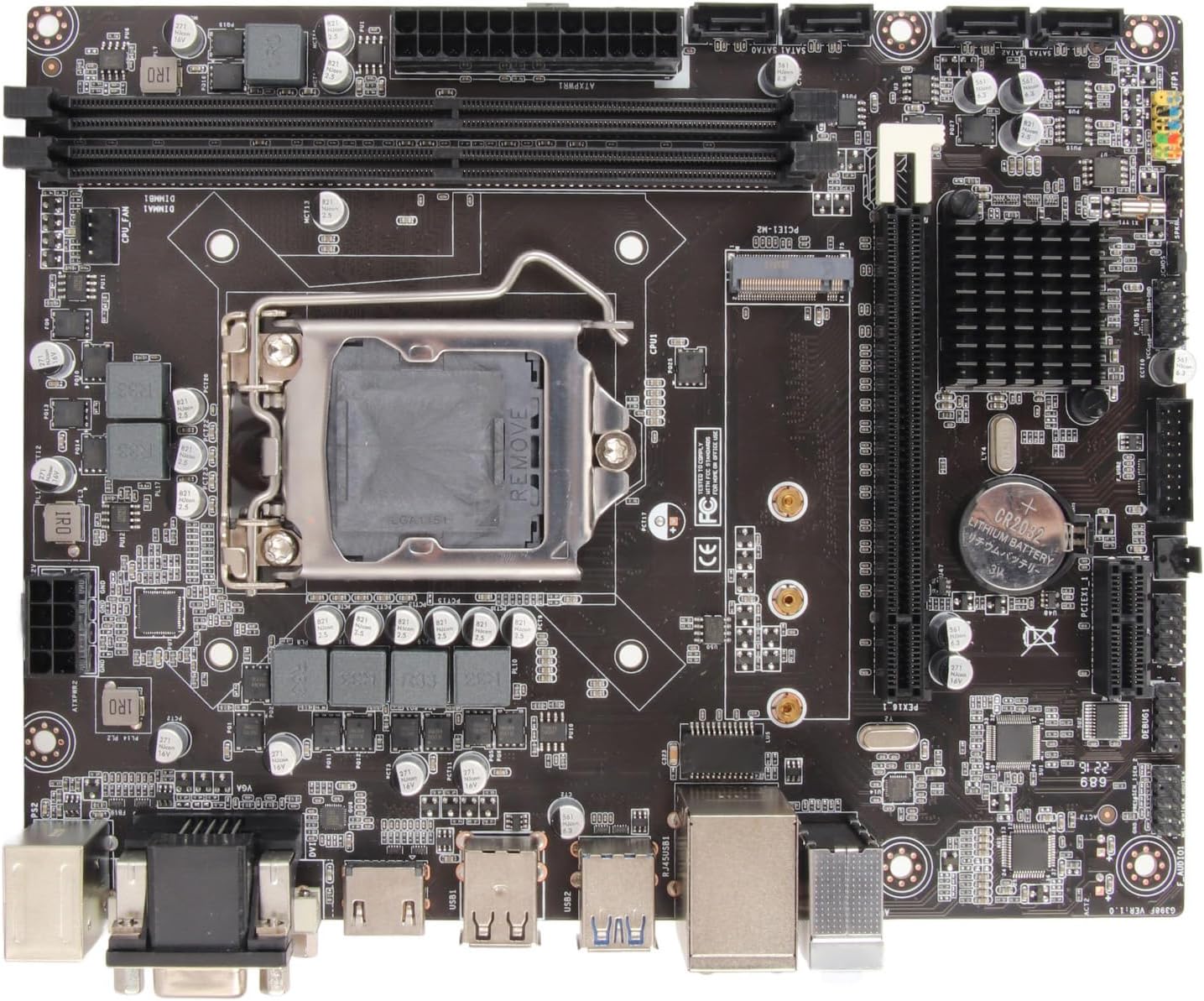
شڪل 5: مٿي کان هيٺ view of the motherboard, useful for identifying component locations during installation.
5. آپريٽنگ هدايتون
Once all components are installed and connected, you can proceed with system operation.
5.1. پهريون بوٽ
- پردي سان ڳنڍڻ: Connect your monitor, keyboard, and mouse to the rear I/O ports.
- پاور آن: Connect the power supply to the wall outlet and flip the power switch on the PSU. Press the power button on your PC case.
- BIOS/UEFI رسائي: During startup, repeatedly press the designated key (usually ڊي ايل or F2) to enter the BIOS/UEFI setup utility.
5.2. BIOS/UEFI ترتيب
The BIOS/UEFI interface allows you to configure system settings, boot order, and monitor hardware status.
- بوٽ آرڊر: Set the boot priority to your operating system installation media (USB drive or DVD-ROM) to install Windows or other OS.
- System Time/Date: Adjust the system clock if necessary.
- فين ڪنٽرول: Configure fan speeds for optimal cooling and noise levels.
- محفوظ ڪريو ۽ نڪرڻ: After making changes, save your settings and exit the BIOS/UEFI. The system will restart.
5.3. آپريٽنگ سسٽم جي انسٽاليشن
Follow the on-screen prompts to install your preferred operating system. After installation, install all necessary drivers for the motherboard chipset, integrated graphics, audio, and LAN from the manufacturer's webسائيٽ يا شامل ميڊيا.
6. سار سنڀال
Proper maintenance ensures the longevity and stable performance of your motherboard.
- صاف رکو: Regularly clean dust from inside your PC case using compressed air. Dust accumulation can lead to overheating.
- BIOS/UEFI اپڊيٽس: ٺاهيندڙ جي چيڪ ڪريو webBIOS/UEFI اپڊيٽس لاءِ سائيٽ. اپڊيٽس مطابقت، استحڪام ۽ ڪارڪردگي کي بهتر بڻائي سگهن ٿا. اپڊيٽ جي هدايتن تي احتياط سان عمل ڪريو.
- ڊرائيور اپڊيٽ: Keep your motherboard drivers (chipset, audio, LAN, graphics) updated to ensure optimal performance and compatibility with new software.
- ماحولياتي حالتون: Operate the motherboard in a well-ventilated area, away from direct sunlight, excessive heat, and moisture.
7. مسئلا حل ڪرڻ
If you encounter issues, refer to the following troubleshooting tips:
- طاقت ناهي:
- Ensure the power supply is connected to the wall and switched on.
- Verify that the 24-pin ATX and 8-pin CPU power connectors are securely seated on the motherboard.
- مڌر بورڊ سان فرنٽ پينل پاور سوئچ ڪنيڪشن چيڪ ڪريو.
- ڪابه ڊسپلي:
- Ensure the monitor is connected to the correct display output (VGA, DVI, or HDMI) on the motherboard or dedicated graphics card.
- Reseat RAM modules. Try booting with only one RAM module.
- Check if the CPU is properly installed.
- سسٽم جي عدم استحڪام/حادثا:
- سي پي يو ۽ جي پي يو جي گرمي پد چيڪ ڪريو. مناسب ٿڌي ڪرڻ کي يقيني بڻايو.
- Verify RAM compatibility and stability. Run memory diagnostic tools.
- پڪ ڪريو ته سڀئي ڊرائيور اپڊيٽ آهن.
- پردي جي سڃاڻپ نه ٿي:
- پردي کي ڪنهن ٻئي USB پورٽ سان ڳنڍڻ جي ڪوشش ڪريو.
- پردي لاءِ ڊرائيور انسٽال يا اپڊيٽ ڪريو.
- Check BIOS/UEFI settings for USB port enablement.
- آپريٽنگ سسٽم جا مسئلا:
- Ensure the operating system is installed on a bootable drive.
- BIOS/UEFI ۾ بوٽ آرڊر چيڪ ڪريو.
- Perform a clean installation of the operating system if issues persist.
8. ٽيڪنيڪل وضاحتون
Detailed specifications for the Bewinner H310 LGA 1151 Motherboard.

Figure 6: Motherboard dimensions: approximately 21.5 cm (8.5 inches) by 17 cm (6.7 inches).
| خاصيت | تفصيل |
|---|---|
| برانڊ | کٽيندڙ |
| ماڊل نالو | H310 (Model Number: Bewinnerw4dsgtaq2y) |
| سي پي يو ساکٽ | LGA 1151 |
| مطابقت رکندڙ پروسيسر | 8th and 9th Generation Intel Core (e.g., i3-8100, i5-8400, i7-8700, i3-9100, i5-9400, i7-9700) |
| چپ سيٽ جو قسم | Intel H310 |
| رام ٽيڪنالاجي | ڊي ڊي آر 4 |
| ميموري سلاٽ | 2 x DIMM (Dual Channel) |
| وڌ ۾ وڌ رام جي گنجائش | 32GB تائين |
| ياداشت جي گھڙي جي رفتار | 2133 MHz (Supports 1066, 1333, 1600 MHz) |
| گرافڪس | انٽيليٽ ٿيل گرافڪس پروسيسر |
| آڊيو ڪوڊيڪ | Realtek ALC662 6-channel |
| LAN ڪنٽرولر | Realtek 100M/1000M |
| توسيع سلاٽ | 1 x PCI Express X16, 1 x PCI Express X1 |
| SATA بندرگاهن | 4 x SATA 6 جي بي/ايس |
| M.2 سلاٽ | 1 x NVME M.2 |
| USB پورٽ (پوئتي) | 4 x USB 2.0/1.1, 2 x USB 3.0 |
| ڊسپلي آئوٽ پُٽ | 1 x VGA, 1 x DVI, 1 x HDMI compatible |
| Other Rear I/O | 1 x PS/2 port, 1 x RJ45 LAN port, 1 x Audio connector |
| فارم فيڪٽر | Micro ATX (17 x 21.5 cm / 6.7 x 8.5 inches) |
| CMOS بيٽري | CR2032 (integrated) |
| مطابقت رکندڙ ڊوائيسز | PC, Laptop (as a component) |
| اصليت | چين |
9. وارنٽي ۽ سپورٽ
For warranty information and technical support, please refer to the retailer or the official Bewinner webسائيٽ. ڪنهن به وارنٽي دعوائن لاءِ خريداري جو ثبوت رکو.
- پيداوار جي حمايت: Visit the Bewinner support page for FAQs, driver downloads, and contact information.
- وارنٽي دعويٰ: Contact your point of purchase or Bewinner customer service with your product model number (Bewinnerw4dsgtaq2y) and purchase details.


