اهم حفاظتي ڄاڻ
Read all instructions before using this product. Keep this manual for future reference. Adhere to all warnings on the product and in the operating instructions. Do not use this apparatus near water. Clean only with a dry cloth. Do not block any ventilation openings. Install in accordance with the manufacturer's instructions. Do not install near any heat sources such as radiators, heat registers, stoves, or other apparatus (including amplifiers) that produce heat. Only use attachments/accessories specified by the manufacturer. Unplug this apparatus during lightning storms or when unused for long periods of time. Refer all servicing to qualified service personnel. Servicing is required when the apparatus has been damaged in any way, such as power-supply cord or plug is damaged, liquid has been spilled or objects have fallen into the apparatus, the apparatus has been exposed to rain or moisture, does not operate normally, or has been dropped.
پيداوار ختمview
The Vivitar Singimals Kids Karaoke Speaker with Microphone (Model SNG200-ELPH-STK-6, Elliot the Elephant) is designed to provide an engaging karaoke experience for children. It features Bluetooth v5.1 connectivity, a 5W speaker, multicolor LED lighting, and a built-in rechargeable battery offering up to 12 hours of playtime.

Image: The Vivitar Singimals Kids Karaoke Speaker, featuring the Elliot the Elephant design, shown with its wired microphone attached. The speaker has a handle on top and control buttons on the front panel.
پيڪيج مواد
- Singimals Kids Karaoke Speaker (Elliot the Elephant)
- وائرڊ مائڪروفون
- USB چارجنگ ڪيبل
- استعمال ڪندڙ دستي
سيٽ اپ ڪريو
اسپيڪر کي چارج ڏيڻ
- Locate the USB charging port on the speaker.
- مهيا ڪيل USB چارجنگ ڪيبل کي اسپيڪر جي چارجنگ پورٽ سان ڳنڍيو.
- USB ڪيبل جي ٻئي ڇيڙي کي هڪ مطابقت رکندڙ USB پاور اڊاپٽر (شامل نه آهي) يا ڪمپيوٽر جي USB پورٽ سان ڳنڍيو.
- چارجنگ انڊيڪيٽر لائيٽ چارجنگ دوران روشن ٿيندي ۽ مڪمل چارج ٿيڻ تي بند ٿي ويندي.
- مڪمل چارج 12 ڪلاڪن تائين راند جو وقت فراهم ڪري ٿو.
مائڪروفون سان ڳنڻ
- Insert the microphone's 3.5mm jack into the MIC input port on the speaker.
- Ensure the microphone's ON/OFF switch is set to the "ON" position for use.

Image: A close-up of the top rear panel of the speaker, highlighting the USB, Micro SD, 5V 1A power, and MIC input ports. This illustrates where to connect the charging cable and microphone.
آپريٽنگ هدايتون
پاور آن / آف
Locate the ON/OFF switch on the speaker's control panel. Slide it to "ON" to power on the device. Slide it to "OFF" to power off.
بلوٽوٿ ڪنيڪشن
- Power on the karaoke speaker. It will automatically enter Bluetooth pairing mode, indicated by a flashing blue LED.
- پنهنجي اسمارٽ فون، ٽيبليٽ، يا ٻئي بلوٽوٿ-فعال ڊوائيس تي، بلوٽوٿ سيٽنگز ڏانهن وڃو.
- ڳولھيو available devices and select "Singimals" from the list.
- Once connected, the blue LED will stop flashing and remain solid. You can now play music from your device through the speaker.
مائڪروفون استعمال ڪندي
After connecting the microphone and ensuring its switch is "ON", speak or sing into the microphone. Your voice will be amplified through the speaker. Adjust the microphone volume using the dedicated controls if available, or the main volume controls.
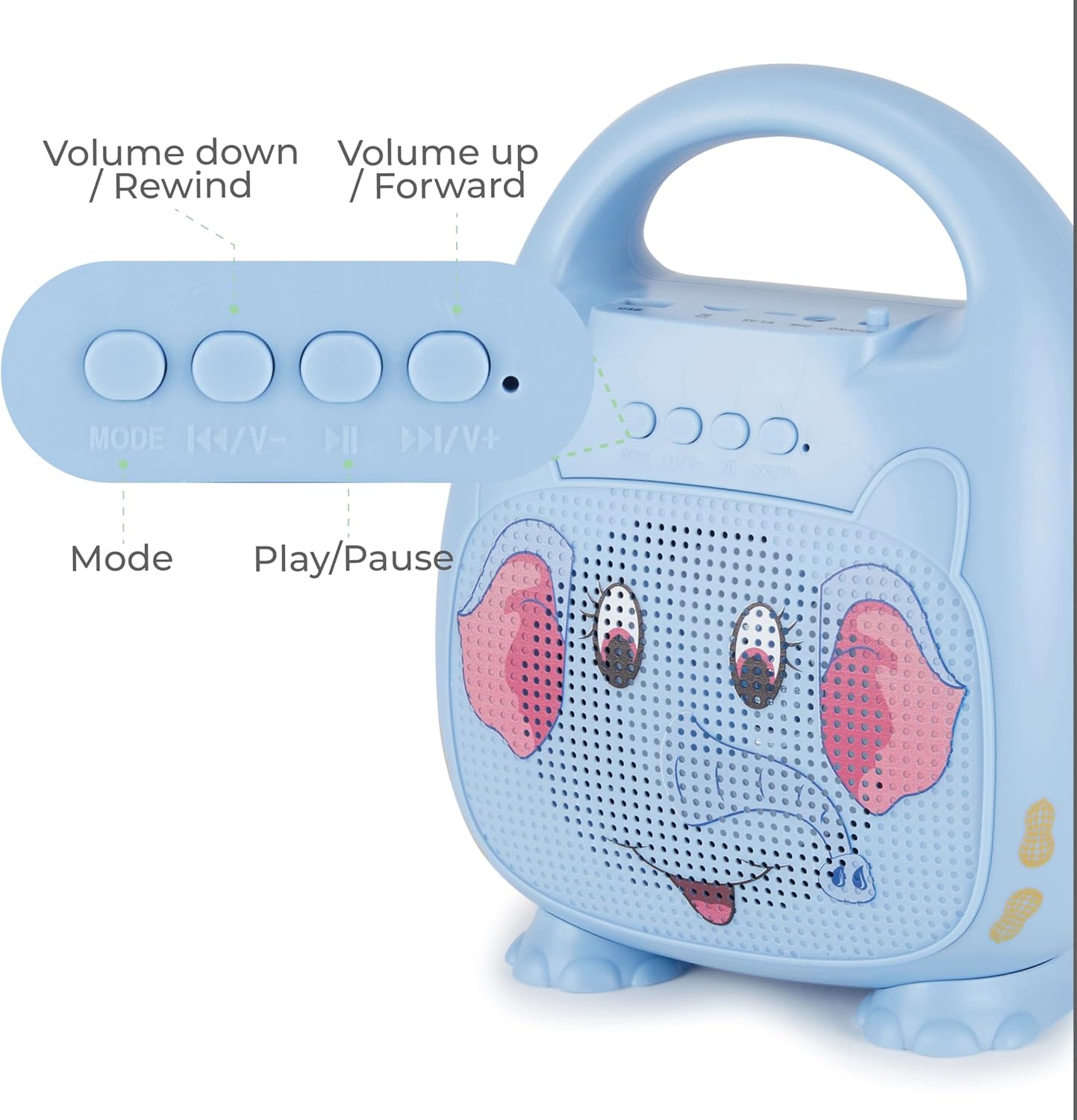
تصوير: هڪ تفصيلي view of the control panel on the speaker, showing buttons for Mode selection, Volume Down/Rewind, Play/Pause, and Volume Up/Forward. This illustrates how to navigate music and adjust settings.
ڪنٽرول بٽڻ
- طرفن: Press to switch between Bluetooth, USB, and Micro SD modes.
- |<< / V-: پوئين ٽريڪ تي وڃڻ لاءِ دٻايو. حجم گهٽائڻ لاءِ دٻايو ۽ رکو.
- > ||: موسيقي کي هلائڻ يا روڪڻ لاءِ دٻايو.
- >>| / V+: ايندڙ ٽريڪ تي وڃڻ لاءِ دٻايو. حجم وڌائڻ لاءِ دٻايو ۽ رکو.
LED روشني
The speaker features multicolor LED lighting that pulses and changes with the music, enhancing the karaoke experience. The lights activate automatically when the speaker is powered on.
سار سنڀال
صفائي
Wipe the speaker and microphone with a soft, dry cloth. Do not use liquid cleaners or abrasive materials.
ذخيرو
ڊوائيس کي سڌي سج جي روشني ۽ انتهائي گرمي پد کان پري ٿڌي، سڪل جاءِ تي رکو.
بيٽري جي سنڀال
بيٽري جي زندگي کي وڌائڻ لاءِ، پهرين استعمال کان اڳ اسپيڪر کي مڪمل طور تي چارج ڪريو ۽ جيڪڏهن باقاعده استعمال نه ڪيو وڃي ته گهٽ ۾ گهٽ هر ٽن مهينن ۾ هڪ ڀيرو.
مشڪلاتون
| مسئلو | حل |
|---|---|
| اسپيڪر پاور آن نٿو ٿئي. | Ensure the battery is charged. Connect the USB charging cable and allow it to charge for at least 30 minutes before attempting to power on again. Check the ON/OFF switch. |
| مائڪروفون مان ڪو آواز ناهي. | Verify the microphone is securely plugged into the MIC port. Ensure the microphone's ON/OFF switch is in the "ON" position. Increase the volume on the speaker. |
| بلوٽوٿ ذريعي ڳنڍي نه ٿو سگهجي. | Ensure the speaker is in Bluetooth pairing mode (flashing blue LED). Turn off and on Bluetooth on your device. Move your device closer to the speaker. Forget "Singimals" from your device's Bluetooth list and try pairing again. |
| آواز ۾ تحريف. | Reduce the volume on both the speaker and your connected device. Ensure there are no obstructions between your Bluetooth device and the speaker. |
وضاحتون
- ماڊل: SNG200-ELPH-STK-6
- برانڊ: جيو
- رابطي: بلوٽوت v5.1
- اسپيڪر آئوٽ: 5W
- طاقت جو ذريعو: بيٽري سان هلندڙ (1 ليٿيم آئن بيٽري، شامل آهي)
- راند جو وقت: 12 ڪلاڪ تائين
- چارج پورٽ: USB
- مواد: ڌاتو، پلاسٽڪ
- پيداوار جي ماپ: 8.7 x 4.7 x 9.4 انچ
- شيء جو وزن: 2.09 پائونڊ (0.95 ڪلوگرام)
- مطابقت رکندڙ ڊوائيسز: اسمارٽ فون، ٽيبليٽ، ذاتي ڪمپيوٽر
وارنٽي ۽ سپورٽ
For warranty information and customer support, please refer to the official Vivitar webسائيٽ تي وڃو يا انهن جي ڪسٽمر سروس ڊپارٽمينٽ سان رابطو ڪريو. خريداري جي ثبوت طور پنهنجي خريداري جي رسيد رکو.
ٺاهيندڙ: ساڪر انٽرنيشنل، انڪارپوريٽڊ.
اضافي معلومات
پراڊڪٽ وڊيوز
No official seller videos are available for embedding in this manual.


