1. تعارف
This manual provides detailed instructions for the installation, operation, and maintenance of your FSP Hydro G PRO 850W Power Supply. This unit is an 80 Plus Gold certified, fully modular power supply compliant with ATX 3.1 and PCIe 5.1 standards, featuring a native 12V-2X6 connector.

تصوير: سامهون واري پاسي view of the FSP Hydro G PRO 850W Power Supply.
2. اهم خاصيتون
- ATX 3.1 & PCIe 5.1 Compliance: Designed to meet the latest ATX 3.1 and PCIe 5.1 specifications, including a native 12V-2X6 connector and cable for next-generation hardware.
- 80 پلس گولڊ تصديق ٿيل: Ensures high power efficiency, operating at a minimum of 90% efficiency at 50% load, reducing electricity consumption and heat generation.
- مڪمل ماڊيولر ڊيزائن: Allows for flexible cable management by connecting only the necessary cables, improving airflow and reducing clutter within the PC case.
- Off-Wet Technology (Conformal Coating): Features an exclusive conformal coating for enhanced reliability and performance in challenging environments, tested to function effectively in up to 95% relative humidity.
- ڪمپيڪٽ سائيز: With a length of 150mm, the power supply offers a smaller footprint, facilitating easier installation in various PC chassis.
- Exceptional Quiet Operation with Eco Switch: Includes an Eco switch that, when activated, optimizes power consumption and allows the fan to remain off under 30% load, providing a silent computing experience.
3. سيٽ اپ ۽ تنصيب
Before installation, ensure your system components are compatible with an 850W power supply and that your PC case has adequate space for the unit (dimensions: 150mm L x 150mm W x 86mm H).
3.1 پيڪنگ ۽ چڪاس
Carefully remove the power supply and all modular cables from the packaging. Inspect for any visible damage. If any damage is found, contact your retailer or FSP support immediately.
3.2 پاور سپلائي کي چڙهڻ
- Position the power supply in the designated PSU bay of your PC case. Ensure the fan is oriented correctly for optimal airflow (typically facing downwards if your case has a bottom vent, or upwards if not).
- Secure the power supply to the case using the provided screws.
3.3 Connecting Modular Cables
The FSP Hydro G PRO is fully modular, allowing you to connect only the cables required for your system. Refer to the image below for the connector layout on the power supply unit.
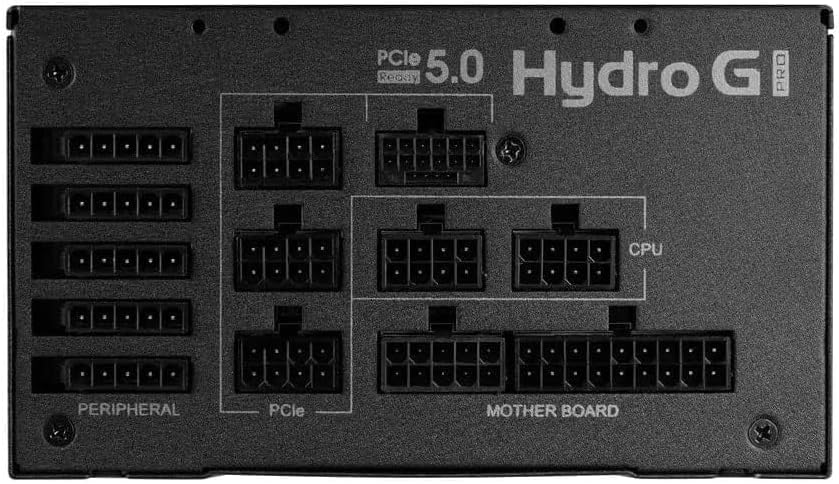
Image: Modular connector panel of the FSP Hydro G PRO power supply, showing clearly labeled ports for Motherboard, CPU, PCIe, and Peripheral connections.
- مدر بورڊ پاور: 24 پن ATX ڪيبل کي ماء بورڊ سان ڳنيو.
- سي پي يو پاور: Connect the 8-pin (4+4 pin) EPS/CPU cables to your motherboard's CPU power connectors. Modern motherboards may require one or two such connectors.
- PCIe Power (Graphics Cards): Use the appropriate PCIe cables for your graphics card(s). This unit includes a native 12V-2X6 connector for compatible PCIe 5.1 graphics cards. For older cards, use the standard 6+2 pin PCIe connectors.
- پردي جي طاقت: Connect SATA power cables for storage drives (SSDs, HDDs) and other peripherals. Use Molex connectors for older devices or case fans if needed.
پڪ ڪريو ته سڀئي ڪنيڪشن محفوظ ۽ صحيح طرح سان سيٽ ٿيل آهن. هوا جي وهڪري ۽ جمالياتيات کي بهتر بڻائڻ لاءِ ڪيبلن کي صاف طور تي روٽ ڪريو.
4. آپريٽنگ هدايتون
4.1 شروعاتي پاور آن
- After all internal connections are made, connect the AC power cord to the power supply and then to a wall outlet.
- Flip the main power switch on the back of the power supply to the 'ON' position.
- سسٽم شروع ڪرڻ لاءِ پنهنجي ڪمپيوٽر ڪيس تي پاور بٽڻ کي دٻايو.
4.2 Eco Switch Functionality
The FSP Hydro G PRO features an Eco switch located on the rear panel. This switch controls the fan's operation based on load.

تصوير: پوئين پاسي view of the FSP Hydro G PRO power supply, highlighting the Eco switch for fan control.
- When the Eco switch is ON, the power supply fan will not operate under low load (below 30%), providing a silent experience during low power consumption. The fan will automatically activate when the load exceeds 30% to maintain optimal cooling.
- When the Eco switch is بند, the power supply fan will operate continuously, regardless of the load, providing constant airflow.
5. سار سنڀال
The FSP Hydro G PRO power supply is designed for long-term reliability with minimal maintenance.
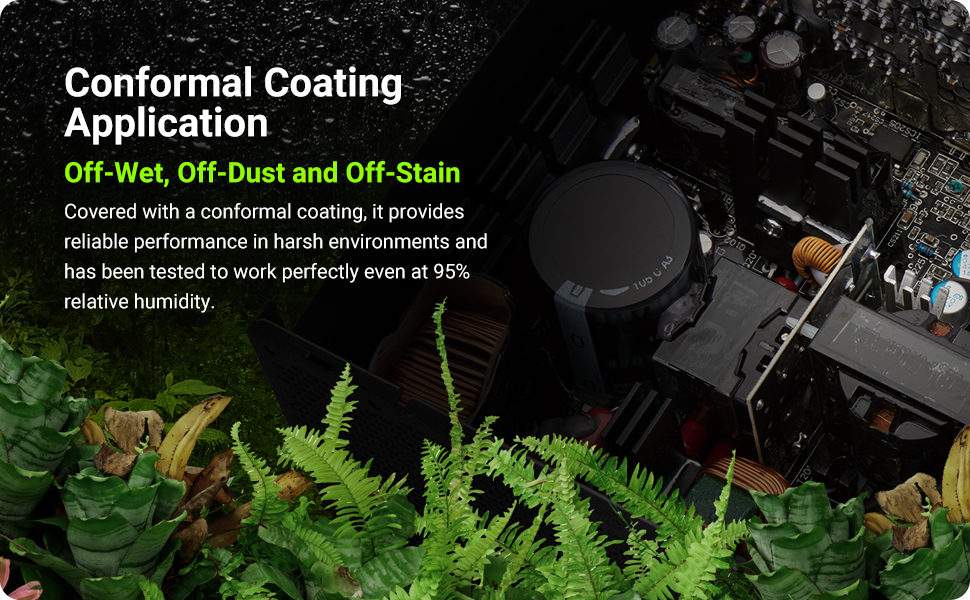
Image: Illustration of internal components protected by conformal coating.
- مٽي هٽائڻ: Periodically inspect the power supply's fan intake and exhaust vents for dust accumulation. Use compressed air to gently clear any dust to ensure proper airflow and cooling. Ensure the power supply is turned off and unplugged before cleaning.
- ڪنفارمل ڪوٽنگ: The unit features an "Off-Wet Technology" conformal coating, providing protection against dust, moisture, and stains. This reduces the need for frequent internal cleaning in typical environments.
6. مسئلا حل ڪرڻ
If you encounter issues with your FSP Hydro G PRO power supply, consider the following steps:
- طاقت ناهي:
- پڪ ڪريو ته AC پاور ڪنڊ محفوظ طور تي پاور سپلائي ۽ وال آئوٽليٽ ٻنهي سان ڳنڍيل آهي.
- Verify that the main power switch on the back of the power supply is in the 'ON' position.
- Check all modular cables (24-pin ATX, CPU, PCIe, etc.) are firmly seated in both the power supply and the respective components.
- وال آئوٽليٽ کي ٻئي ڊوائيس سان جانچيو ته جيئن تصديق ڪري سگهجي ته اهو بجلي فراهم ڪري رهيو آهي.
- سسٽم جي عدم استحڪام/ بي ترتيب بندش:
- Ensure your system's power requirements do not exceed the 850W capacity of the power supply.
- Check for proper ventilation around the power supply and within the PC case to prevent overheating.
- Verify that all power connectors are correctly installed and not loose.
- Fan Not Spinning (Eco Mode):
- If the Eco switch is ON, the fan is designed not to spin under low load (below 30%). This is normal operation. The fan will activate automatically when the system load increases.
- If the Eco switch is OFF and the fan is not spinning, ensure the power supply is receiving power and is not faulty.
If issues persist after performing these checks, contact FSP customer support or your retailer for further assistance.
7. وضاحتون
| خاصيت | تفصيل |
|---|---|
| ماڊل نالو | HG2-850-G5T |
| آئوٽ پٽ واٽtage | 850 واٽ |
| 80 پلس سرٽيفڪيشن | سون |
| ATX نسخو | 3.1 |
| PCIe ورزن | 5.1 (with 12V-2X6 connector) |
| فارم فيڪٽر | اي ٽي ايڪس |
| ماڊلرٽي | مڪمل ماڊلر |
| کولڻ جو طريقو | Air (with Eco fan control) |
| پيداوار جي ماپ (L x W x H) | 150mm x 150mm x 86mm (6 x 6 x 3.5 انچ) |
| شيءِ جو وزن | 3.38 ڪلوگرام (7.44 پائونڊ) |
| ٺاهيندڙ | FSP Group INC |
8. وارنٽي ۽ سپورٽ
The FSP Hydro G PRO 850W Power Supply comes with a 10 سال وارنٽي, ensuring long-term reliability and peace of mind. For warranty claims, technical support, or any product-related inquiries, please contact FSP customer service through their official webسائيٽ يا توهان جي خريداري جو نقطو.
مھرباني ڪري وارنٽي جي تصديق لاءِ خريداري جو ثبوت رکو.


