تعارف
The SUNOL T16 Wireless Earbuds are designed for an active lifestyle, offering high-quality audio and convenient features. These Bluetooth headphones provide up to 48 hours of total playtime with their wireless charging case, featuring an LED power display for easy monitoring. With earhooks for a secure fit and water resistance, they are ideal for workouts, running, and various sports activities. The built-in microphone with noise cancellation ensures clear calls.
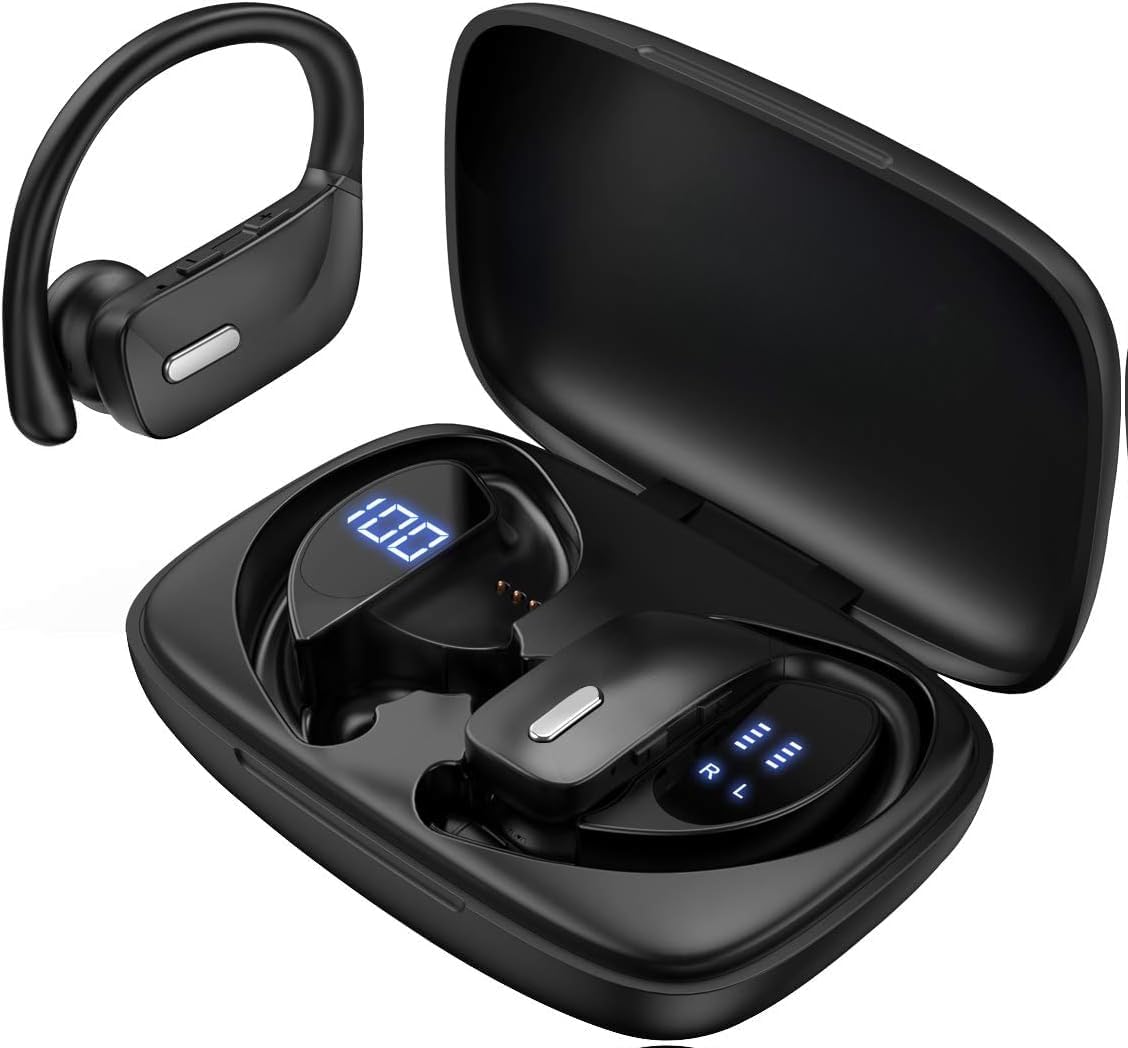
Image: The SUNOL T16 Wireless Earbuds with their charging case, showcasing the digital display.
دٻي ۾ ڇا آهي
- SUNOL T16 Wireless Earbuds (Left and Right)
- وائرليس چارجنگ ڪيس
- USB-C چارجنگ ڪيبل
- 3 Pairs of Ear Caps (S, M, L)
وضاحتون
| خاصيت | تفصيل |
|---|---|
| ماڊل نالو | تي16 |
| رابطي ٽيڪنالاجي | وائرليس (بلوٽوٿ 5.0) |
| بلوٽوٿ رينج | 10 ميٽر تائين |
| Earbud جي بيٽري جي زندگي | 9 ڪلاڪن تائين (هڪ چارج تي) |
| ڪُل راند جو وقت (ڪيس سان) | 48 ڪلاڪ تائين |
| چارج ڪرڻ جا اختيار | Wireless Charging, USB-C Charging |
| آڊيو ڊرائيور جي ماپ | 10 ملي ايم ڊائنامڪ ڊرائيور |
| تعدد جي حد | 20 هرٽز - 20,000 هرٽز |
| رڪاوٽ | 40 اوم |
| شور ڪنٽرول | فعال شور منسوخي |
| مائڪروفون | Built-in with Noise Cancellation |
| پاڻي جي مزاحمت جي سطح | پاڻي مزاحمتي |
| ڪنٽرول قسم | Touch, Siri Voice Assistant |
| ڪن جي جڳهه | ڪنن جي مٿان (ڪن جي ڪُنڊن سان) |
| مواد | Acrylonitrile Butadiene Styrene (ABS) |
| شيءِ جو وزن | 6.4 اونس |

Image: Diagram illustrating the premium stereo sound quality and Bluetooth 5.0 connectivity.
سيٽ اپ ڪريو
1. ائربڊس ۽ ڪيس کي چارج ڪرڻ
The charging case supports both wireless charging and USB-C charging. The impressive 9 hours of listening time on a single charge for the sports wireless headphones are extended to a remarkable 48 hours of play time with the included charging case.
- To charge the case, connect a USB-C cable to the charging port on the back of the case, or place it on a compatible wireless charging pad.
- Place the earbuds into their respective slots in the charging case. Ensure they are properly seated to initiate charging.
- The smart LED digital power display on the case will show the remaining battery level of the charging case and the individual earbuds. The percentage in the middle indicates the case battery, while the battery icons on both sides indicate the left and right earbud charge levels.

Image: The charging case with its LED display showing battery levels for the case and individual earbuds.

Image: Diagram illustrating the battery life: 15 min charge for 1 hour playtime, 8 hours on a single charge, and 48 hours with the charging case.
2. توهان جي ڊوائيس سان جوڙو ٺاهڻ
The earbuds automatically enter pairing mode when removed from the charging case.
- چارجنگ ڪيس کوليو ۽ ٻئي ائربڊ ڪڍو. اهي خودڪار طريقي سان پاور آن ٿيندا ۽ پيئرنگ موڊ ۾ داخل ٿيندا.
- On your mobile device (smartphone, tablet, laptop), go to the Bluetooth settings.
- ڳولھيو available devices. You should see "T16" or "S8" appear in the list.
- Select "T16" or "S8" to connect. Once connected, you will hear an audio prompt, and the earbuds will be ready for use.

Image: Diagram showing the earbuds automatically pairing with mobile phones.
Video: Official product video demonstrating the unboxing, charging, and Bluetooth pairing process of the SUNOL T16 Wireless Earbuds.
آپريٽنگ هدايتون
Earbuds پائڻ
The T16 earbuds are designed with flexible earhooks to ensure a secure and comfortable fit, especially during physical activity. Gently place the earbud into your ear canal and adjust the earhook over the top of your ear until it feels stable and comfortable. Experiment with the included ear cap sizes to find the best fit for optimal sound and comfort.

Image: A woman wearing the SUNOL T16 earbuds, demonstrating their secure fit for an active lifestyle.
ٽچ ڪنٽرول
The earbuds feature physical buttons for precise control of various functions:
- راند/روڪ: ٻنهي ائربڊ تي هڪ ڀيرو ٽيپ ڪريو.
- جواب ڏيو / ڪال بند ڪريو: ڪال دوران ٻنهي ائربڊ تي هڪ ڀيرو ٽيپ ڪريو.
- اڳيون گيت: کاٻي ائربڊ تي ٻٽي ٽيپ ڪريو.
- اڳيون گيت: ساڄي ائربڊ تي ٻٽي ٽيپ ڪريو.
- Active Voice Assistant (Siri): ٻنهي مان ڪنهن به ائربڊ تي ٽي ڀيرا ٽيپ ڪريو.
- ڪال رد ڪريو: ايندڙ ڪال دوران ٻنهي ائربڊ کي ڊگهو دٻايو.
- حجم جي ترتيب: Use the dedicated volume buttons on the earbuds.

Image: Diagram detailing the physical buttons and their functions, including volume adjustment, play/pause, call management, and voice assistant activation.
سار سنڀال
To ensure the longevity and optimal performance of your SUNOL T16 Wireless Earbuds, follow these maintenance guidelines:
- صفائي: Regularly wipe the earbuds and charging case with a soft, dry, lint-free cloth. For ear caps, remove them and clean with mild soap and water, then dry thoroughly before reattaching.
- پاڻي جي مزاحمت: While water-resistant, avoid submerging the earbuds in water. Dry them completely if they get wet from sweat or rain before placing them back in the charging case.
- اسٽوريج: جڏهن استعمال ۾ نه هجي، ته ائربڊس کي انهن جي چارجنگ ڪيس ۾ محفوظ ڪريو ته جيئن انهن کي محفوظ رکي سگهجي ۽ انهن کي چارج رکيو وڃي. انتهائي گرمي پد کان پري ٿڌي، سڪل جاءِ تي ذخيرو ڪريو.
- چارج پورٽ: USB-C چارجنگ پورٽ کي مٽي ۽ ملبي کان پاڪ رکو.
مشڪلاتون
If you encounter any issues with your SUNOL T16 Wireless Earbuds, try the following solutions:
- ائربڊس جوڙو نه پيا لڳن:
- پڪ ڪريو ته ٻئي ائربڊ مڪمل طور تي چارج ٿيل آهن.
- Place earbuds back in the case, close the lid, wait a few seconds, then open and remove them again.
- پنهنجي ڊوائيس تي بلوٽوٿ بند ڪريو، پوءِ ان کي واپس آن ڪريو ۽ ٻيهر جوڙڻ جي ڪوشش ڪريو.
- Forget or remove the "T16" or "S8" device from your device's Bluetooth list and attempt to pair from scratch.
- صرف هڪ ائربڊ ڪم ڪري رهيو آهي:
- پڪ ڪريو ته ٻئي earbuds چارج ٿيل آهن.
- Place both earbuds back in the charging case, close the lid, and then take them out simultaneously.
- If the issue persists, try resetting the earbuds.
- غريب آواز جي معيار:
- Ensure the earbuds are properly seated in your ears and the ear caps provide a good seal.
- Check the audio source device's volume and sound settings.
- Move closer to your connected device to avoid interference or exceeding the 10-meter Bluetooth range.
- Clean the earbud speakers and ear caps.
- چارجنگ ڪيس چارج نه ٿي رهيو آهي:
- پڪ ڪريو ته USB-C ڪيبل ڪيس ۽ پاور سورس ٻنهي سان محفوظ طور تي ڳنڍيل آهي.
- هڪ مختلف USB-C ڪيبل يا پاور اڊاپٽر آزمايو.
- جيڪڏهن وائرليس چارجنگ استعمال ڪري رهيا آهيو، پڪ ڪريو ته ڪيس چارجنگ پيڊ تي صحيح طور تي رکيل آهي.
وارنٽي ۽ سپورٽ
For warranty information and technical support, please refer to the documentation included with your product or contact the manufacturer, SUNOL, directly through their official webسائيٽ يا ڪسٽمر سروس چينلز. ڪنهن به وارنٽي دعوائن لاءِ خريداري جي ثبوت طور پنهنجي خريداري جي رسيد رکو.


