1. تعارف
This manual provides detailed instructions for the safe and effective operation of your DEPSTECH 50FT Sewer Inspection Camera. This device is designed for visual inspection in hard-to-reach areas such as pipes, drains, engine compartments, and wall cavities. It features a 1080P dual-lens camera, a 5-inch IPS display, and a 50-foot semi-rigid cable with IP67 waterproofing.
2. حفاظت جي ڄاڻ
- ڊوائيس کي انتهائي گرمي پد يا سڌي سج جي روشني کي ظاهر نه ڪريو.
- ڊوائيس کي مضبوط مقناطيسي شعبن کان پري رکو.
- Ensure the camera probe is securely connected before use.
- ڊوائيس کي ڌار ڪرڻ يا تبديل ڪرڻ جي ڪوشش نه ڪريو. مرمت صرف مجاز اهلڪارن پاران ڪئي وڃي.
- Clean the camera lens and probe after each use to maintain optimal performance.
- The camera probe is IP67 waterproof, but the main unit is not. Avoid exposing the main unit to water.
- Charge the device using the provided Type-C cable and a compatible power adapter (not included).
3. پيڪيج مواد
پڪ ڪريو ته سڀئي شيون توهان جي پيڪيج ۾ موجود آهن:
- Handheld Endoscope Inspection Camera (with built-in 32GB TF Card)
- 50FT Semi-Rigid Camera Cable with Dual Lens Probe
- قسم-سي چارجنگ ڪيبل
- Accessories: Hook, Magnet, Protective Cap
- استعمال ڪندڙ دستي
- کڻڻ وارو ڪيس

4. پراڊڪٽ ختمview
4.1 Main Unit and Display
The main unit features a 5-inch IPS screen for clear, real-time observation. The ergonomic design ensures comfortable handling during extended use.


4.2 Camera Probe and Cable
The device includes a 50-foot semi-rigid cable with a 7.9mm dual-lens camera probe. The probe is IP67 waterproof and equipped with adjustable LED lights for illumination in dark environments.


4.3 ڪنٽرول پينل
The control panel provides intuitive buttons for power, menu navigation, camera mode selection, light adjustment, and media capture.
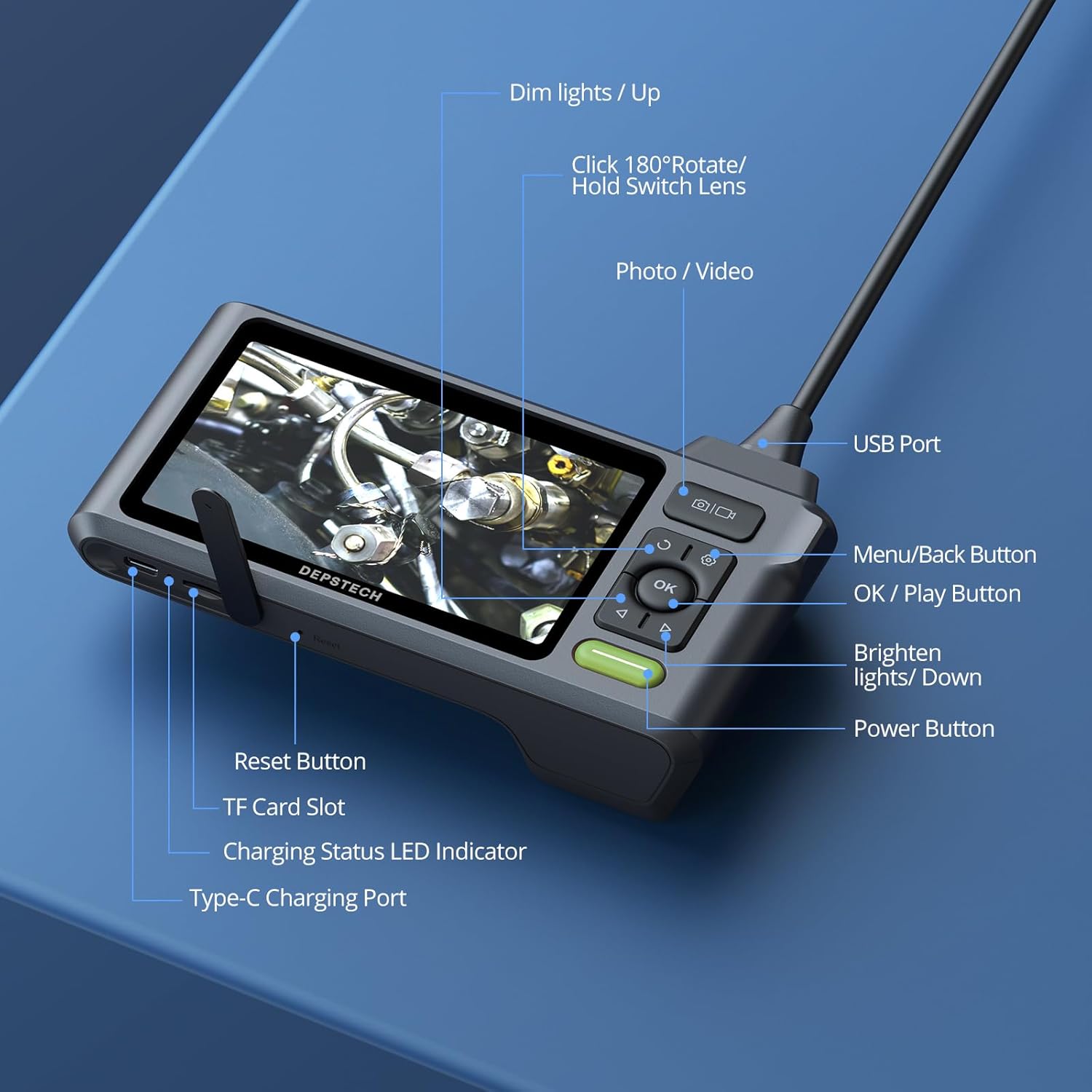
- پاور بٽڻ: ڊيوائس کي آن/بند ڪرڻ لاءِ دٻايو ۽ رکو.
- مينيو/واپس بٽڻ: Access menu options or go back.
- OK/Play بٽڻ: Confirm selections or play recorded media.
- فوٽو / وڊيو بٽڻ: Short press to take a photo, long press to start/stop video recording.
- Dim Lights/Up Button: Decrease LED brightness or navigate up in menus.
- Brighten Lights/Down Button: Increase LED brightness or navigate down in menus.
- Rotate 180°/Hold Switch Lens: Short press to rotate the image 180 degrees. Long press to switch between front, side, and split-screen camera views.
5. سيٽ اپ
5.1 ڊوائيس چارج ڪرڻ
Before first use, fully charge the device. Connect the Type-C charging cable to the charging port on the main unit and plug the other end into a USB power adapter (5V/1A recommended). The charging status LED indicator will show charging progress.
5.2 Connecting the Camera Probe
Insert the USB connector of the camera cable firmly into the USB port on the top of the main unit. Ensure it clicks into place for a secure connection. The device is designed to prevent accidental disconnection.
5.3 TF ڪارڊ داخل ڪرڻ
The device comes with a built-in 32GB TF card. If you need to replace it, gently insert a new Micro SD card (up to 32GB, Class 10 recommended) into the TF card slot until it clicks.
6. آپريٽنگ هدايتون
6.1 پاور آن/آف
کي دٻايو ۽ رکو پاور بٽڻ for a few seconds to turn the device on. Repeat the action to turn it off.
6.2 Adjusting LED Lights
استعمال ڪريو Dim Lights/Up ۽ Brighten Lights/Down buttons to adjust the brightness of the LED lights on the camera probe. This helps optimize visibility in various lighting conditions.
6.3 سوئچنگ ڪيمرا Views
The dual-lens camera offers multiple viewداخل ٿيڻ جا اختيار:
- سامهون ڪئميرا: Provides a direct forward view.
- پاسي ڪئميرا: Provides a lateral view.
- ورهايل اسڪرين: Displays both front and side views simultaneously for comprehensive inspection.
ڊگھو دٻايو Rotate 180°/Hold Switch Lens button to cycle through these camera modes.

6.4 Capturing Photos and Videos
- فوٽو ڪڍڻ لاءِ: مختصر دٻايو فوٽو / وڊيو بٽڻ.
- وڊيو رڪارڊ ڪرڻ لاءِ: ڊگھو دٻايو فوٽو / وڊيو بٽڻ to start recording. Long press again to stop recording.
All captured media is saved to the inserted TF card.
6.5 ڊيٽا جي منتقلي
ڪمپيوٽر تي تصويرون ۽ وڊيوز منتقل ڪرڻ لاءِ:
- Connect the main unit to your computer using the Type-C charging cable.
- The device will appear as a removable storage device.
- Alternatively, remove the TF card and insert it into a card reader connected to your computer.

6.6 Bluart 3.0 Technology
The device incorporates Bluart 3.0 technology, which enhances image clarity, processing speed, and low-light performance, providing a clearer and smoother inspection experience.

7. سار سنڀال
7.1 صفائي
- After each use, wipe the camera lens and probe with a soft, damp cloth. For stubborn dirt, a small amount of mild soap can be used.
- Ensure the lens is dry before storage.
- Clean the main unit with a dry, soft cloth. Do not use abrasive cleaners or immerse the main unit in water.
7.2 اسٽوريج
- Store the device and its accessories in the provided carrying case to protect them from dust and damage.
- هڪ ٿڌي، سڪل جڳهه ۾ ذخيرو ڪريو، سڌو سورج جي روشني ۽ انتهائي گرمي کان پري.
- جيڪڏهن گهڻي عرصي تائين ذخيرو ڪري رهيا آهيو، ته پڪ ڪريو ته بيٽري جزوي طور تي چارج ٿيل آهي (تقريبن 50٪) ته جيئن ان جي عمر وڌندي.
8. مسئلا حل ڪرڻ
- اسڪرين تي ڪا به تصوير ناهي: Ensure the camera probe is securely connected to the main unit. Check if the device is powered on and fully charged.
- تصوير blurry آهي: Clean the camera lens. Adjust the LED brightness. Ensure the object is within the camera's focal range (Front Camera: 3-10 cm; Side Camera: 2-5 cm).
- ڊوائيس چالو نه آهي: Charge the device for at least 30 minutes. If the issue persists, try pressing the reset button (if available, refer to Figure 4.5).
- تصويرون/وڊيو رڪارڊ نه ٿا ڪري سگهجن: Check if the TF card is inserted correctly and has sufficient storage space. Ensure the card is not write-protected.
- Difficulty maneuvering the cable: For longer runs or navigating tight bends, consider attaching the probe to a stiffer guide wire or pipe snake (not included) for better control.
9. وضاحتون
| خاصيت | تفصيل |
|---|---|
| ماڊل نمبر | USDS520DLG-15M |
| پيداوار جي ماپ | 5.91 x 1.97 x 3.94 انچ |
| شيءِ جو وزن | 4.08 پائونڊ |
| ڪيبل ڊگھائي | 50 فوٽ |
| ڪئميرا قطر | 7.9mm |
| ڪئميرا قرارداد | 1080P (1920 x 1080) |
| لينس جو قسم | ڊبل لينس (اڳيون ۽ پاسي) |
| اسڪرين جي ماپ | 5 انچ IPS |
| پنروڪ درجه بندي | IP67 (Camera Probe) |
| LED بتيون | 6+1 ترتيب ڏيڻ وارا ايل اي ڊي |
| بيٽري | 1 Lithium Ion battery (up to 4 hours use) |
| ذخيرو | Built-in 32GB Micro SD Card (supports up to 32GB) |
| رابطي | USB قسم-سي |
| ٺاهيندڙ | DEPSTECH |
10. وارنٽي ۽ سپورٽ
DEPSTECH products are designed for reliability and performance. For warranty information, technical support, or service inquiries, please refer to the contact information provided with your purchase documentation or visit the official DEPSTECH webسائيٽ. مھرباني ڪري وارنٽي دعوائن لاءِ خريداري جو ثبوت رکو.


