تعارف
Thank you for choosing the Sharp Digital Alarm Clock. This manual provides detailed instructions for setting up, operating, and maintaining your new alarm clock. Designed for clarity and convenience, this clock features an easy-to-read LCD display with an optional always-on backlight, dual alarm settings, and a USB charging port for your devices. Please read this manual thoroughly before use to ensure optimal performance and longevity of your product.

سامهون view of the Sharp Digital Alarm Clock, displaying time, month, date, day, and temperature on its colorful LCD screen.
حفاظت جي ڄاڻ
Please observe the following safety precautions to prevent damage to the unit or personal injury:
- يونٽ کي انتهائي گرمي پد، سڌي سج جي روشني، يا وڌيڪ نمي جي سامهون نه آڻيو.
- يونٽ کي ڇڏڻ يا مضبوط اثرن جي تابع ڪرڻ کان پاسو ڪريو.
- پراڻي ۽ نئين بيٽرين، يا بيٽرين جي مختلف قسمن کي گڏ نه ڪريو.
- جيڪڏهن يونٽ ڊگهي عرصي تائين استعمال نه ڪيو ويندو ته جيئن رسي کي روڪي سگهجي ته بيٽريون هٽايو.
- يونٽ کي پاڻي ۽ ٻين مائع کان پري رکو.
- يونٽ کي پاڻ ڌار ڪرڻ يا مرمت ڪرڻ جي ڪوشش نه ڪريو. سڀني سروسنگ کي قابل اهلڪارن جي حوالي ڪريو.
پيڪيج مواد
پڪ ڪريو ته سڀئي شيون پيڪيج ۾ موجود آهن:
- Sharp Digital Alarm Clock (Model SPC5028AMZ)
- استعمال ڪندڙ جو دستياب (ھي دستاويز)
Note: 3 x AAA batteries are required and not included.
پيداوار ختمview
سامهون ڊسپلي

Diagram illustrating key features of the alarm clock, including atomic accuracy, 1.5-inch tall time display, on/off display nightlight, indoor temperature display, calendar display, bright color display, wall mountable or tabletop viewing, and battery operation (3x AAA batteries).
The front of the clock features a clear LCD display that shows the time, month, date, day of the week, and indoor temperature. The main time display is approximately 1.5 inches tall for easy readability.
ريئر پينل ۽ ڪنٽرولس

تفصيلي view of the clock's rear panel, showing the location of the battery compartment, various control buttons (Calendar, Time, Alarm, 12/24, Up, °C/°F, Down, Wave), the ON/OFF switch for the nightlight, and the backstand for tabletop viewing. Dimensions (6.45"W x 5"H) are also indicated.
- CALENDAR Set Button: Used to set the date and year.
- TIME Set Button: Used to set the time manually.
- ALARM Set & ON/OFF Button: Used to set and activate/deactivate alarms.
- 12/24 بٽڻ: 12-ڪلاڪ ۽ 24-ڪلاڪ وقت جي فارميٽ جي وچ ۾ ٽوگل ڪري ٿو.
- UP بٽڻ: Adjusts settings upwards.
- °C/°F بٽڻ: سيلسيس ۽ فارنهائيٽ جي وچ ۾ گرمي پد جي ڊسپلي کي ٽوگل ڪري ٿو.
- ڊائون بٽڻ: Adjusts settings downwards.
- WAVE (Atomic Search) Button: Initiates a manual search for the atomic time signal.
- ON/OFF Switch (Nightlight): Controls the always-on backlight feature.
- بيٽري جو خانو: Holds 3 x AAA batteries.
- Backstand: For tabletop viewing.
- ڀت تي لڳل سوراخ: For hanging the clock on a wall.
سيٽ اپ ڪريو
بيٽري لڳائڻ
- Open the battery compartment cover on the rear of the clock.
- 3 نيون AAA بيٽريون داخل ڪريو، صحيح پولارٽي (+ ۽ -) کي يقيني بڻائي.
- بيٽري جي ڪمري واري ڍڪ کي محفوظ طور تي بند ڪريو.
شروعاتي پاور آن
Upon battery installation, the clock will power on and attempt to synchronize with the atomic time signal.
Atomic Time Synchronization (WWVB)
The Sharp Digital Alarm Clock is designed to automatically synchronize with the WWVB atomic time signal broadcast from Fort Collins, Colorado, ensuring precise timekeeping.

Map of the United States showing the WWVB radio broadcast signal originating from Fort Collins, Colorado, which the atomic clock uses for synchronization.
- The clock will automatically attempt to receive the signal daily, typically overnight when electronic interference is minimal.
- For optimal reception, place the clock near a window and orient its front or rear panel towards Fort Collins, Colorado.
- A signal strength indicator (antenna icon) on the display will show the reception status.
- To manually initiate a signal search, press the موج پوئين پينل تي بٽڻ.

Graphic depicting a full moon, with text 'LESS ELECTRONIC INTERFERENCE AT NIGHT SET BY MORNING', indicating optimal atomic clock synchronization occurs during nighttime hours.
Setting Time Zone
Even with atomic synchronization, you must manually select your local time zone for the correct hourly time display.
- کي دٻايو ۽ رکو ٽائيم button until the time zone indicator flashes.
- استعمال ڪريو UP or هيٺ buttons to select your desired time zone (e.g., PST, MST, CST, EST).
- کي دٻايو ٽائيم تصديق ڪرڻ ۽ نڪرڻ لاءِ ٻيهر بٽڻ.
Manual Time and Date Setting
If atomic synchronization is not desired or available, you can set the time and date manually.
- وقت مقرر ڪرڻ لاءِ. کي دٻايو ۽ رکو ٽائيم button until the hour flashes. Use UP/هيٺ to adjust. Press ٽائيم to move to minutes, then adjust. Press ٽائيم ٻيهر بچائڻ لاءِ.
- تاريخ مقرر ڪرڻ لاءِ. کي دٻايو ۽ رکو عالمگير button until the year flashes. Use UP/هيٺ to adjust. Press عالمگير to move to month, then day, adjusting each. Press عالمگير ٻيهر بچائڻ لاءِ.
- 12/24 ڪلاڪ فارميٽ: کي دٻايو 12/24 button to switch between 12-hour (with AM/PM indicator) and 24-hour formats.
آپريٽنگ هدايتون
Adjusting Display Brightness and Backlight
The clock features an optional always-on backlight with adjustable brightness for optimal viewروشني جي مختلف حالتن ۾.
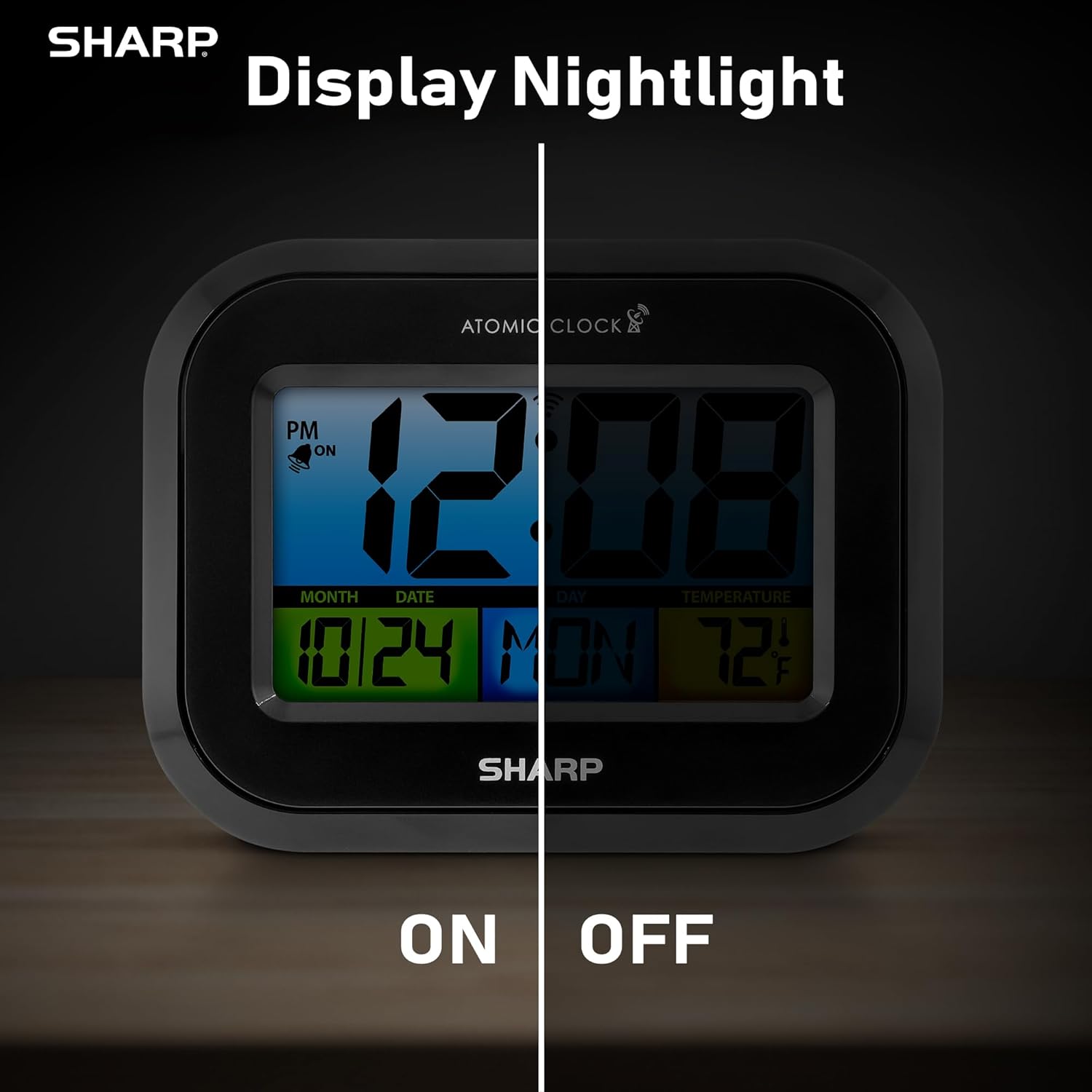
Comparison image showing the clock's display with the nightlight off (dim) and on (illuminated) in both day and night settings.
- Always-On Backlight: استعمال ڪريو آن / آف سوئچ on the rear panel to activate or deactivate the continuous backlight. When ON, the display will have a soft glow.
- آن ڊيمانڊ بيڪ لائيٽ: Even if the always-on backlight is OFF, you can momentarily illuminate the display by pressing the پوئتي روشني button (usually located on the top edge, though not explicitly labeled in the provided image, it's a common feature). This provides a brighter illumination for a few seconds.

Image highlighting the physical ON/OFF switch on the rear of the clock for controlling the display nightlight, indicating its function for soft glowing backlight in the dark.
Setting Dual Alarms
The clock supports two independent alarm settings.
- کي دٻايو الارم button once to select Alarm 1. Press again for Alarm 2.
- جڏهن الارم جو وقت ڏيکاريو وڃي، دٻايو ۽ رکو الارم button until the hour flashes.
- استعمال ڪريو UP or هيٺ ڪلاڪ کي ترتيب ڏيڻ لاءِ بٽڻ. دٻايو الارم to move to minutes, then adjust.
- دٻايو الارم again to save the alarm time.
- الارم کي چالو/غير فعال ڪرڻ لاءِ، دٻايو الارم button repeatedly until the alarm icon (bell) appears/disappears for the desired alarm.
USB چارجنگ پورٽ استعمال ڪندي
The clock includes a USB charging port for convenient charging of small electronic devices. Locate the USB port on the side or rear of the unit (specific location not detailed in provided images, but implied by feature bullets). Connect your device's USB cable to this port to begin charging.
Temperature Display (°C/°F)
The clock displays the indoor temperature. To switch between Celsius and Fahrenheit, press the ° سي / ° ايف پوئين پينل تي بٽڻ.
Viewing Angle Optimization
Like most LCD screens, this display is best viewed from the front or slightly above. Visibility may appear reduced at sharp side or low angles. For the best viewing experience, use the built-in kickstand to position the clock to face you.

Illustration demonstrating the optimal viewing angle for the LCD display, showing that the clock is best viewed from above or straight on, with a built-in kickstand to position it.
Wall Mounting and Tabletop Use
The clock is designed for versatile placement. Use the integrated backstand for tabletop viewing or the wall mount hole on the rear for hanging it on a wall.

The Sharp Digital Alarm Clock displayed in a home office setting, showing its versatility for both wall mounting and tabletop placement.
سار سنڀال
صفائي
نرم، سڪل ڪپڙي سان گھڙي کي صاف ڪريو. گھڙيال صاف ڪندڙ يا محلول استعمال نه ڪريو، ڇاڪاڻ ته اهي مٿاڇري کي نقصان پهچائي سگهن ٿا.
بيٽري مٽائڻ
When the display becomes dim or the clock stops functioning, it's time to replace the batteries. Follow the battery installation steps in the Setup section. It is recommended to replace all three AAA batteries at the same time with new ones.
مشڪلاتون
| مسئلو | ممڪن حل |
|---|---|
| ڊسپلي مدھم يا خالي آهي. | Check battery polarity and ensure batteries are fresh. Replace all 3 AAA batteries. Ensure the backlight ON/OFF switch is in the 'ON' position if continuous illumination is desired. |
| Atomic time not synchronizing. | Ensure the clock is placed near a window and oriented towards Fort Collins, Colorado. Avoid placing near electronic devices that may cause interference. Try initiating a manual search by pressing the WAVE button. Synchronization is often best overnight. |
| Time or date is incorrect after battery change. | Manually set the time zone. Allow time for atomic synchronization, or manually set the time and date using the TIME and CALENDAR buttons. |
| Display is hard to read from certain angles. | This is a characteristic of LCD technology. Adjust the clock's position using the kickstand to ensure it is viewed straight-on or from slightly above eye level. |
| الارم نٿو وڄي. | Ensure the alarm is set and activated (bell icon visible). Check battery level. |
وضاحتون
| ملڪيت | قدر |
|---|---|
| برانڊ | تيز |
| ماڊل نمبر | SPC5028AMZ |
| ڊسپلي جو قسم | ايل سي ڊي |
| رنگ | ڪارو |
| پيداوار جي ماپ | 6.45"W x 5"H |
| شيءِ جو وزن | 10.8 اونس (0.31 ڪلوگرام) |
| طاقت جو ذريعو | Battery Powered (3 x AAA, not included) |
| آپريشن موڊ | ايٽمي |
| خاص خاصيتون | Cordless, Dual Alarm, USB Charging Port, Indoor Temperature Display, Always-On Backlight |
| چڙهڻ جو قسم | ڀت جبل، ٽيبل ٽاپ |
| فريم مواد | پلاسٽڪ |
وارنٽي ۽ سپورٽ
Sharp products are manufactured to the highest quality standards. For warranty information or technical support, please refer to the documentation included with your purchase or visit the official Sharp webسائيٽ. وارنٽي دعوائن لاءِ خريداري جي ثبوت طور پنهنجي خريداري جي رسيد رکو.

Sharp Time Solutions


