1. تعارف
This manual provides essential instructions for the safe and efficient operation of your eKids Disney Wish Karaoke Machine, Model WH-555. Please read this manual thoroughly before using the device and retain it for future reference.

تصوير 1.1: سامهون view of the eKids Disney Wish Karaoke Machine with its wired microphone.
2. حفاظت جي ڄاڻ
محفوظ آپريشن کي يقيني بڻائڻ لاءِ، مھرباني ڪري ھيٺين احتياطن تي عمل ڪريو:
- Do not expose the unit to extreme temperatures, direct sunlight, or moisture.
- پاڻي يا ٻين مائع کي يونٽ ۾ مت وڃايو.
- چارج ڪرڻ لاءِ صرف مهيا ڪيل USB ڪيبل استعمال ڪريو.
- يونٽ کي گرمي جي ذريعن جهڙوڪ ريڊيئيٽر، گرمي رجسٽر، اسٽو، يا ٻين سامان کان پري رکو (بشمول ampلائفائرز) جيڪي گرمي پيدا ڪن ٿا.
- Do not attempt to disassemble or modify the unit. Refer all servicing to qualified service personnel.
- This product is intended for use by children under adult supervision.
3. پيڪيج مواد
پڪ ڪريو ته سڀئي شيون پيڪيج ۾ موجود آهن:
- eKids Disney Wish Karaoke Machine (Model WH-555)
- وائرڊ مائڪروفون
- USB چارجنگ ڪيبل
4. پراڊڪٽ ختمview
Familiarize yourself with the various parts and controls of your karaoke machine.
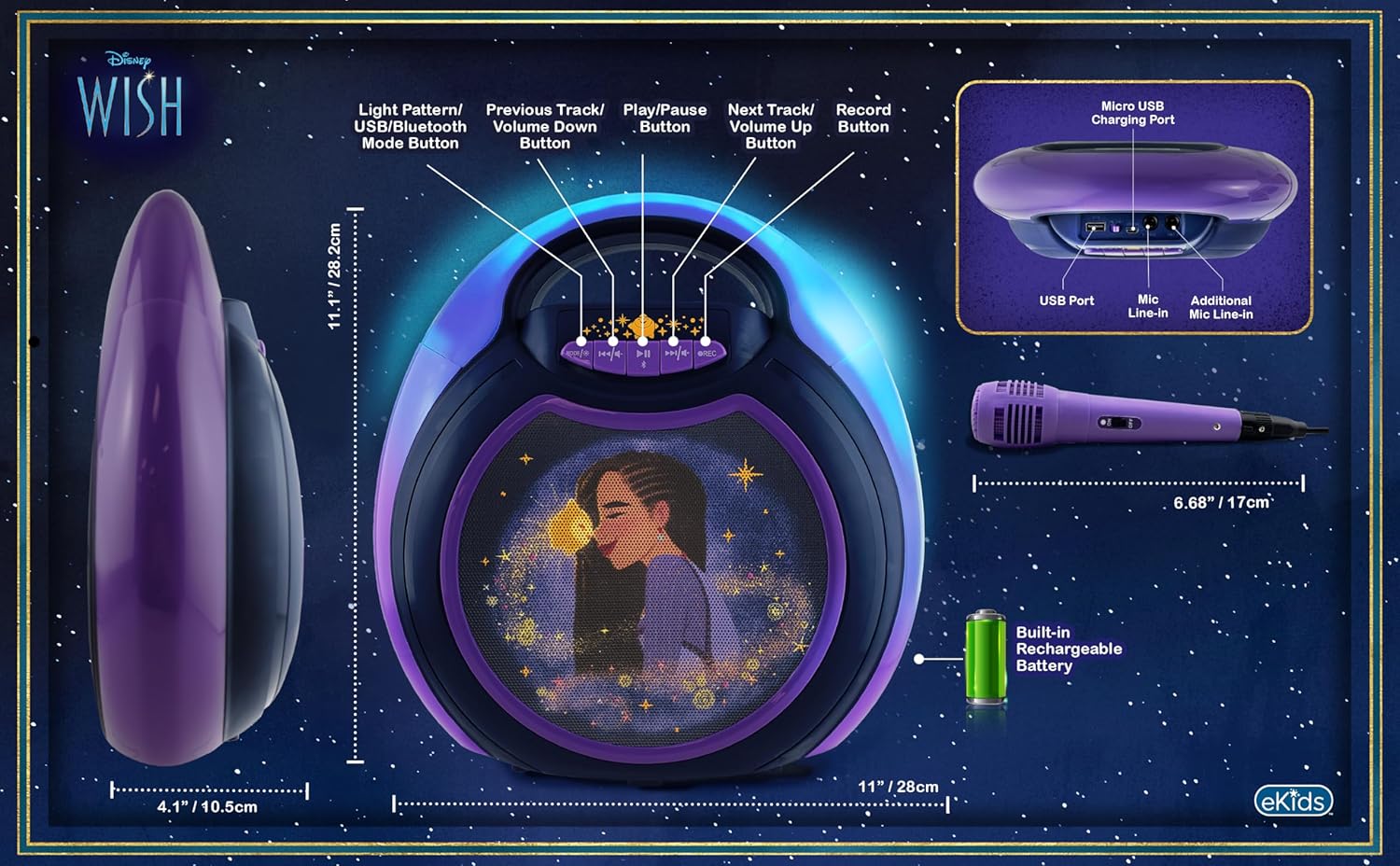
Image 4.1: Diagram of the eKids Disney Wish Karaoke Machine's controls, ports, and dimensions.
ڪنٽرول ۽ بندرگاهن:
- MODE / # Button: Switches between input modes (Bluetooth, USB) and adjusts light patterns.
- Previous Track / Volume Down Button: Navigates to the previous track or decreases volume.
- کيڏڻ / روڪيو بٽڻ: آڊيو هلائي ٿو يا روڪي ٿو.
- Next Track / Volume Up Button: Navigates to the next track or increases volume.
- آر اي سي بٽڻ: Initiates recording (requires USB flash drive).
- مائڪرو USB چارجنگ پورٽ: اندروني بيٽري چارج ڪرڻ لاءِ.
- USB پورٽ: For connecting a USB flash drive for recording or playback.
- Mic Line-in: Primary port for the included wired microphone.
- Additional Mic Line-in: For connecting a second microphone (not included) for duets.
5. سيٽ اپ
5.1 يونٽ کي چارج ڪرڻ
Before first use, fully charge the karaoke machine. Connect the provided USB charging cable to the Micro USB Charging Port on the unit and to a standard USB power adapter (not included) or a computer's USB port. The charging indicator will illuminate during charging and turn off when fully charged.
5.2 مائڪروفون کي ڳنڍڻ
Plug the wired microphone's connector into the 'Mic Line-in' port on the karaoke machine. For duet performances, an additional microphone (not included) can be connected to the 'Additional Mic Line-in' port.

تصوير 5.1: پاسي view of the karaoke machine with the wired microphone connected.
6. آپريٽنگ هدايتون
6.1 پاور آن/آف
کي دٻايو ۽ رکو MODE / # button to power the unit on or off.
6.2 بلوٽوٽ جوڙي
When the unit is powered on, it will automatically enter Bluetooth pairing mode. The indicator light will flash. On your compatible device (smartphone, tablet, etc.), enable Bluetooth and select "eKids Wish Karaoke" from the list of available devices. A confirmation tone will sound when pairing is successful.

Image 6.1: Bluetooth compatibility with various devices.
6.3 موسيقي کيڏڻ
Once paired via Bluetooth, start playing music from your connected device. Use the راند / روڪيو, پويون ٽريڪ / حجم ھيٺ، ۽ اڳيان ايندڙ ٽريڪ / حجم مٿي buttons on the karaoke machine to control playback.
6.4 مائڪروفون استعمال ڪرڻ
Ensure the microphone is connected to the 'Mic Line-in' port. Adjust the microphone's volume using the dedicated switch on the microphone itself. Sing into the microphone while music plays from the speaker.
6.5 رڪارڊنگ پرفارمنس
To record your singing, insert a USB flash drive (not included) into the USB Port. Press the آر اي سي button to start recording. Press it again to stop recording. Recordings will be saved to the USB flash drive. Refer to the Product Overview (Image 4.1) for the location of the USB port.
6.6 Light Show Modes
کي دٻايو MODE / # button repeatedly to cycle through different color-changing LED light show patterns.
6.7 حجم ڪنٽرول
Adjust the main speaker volume using the پويون ٽريڪ / حجم ھيٺ ۽ اڳيان ايندڙ ٽريڪ / حجم مٿي buttons. The microphone has its own volume control switch.
7. سار سنڀال
7.1 صفائي
يونٽ کي نرم، سڪل ڪپڙي سان صاف ڪريو. مائع صاف ڪندڙ يا رگڙيندڙ مواد استعمال نه ڪريو.
7.2 اسٽوريج
جڏهن استعمال ۾ نه هجي، ته يونٽ کي ٿڌي، سڪل جاءِ تي، سڌي سج جي روشني ۽ انتهائي گرمي پد کان پري رکو.
8. مسئلا حل ڪرڻ
- طاقت ناهي: Ensure the unit is charged. Connect the USB charging cable and allow it to charge for a period.
- آواز ناهي: Check that the volume on both the karaoke machine and the connected Bluetooth device is turned up. Ensure the microphone is properly connected and its switch is on.
- بلوٽوت نه ڳنڍي رهيو آهي: Make sure Bluetooth is enabled on your device and the karaoke machine is in pairing mode. Try unpairing and re-pairing the device. Ensure no other devices are currently connected to the karaoke machine.
- رڪارڊنگ ڪم نه ڪري رهي آهي: Verify that a compatible USB flash drive is inserted into the USB port and has sufficient free space.
9. وضاحتون
| ماڊل نمبر | WH-555 |
| طول و عرض | 11.07 x 4.14 x 11.11 انچ |
| وزن | 3.67 پائونڊ |
| طاقت جو ذريعو | بيٽري سان هلندڙ (ريچارج لائق) |
| جلدtage | 3 وولٽ |
| رابطي | بلوٽوٿ، يو ايس بي |
| اسپيڪر شمار | 1 |
| خاص خاصيتون | Light Up Speaker, Recording Function |
10. وارنٽي ۽ سپورٽ
وارنٽي جي معلومات ۽ ڪسٽمر سپورٽ لاءِ، مھرباني ڪري پنھنجي خريداري سان شامل دستاويزن جو حوالو ڏيو يا سرڪاري eKids جو دورو ڪريو. webسائيٽ. وارنٽي دعوائن لاءِ خريداري جو ثبوت رکو.


