Powerwave Wireless Controller Purple Rush
استعمال ڪندڙ دستي
1. تعارف
خريد ڪرڻ لاءِ مهربانيasing the Powerwave Wireless Controller. This controller is designed to enhance your gaming experience on PlayStation 4 consoles, offering advanced features such as motion sensing, dual motor vibration, and a built-in speaker. Please read this manual carefully to ensure proper use and maintenance of your device.
This controller is compatible with PS4, PS4 Slim, and PS4 Pro models. Please note that PlayStation Lightbar, PSVR, turbo functionality, and PS5 compatibility are not supported.
2. پيڪيج مواد
- 1 x Powerwave Wireless Controller (Purple Rush)
- 1 x USB چارجنگ ڪيبل
- 1 x استعمال ڪندڙ دستياب (هي دستاويز)

Image: The Powerwave Wireless Controller shown within its retail packaging, highlighting the product and its box.
3. Controller Features
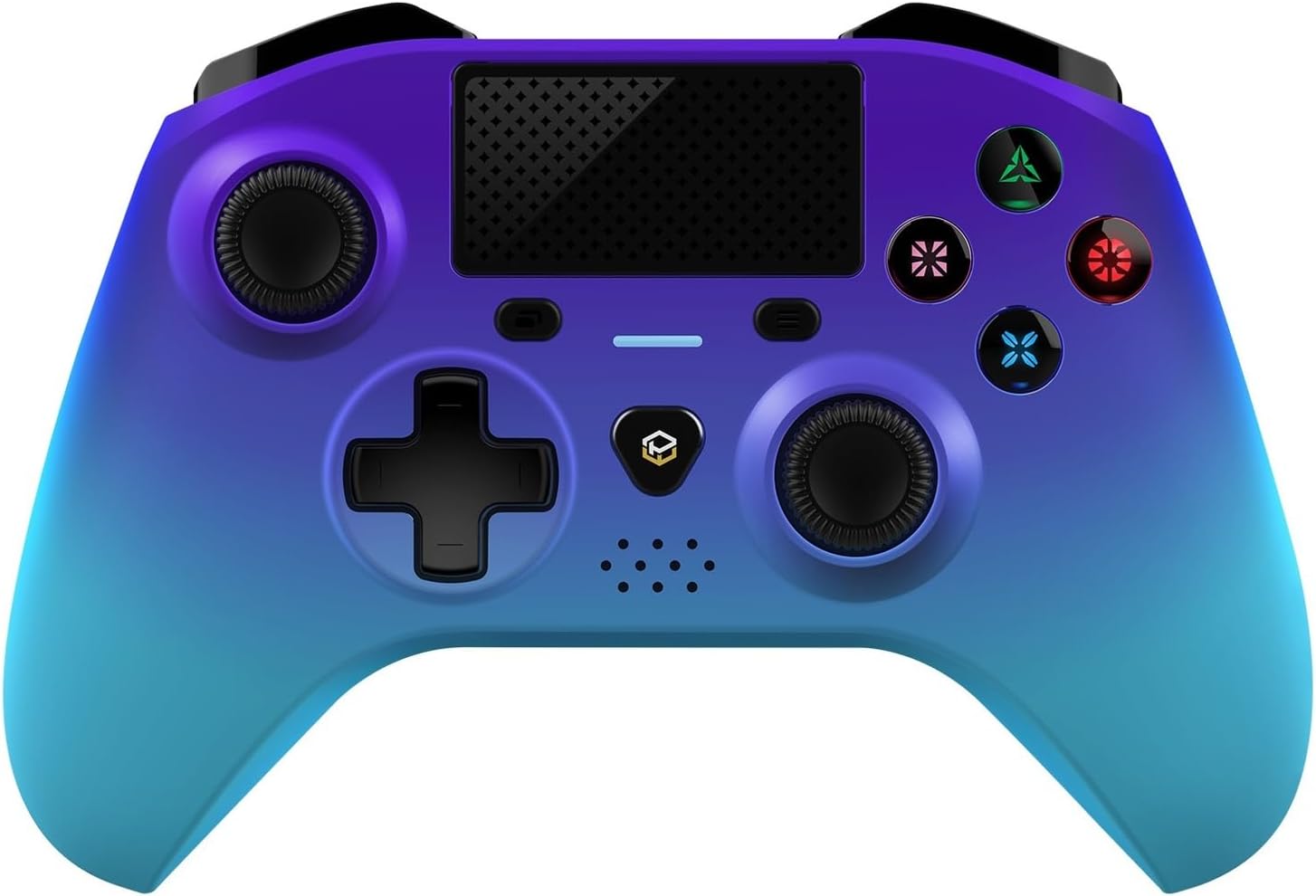
تصوير: هڪ تفصيلي سامهون view of the Powerwave Wireless Controller in Purple Rush color, showcasing its buttons, joysticks, touchpad, and LED display.
- وائرليس بلوٽوت ڪنيڪشن: For seamless gaming without cables.
- LED Display Buttons: Illuminated buttons for enhanced visibility.
- Rechargeable بيٽري: Built-in lithium polymer battery for extended playtime.
- موشن سينسنگ ٽيڪنالاجي: Integrated sensors for intuitive control in compatible games.
- ٻٽي موٽر وائبريشن: Provides immersive haptic feedback during gameplay.
- ٽچ پيڊ: Interactive surface for unique gameplay mechanics.
- بلٽ ان اسپيڪر: Enhances audio experience directly from the controller.
- 3.5mm Stereo Audio Jack: هيڊفون يا هيڊ سيٽ ڳنڍڻ لاءِ.
4. سيٽ اپ گائيڊ
4.1 ڪنٽرولر کي چارج ڪرڻ
- Connect the small end of the supplied USB charging cable to the micro-USB port on the front of the controller.
- Connect the larger end of the USB cable to an available USB port on your PlayStation 4 console or a compatible USB wall adapter (5V/1A recommended).
- The controller's LED indicator will show charging status. It will typically turn off or change color once fully charged.
4.2 Pairing with PlayStation 4
- پڪ ڪريو ته توهان جو PlayStation 4 ڪنسول آن آهي.
- Connect the controller to the PS4 console using the supplied USB charging cable.
- کي دٻايو پي ايس بٽڻ (the button with the PlayStation logo) in the center of the controller.
- The controller will automatically pair with the console. Once paired, you can disconnect the USB cable for wireless play.
- To pair additional controllers, repeat the steps above.
Note: If the controller does not pair, ensure it is fully charged and try connecting it to a different USB port on the console.
5. ڪنٽرولر کي هلائڻ
5.1 بنيادي ڪنٽرول
The Powerwave Wireless Controller features standard PlayStation layout buttons, including:
- هدايتي پيڊ (ڊي-پيڊ): هدايتي ان پٽ لاءِ.
- ايڪشن بٽڻ (ٽڪنڊو، دائرو، ڪراس، چورس): راند ۾ ڪمن لاءِ.
- کاٻي ۽ ساڄي اينالاگ اسٽڪس: صحيح حرڪت ۽ ڪئميرا ڪنٽرول لاءِ.
- L1/R1 and L2/R2 Buttons: ڪلهي ۽ ٽرگر بٽڻ.
- شيئر بٽڻ: For sharing gameplay moments.
- آپشن بٽڻ: For accessing in-game menus.
- پي ايس بٽڻ: For accessing the PS4 home screen and power options.
- ٽچ پيڊ: Functions as a clickable button and multi-touch surface.
5.2 ترقي يافته افعال
- موشن سينسنگ: Tilt and move the controller to interact with games that support motion controls.
- وائبريشن راءِ: Experience realistic vibrations during gameplay, such as impacts or explosions.
- آڊيو آئوٽ: Connect a 3.5mm headset to the audio jack for in-game sound and voice chat. Adjust volume through the PS4 system settings.
6. سار سنڀال ۽ سنڀال
- صفائي: ڪنٽرولر کي صاف ڪرڻ لاءِ نرم، سڪل ڪپڙو استعمال ڪريو. ضدي مٽيءَ لاءِ، ٿورو ڊيampڪپڙو پاڻي سان ڌوئي ڇڏيو. سخت ڪيميڪل يا رگڙيندڙ صاف ڪندڙ استعمال نه ڪريو.
- اسٽوريج: ڪنٽرولر کي سڌي سج جي روشني ۽ انتهائي گرمي پد کان پري ٿڌي، سڪل جاءِ تي ذخيرو ڪريو.
- بيٽري جي سنڀال: بيٽري جي زندگي کي وڌائڻ لاءِ، ڪنٽرولر کي بار بار مڪمل طور تي ڊسچارج ڪرڻ کان پاسو ڪريو. ان کي باقاعدي چارج ڪريو، جيتوڻيڪ ڊگهي عرصي تائين استعمال ۾ نه هجي.
- قطرن کان پاسو ڪريو: ڪنٽرولر کي جسماني جھٽڪن ۽ ڦڙن کان بچايو، جيڪي اندروني حصن کي نقصان پهچائي سگهن ٿا.
7. مسئلا حل ڪرڻ
| مسئلو | ممڪن حل |
|---|---|
| ڪنٽرولر آن نٿو ٿئي. | Ensure the controller is fully charged. Connect it to the PS4 via USB cable and try pressing the PS button. |
| Controller does not pair with PS4. |
|
| Input lag or disconnection during wireless play. |
|
| Vibration or motion sensing not working. | Check in-game settings and PS4 system settings to ensure these features are enabled. Some games may not support these features. |
8. وضاحتون
| خاصيت | تفصيل |
|---|---|
| رابطي | وائرليس بلوٽوت |
| مطابقت | PlayStation 4, PS4 Slim, PS4 Pro |
| بيٽري جو قسم | 1 ليتيم پوليمر بيٽري (شامل) |
| طول و عرض (تقريبن) | 17.5 x 15.6 x 6.9 سينٽي |
| وزن (تقريبن) | 987 گرام |
| آڊيو پورٽ | 3.5mm اسٽيريو آڊيو جيڪ |
| ماڊل سڃاڻپ ڪندڙ (ASIN) | B0CKPF5X2N |
9. وارنٽي ۽ سپورٽ
For warranty information and customer support, please refer to the documentation provided with your purchase or visit the official Powerwave webسائيٽ. وارنٽي دعوائن لاءِ خريداري جو ثبوت رکو.
وڌيڪ مدد لاءِ، توهان پرچون ڪندڙ سان پڻ رابطو ڪري سگهو ٿا جتان پراڊڪٽ خريد ڪئي وئي هئي.
هن پراڊڪٽ لاءِ ڪو به سرڪاري وڪرو ڪندڙ وڊيو نه مليو.


