1. تعارف
Thank you for choosing the Defender Enjoy S200 Portable Bluetooth Speaker. This manual provides essential information for setting up, operating, and maintaining your speaker to ensure optimal performance and longevity. Please read this manual thoroughly before use.
The Defender Enjoy S200 is a versatile portable speaker featuring Bluetooth 5.3 connectivity, True Wireless Stereo (TWS) pairing, an integrated FM radio, and MP3 playback capabilities via USB flash drive or microSD card. It also includes an LED light and supports hands-free calling. Designed for portability, it offers up to 9 hours of playback on a single charge and convenient USB Type-C charging.
2. پراڊڪٽ ختمview
2.1 اهم خاصيتون
- بلوٽوٽ 5.3: For stable and efficient wireless audio streaming.
- سچو وائرليس اسٽيريو (TWS): Connect two Enjoy S200 speakers for a stereo sound experience.
- ڪيترائي پلے بیک موڊ: Bluetooth, FM Radio, USB Flash Drive, MicroSD Card (up to 32GB).
- مربوط LED لائيٽ: Provides visual ambiance.
- هينڊ فري ڪالنگ: فون ڪالز لاءِ بلٽ ان مائڪروفون.
- ڊگھي بيٽري زندگي: Up to 9 hours of continuous music playback.
- USB قسم-سي چارج: جديد ۽ آسان چارجنگ پورٽ.
- پورٽبل ڊيزائن: Compact and lightweight with a carrying strap.
2.2 پيڪيج مواد
- Defender Enjoy S200 Portable Bluetooth Speaker
- قسم-سي چارجنگ ڪيبل
- تڪڙو شروع ھدايت
- کڻندڙ پٽي

Image: The Defender Enjoy S200 Portable Bluetooth Speaker, showcasing its compact design and front grille with an illuminated LED ring.

Image: An infographic highlighting key features such as multi-colored LED lighting, True Wireless Stereo (TWS) pairing, Bluetooth 5.3, MP3 player, FM receiver, and hands-free calling.
3. سيٽ اپ
3.1 اسپيڪر کي چارج ڪرڻ
- Locate the Type-C charging port on the back of the speaker.
- Connect the provided Type-C charging cable to the speaker and the other end to a USB power adapter (not included) or a computer's USB port.
- The LED indicator will show charging status. A full charge typically takes approximately 3-4 hours.
- مڪمل چارج ٿيڻ کان پوءِ ڪيبل کي ڌار ڪريو.
3.2 پاور آن/آف
- To power on, slide the ON/OFF switch located on the back of the speaker to the 'ON' position.
- To power off, slide the ON/OFF switch to the 'OFF' position.
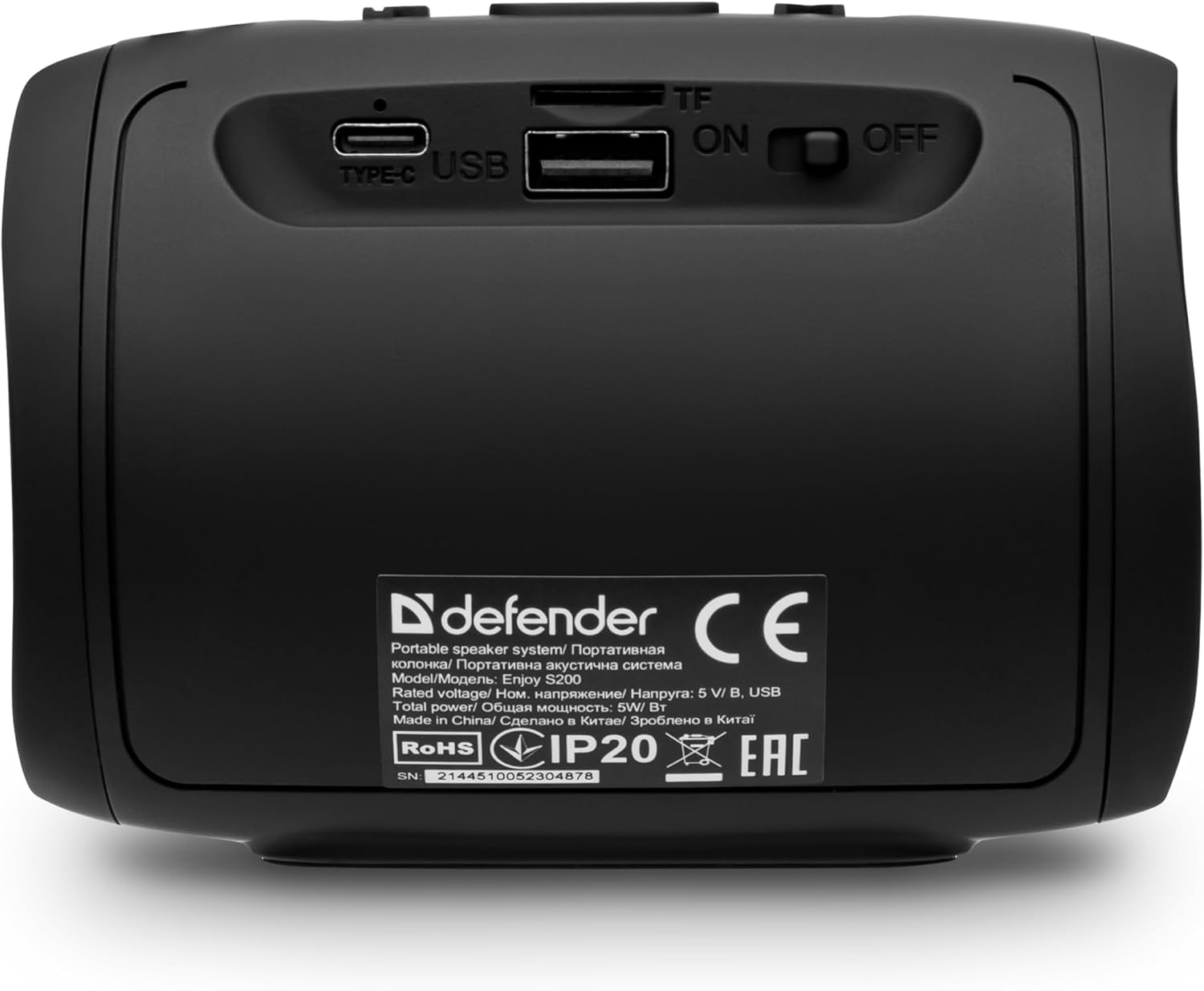
تصوير: پوئين پاسي view of the Defender Enjoy S200 speaker, showing the Type-C charging port, USB port, TF (microSD) card slot, and the ON/OFF power switch.
3.3 بلوٽوٽ جوڙي
- پڪ ڪريو ته اسپيڪر آن آهي ۽ بلوٽوٿ پيئرنگ موڊ ۾ آهي (هڪ چمڪندڙ LED ذريعي اشارو ڪيو ويو آهي).
- پنهنجي ڊوائيس (اسمارٽ فون، ٽيبليٽ، وغيره) تي، بلوٽوٿ کي فعال ڪريو ۽ موجود ڊوائيسز جي ڳولا ڪريو.
- Select "Defender Enjoy S200" from the list of devices.
- Once paired, the speaker will emit a confirmation sound, and the LED will stop flashing.
3.4 ٽرو وائرليس اسٽيريو (TWS) پيئرنگ
To pair two Defender Enjoy S200 speakers for stereo sound:
- پڪ ڪريو ته ٻئي اسپيڪر آن آهن ۽ ڪنهن به بلوٽوٿ ڊوائيس سان ڳنڍيل نه آهن.
- On one speaker (this will be the primary speaker), press and hold the TWS button (often indicated by a double-arrow icon) until you hear a pairing tone.
- The two speakers will automatically search and connect to each other. A confirmation tone will sound once connected.
- هاڻي، پنهنجي ڊوائيس کي بلوٽوٿ ذريعي پرائمري اسپيڪر سان ڳنڍيو جيئن سيڪشن 3.3 ۾ بيان ڪيو ويو آهي. آڊيو ٻنهي اسپيڪرن ذريعي اسٽيريو ۾ هلندو.

Image: A visual representation of two Defender Enjoy S200 speakers pairing wirelessly to create a True Wireless Stereo system, alongside icons for Bluetooth 5.3, MP3 player, FM receiver, and hands-free calling.
4. آپريٽنگ هدايتون
4.1 Button Functions (Refer to top panel controls)
- پاور بٽڻ: Long press to power on/off. Short press to play/pause in music mode, or answer/end calls.
- حجم وڌايو (+): Short press to increase volume. Long press for next track/station.
- حجم گھٽ (-): Short press to decrease volume. Long press for previous track/station.
- موڊ (ايم) بٽڻ: Short press to switch between Bluetooth, FM Radio, USB, and MicroSD modes.
- ايل اي ڊي لائيٽ بٽڻ: Short press to cycle through LED light modes or turn off the LED.
4.2 بلوٽوٿ پلے بیک
After successful Bluetooth pairing (Section 3.3), open your music application on your device and begin playback. Use the speaker's volume buttons or your device's volume controls to adjust the audio level.
4.3 FM ريڊيو موڊ
- Press the 'M' (Mode) button until you hear the FM radio prompt.
- Long press the Play/Pause button to automatically scan and save available FM stations.
- محفوظ ڪيل اسٽيشنن جي وچ ۾ نيويگيٽ ڪرڻ لاءِ واليوم اپ (+) ۽ واليوم ڊائون (-) بٽڻ (ڊگهو پريس) استعمال ڪريو.
4.4 USB/مائڪرو ايس ڊي پلے بیک
- Insert a USB flash drive or a microSD card (up to 32GB) containing MP3 audio fileاسپيڪر جي پوئين پاسي واري پورٽ ۾ داخل ٿئي ٿو.
- Press the 'M' (Mode) button until the speaker automatically switches to USB or MicroSD mode and begins playback.
- Use the speaker's control buttons for play/pause, next track, and previous track.
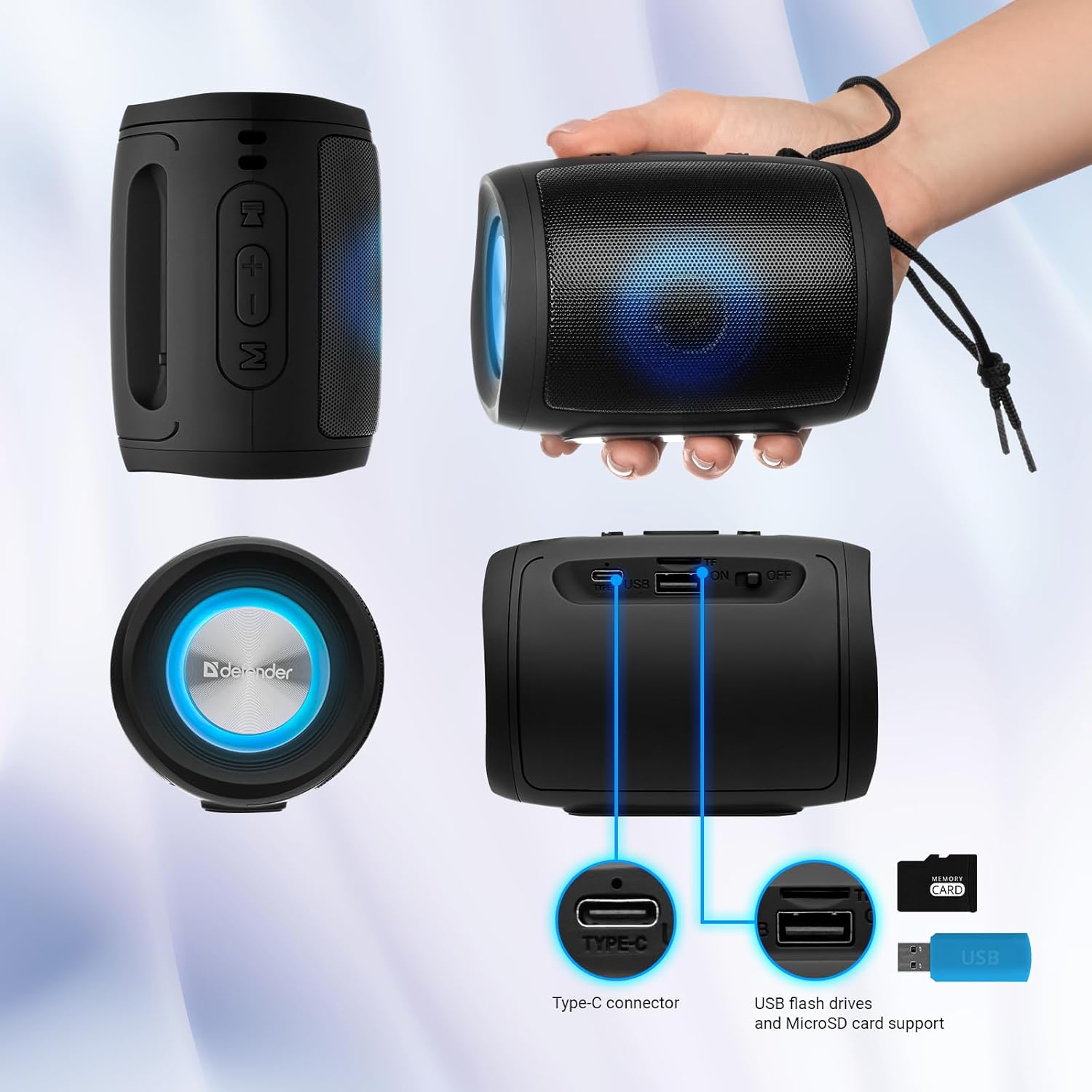
Image: A detailed diagram illustrating the Type-C connector, USB flash drive port, and MicroSD card slot on the Defender Enjoy S200 speaker.
4.5 هٿ کان سواءِ ڪالنگ
When connected to your smartphone via Bluetooth, the speaker's built-in microphone allows for hands-free calls.
- جواب ڏيو ڪال: Play/Pause بٽڻ کي مختصر دٻايو.
- ڪال ختم ڪريو: Play/Pause بٽڻ کي مختصر دٻايو.
- ڪال رد ڪريو: پلي/پاز بٽڻ کي ڊگھو دٻايو.
5. سار سنڀال
- صفائي: اسپيڪر جي مٿاڇري کي صاف ڪرڻ لاءِ نرم، سڪل ڪپڙو استعمال ڪريو. رگڙيندڙ صاف ڪندڙ يا محلول استعمال نه ڪريو.
- اسٽوريج: اسپيڪر کي سڌي سج جي روشني ۽ انتهائي گرمي پد کان پري ٿڌي، سڪل جاءِ تي رکو.
- پاڻي جي مزاحمت: The speaker has an IP20 rating, meaning it is protected against solid objects larger than 12.5mm but has no protection against water. Avoid exposure to rain, splashes, or immersion in water.
- بيٽري جي سنڀال: بيٽري جي زندگي کي وڌائڻ لاءِ، پهرين استعمال کان اڳ اسپيڪر کي مڪمل طور تي چارج ڪريو ۽ جيڪڏهن باقاعده استعمال نه ڪيو وڃي ته گهٽ ۾ گهٽ هر ٽن مهينن ۾ هڪ ڀيرو ان کي ري چارج ڪريو.
6. مسئلا حل ڪرڻ
- طاقت ناهي: Ensure the speaker is charged. Connect the Type-C cable and allow it to charge for a few minutes before attempting to power on again.
- آواز ناهي: Check the volume levels on both the speaker and your connected device. Ensure the speaker is in the correct mode (Bluetooth, FM, USB, MicroSD).
- بلوٽوٿ جوڙڻ جا مسئلا: Ensure the speaker is in pairing mode. Turn off Bluetooth on your device and turn it back on. Try unpairing and re-pairing the speaker. Move closer to the speaker to ensure you are within the 10-meter range.
- ايف ايم ريڊيو جو استقبال خراب: Ensure you are in an area with good signal. The charging cable can sometimes act as an antenna; try connecting it for improved reception.
- USB/MicroSD Not Playing: آڊيو کي يقيني بڻايو files are in a compatible format (e.g., MP3). Check that the USB drive or microSD card is inserted correctly and is not corrupted.
7. وضاحتون
| ماڊل نالو | مزو وٺو S200 |
| شيون ماڊل نمبر | 65200 |
| برانڊ | محافظ |
| رابطي ٽيڪنالاجي | بلوٽوٿ 5.3، يو ايس بي |
| وائرليس ڪميونيڪيشن ٽيڪنالاجي | Bluetooth, Radio Frequency |
| اسپيڪر جو قسم | ملٽي ميڊيا |
| اسپيڪر سائيز | 2 انچ |
| پاور آئوٽ | 5 واٽ |
| آڊيو آئوٽ پٽ موڊ | اسٽيريو |
| طاقت جو ذريعو | بيٽري سان هلندڙ (1 ليٿيم آئن بيٽري شامل آهي) |
| خاص خاصيتون | Integrated Microphone, USB Port, Portable Bluetooth, LED Light, FM Radio, MicroSD Card Support, TWS |
| پيداوار جي ماپ (L x W x H) | 8 x 11 x 8 سينٽي |
| وزن | 330 گرام |
| وڌ ۾ وڌ رينج | 10 ميٽر |
| IP جي درجه بندي | IP20 |
8. وارنٽي ۽ سپورٽ
8.1 وارنٽي ڄاڻ
مخصوص وارنٽي تفصيل عام طور تي توهان جي خريداري دستاويزن سان يا ٺاهيندڙ جي سرڪاري دستاويز تي مهيا ڪيا ويندا آهن website. Please refer to these resources for information regarding warranty coverage and duration.
8.2 ڪسٽمر سپورٽ
For technical assistance, troubleshooting beyond this manual, or inquiries about your Defender Enjoy S200 speaker, please contact Defender Global customer support. Contact information can usually be found on the product packaging, the manufacturer's webسائيٽ، يا توهان جي خريداري جي رسيد.


