1. تعارف
This manual provides detailed instructions for the safe and effective operation of your Owon OWM5500 Digital Smart Anemometer. This device is a versatile handheld instrument designed for precise measurement of various environmental parameters, including wind speed, air volume, temperature, and humidity. Please read this manual thoroughly before using the device to ensure optimal performance and longevity.

Figure 1: Owon OWM5500 Digital Smart Anemometer (Front View)
This image displays the front of the Owon OWM5500 anemometer, highlighting its digital screen which shows wind speed, maximum, average, and minimum readings, along with battery status. Below the screen are navigation and function buttons, and the wind impeller is visible at the top.
2. حفاظت جي ڄاڻ
To ensure safe operation and to prevent damage to the device, please observe the following safety precautions:
- ڊوائيس کولڻ جي ڪوشش نه ڪريو casing or replace the battery without first powering off the unit.
- ڊوائيس کي پاڻي ۽ گهڻي نمي کان پري رکو.
- ڊگھي عرصي تائين ڊيوائس کي انتهائي گرمي پد يا سڌي سج جي روشنيءَ کي بي نقاب ڪرڻ کان پاسو ڪريو.
- Handle the wind impeller carefully to prevent damage.
- صرف مخصوص چارجنگ ڪيبل ۽ پاور سورس استعمال ڪريو.
- Store the device in a clean, dry environment when not in use.

Figure 2: Owon OWM5500 Digital Smart Anemometer (Back View)
This image shows the back of the Owon OWM5500 anemometer. A warning label is visible, advising to power off the device before replacing the battery or opening the case. The battery compartment and regulatory marks (UKCA, CE) are also displayed.
3. پيڪيج مواد
پيڪنگ کولڻ تي، مھرباني ڪري تصديق ڪريو ته ھيٺ ڏنل سڀ شيون موجود آھن ۽ سٺي حالت ۾ آھن:
- Owon OWM5500 Anemometer
- استعمال ڪندڙ دستي
- USB قسم-سي چارجنگ ڪيبل
- لانڍي
- پيڪنگ باڪس
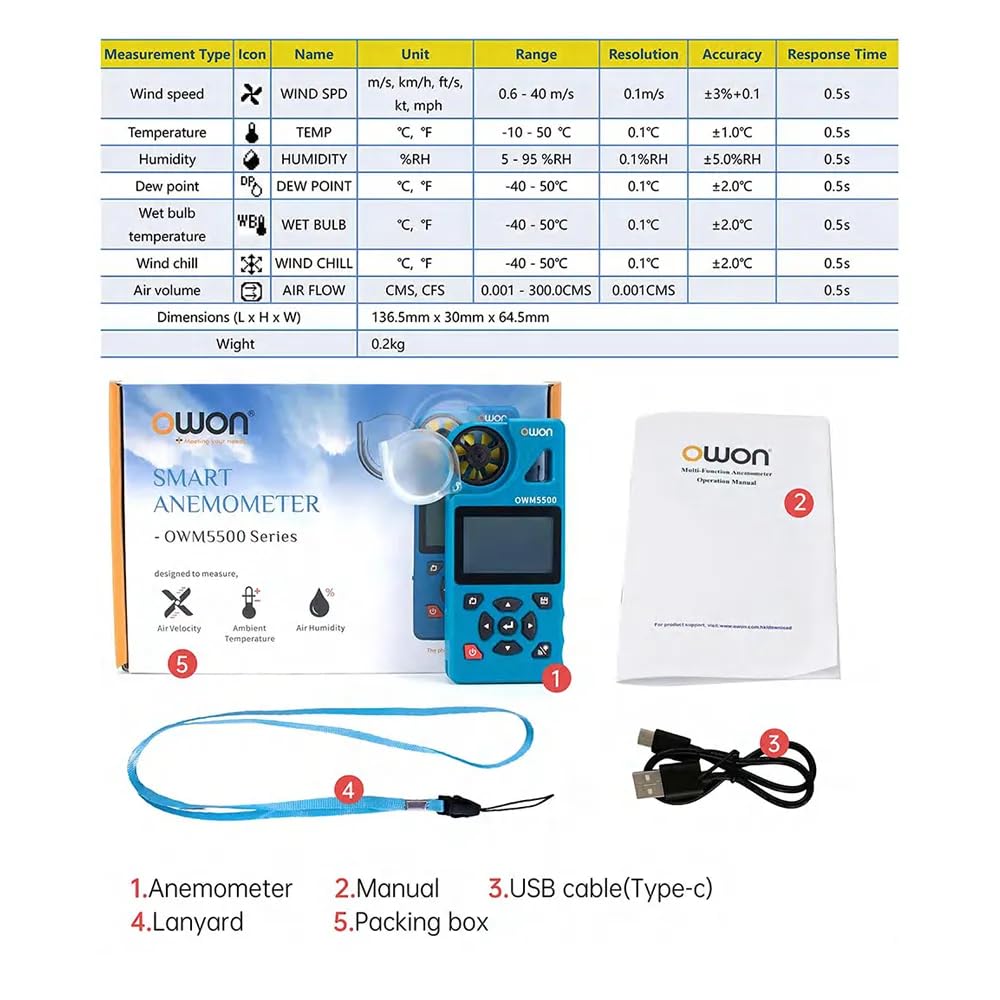
شڪل 3: پيڪيج مواد
This image illustrates the items included in the Owon OWM5500 package. It shows the anemometer itself, a printed user manual, a USB Type-C charging cable, and a lanyard, all laid out next to the product's packaging.
4. پراڊڪٽ ختمview ۽ خاصيتون
The Owon OWM5500 is designed for comprehensive environmental monitoring with a range of advanced features:
- Multi-Measurement Capability: Measures 7 types of parameters: wind speed, air volume, temperature, humidity, dew point, wet bulb temperature, and wind chill. Supports Beaufort scale wind rating.
- ڊيٽا بصري: Features a charts display mode for analyzing trends and performing statistical analysis on collected data.
- وسيع ڊيٽا اسٽوريج: Built-in memory for 8000 sets of data, supporting both automatic and manual storage, with a one-click data clearing function.
- طاقت جو انتظام: Multi-gear setting for automatic power-off to conserve energy.
- Rechargeable بيٽري: Integrated lithium battery, rechargeable via USB Type-C interface for extended use.
- سمارٽ ڪنيڪشن: Supports remote control via a dedicated mobile application (APP).
- PC Software Support: Data graph mode allows for exporting data for further analysis using PC software.
- High Precision Design: Features a 7-blade airfoil fan for accurate data collection and a replaceable airfoil wheel for long-term accuracy.
- استعمال ڪندڙ-دوستانه ڊسپلي: Allows for simultaneous display of up to three measurement values on one screen for quick data interpretation.

شڪل 4: اهم خاصيتون ختمview
This infographic visually summarizes the key advantages of the Owon OWM5500 anemometer. Icons represent features such as 7 measurement types, multi-unit conversions, air volume calculation, high precision, a 7-blade wind wheel, lithium battery power, multi-gear auto power off, a backlit large screen, large data storage, and unlimited communication capabilities.
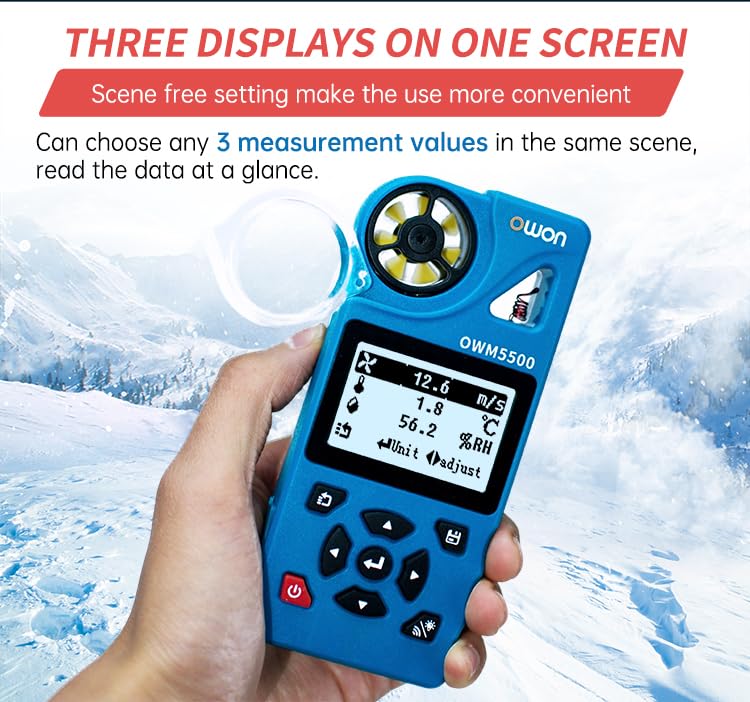
Figure 5: Three Displays on One Screen
This image shows the Owon OWM5500 anemometer held in a hand, with its screen displaying three different measurement values concurrently: wind speed (12.6 m/s), temperature (1.8 °C), and relative humidity (56.2 %RH). This illustrates the device's ability to present multiple data points at a glance.

Figure 6: 7-Blade Airfoil Fan Design
هي تصوير هڪ تفصيلي وضاحت فراهم ڪري ٿي view of the Owon OWM5500's 7-blade airfoil fan, designed for accurate data collection. It also shows a separate, replaceable fan wheel, emphasizing the device's maintainability and long-term measurement accuracy.
5. سيٽ اپ
5.1 بيٽري کي چارج ڪرڻ
The OWM5500 comes with a built-in rechargeable lithium battery. Before first use, or when the battery indicator shows low power, charge the device using the provided USB Type-C cable.
- USB ٽائپ-سي ڪيبل کي ڊوائيس تي چارجنگ پورٽ سان ڳنڍيو.
- USB ڪيبل جي ٻئي ڇيڙي کي معياري USB پاور اڊاپٽر (شامل نه آهي) يا ڪمپيوٽر جي USB پورٽ سان ڳنڍيو.
- The charging indicator on the device will show the charging status. Once fully charged, disconnect the cable.
5.2 لين يارڊ ڳنڍڻ
For secure handling and to prevent accidental drops, attach the provided lanyard to the designated loop on the anemometer.
6. آپريٽنگ هدايتون
6.1 پاور آن/آف
- پاور آن: پاور بٽڻ کي دٻايو ۽ رکو (⑂) for a few seconds until the screen illuminates.
- بجلي بند: پاور بٽڻ کي دٻايو ۽ رکو (⑂) again until the screen turns off. The device also features an automatic power-off function, which can be configured in the settings.
6.2 ماپ جا طريقا
The OWM5500 supports various measurement types. Use the navigation buttons to cycle through and select the desired measurement mode.

Figure 7: Full Functional Measurement Displays
This image presents a collage of screenshots from the Owon OWM5500's display, showcasing its full range of measurement capabilities. It includes readings for Wind Speed (with Beaufort scale), Wind Volume (Air Flow), Temperature, Humidity, Wet Bulb Temperature, Dew Point, Wind Chill Temperature, and the Date/Time setting interface. Each display shows the unit of measurement and current value.
- هوا جي رفتار: Measures current wind velocity. Units include m/s, km/h, ft/s, kt, mph.
- Air Volume (Air Flow): Measures the volume of air passing through. Units include CMS, CFS. Requires input of area.
- گرمي پد: Measures ambient temperature. Units include °C, °F.
- نمي: Measures relative humidity. Unit: %RH.
- وس وارو نقطو: Calculates the dew point temperature. Units include °C, °F.
- ويٽ بلب جو گرمي پد: Calculates the wet bulb temperature. Units include °C, °F.
- Wind Chill Temperature: Calculates the wind chill factor. Units include °C, °F.
To change units within a measurement mode, refer to the on-screen prompts or the detailed instructions in the full user manual.
6.3 ڊيٽا لاگنگ ۽ اسٽوريج
The OWM5500 can store up to 8000 sets of measurement data.
- Automatic Storage: Configure the logging rate (e.g., every 2 seconds to 12 hours) in the settings menu to enable automatic data recording.
- دستي اسٽوريج: Press the designated button (refer to device interface) to manually save the current measurement data.
- ڊيٽا ريview: Access stored data through the device's menu.
- ڊيٽا برآمد: Connect the device to a PC via the USB Type-C cable and use the dedicated PC software to export data for further analysis and charting.
- ڊيٽا صاف ڪرڻ: The device supports one-click data zero clearing. Exercise caution when using this function as it will permanently delete all stored data.

Figure 8: Built-in Mass Data Storage
This image illustrates the data storage capabilities of the Owon OWM5500. The device's screen shows settings for data logging, including 'Log Num' (log number), 'Log Rate' (logging interval), and 'Auto Log On/Off'. Below, a graphical representation of historical data trends is displayed, demonstrating the device's ability to store and visualize extensive measurement data.
6.4 اي پي پي ريموٽ ڪنٽرول
The OWM5500 supports remote control via a mobile application. Download the official Owon APP from your smartphone's app store. Follow the in-app instructions to pair your device and access remote monitoring and control features.
7. سار سنڀال
7.1 صفائي
Wipe the device with a soft, dry cloth. Do not use abrasive cleaners or solvents. Ensure the wind impeller is free from dust and debris for accurate readings.
7.2 بيٽري جي سنڀال
بيٽري جي زندگي کي وڌائڻ لاءِ، بيٽري کي بار بار مڪمل طور تي چارج ڪرڻ کان پاسو ڪريو. ڊوائيس کي باقاعدي طور تي چارج ڪريو، خاص طور تي جيڪڏهن اهو ڊگهي عرصي تائين ذخيرو ڪيو ويندو.
7.3 Impeller Replacement
If the wind impeller becomes damaged or its accuracy degrades over time, it can be replaced. Refer to Figure 6 for an illustration of the replaceable impeller. Contact Owon customer support for replacement parts and detailed instructions.
7.4 اسٽوريج
Store the anemometer in a cool, dry place, away from direct sunlight and extreme temperatures. Use the original packing box or a protective case for storage.
8. مسئلا حل ڪرڻ
If you encounter issues with your OWM5500, refer to the following common problems and solutions:
| مسئلو | ممڪن سبب | حل |
|---|---|---|
| ڊوائيس تي طاقت نه آهي. | گھٽ بيٽري؛ ڊوائيس جي خرابي. | Charge the battery fully. If the issue persists, contact customer support. |
| غلط پڙھڻ. | Blocked impeller; sensor dirty; incorrect unit setting. | Ensure impeller is clear and spinning freely. Clean sensors. Verify unit settings. |
| APP سان ڳنڍجي نٿو سگهي. | Bluetooth/wireless off; APP not updated; device not in pairing mode. | Ensure device and phone Bluetooth are on. Update APP. Refer to APP instructions for pairing. |
| Data not saving. | Storage full; auto-log off; manual save not performed. | Clear old data. Check auto-log settings. Ensure manual save button is pressed correctly. |
9. وضاحتون
| پيرا ميٽر | قدر |
|---|---|
| ماڊل نمبر | OWM5500 |
| برانڊ | Owon |
| بيٽريون | 1 ليتيم آئن بيٽري (شامل) |
| پيداوار جي ماپ (L x W x H) | 22 x 15 x 12 سينٽي (8.66 x 5.91 x 4.72 انچ) |
| شيءِ جو وزن | 0.5 ڪلوگرام (1.1 پائونڊ) |
| اصل جو ملڪ | چين |
| ڊيٽا اسٽوريج | 8000 سيٽ |
| رابطي | USB Type-C, APP Remote Control |
| EU اسپيئر پارٽ جي دستيابي جي مدت | 1 سال |
نوٽ: وضاحتون بغير ڪنهن اڳواٽ اطلاع جي تبديلي جي تابع آهن.
10. وارنٽي ۽ سپورٽ
Owon products are manufactured to high-quality standards. For warranty information and technical support, please refer to the warranty card included with your product or visit the official Owon webسائيٽ. وارنٽي دعوائن لاءِ خريداري جي ثبوت طور پنهنجي خريداري جي رسيد رکو.
For assistance, please contact Owon customer service through their official channels.


