1. تعارف
Thank you for choosing the Verbatim 500GB USB 3.2 Gen 1 Portable External Hard Drive. This device provides a high-speed, high-capacity storage solution, ideal for expanding your computer's storage or backing up important files. Its compact 2.5-inch form factor makes it highly portable, allowing you to carry your data wherever you go. This manual will guide you through the setup, operation, and maintenance of your new hard drive.
2. حفاظت جي ڄاڻ
- ڊوائيس کي نمي، انتهائي گرمي پد، يا سڌي سج جي روشني ۾ نه لڳايو.
- ڊوائيس کي مضبوط اثرن لاءِ ڇڏڻ يا تابع ڪرڻ کان پاسو ڪريو.
- پاڻ ڊوائيس کي ڌار ڪرڻ يا مرمت ڪرڻ جي ڪوشش نه ڪريو. قابل سروس اهلڪارن سان رجوع ڪريو.
- آپريشن دوران ڊوائيس جي چوڌاري مناسب وينٽيليشن کي يقيني بڻايو وڃي.
- Always safely eject the hard drive from your computer before disconnecting the USB cable to prevent data loss or corruption.
3. پيڪيج مواد
تصديق ڪريو ته توھان جي پيڪيج ۾ ھيٺيون شيون شامل آھن:
- Verbatim 500GB Portable External Hard Drive
- USB ڪيبل

تصوير 3.1: سامهون view of the Verbatim Portable Hard Drive packaging. The packaging displays the product name, capacity (500GB), USB 3.2 Gen 1 interface, and an image of the black hard drive with a green accent band. It also highlights 'Eco Friendly Packaging' and 'Nero Backup Software'.
4. پراڊڪٽ ختمview
The Verbatim Portable Hard Drive is a sleek, compact device designed for easy data storage and transfer. It features a durable casing and a standard USB port for connectivity.

تصوير 4.1: مٿي view of the Verbatim Portable Hard Drive. The drive is black with a textured surface and features a distinctive green band across its width.
5. سسٽم گهرجون
To use your Verbatim Portable Hard Drive, your computer must meet the following minimum requirements:
- آپريٽنگ سسٽم: Windows (Windows 10, 8, 7) or Mac OS (Mac OS X 10.6 or higher)
- USB پورٽ: USB 3.2 Gen 1 (also compatible with USB 2.0 ports, but at reduced speeds)
6. سيٽ اپ ۽ تنصيب
The Verbatim Portable Hard Drive is designed for plug-and-play operation, requiring no additional drivers for most modern operating systems.
- Locate an available USB port on your computer. For optimal performance, use a USB 3.2 Gen 1 (or USB 3.0) port.
- Connect the small end of the provided USB cable to the USB port on the Verbatim Portable Hard Drive.
- Connect the larger end of the USB cable to the USB port on your computer.
- Your operating system should automatically detect and install the necessary drivers. The drive will appear as a new storage device in 'My Computer' (Windows) or 'Finder' (Mac OS).
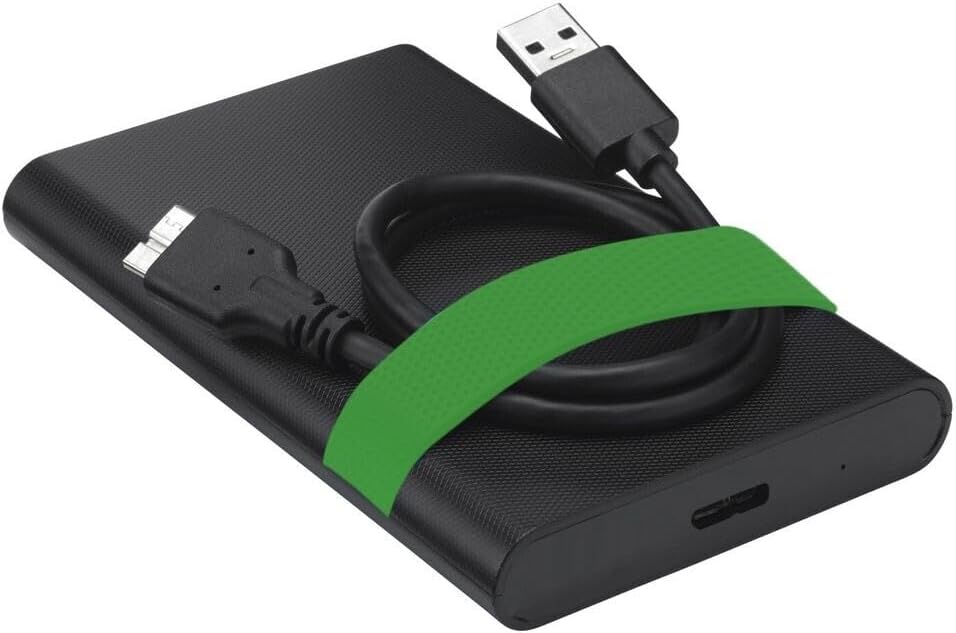
Image 6.1: The Verbatim Portable Hard Drive with its USB cable connected, illustrating the connection point on the drive.
7. آپريٽنگ هدايتون
7.1 ڊيٽا جي منتقلي
هڪ دفعو ڳنڍيل، توهان منتقل ڪري سگهو ٿا files to and from the hard drive just like any other storage device:
- ڇڪيو ۽ ڇڏي ڏيو: ڪلڪ ڪريو ۽ ڇڪيو files or folders from your computer to the hard drive's icon, or vice versa.
- ڪاپي ۽ پيسٽ ڪريو: تي صحيح ڪلڪ ڪريو files/folders, select 'Copy', then navigate to the desired location on the hard drive, right-click, and select 'Paste'.
7.2 Ejecting the Drive Safely
To prevent data corruption, always safely eject the hard drive before disconnecting it.
- ونڊوز: Click the 'Safely Remove Hardware and Eject Media' icon in the system tray, then select your Verbatim drive. Wait for the 'Safe to Remove Hardware' message.
- ميڪ او ايس: Drag the hard drive icon from your desktop to the Trash, or right-click the icon and select 'Eject'.
8. سار سنڀال ۽ سنڀال
- Keep the hard drive clean by wiping it with a soft, dry cloth. Avoid liquid cleaners.
- Store the drive in a cool, dry place away from magnetic fields.
- Regularly back up important data from the portable drive to another storage medium.
- Periodically check the drive's health using your operating system's disk utility tools.
9. مسئلا حل ڪرڻ
| مسئلو | ممڪن حل |
|---|---|
| ڪمپيوٽر طرفان ڊرائيو نه ملي. |
|
| سست ڊيٽا منتقلي جي رفتار. |
|
| Error message during file منتقلي |
|
10. وضاحتون
| خاصيت | تفصيل |
|---|---|
| برانڊ | لفظي |
| ماڊل نمبر | 53111 |
| ڊجيٽل اسٽوريج جي صلاحيت | 500 جي بي |
| هارڊ ڊسڪ فارم فيڪٽر | 2.5 انچ |
| هارڊ ڊسڪ جو قسم | Mechanical Hard Disk Drive (HDD) |
| انٽرفيس | USB 3.2 Gen 1 (compatible with USB 2.0) |
| گردش جي رفتار | 5400 RPM |
| Max Data Transfer Speed | 5000 Mbit/s (5 Gbit/s) |
| رابطي ٽيڪنالاجي | USB |
| مطابقت رکندڙ ڊوائيسز | Computers with Windows OS, Computers with Mac OS |
| شيءِ جو وزن | 220 جي |
11. وارنٽي ۽ سپورٽ
Verbatim products are designed and manufactured to the highest quality standards. For information regarding warranty coverage, technical support, or service, please refer to the official Verbatim webسائيٽ تي وڃو يا سڌو سنئون انهن جي ڪسٽمر سپورٽ سان رابطو ڪريو. وارنٽي دعوائن لاءِ خريداري جي ثبوت طور پنهنجي خريداري جي رسيد رکو.
آن لائن سپورٽ: گهمڻ www.verbatim.com اڪثر پڇيا ويندڙ سوالن، ڊرائيور ڊائون لوڊ، ۽ رابطي جي معلومات لاءِ.


