تعارف
خريد ڪرڻ لاءِ مهربانيasing the Baseus S-09 Pro Series Car FM Transmitter. This device allows you to stream audio from your smartphone or other devices to your car's FM radio, and also provides fast charging capabilities. Please read this manual carefully before use to ensure proper operation and to maximize the product's lifespan.
پيداوار ختمview
The Baseus S-09 Pro Series Car FM Transmitter is designed to enhance your in-car audio experience and provide convenient charging. Key features include:
- FM Transmitter Functionality: Broadcasts audio to your car's FM radio.
- بلوٽوت 5.3 ڪنيڪشن: For stable wireless audio streaming from compatible devices.
- Flash Drive Playback: Supports audio playback directly from a flash drive (up to 512GB).
- تيز چارج: Equipped with a USB-C port supporting PD 18W (Max) fast charging.
- Dual-Mic System: Provides premium sound quality and clear calls.
- Large LED Screen with Dual Display: Shows frequency band and battery voltage alternately.
- Triple Charging Ports: Offers multiple charging options.
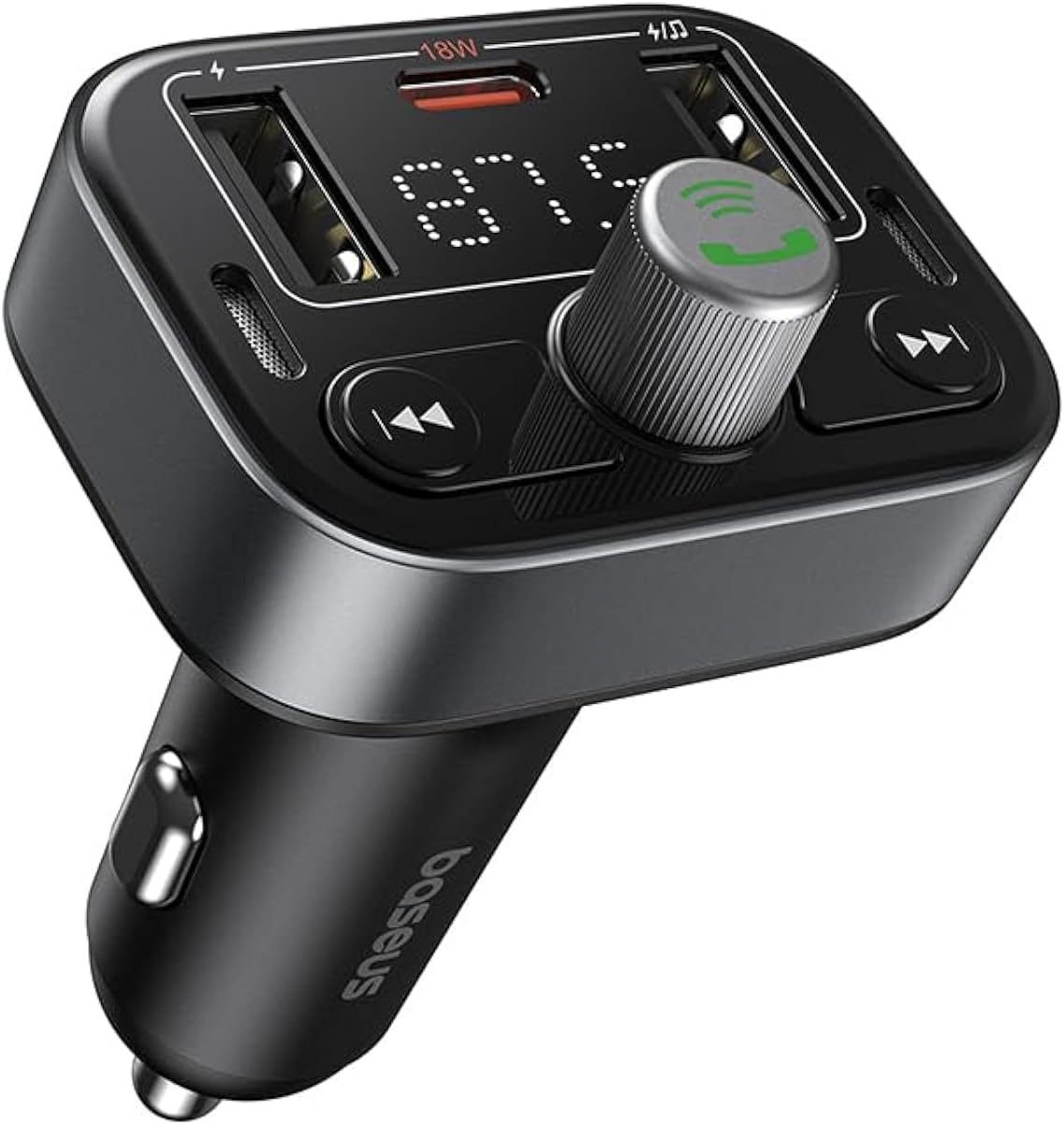
شڪل 1: سامهون view of the Baseus S-09 Pro Series Car FM Transmitter, showing the display, control knob, and USB ports.
پيڪيج مواد
مھرباني ڪري ھيٺ ڏنل شين لاءِ پيڪيج چيڪ ڪريو:
- Baseus S-09 Pro Series Car FM Transmitter
- هدايت نامو (هي دستاويز)

Figure 2: The Baseus S-09 Pro Series Car FM Transmitter shown in its retail packaging.
سيٽ اپ ڪريو
- Insert into Car Cigarette Lighter Socket: Plug the Baseus S-09 Pro Series Car FM Transmitter firmly into your car's 12V/24V cigarette lighter socket. The device will power on automatically, and the LED display will light up.
- ايف ايم فريڪوئنسي ٽيون ڪريو:
- On the FM Transmitter, press and hold the multi-function knob (the large central knob) until the FM frequency on the LED display starts flashing.
- Rotate the multi-function knob left or right to adjust the frequency. Choose an empty FM frequency (one with no radio station broadcasting) to minimize interference.
- On your car's FM radio, tune to the exact same empty frequency you selected on the transmitter.
- Once matched, the transmitter is ready to broadcast audio to your car stereo.
- بلوٽيون ٺاھڻ:
- After the device powers on, it will automatically enter Bluetooth pairing mode. The Bluetooth icon on the display may flash.
- On your smartphone or Bluetooth-enabled device, open the Bluetooth settings and search for available devices.
- Select "Baseus S-09 Pro" (or similar name) from the list to connect. Once connected, the Bluetooth icon on the transmitter's display will stop flashing and remain solid.

Figure 3: Illustration showing connection options: via flash drive and Bluetooth 5.3 pairing with a smartphone.
آپريٽنگ هدايتون
آڊيو پلے بیک
- بلوٽوڊيو آڊيو: Once paired, play music or audio from your smartphone. The audio will be transmitted to your car's FM radio.
- Flash Drive Audio: Insert a USB flash drive (up to 512GB, formatted to FAT32) containing MP3 audio files into the designated USB port on the transmitter. The device will automatically detect and play the audio files.
- ڪنٽرول بٽڻ:
- ملٽي فنڪشنل نوب: Rotate to adjust volume. Press once to play/pause.
- پوئين ٽريڪ بٽڻ (◀◀): ا Pressئين ٽريڪ ڏانھن وڻ لاءِ دايو.
- ايندڙ ٽريڪ بٽڻ (▶▶): ا trackيان ٽريڪ ڏانھن وڻ لاءِ دايو.
هينڊ فري ڪالنگ
- جواب/آخر ڪال: Press the multi-function knob once to answer an incoming call or end an ongoing call.
- ڪال رد ڪريو: Press and hold the multi-function knob for 2 seconds to reject an incoming call.
- ريڊل آخري نمبر: Double-press the multi-function knob to redial the last dialed number.
- ڪال کي فون تي تبديل ڪريو: During a call, press and hold the multi-function knob for 2 seconds to switch the call between the transmitter and your phone.

Figure 4: The device highlighting its dual-mic system for premium sound quality during calls and music playback.
چارجنگ ڊوائيسز
- The transmitter features multiple USB ports for charging your devices.
- USB-C پورٽ: Supports Power Delivery (PD) 18W (Max) fast charging. Use a compatible USB-C to USB-C or USB-C to Lightning cable for fast charging supported devices.
- USB-A بندرگاهن: Provide standard charging for various devices.

Figure 5: The transmitter connected via its USB-C port to an iPhone for fast charging.
معلومات ڏيکاريو
- The large LED screen alternately displays the current FM frequency and the car battery voltage.
- FM فريڪوئنسي: Indicates the frequency the transmitter is broadcasting on.
- بيٽري جلدtage: ڏيکاري ٿو حقيقي وقت وارو حجمtage of your car's battery, allowing you to monitor its health.

Figure 6: The LED screen displaying both the FM frequency (87.5) and the car battery voltagاي (12.5V).
سار سنڀال
- ڊوائيس کي سڪل رکو. ان کي نمي يا انتهائي گرمي پد جي سامهون نه رکو.
- ڊوائيس کي نرم، سڪل ڪپڙي سان صاف ڪريو. سخت ڪيميڪل يا رگڙيندڙ ڪلينر استعمال نه ڪريو.
- ڊوائيس کي مضبوط اثرن لاءِ ڇڏڻ يا تابع ڪرڻ کان پاسو ڪريو.
- هڪ ٿڌي، سڪل جڳهه ۾ ذخيرو ڪريو جڏهن استعمال ۾ نه هجي.
مشڪلاتون
| مسئلو | ممڪن سبب | حل |
|---|---|---|
| ڪابه پاور/ڊسپلي بند ناهي | Not properly inserted into cigarette lighter; Car socket fuse blown. | Ensure firm connection. Check car's fuse box. |
| Static/Poor audio quality | FM frequency interference; Volume too low. | Change to a different, empty FM frequency. Increase volume on both transmitter and car stereo. |
| بلوٽوٽ کي جوڙي نٿو سگھجي | Device not in pairing mode; Bluetooth disabled on phone. | Ensure transmitter is in pairing mode. Enable Bluetooth on your phone and search again. |
| تيز چارجنگ ڪم نه ڪري رهي آهي | Cable not compatible; Device does not support fast charging. | Use a certified fast-charging cable. Ensure your device supports PD 18W. |
وضاحتون
- ماڊل نالو: S-09 Pro Series
- ماڊل نمبر: C10762200113-00
- هارڊويئر انٽرفيس: بلوٽوٿ
- مطابقت رکندڙ ڊوائيسز: Car Stereo System, Smartphone, Tablet
- خاص خاصيتون: ايف ايم ٽرانسميٽر
- آڊيو ان پٽ: 3.5mm AUX
- آڊيو آئوٽ موڊ: اسٽيريو
- آڊيو آئوٽ جو قسم: ايف ايم ريڊيو، بلوٽوت
- جلدtage: 12 وولٽ (DC)
- طاقت جو ذريعو: تار ٿيل برقي
- وائرليس قسم: بلوٽوٿ
- بلوٽوت ورزن: 5.3
- Media Type Supported: MP3 (from flash drive)
- پيڪيج جي ماپ: 17 x 11.6 x 3.9 سينٽي
- شيء جو وزن: 80 گرام
- رنگ: ڪارو
وارنٽي ۽ سپورٽ
Baseus products typically come with a standard manufacturer's warranty. Please refer to the warranty card included in your product packaging or visit the official Baseus webتفصيلي وارنٽي شرطن ۽ ضابطن لاءِ سائيٽ.
For technical support, troubleshooting assistance, or warranty claims, please contact Baseus customer service through their official channels or the retailer from whom you purchased the product.
توهان وڌيڪ معلومات ۽ مدد تي ڳولي سگهو ٿا ايميزون تي بيسس اسٽور.


