تعارف
Thank you for choosing the ODK L-Shaped Desk. This manual provides detailed instructions for assembly, operation, maintenance, and safety to ensure optimal use of your new desk. Please read this manual thoroughly before beginning assembly or use.
حفاظت جي ڄاڻ
خبردار: زخم يا نقصان کان بچڻ لاءِ، هميشه هيٺ ڏنل حفاظتي هدايتن تي عمل ڪريو:
- Do not use the desk near water or in excessively humid environments.
- Unplug the desk from the power source when not in use or during cleaning.
- Do not overload the power outlets or USB ports. Ensure connected devices do not exceed the specified electrical ratings.
- Keep the desk away from direct heat sources, open flames, or flammable materials.
- Always follow the manufacturer's instructions for assembly and proper use.
- پڪ ڪريو ته سڀئي ڪنيڪشن محفوظ آهن پاور لاڳو ڪرڻ کان پهريان.
- ننڍن حصن ۽ پيڪنگنگ مواد کي ٻارن کان پري رکو ته جيئن ٿڪڻ جي خطرن کي روڪيو وڃي.
پيڪيج مواد
Before assembly, verify that all components are present and undamaged. Refer to the included parts list in your physical package for exact quantities. Common components include:
- Desk panels (main desktop, L-extension, monitor shelf)
- Metal frame components (legs, support beams)
- 4 ڪپڙي جا دراز
- Power strip with 2 AC outlets and 2 USB ports
- LED light strip with controller
- رکڻ واري بيگ
- Assembly hardware (screws, bolts, nuts, Allen wrench, screwdriver)
- ھدايت وارو دستور
تصوير: Detailed diagram illustrating the dimensions and various components of the ODK L-shaped desk, including the main desktop, L-extension, monitor shelf, and storage units.
سيٽ اپ ۽ اسيمبلي جون هدايتون
The ODK L-shaped desk is designed for straightforward assembly. All parts are clearly labeled. Follow the step-by-step instructions provided in your package. A screwdriver and Allen wrench are included.
- علائقو تيار ڪريو: Clear a spacious area for assembly. Lay down a blanket or cardboard to protect the floor and desk components.
- اجزاء جي سڃاڻپ: Unpack all parts and match them with the labels in the instruction manual.
- فريم گڏ ڪريو: Begin by assembling the metal frame according to the diagrams. Ensure all screws are tightened securely but do not overtighten until the entire frame is assembled.
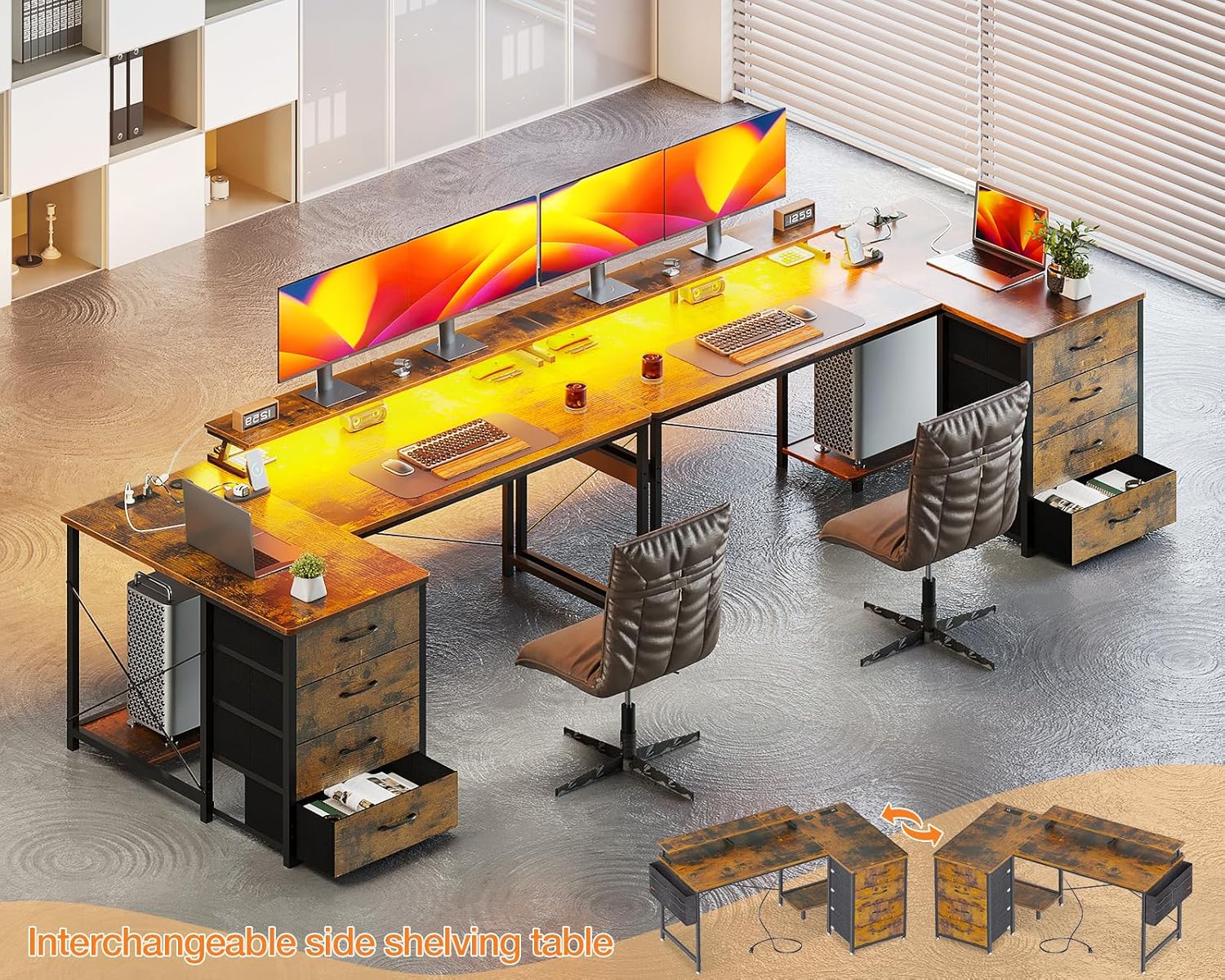
- ڊيسڪ پينلز ڳنڍيو: Secure the main desktop and the L-extension panels to the assembled frame. The L-extension is reversible, allowing you to mount the drawer side on either the left or right, depending on your preference and room layout.
- Install Monitor Shelf: Attach the monitor shelf to the designated area on the desktop.
- دراز داخل ڪريو: Assemble the four fabric drawers and slide them into their respective compartments.
- Install Power Strip: Place the power strip with USB ports and AC outlets into its recessed slot on the desktop. Ensure the power cable is routed safely.
- ايل اي ڊي پٽي لڳايو: Adhere the LED light strip to the underside of the monitor shelf or desired location. Connect it to the power source.
- آخري سختي: Once all components are in place, go back and fully tighten all screws and bolts.

تصوير: هڪ اوور هيڊ view of the fully assembled ODK L-shaped desk, showcasing its spacious design, monitor shelf, and integrated power strip, ready for a complete computer setup.

تصوير: A visual representation demonstrating the reversible design of the desk's storage unit, allowing it to be configured on either the left or right side of the L-shape.
آپريٽنگ هدايتون
پاور آئوٽليٽس ۽ USB پورٽس
The desk is equipped with a built-in power strip featuring 2 standard AC outlets (220-250V/16A) and 2 USB charging ports (5V-2A). These are designed for convenient charging of electronic devices such as smartphones, tablets, and other peripherals.
- Plug the desk's main power cable into a wall outlet.
- Insert device power adapters into the AC outlets.
- Connect USB charging cables to the USB ports for charging compatible devices.
- Do not exceed the maximum electrical load for the outlets.

تصوير: هڪ تفصيلي view of the integrated power strip, highlighting the two AC outlets and two USB charging ports, along with their electrical specifications.
LED روشني جو نظام
The desk includes an LED light strip with a remote control for customizable ambient lighting. This feature can help reduce eye strain and enhance focus.
- پاور آن / آف: Use the "On/Off" button on the controller to activate or deactivate the LED lights.
- رنگ جي چونڊ: Cycle through 10 static colors using the designated color buttons or mode button.
- روشني جي ترتيب: Adjust the light intensity with 6 levels of brightness control.
- متحرڪ موڊس: مختلف اثرن لاءِ 10 متحرڪ روشني جي طريقن مان چونڊيو.
- ميموري فنڪشن: The LED system retains the last selected setting when powered off and on.

تصوير: A close-up shot of the LED light strip installed under the monitor shelf, along with its control unit, illustrating the various color and mode options.
سار سنڀال
Regular maintenance will prolong the life and appearance of your ODK L-shaped desk.
- صفائي: ڊيسڪ جي مٿاڇري کي نرم، ڊي سان صاف ڪريوamp ڪپڙو. سخت ڪيميڪلز يا رگڙيندڙ صاف ڪندڙن کان پاسو ڪريو جيڪي ختم کي نقصان پهچائي سگهن ٿا.
- illsرندڙ: داغ يا پاڻي جي نقصان کان بچڻ لاءِ ڪنهن به ڦڙي کي فوري طور تي صاف ڪريو.
- هارڊويئر: وقت بوقت سڀني اسڪرو ۽ بولٽن کي چيڪ ڪريو ته جيئن پڪ ڪري سگهجي ته اهي تنگ رهن. جيڪڏهن ضروري هجي ته ٻيهر مضبوط ڪريو.
- دراز: The fabric drawers can be spot cleaned with a mild detergent and damp ڪپڙو. مڪمل طور تي هوا ۾ سڪي وڃڻ ڏيو.
- برقي اجزاء: Ensure the power strip and LED lights are kept dry. Do not attempt to repair electrical components yourself.
مشڪلاتون
If you encounter issues with your desk, refer to the following common troubleshooting steps:
| مسئلو | ممڪن سبب | حل |
|---|---|---|
| ڊيسڪ لڏپلاڻ واري آهي. | ڍِلا پيچ يا اڻ برابر فرش. | Check and tighten all assembly screws. Adjust the leveling feet on the desk legs if your floor is uneven. |
| پاور آئوٽليٽس/USB پورٽ ڪم نه ڪري رهيا آهن. | Desk not plugged in, power strip switch off, or overloaded circuit. | Ensure the desk's power cable is securely plugged into a functional wall outlet. Check if the power strip has an on/off switch and it's in the "on" position. Reduce the number of devices connected if overloaded. |
| ايل اي ڊي بتيون نه ٻرنديون آهن. | LED strip not connected, power issue, or remote control battery dead. | Verify the LED strip is properly connected to its power source. Ensure the main desk power is on. Check the remote control battery and replace if necessary. |
| دراز آساني سان نه سلائڊ ڪندا آهن. | Improper assembly or obstruction. | Recheck drawer assembly. Ensure nothing is obstructing the drawer's path. |
جيڪڏهن مسئلا برقرار رهن، مهرباني ڪري ڪسٽمر سپورٽ سان رابطو ڪريو.
وضاحتون
| خاصيت | تفصيل |
|---|---|
| ماڊل نمبر | SNKLFZDE-01 |
| طول و عرض (L x W x H) | 160 x 80 x 84.7 سينٽي (63 x 31.5 x 33.3 انچ) |
| وزن | 22.3 ڪلوگرام (49.16 پائونڊ) |
| رنگ | ناسي |
| مواد | انجنيئر ٿيل ڪاٺ، ڌاتو فريم |
| بجلي جا دڪان | 2 x AC (220-250V/16A) |
| USB بندرگاهن | 2 x USB (5V-2A) |
| LED روشني | 10 static colors, 6 brightness levels, 10 dynamic modes, memory function |
| ذخيرو | 4 fabric drawers, 1 storage bag |
| خاصيتون | Reversible L-shape, Ergonomic monitor shelf |
وارنٽي ۽ سپورٽ
ODK is committed to providing high-quality products. If your ODK desk arrives damaged, has missing parts, or is scratched, please contact our professional customer support team. We aim to resolve issues within 24 hours.
For support, please refer to the contact information provided in your product packaging or visit the official ODK webسائيٽ.