تعارف
Thank you for choosing the Rohnson Genius 16 Dehumidifier. This appliance is designed to efficiently remove excess moisture from your indoor environment, improve air quality, and create a healthier living space. With its advanced features, including Wi-Fi control, a powerful dehumidification capacity of up to 16 liters per day, and an ultra-quiet operation, the Genius 16 is an ideal solution for rooms up to 100 square meters. Please read this manual thoroughly before operating the unit to ensure safe and optimal performance.
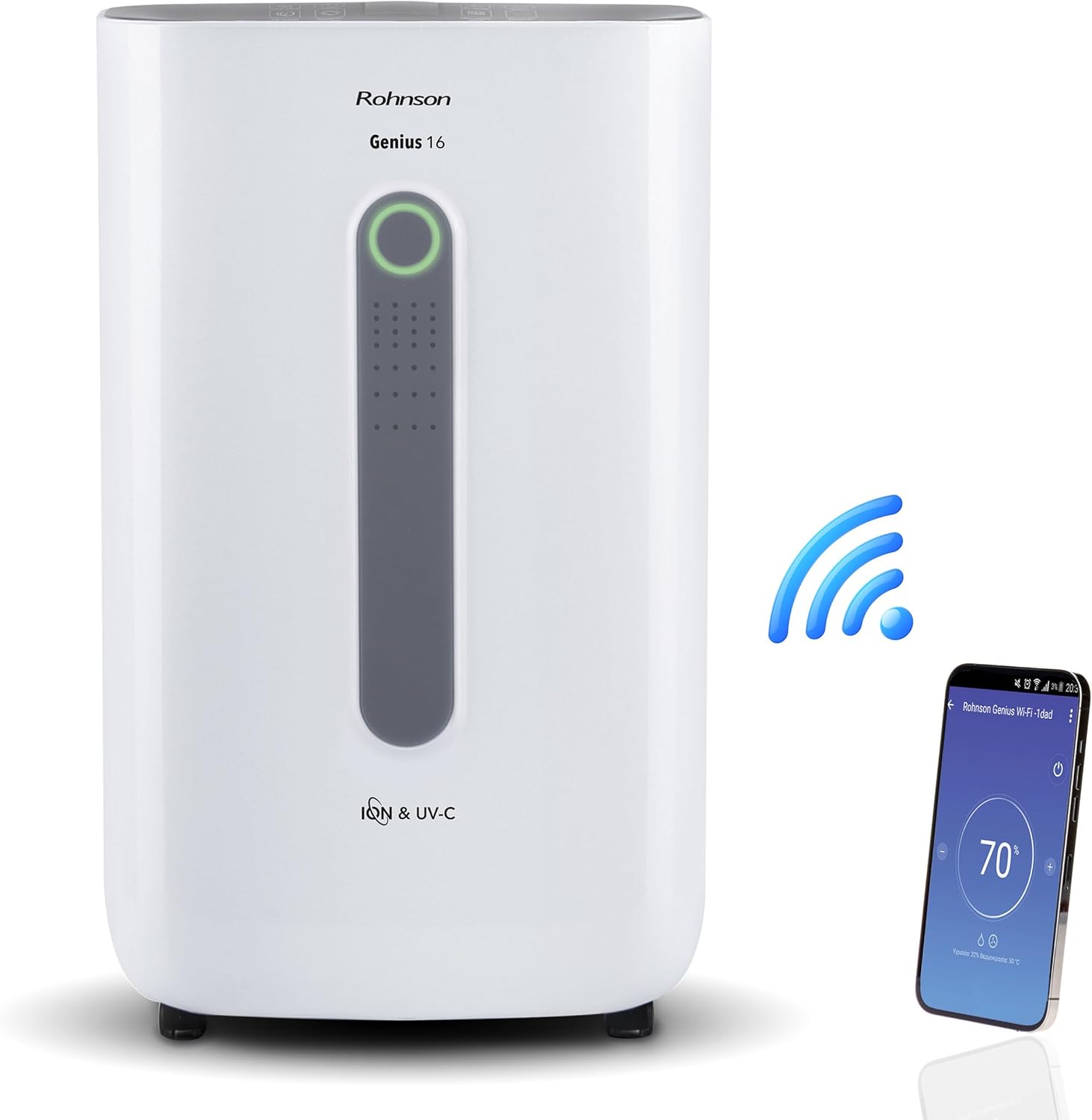
Image: The Rohnson Genius 16 Dehumidifier, a white rectangular unit with a central display, shown alongside a Wi-Fi symbol and a smartphone displaying the control app. This illustrates the unit's smart connectivity.
حفاظتي هدايتون
باهه، بجليءَ جي جھٽڪي ۽ زخم جي خطري کي گهٽائڻ لاءِ بجليءَ جا سامان استعمال ڪرڻ وقت هميشه بنيادي حفاظتي احتياطن تي عمل ڪريو.
- پڪ ڪريو ته بجلي جي فراهمي جي مقدار سان ملي ٿيtagيونٽ جي ريٽنگ ليبل تي بيان ڪيل.
- يونٽ کي خراب ٿيل ڪنڊ يا پلگ سان هلائڻ نه ڏيو.
- يونٽ کي گرمي جي ذريعن ۽ س sunي سج جي روشنيءَ کان پري رکو.
- ايئر انليٽ يا آئوٽليٽ کي بلاڪ نه ڪريو.
- هميشه صاف ڪرڻ يا سار سنڀال ڪرڻ کان اڳ يونٽ کي انپلگ ڪريو.
- ٻارن جي پهچ کان پري رکو.
پيداوار ختمview
The Rohnson Genius 16 Dehumidifier is equipped with several features to enhance your indoor air quality and comfort.
- موثر Dehumidification: Removes up to 16 liters of moisture per day, suitable for areas up to 100 m².
- جديد هوا صاف ڪرڻ: Features UV-C light and a dual ionizer to eliminate bacteria and odors. An optional HEPA 13 + Activated Carbon filter can remove 99.7% of particles, smoke, chemicals, and allergens.
- الٽرا خاموش آپريشن: Operates at a low noise level of 36 dB(A) in low fan mode, ideal for bedrooms and living areas.
- سمارٽ ڪنٽرول: Wi-Fi enabled for remote control via the Rohnson App (Android and iOS compatible). Includes a touch control panel, 1-24 hour timer, and automatic restart after power failure.
- توانائي بچائڻ وارو ڊيزائن: Powerful yet energy-efficient with only 240W power consumption. Features a Turbo-Boost mode for fast clothes drying and automatic shut-off when the water tank is full.
- Digital Humidity Display: A color indicator (Blue, Green, Red) shows current humidity levels for easy monitoring.

Image: The Rohnson Genius 16 Dehumidifier positioned in a living room, illustrating its compact size. Key features are overlaid, including its 16L/day dehumidification capacity, anti-frost system, digital humidity display, smart Wi-Fi control, UV-C light and ionizer, silent 36dB operation, and 6.5L water tank.
سيٽ اپ ڪريو
1. Unpacking
ڊيهوميڊفائر کي احتياط سان ان جي پيڪنگ مان هٽايو. نقصان جي ڪنهن به نشاني لاءِ يونٽ جو معائنو ڪريو. مستقبل جي اسٽوريج يا ٽرانسپورٽ لاءِ پيڪنگ کي برقرار رکو.
2. رکڻ
Place the dehumidifier on a firm, level surface in the area where dehumidification is desired. For optimal performance, ensure there is at least 20 cm (8 inches) of space around all sides of the unit to allow for proper airflow. The unit is effective for rooms up to 100 m². For best air circulation, consider placing it centrally within the room.

Image: A diagram illustrating the optimal placement of the dehumidifier in different household areas such as a laundry room, bedroom, living room, office, and basement, emphasizing central positioning for maximum effectiveness in rooms up to 100 m².
3. پاور ڪنيڪشن
Plug the power cord into a grounded electrical outlet. Ensure the outlet meets the electrical requirements of the unit (230 Volts AC).
4. Filter Installation (Optional HEPA 13 + Activated Carbon Filter)
The Rohnson Genius 16 comes with an optional HEPA 13 + Activated Carbon filter for enhanced air purification.
- Locate the filter compartment, typically at the back or side of the unit.
- فلٽر ڪپڙا کوليو.
- Insert the HEPA 13 + Activated Carbon filter, ensuring it is correctly oriented.
- فلٽر ڍڪ کي محفوظ طور تي بند ڪريو.
5. پاڻي جي نيڪال جا آپشن
يونٽ ٻه نيڪال جا طريقا پيش ڪري ٿو:
- پاڻي جي ٽانڪي: The unit has a 6.5-liter water tank. When the tank is full, the unit will automatically shut off and an indicator will light up. Empty the tank and reinsert it to resume operation.
- مسلسل نيڪال: For continuous operation without needing to empty the tank, connect a drainage hose (not included) to the continuous drainage port on the unit. Route the hose to a suitable drain or larger container.
آپريٽنگ هدايتون
1. ڪنٽرول پينل
The Rohnson Genius 16 features an intuitive touch control panel and a digital display.
- پاور بٽڻ: يونٽ کي آن يا بند ڪري ٿو.
- موڊ جي چونڊ: Cycle through different operating modes (e.g., Dehumidification, Turbo-Boost, Night Mode).
- فين جي رفتار: Adjust fan speed (low, medium, high).
- نمي جي جوڙجڪ: Set your desired humidity level. The unit will operate until this level is reached.
- ٽائمر بٽڻ: Set a timer for automatic shut-off (1-24 hours).
- UV-C/Ionizer Button: Activates or deactivates the UV-C light and dual ionizer.
- ڊجيٽل ڊسپلي Shows current humidity, temperature, and selected settings.

Image: A visual representation of the digital humidity control feature, showing the dehumidifier and its color-coded humidity indicators. Blue indicates humidity below 55%, Green for 55-70%, and Red for above 70%, providing an easy visual cue for air moisture levels.
2. وائي فائي ايپ ڪنٽرول
Control your Rohnson Genius 16 from anywhere using the Rohnson App.
- Download the "Rohnson" app from the App Store (iOS) or Google Play Store (Android).
- هڪ اڪائونٽ رجسٽر ڪريو ۽ لاگ ان ڪريو.
- Follow the in-app instructions to add your Rohnson Genius 16 dehumidifier. This typically involves putting the unit into pairing mode and connecting it to your home Wi-Fi network.
- Once connected, you can remotely monitor humidity, adjust settings, set schedules (hourly, daily, weekly), and control all functions of the dehumidifier.

Image: A banner illustrating the smart connectivity of the dehumidifier, showing the unit and a smartphone displaying the Rohnson app. This highlights the ability to control the room climate remotely, schedule operations, and monitor humidity via a smartphone, compatible with both Android and iOS.
3. خاص طريقا
- Turbo-Boost Mode (Laundry Drying): This mode provides a powerful airflow to quickly dry clothes indoors. Position the unit near the laundry for efficient drying.
- رات جو موڊ: ننڊ دوران خاموش ڪم ڪرڻ لاءِ پنکڙي جي رفتار گھٽائي ٿو ۽ ڊسپلي لائيٽن کي مدھم ڪري ٿو.

Image: The Rohnson Genius 16 Dehumidifier positioned in a room with a clothes drying rack, illustrating its effectiveness in drying laundry indoors, especially useful during rainy weather or in apartments without balconies.
سار سنڀال
باقاعده سار سنڀال توهان جي ڊيهوميڊفائر جي ڊگهي عمر ۽ موثر آپريشن کي يقيني بڻائي ٿي. صفائي کان اڳ هميشه يونٽ کي ان پلگ ڪريو.
1. ٻاهرين صفائي
يونٽ جي ٻاهرئين حصي کي نرم سان صاف ڪريو، ڊيamp ڪپڙو. سخت ڪيميڪل، رگڙيندڙ شيون، يا محلول استعمال نه ڪريو، ڇاڪاڻ ته اهي مٿاڇري کي نقصان پهچائي سگهن ٿا.
2. Cleaning/Replacing Filters
The air filter should be cleaned regularly (e.g., every two weeks or as needed) to maintain optimal performance. If using the optional HEPA 13 + Activated Carbon filter, refer to its specific replacement schedule.
- بند ڪريو ۽ dehumidifier unplug.
- Remove the filter cover and carefully take out the filter(s).
- For washable filters, rinse with lukewarm water and mild detergent. Allow to air dry completely before reinserting.
- For HEPA/Activated Carbon filters, these are typically not washable and should be replaced according to manufacturer recommendations or when visibly dirty.
- Reinsert the clean/new filter(s) and close the cover.
3. پاڻي جي ٽانڪي کي خالي ڪرڻ
جڏهن پاڻي جي ٽانڪي ڀرجي ويندي، ته يونٽ ڪم ڪرڻ بند ڪري ڇڏيندو.
- احتياط سان يونٽ مان پاڻي جي ٽانڪي کي ڪڍو.
- Carefully empty the collected water.
- جيڪڏهن ضروري هجي ته ٽينڪ کي هلڪي صابڻ ۽ پاڻي سان صاف ڪريو، پوءِ چڱي طرح ڌوئي ڇڏيو.
- Reinsert the empty tank firmly into the unit until it clicks into place. The unit will resume operation.
مشڪلاتون
ڪسٽمر سپورٽ سان رابطو ڪرڻ کان اڳ، مھرباني ڪري ھيٺ ڏنل عام مسئلن ۽ حلن جو حوالو ڏيو.
| مسئلو | ممڪن سبب | حل |
|---|---|---|
| يونٽ چالو نه آهي. | بجلي نه هجڻ، بجلي جي تار ڍلي هجڻ، پاڻي جي ٽانڪي ڀريل هجڻ يا صحيح طرح سان نه لڳل هجڻ. | Check power connection. Empty and reinsert water tank securely. |
| No water collected / Low dehumidification. | Room humidity too low, air filter clogged, temperature too low, unit size too small for room. | Check current humidity setting. Clean or replace air filter. Ensure room temperature is above 5°C (41°F). |
| يونٽ شور آهي. | Unit not on a level surface, fan obstruction, dirty filter. | Place unit on a flat, stable surface. Check for obstructions in fan area. Clean filter. |
| وائي فائي ڪنيڪشن جا مسئلا. | Incorrect Wi-Fi password, unit too far from router, app not updated. | Ensure correct Wi-Fi password. Move unit closer to router. Update Rohnson App. Refer to app's troubleshooting guide. |
وضاحتون
| خاصيت | تفصيل |
|---|---|
| برانڊ | روهنسن |
| ماڊل نمبر | آر-9916W |
| دي هائيڊريشن ڪرڻ جي صلاحيت | Up to 16 liters/day |
| تجويز ڪيل ڪمرو ايريا | 100 m² تائين |
| پاڻي جي ٽانڪي گنجائش | 6.5 ليٽر |
| شور جي سطح | 36 dB(A) (low fan mode) |
| بجلي جو استعمال | 240 ڊبليو |
| جلدtage | 230 وولٽ (AC) |
| پيداوار جي ماپ (L x W x H) | 28 x 38 x 64 سينٽي |
| شيءِ جو وزن | 16 ڪلوگرام |
| خاص خاصيتون | Digital Display, Wi-Fi Control, UV-C Light, Dual Ionizer, Optional HEPA 13 Filter, Turbo-Boost Mode, Auto Shut-off, Auto Restart |
| رنگ | اڇو |
وارنٽي ۽ سپورٽ
For information regarding warranty coverage and customer support, please refer to the warranty card included with your product or visit the official Rohnson webسائيٽ. خريداري جي ثبوت طور پنهنجي خريداري جي رسيد رکو.
If you encounter issues not covered in this manual, please contact Rohnson customer service for assistance.


