1. تعارف
Thank you for choosing the DAITSU ADD-20XB Dehumidifier. This manual provides essential information for the safe and efficient operation, installation, and maintenance of your appliance. Please read this manual thoroughly before using the dehumidifier and retain it for future reference.
The DAITSU ADD-20XB is designed to reduce excess humidity in your indoor environment, contributing to a more comfortable and healthier living space. It features a compact design, an integrated display, and various functions for optimal humidity control.
2. حفاظت جي ڄاڻ
اوزار کي زخم يا نقصان کان بچڻ لاءِ مھرباني ڪري ھيٺ ڏنل حفاظتي احتياطي تدبيرن تي عمل ڪريو:
- Always connect the dehumidifier to a grounded power outlet with the correct voltage.
- يونٽ کي خراب ٿيل پاور ڪنڊ يا پلگ سان هلائڻ نه ڏيو.
- اوزار کي پاڻي ۽ ٻين مايعات کان پري رکو. ان کي ٻوڙيو نه.
- يونٽ جي چوڌاري مناسب وينٽيليشن کي يقيني بڻايو. هوا جي داخل ٿيڻ يا آئوٽليٽ کي بلاڪ نه ڪريو.
- شين کي ايئر وينٽس ۾ داخل نه ڪريو.
- Unplug the unit before cleaning, maintenance, or when not in use for extended periods.
- هي اوزار استعمال ڪرڻ جو ارادو نه ڪيو ويو آهي ماڻهن (بشمول ٻارن سميت) گھٽ جسماني، حسي، يا ذهني صلاحيتن سان، يا تجربو ۽ ڄاڻ جي کوٽ، جيستائين انهن جي حفاظت لاء ذميوار شخص طرفان اوزار جي استعمال بابت نگراني يا هدايت نه ڏني وئي آهي. .
- ٻارن کي نگراني ڪرڻ گهرجي انهي کي يقيني بڻائڻ ته اهي اوزار سان راند نه ڪن.
3. پراڊڪٽ ختمview
The DAITSU ADD-20XB Dehumidifier is a white, compact, floor-standing unit designed for efficient moisture removal. It features an intuitive control panel on the top surface and a large capacity water tank.

شڪل 3.1: سامهون view of the DAITSU ADD-20XB Dehumidifier. This image shows the sleek white design and the DAITSU brand logo prominently displayed on the front panel.
3.1. مکيه اجزاء
- ڪنٽرول پينل: Located on the top surface, with an integrated digital display and touch buttons.
- ايئر انليٽ / آئوٽليٽ: Vents for drawing in humid air and expelling dry air.
- پاڻي جي ٽانڪي: ڪنسنسڊ پاڻي گڏ ڪرڻ لاءِ هٽائڻ وارو ٽانڪي.
- مسلسل نيڪال پورٽ: مسلسل پاڻي جي نيڪال لاءِ نلي کي ڳنڍڻ لاءِ.
- سنڀال: Integrated handle for easy mobility.

شڪل 3.2: بند اپ view of the control panel. This image highlights the digital display and various control buttons for operating the dehumidifier.
3.2. ڪنٽرول پينل جي ڪم ڪار
- پاور بٽڻ: يونٽ کي آن يا بند ڪري ٿو.
- موڊ بٽڻ: Selects operating modes (e.g., Dehumidification, Laundry Mode).
- Humidity Adjustment Buttons: Increases or decreases the desired humidity level.
- ٽائمر بٽڻ: آٽو آن يا آٽو آف ٽائمر سيٽ ڪري ٿو.
- فين اسپيڊ بٽڻ: فين جي رفتار کي ترتيب ڏئي ٿو.
- مربوط ڊسپلي: موجوده نمي، سيٽ نمي، ٽائمر سيٽنگون، ۽ غلطي ڪوڊ ڏيکاري ٿو.
4. سيٽ اپ
4.1. Unpacking
- ڊيهوميڊفائر کي ان جي پيڪنگ مان احتياط سان هٽايو.
- سڀئي پيڪنگ مواد هٽايو، بشمول ڪنهن به حفاظتي فلم يا ٽيپ.
- نقصان جي ڪنهن به نشاني لاءِ يونٽ جو معائنو ڪريو. جيڪڏهن خراب ٿي وڃي ته ڪم نه ڪريو ۽ ڪسٽمر سپورٽ سان رابطو ڪريو.
4.2. رکڻ
- Place the dehumidifier on a firm, level surface capable of supporting its weight.
- Ensure there is at least 20 cm (8 inches) of clear space around the air inlet and outlet for proper airflow.
- يونٽ کي گرمي جي ذريعن جي ويجهو، سڌي سج جي روشني ۾، يا گهڻي مٽي وارن علائقن ۾ رکڻ کان پاسو ڪريو.
- بهترين ڪارڪردگيءَ لاءِ، ڪمري ۾ سڀئي دروازا ۽ دريون بند ڪريو جتي ڊيهوميڊفائر ڪم ڪري رهيو آهي.
4.3. پاور ڪنيڪشن
بجلي جي تار کي هڪ مناسب گرائونڊ ٿيل بجلي جي آئوٽليٽ ۾ لڳايو. پڪ ڪريو ته وولٽيجtagاي يونٽ جي وضاحتن سان ملندو آهي.
5. آپريٽنگ هدايتون
5.1. بنيادي آپريشن
- کي دٻايو پاور بٽڻ to turn on the dehumidifier. The display will show the current room humidity.
- استعمال ڪريو Humidity Adjustment Buttons (Up/Down arrows) to set your desired humidity level. The recommended range is typically between 40% and 60% relative humidity.
- The unit will automatically start dehumidifying until the set humidity level is reached, then it will cycle on and off to maintain it.
5.2. موڊ چونڊ
کي دٻايو موڊ بٽڻ to cycle through available operating modes:
- Dehumidification موڊ: Standard operation to reduce room humidity.
- Laundry Mode (Dry Clothes): Designed to quickly dry clothes by continuously running the dehumidifier at a high fan speed.
5.3. ٽائمر فنڪشن
کي دٻايو ٽائمر بٽڻ to set an auto-on or auto-off time. Use the humidity adjustment buttons to set the desired hours (1-24). The timer indicator will illuminate when active.
5.4. فين اسپيڊ ايڊجسٽمينٽ
کي دٻايو فين اسپيڊ بٽڻ to select between different fan speeds (e.g., Low, High). Higher fan speed results in faster dehumidification but may produce more noise.
5.5. Water Tank and Continuous Drainage
- پاڻي جي ٽانڪي: When the water tank is full, the unit will automatically shut off, and a مڪمل ٽينڪ الرٽ will activate. Carefully remove the tank, empty the collected water, and reinsert it securely.
- مسلسل نيڪال: For extended operation without emptying the tank, connect a suitable drainage hose (not included) to the continuous drainage port at the back of the unit. Ensure the hose is sloped downwards to allow gravity drainage into a floor drain or larger container.
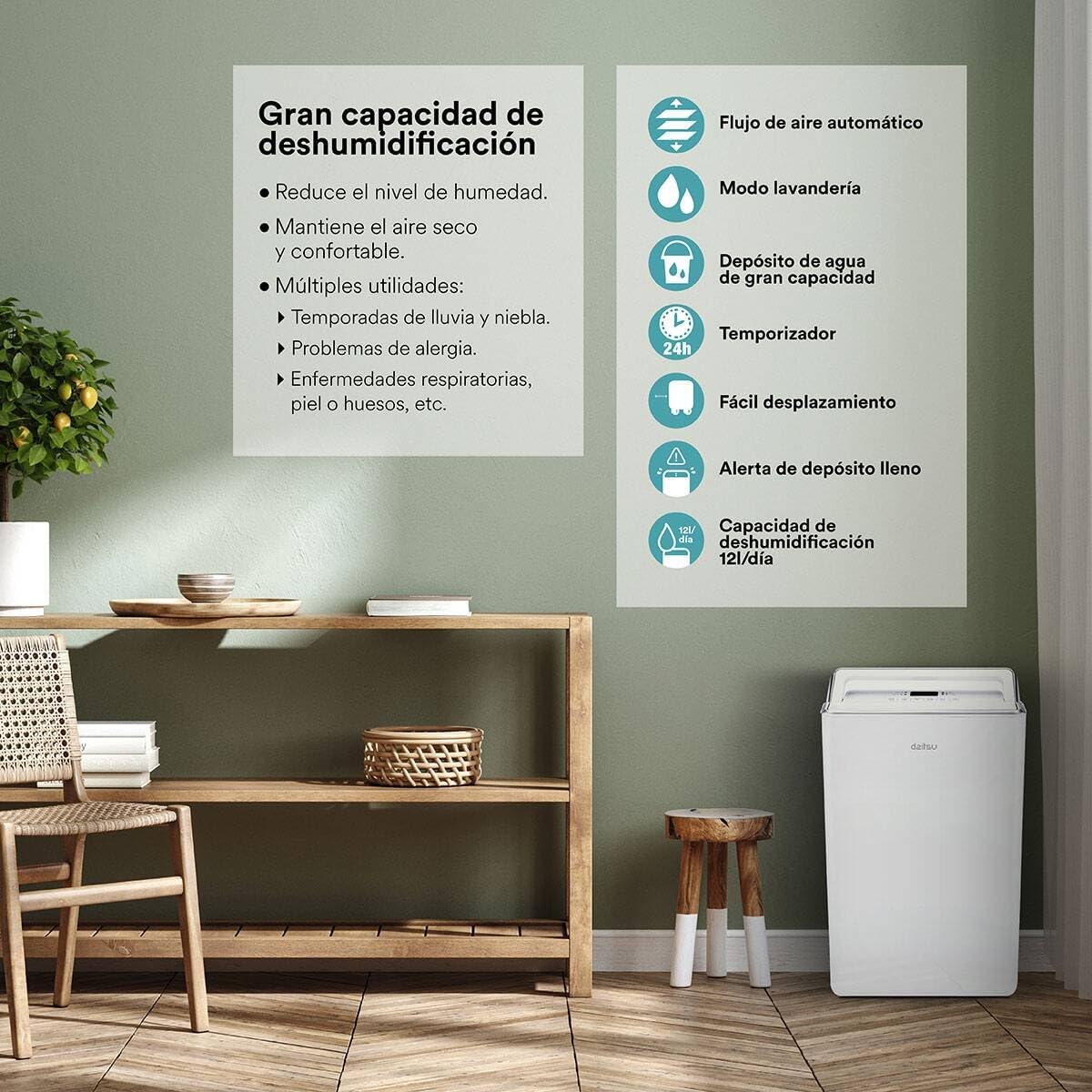
شڪل 5.1: ختمview of key features including high dehumidification capacity (20L/day), automatic airflow, laundry mode, large capacity water tank, timer, easy mobility, and full tank alert.
6. سار سنڀال
باقاعده سار سنڀال بهترين ڪارڪردگي کي يقيني بڻائي ٿي ۽ توهان جي ڊيهوميڊفائر جي عمر وڌائي ٿي.
6.1. ايئر فلٽر کي صاف ڪرڻ
استعمال ۽ هوا جي معيار جي لحاظ کان ايئر فلٽر کي هر ٻن هفتن يا وڌيڪ ڀيرا صاف ڪرڻ گهرجي.
- بند ڪريو ۽ dehumidifier unplug.
- ايئر فلٽر کي ڳوليو ۽ هٽايو (عام طور تي يونٽ جي پوئين پاسي يا پاسي تي).
- فلٽر کي گرم، صابڻ واري پاڻي سان ڌوئو. چڱي طرح ڌوئو ۽ ٻيهر داخل ڪرڻ کان اڳ ان کي مڪمل طور تي هوا ۾ سڪي وڃڻ ڏيو.
- Do not use a dishwasher or expose the filter to direct sunlight for drying.
6.2. پاڻي جي ٽانڪي کي صاف ڪرڻ
پاڻيءَ جي ٽانڪي کي باقاعدي صاف ڪريو ته جيئن ڦڦڙن ۽ ڦڦڙن جي واڌ کي روڪي سگهجي.
- يونٽ مان پاڻي جي ٽانڪي کي هٽايو.
- ٽانڪي کي هلڪي صابڻ ۽ گرم پاڻي سان ڌوئو.
- ان کي واپس dehumidifier ۾ رکڻ کان اڳ چڱي طرح ڌوء ۽ سڪي.
6.3. خارجي صفائي
يونٽ جي ٻاهرئين حصي کي نرم سان صاف ڪريو، ڊيamp ڪپڙو. سخت ڪيميڪل، رگڙيندڙ صاف ڪندڙ، يا محلول استعمال نه ڪريو.
6.4. اسٽوريج
جيڪڏهن يونٽ کي وڌايل عرصي تائين ذخيرو ڪيو وڃي:
- پاڻي جي ٽينڪ کي خالي ۽ صاف ڪريو.
- ايئر فلٽر کي صاف ڪريو.
- بجلي جي تار کي چڱيءَ طرح ويڙهو.
- يونٽ کي سڌي طرح ٿڌي، سڪل جاءِ تي، سڌي سج جي روشني ۽ انتهائي گرمي پد کان پري رکو.
7. مسئلا حل ڪرڻ
ڪسٽمر سپورٽ سان رابطو ڪرڻ کان اڳ، مھرباني ڪري عام مسئلن لاءِ ھيٺ ڏنل مسئلو حل ڪرڻ واري گائيڊ جو حوالو ڏيو:
| مسئلو | ممڪن سبب | حل |
|---|---|---|
| يونٽ چالو نه آهي | بجلي جي فراهمي ناهي پاور تار محفوظ طور تي پلگ ان ۾ نه آهي | Check power outlet and plug connection Ensure the outlet is functional |
| پاڻي گڏ نه ٿيو | Room humidity is too low ايئر فلٽر بند ٿيل آهي گرمي پد تمام گهٽ آهي پاڻي جي ٽانڪي صحيح طرح نصب نه آهي | Increase desired humidity setting ايئر فلٽر کي صاف ڪريو Operate in a warmer environment (above 5°C) Ensure water tank is correctly seated |
| يونٽ شور آهي | يونٽ هڪ سطح جي مٿاڇري تي نه آهي ايئر فلٽر بند ٿيل آهي اندروني جزا وائبريٽ ٿيڻ | هڪ لوڻ، مستحڪم مٿاڇري تي رکو ايئر فلٽر کي صاف ڪريو This may be normal during operation; if excessive, contact support |
| Water tank full indicator on, but tank is not full | فلوٽ سوئچ جي خرابي ٽينڪ صحيح طرح سان نه رکيل آهي | Remove and reinsert the water tank firmly جيڪڏهن مسئلو برقرار رهي ته ڪسٽمر سپورٽ سان رابطو ڪريو. |
| Automatic defrost function active | Coils are freezing due to low temperature | This is normal operation. The unit will pause dehumidification and run the fan to melt frost. Dehumidification will resume automatically. |
8. وضاحتون
| خاصيت | تفصيل |
|---|---|
| ماڊل نمبر | ADD-20XB (3NDA0044) |
| برانڊ | DAITSU |
| دي هائيڊريشن ڪرڻ جي صلاحيت | 20 ليٽر/ڏينهن |
| رنگ | اڇو |
| مواد | مصر جو اسٽيل |
| وزن | 13 ڪلوگرام |
| خاص خاصيتون | Adjustable Humidity Control, Automatic Defrost, Water Level Indicator, Continuous Drainage |
| توانائي ڪلاس | A++ کان E |
9. وارنٽي ۽ سپورٽ
For warranty information, please refer to the documentation provided at the time of purchase. Keep your proof of purchase for any warranty claims.
If you encounter issues not covered in this manual or require further assistance, please contact DAITSU customer support. Contact details can typically be found on the manufacturer's webسائيٽ يا توهان جي خريداري جي رسيد.


