تعارف
This manual provides comprehensive instructions for the Hodozzy 9-inch Android Car Stereo, Model 4G+64G. It is specifically designed for Mercedes-Benz C-Class W204 and S204 vehicles manufactured between 2007 and 2010. This guide covers product features, installation procedures, operational instructions, maintenance tips, and troubleshooting information to ensure optimal performance and user experience.
مطابقت رکندڙ گاڏيون: Mercedes-Benz C-Class W204 S204 (2007-2010)
پيڪيج مواد
پڪ ڪريو ته هيٺ ڏنل سڀئي شيون توهان جي پيڪيج ۾ شامل آهن. جيڪڏهن ڪا به شيءِ غائب يا خراب آهي، مهرباني ڪري ڪسٽمر سپورٽ سان رابطو ڪريو.
- Car Radio Player (9-inch Android Unit) x 1
- Dashboard Kit x 1
- پاور ڪيبل x 1
- جي پي ايس اينٽينا x 1
- Rear Camera Input Cable x 1
- RCA ڪيبل x 1
- USB ڪيبل x 2
- وڌندڙ بریکٹ x 2
- اسڪرو x 4
- تنصيب جو اوزار x 1
- Canbus x 1
- يوزر مينوئل x 1
- ريئر ڪيمرا x 1
- مائڪروفون x 1
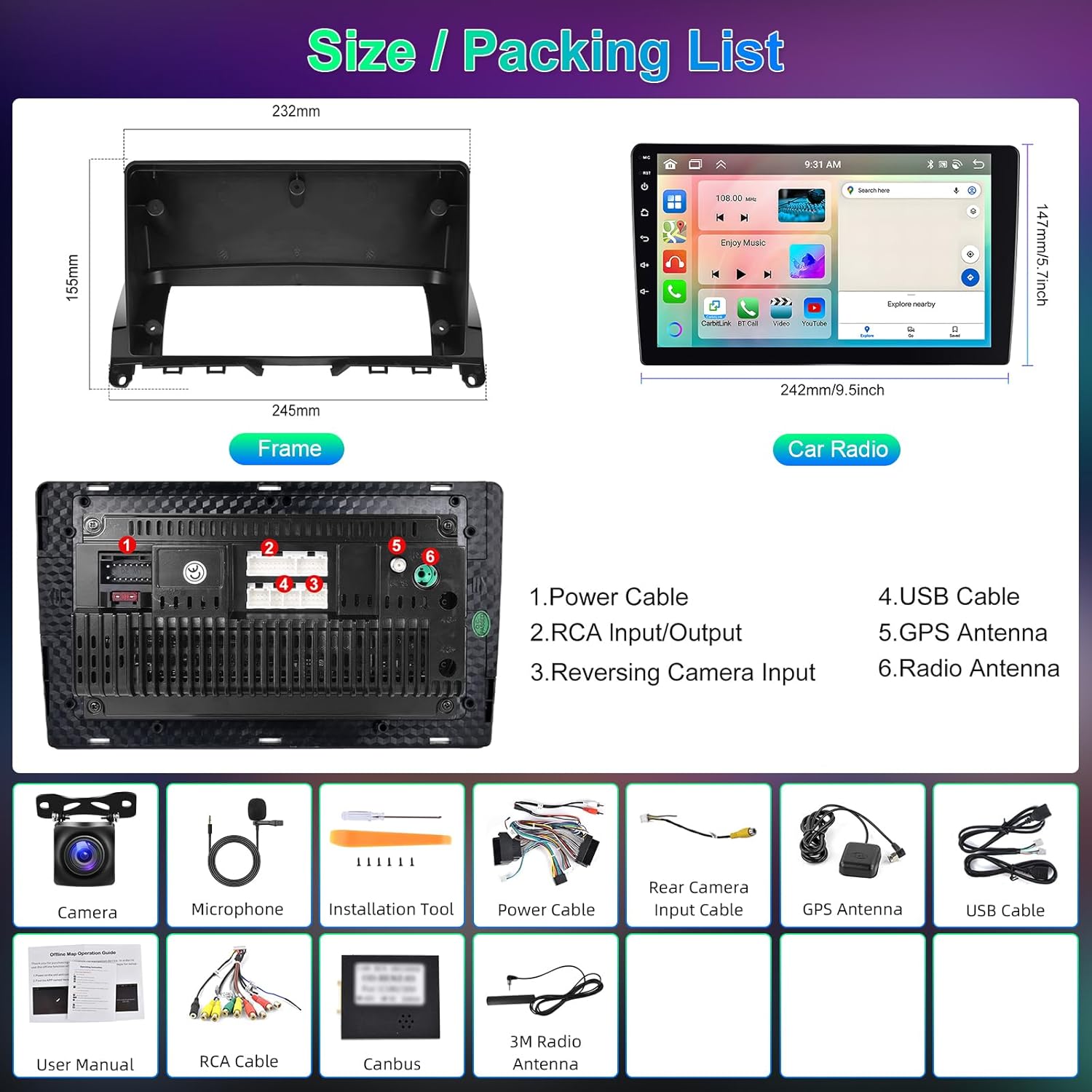
تصوير: مٿانview of the car radio unit dimensions and a visual representation of all included accessories in the package.
وضاحتون
| خاصيت | تفصيل |
|---|---|
| سسٽم | Android 13 |
| چپ سيٽ | 8257 (8-Core CPU) |
| ياداشت | 4GB رام + 64GB روم |
| اسڪرين جي ماپ | 9 انچ ٽچ اسڪرين |
| اسڪرين جي قرارداد | 1280*720 |
| ريڊيو چپ | 8035 (FM/RDS) |
| ٻاھر نڪرڻ جي طاقت | 4*45W (Amplifier Chip: YD7388) |
| بلوٽوت ورزن | 5.0 (A2DP, Hands-free, Phonebook Sync) |
| ڊي ايس پي | 36-band Equalizer |
| ڪم ڪندڙ درجه حرارت | -20 ℃ کان 75 ℃ |
| اسٽيئرنگ ويل ڪنٽرول | حمايت ڪئي |
| وڊيو آئوٽ | حمايت ڪئي |
| ريورسنگ ان پٽ | اي ايڇ ڊي/سي وي بي ايس |
| خارجي مائڪروفون | حمايت ڪئي |
| ورهايل اسڪرين | حمايت ڪئي |
| نيويگيشن | Built-in Offline Maps (requires internet for data download) |
| رابطي | WiFi, Dual USB Interface |
| آڊيو فارميٽ | APE/FLAC/WAV/MP3/WMA، وغيره. |
| وڊيو فارميٽ | ايم ڪي وي/آر ايم وي بي/اي وي آءِ/ايم پي 4/ايم ڊي وي، وغيره. |
| تصويري فارميٽ | PNG/JPEG/JPG/GIF/WBMP/BNP، وغيره. |
| Factory Keyword | 1234 |
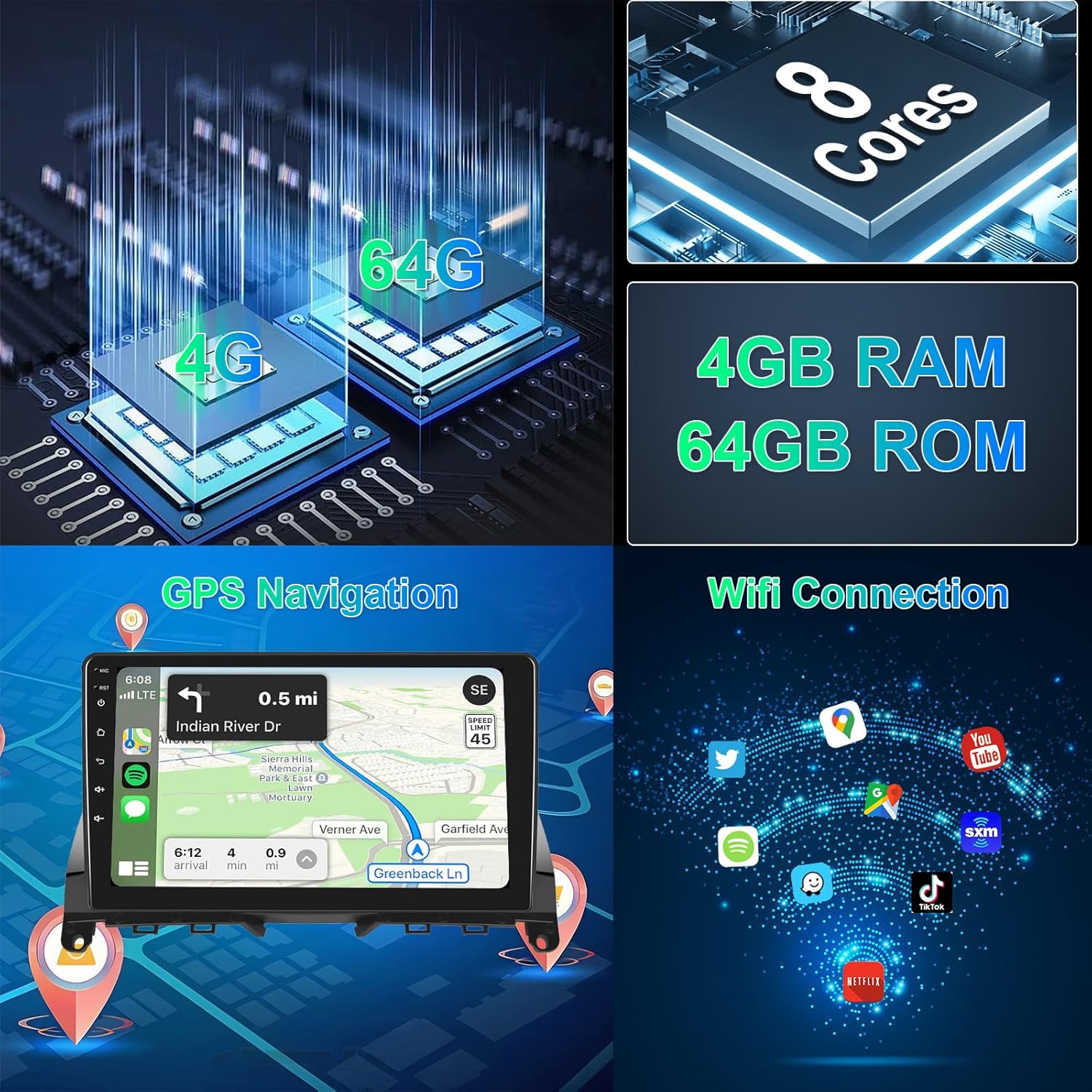
تصوير: Visual representation of the system's core specifications including CPU, memory, GPS navigation, and WiFi connectivity.
سيٽ اپ ۽ تنصيب
Professional installation is recommended for this car stereo system. Ensure the vehicle's power is disconnected before beginning installation.
- تياري: Carefully remove the original car radio unit from your Mercedes-Benz C-Class W204/S204 (2007-2010). Refer to your vehicle's service manual for specific removal instructions.
- وائرنگ هارنس ڪنيڪشن: Connect the provided power cable and Canbus to the vehicle's original wiring harness. Ensure all connections are secure.
- پردي ڪنيڪشن:
- Connect the GPS antenna and position it for optimal signal reception (e.g., on the dashboard).
- هٿ کان سواءِ ڪال ڪرڻ لاءِ ٻاهرين مائڪروفون کي ڳنڍيو.
- If installing the rear camera, connect the rear camera input cable and route the camera cable to the rear of the vehicle.
- Connect any additional USB devices or RCA cables as needed.
- چڙهڻ: Use the provided mounting brackets and screws to secure the new Hodozzy car stereo unit into the dashboard. Ensure it fits snugly within the dashboard kit.
- پاور آن ۽ ٽيسٽ: Reconnect the vehicle's power. Turn on the car stereo and perform initial tests to ensure all functions (radio, GPS, Bluetooth, touchscreen, steering wheel controls) are operational.

تصوير: تفصيلي view of the wiring harness connections and an illustration of the steering wheel control interface.
آپريٽنگ هدايتون
بنيادي آپريشن
- پاور آن / آف: يونٽ کي آن يا آف ڪرڻ لاءِ پاور بٽڻ (عام طور تي فرنٽ پينل تي واقع هوندو آهي) کي دٻايو ۽ رکو.
- حجم ڪنٽرول: Adjust volume using the physical knobs or touchscreen controls.
- گھر جي اسڪرين: Tap the Home icon to return to the main application interface.
- App Switching: Long press on an app icon to switch applications or customize your home screen layout.
CarPlay & Android Auto (Wireless/Wired)
The unit supports both wireless and wired CarPlay and Android Auto via Zlink. Mirror Link (Airplay) is also supported for Android (wireless/wired) and iOS (wireless).
- وائرليس ڪنيڪشن:
- پنهنجي اسمارٽ فون تي بلوٽوت ۽ وائي فائي کي فعال ڪريو.
- On the car stereo, open the Zlink application.
- Pair your phone via Bluetooth with the car stereo.
- Follow the on-screen prompts to activate CarPlay or Android Auto.
- وائرڊ ڪنيڪشن:
- USB ڪيبل استعمال ڪندي پنهنجي اسمارٽ فون کي ڪار اسٽيريو سان ڳنڍيو.
- سسٽم کي خودڪار طريقي سان ڪار پلي يا اينڊرائيڊ آٽو ڳولڻ ۽ لانچ ڪرڻ گهرجي.

تصوير: Visual guide to connecting and using Apple CarPlay, Android Auto, and Mirror Link functionalities.
GPS نيويگيشن
The unit comes with built-in offline maps. For online maps and updates, connect to Wi-Fi or a mobile hotspot.
- Open the Navigation app from the home screen.
- پنھنجي منزل داخل ڪريو.
- The system will provide turn-by-turn directions.
- To download offline map data, ensure an internet connection is active and follow the prompts within the navigation application.
بلوٽوٿ افعال
Connect your phone via Bluetooth for hands-free calls and music streaming.
- ڪار اسٽيريو تي بلوٽوٿ سيٽنگز ڏانهن وڃو.
- پنهنجي اسمارٽ فون تي بلوٽوت کي فعال ڪريو ۽ دستياب ڊوائيسز لاء ڳولا ڪريو.
- Select the car stereo's Bluetooth name (e.g., "Hodozzy Car Stereo") and pair.
- Once connected, you can make/receive calls and play music from your phone.

تصوير: Demonstrates Bluetooth connectivity for calls and music, the 36-band DSP interface, and FM radio with RDS functionality.
ريڊيو (ايف ايم/آر ڊي ايس)
- Open the Radio application.
- دستياب اسٽيشنن کي ڳولڻ لاءِ اسڪين فنڪشن استعمال ڪريو يا دستي طور تي فريڪوئنسي تي ٽيون ڪريو.
- آر ڊي ايس (ريڊيو ڊيٽا سسٽم) اسٽيشن جي معلومات ڏيکاريندو جتي دستياب هوندو.
DSP (Digital Sound Processor)
Adjust audio settings for an optimized listening experience.
- Access the DSP settings from the main menu.
- Utilize the 36-band equalizer to fine-tune audio frequencies.
- Select from preset sound styles (Rock, Pop, Jazz, Classic) or create custom profiles.
اسٽيئرنگ ويل ڪنٽرول
The unit supports your vehicle's original steering wheel controls. Configuration may be required.
- Go to "Settings" and find "Steering Wheel Control" or "SWC".
- Follow the on-screen instructions to map your steering wheel buttons to the corresponding functions on the car stereo.
ريڙهه View ڪئميرا
جڏهن گاڏي کي ريورس ۾ منتقل ڪيو ويندو، ته ڊسپلي خودڪار طريقي سان پوئين ڪئميرا ڏانهن سوئچ ٿي ويندي. view.
- Ensure the rear camera is correctly installed and connected to the "Reversing Input" port.
- The system supports AHD/CVBS camera types.
حسب ضرورت

تصوير: Demonstrates the IPS screen quality, various UI themes, wallpaper options, and the method for switching applications.
- UI ٿيمز: Choose from 59 different user interface desktop themes in the settings.
- وال پيپر: Select from 19 wallpaper options to personalize your display.
- App Arrangement: Customize the arrangement of apps on your home screen.
- ورهايل اسڪرين: Use the split-screen function to run two applications simultaneously.
سار سنڀال
- اسڪرين جي صفائي: ٽچ اسڪرين کي صاف ڪرڻ لاءِ نرم، لِنٽ فري ڪپڙو استعمال ڪريو. رگڙيندڙ ڪلينر يا سالوينٽس استعمال نه ڪريو.
- سافٽ ويئر اپڊيٽ: Periodically check for software updates via the system settings (requires internet connection) to ensure optimal performance and access to new features.
- سسٽم ري سيٽ: If the unit experiences issues, a soft reset can often resolve them. Refer to the troubleshooting section for details.
- گرمي پد: Avoid exposing the unit to extreme temperatures outside the operating range of -20℃ to 75℃.
مشڪلاتون
| مسئلو | ممڪن سبب | حل |
|---|---|---|
| يونٽ پاور نه آهي. | Incorrect wiring, blown fuse, power supply issue. | پاور ڪيبل ڪنيڪشن چيڪ ڪريو. گاڏي جي فيوز جي تصديق ڪريو. ڪنهن پيشيور انسٽالر سان صلاح ڪريو. |
| آواز ڪونهي. | Volume too low, incorrect audio settings, speaker wiring issue. | Increase volume. Check DSP settings. Verify speaker connections. |
| GPS سگنل گم ٿي ويو يا غلط. | GPS antenna improperly placed or disconnected, environmental interference. | پڪ ڪريو ته GPS اينٽينا صاف آهي view آسمان جو. اينٽينا ڪنيڪشن چيڪ ڪريو. |
| بلوٽوٿ ڪنيڪشن جا مسئلا. | فون دريافت نه ٿي سگهيو، غلط جوڙو، مداخلت. | Ensure phone's Bluetooth is on and discoverable. Re-pair the device. Clear previous pairings. |
| Touchscreen unresponsive or lagging. | Temporary software glitch, excessive background apps. | Restart the unit. Close unnecessary applications. Perform a factory reset if issues persist (note: this will erase data). |
| پوئين ڪئميرا نه ڏيکاري رهيو آهي. | Camera cable disconnected, incorrect camera type setting, faulty camera. | Check camera input cable connection. Verify camera type setting in system. Test with a known working camera if possible. |
If problems persist after attempting these solutions, please contact Hodozzy customer support.
وارنٽي ۽ سپورٽ
This Hodozzy Autoradio comes with a 2 سالن جي ٺاهيندڙ جي وارنٽي خريداري جي تاريخ کان. هي وارنٽي عام استعمال هيٺ مواد ۽ ڪاريگري ۾ خرابين کي ڍڪيندي آهي.
وارنٽي نه ڍڪيندي آهي:
- Damage caused by improper installation, accident, misuse, abuse, or unauthorized modification.
- عام لباس ۽ ڳوڙها.
- Damage during transit.
For warranty claims or technical support, please contact Hodozzy customer service through the retailer where the product was purchased or visit the official Hodozzy webرابطي جي معلومات لاء سائيٽ.
مھرباني ڪري وارنٽي جي تصديق لاءِ خريداري جو ثبوت رکو.


