1. تعارف
Thank you for choosing the Charmast C05S 5000mAh Portable Power Bank. This device is designed to provide convenient and fast charging for your mobile devices on the go. Its compact size, built-in cable, and digital display make it an essential accessory for daily use and travel.
2. پيڪيج مواد
- Charmast C05S 5000mAh Portable Power Bank with built-in Lightning cable (x1)
- USB-C to USB-C charging cable (x1)
- يوزر مينوئل (x1)

3. پراڊڪٽ ختمview
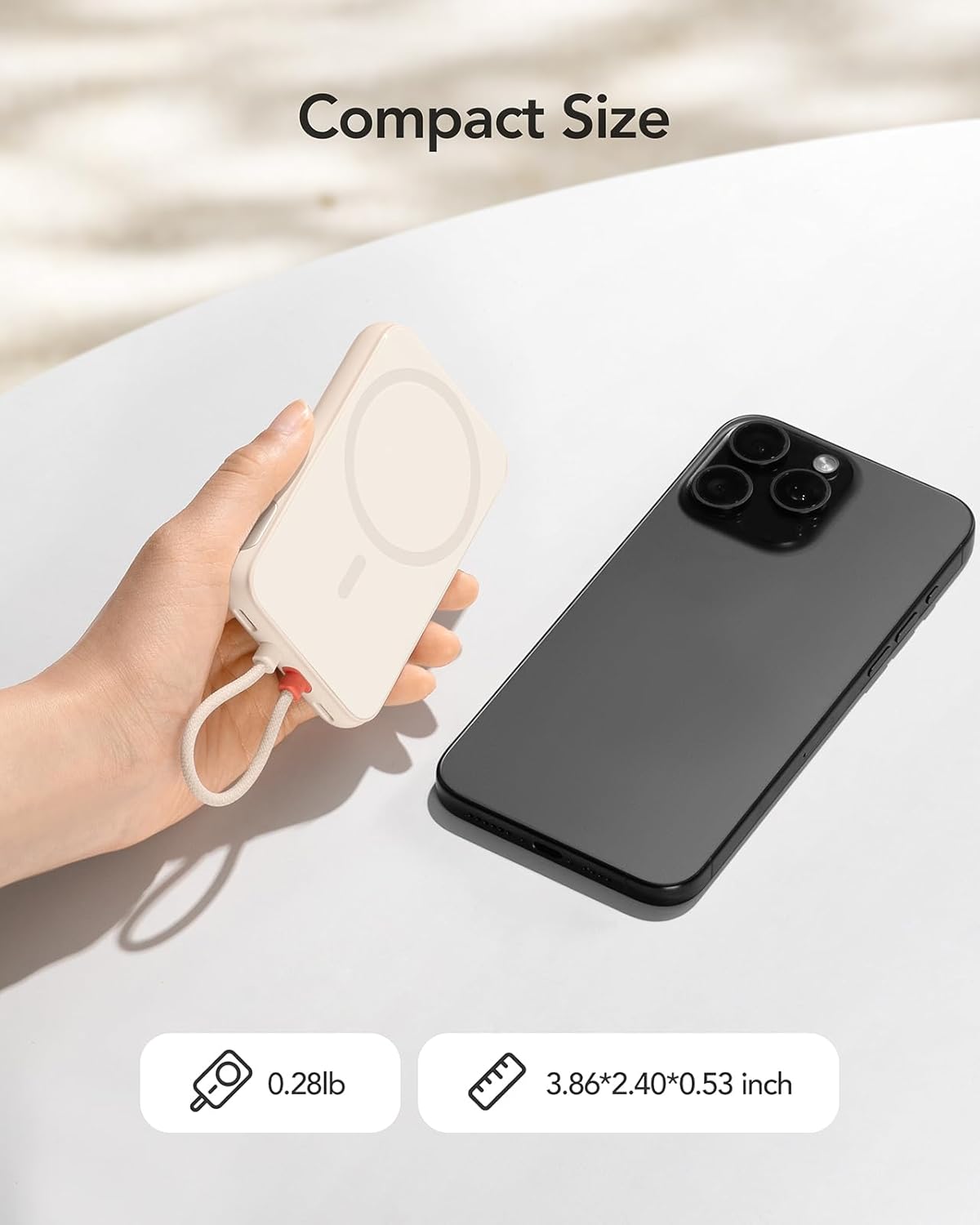
The Charmast C05S is a slim and lightweight power bank designed for portability and efficiency.
- طول و عرض: 3.86 x 2.40 x 0.53 انچ
- وزن: تقريبن 0.28 پائونڊ (5.9 آونس)
- بلٽ ان ڪيبل: Features an integrated Lightning cable for direct connection to compatible Apple devices.
- USB-C پورٽ: A versatile USB-C port for both input (recharging the power bank) and output (charging other devices).
- ڊجيٽل ڊسپلي An LED screen on the side indicates the remaining battery percentage.

4. Setup and Recharging the Power Bank
Before first use, fully charge your Charmast C05S Power Bank.
- USB-C پورٽ استعمال ڪندي: Connect the provided USB-C to USB-C cable to the power bank's USB-C port and to a compatible USB wall adapter (not included). The power bank will fully recharge in approximately 2.0 hours.
- Using the Built-in Lightning Cable: Connect the built-in Lightning cable to a compatible Lightning input port on a wall adapter. The power bank will fully recharge in approximately 3.5 hours.
The digital display will show the charging progress, indicating 100% when fully charged.

5. آپريٽنگ هدايتون
توهان جي ڊوائيسز کي چارج ڪرڻ لاء:
- For iPhone (Lightning devices): Pull out the built-in Lightning cable and connect it directly to your iPhone or other compatible Lightning device.
- For USB-C devices: Use the provided USB-C to USB-C cable. Connect one end to the power bank's USB-C port and the other end to your USB-C compatible device.
پاور بينڪ خودڪار طريقي سان توهان جي ڊوائس کي چارج ڪرڻ شروع ڪندو. ڊجيٽل ڊسپلي باقي بيٽري جي فيصد ڏيکاريندو.tagپاور بئنڪ جي e.


6. ڊجيٽل ڊسپلي
The integrated digital display provides real-time information about the power bank's battery level. It shows the remaining percentage, allowing you to easily monitor when it's time to recharge the power bank.
- To activate the display, press the on/off button located on the side of the power bank.
- The display will automatically turn off after a short period of inactivity to conserve power.
7. Universal Compatibility and Charging Speed
The Charmast C05S Power Bank offers broad compatibility and fast charging capabilities.
- بلٽ-ان لائيٽنگ ڪيبل: Universally compatible with iPhone 14, 13, 12, 11, 8, 7 series, and other Lightning-enabled devices.
- USB-C پورٽ: Compatible with iPhone 15 series, Samsung S24/S23/S22/S21/S20, Google Pixel series, other Android phones, and various low-current devices such as portable fans, neck fans, Bluetooth headphones, and heated vests.
- 20W PD فاسٽ چارج: Supports Power Delivery (PD) 20W fast charging, significantly reducing charging times for both your devices and the power bank itself.


8. سار سنڀال ۽ سنڀال
To ensure the longevity and optimal performance of your power bank:
- بيٽري جي سطح: Keep the power bank's battery level above 40% to improve overall battery life and maintain efficient charging speeds.
- اسٽوريج: پاور بئنڪ کي سڌي سج جي روشني ۽ انتهائي گرمي پد کان پري ٿڌي، سڪل جاءِ تي رکو.
- صفائي: پاور بينڪ جي ٻاهرين حصي کي صاف ڪرڻ لاءِ نرم، سڪل ڪپڙو استعمال ڪريو. سخت ڪيميڪلز يا رگڙيندڙ مواد استعمال ڪرڻ کان پاسو ڪريو.
- قطرن کان پاسو ڪريو: ڊوائيس کي ڦڙن ۽ اثرن کان بچايو، جيڪي اندروني حصن کي نقصان پهچائي سگهن ٿا.
9. مسئلا حل ڪرڻ
If you encounter issues with your Charmast C05S Power Bank, please refer to the following common solutions:
- ڊوائيس چارج نه ٿي رهي آهي: Ensure the power bank is sufficiently charged. Check that the charging cable (built-in Lightning or USB-C) is securely connected to both the power bank and your device. Try a different cable or device to isolate the issue.
- پاور بينڪ ري چارج نه ٿي رهيو آهي: Verify that the charging cable and wall adapter are functioning correctly. Ensure the cable is properly inserted into the power bank's input port.
- Digital display not showing: Press the on/off button on the side of the power bank to reactivate the display. If it remains off, the power bank might be fully depleted and requires recharging.
- سست چارج: Ensure you are using a 20W PD compatible wall adapter for optimal fast charging. Charging speed can also be affected by the device being charged and its current battery level.
10. وضاحتون
| خاصيت | تفصيل |
|---|---|
| ماڊل نمبر | سي 05 ايس |
| بيٽري جي گنجائش | 5000 مليamp ڪلاڪ (mAh) |
| پيداوار جي ماپ | 3.86 x 2.4 x 0.53 انچ |
| شيءِ جو وزن | 5.9 اونس |
| ان پٽ (USB-C) | 20W PD (Max) |
| ان پٽ (بجلي) | 10W (وڌ کان وڌ) |
| آئوٽ پُٽ (بلٽ ان لائيٽننگ ڪيبل) | 20W PD (Max) |
| آئوٽ پُٽ (USB-C پورٽ) | 20W PD (Max) |
| خاص خاصيتون | Built-in Cable, Digital Display, Fast Charging, Pocket Size, Ultra Slim |
11. وارنٽي ۽ سپورٽ
چارماسٽ مهيا ڪري ٿو 24 مهينن جي مدد for this product. If you encounter any problems or have questions, please contact us through Amazon. We are committed to resolving any issues within 24 hours.
12. حفاظت جي ڄاڻ
پراڊڪٽ کي نقصان پهچڻ يا پاڻ کي نقصان پهچڻ کان بچائڻ لاءِ مهرباني ڪري انهن حفاظتي هدايتن کي پڙهو ۽ ان تي عمل ڪريو:
- پاور بئنڪ کي پاڻي، نمي، يا انتهائي گرمي پد جي سامهون نه رکو.
- ڊوائيس کي جدا ڪرڻ، تبديل ڪرڻ، يا مرمت ڪرڻ جي ڪوشش نه ڪريو.
- ٻارن جي پهچ کان پري رکو.
- Avoid dropping or subjecting the power bank to heavy impacts.
- پاور بينڪ کي مقامي ضابطن جي مطابق ذميواري سان ضايع ڪريو. ان کي گھر جي ڪچري ۾ نه اڇلايو.


