تعارف
Welcome to the user manual for your OhO sunshine Smart Bluetooth Sunglasses & 4K Camera Sunglasses. This device combines high-quality sunglasses with advanced smart features, including Bluetooth audio connectivity and a 4K camera for capturing photos and videos. Please read this manual carefully to ensure proper use, optimal performance, and longevity of your product.

Image: OhO sunshine Smart Bluetooth Sunglasses, showcasing the integrated camera and various interchangeable lens options (black, clear, yellow, orange).
سيٽ اپ ڪريو
1. ڊوائيس کي چارج ڪرڻ
Before first use, fully charge your sunglasses.
- Locate the charging port, typically on one of the temples.
- Connect the provided USB charging cable to the sunglasses and a power source (e.g., computer USB port or wall adapter).
- The LED indicator will show charging status (e.g., red for charging, blue/green for fully charged).
- Charging time may vary, typically 1-2 hours for a full charge.
2. Inserting a MicroSD Card (for Camera Function)
A MicroSD card (not included) is required for recording videos and taking photos.
- Locate the MicroSD card slot, usually near the charging port.
- مائڪرو ايس ڊي ڪارڊ کي نرميءَ سان داخل ڪريو ۽ سون جي رابطن کي هيٺ ڪريو جيستائين اهو جاءِ تي ڪلڪ نه ڪري.
- Ensure the card is properly formatted (FAT32 recommended) for optimal performance.
3. بلوٽوٽ جوئر
Pair your sunglasses with your smartphone or other Bluetooth-enabled device for audio playback and calls.
- Ensure the sunglasses are charged and powered on.
- پنهنجي اسمارٽ فون تي بلوٽوت کي فعال ڪريو.
- Put the sunglasses into pairing mode (refer to specific button press combination in the operating section, usually holding the power button). The LED indicator will flash rapidly.
- On your smartphone, search for available Bluetooth devices and select "OhO sunshine" or similar name.
- Once paired, the LED indicator will change to a steady blue/green light.
آپريٽنگ هدايتون
پاور آن / آف
- پاور آن: پاور بٽڻ کي تقريباً 3 سيڪنڊن تائين دٻايو ۽ رکو جيستائين LED اشارو روشن نه ٿئي.
- بجلي بند: پاور بٽڻ کي تقريباً 5 سيڪنڊن تائين دٻايو ۽ رکو جيستائين LED اشارو بند نه ٿئي.
Camera Operation (Video Recording & Photo Capture)
Ensure a MicroSD card is inserted and formatted.
- Start Video Recording: With the device powered on, short press the Camera button. The LED indicator will flash slowly during recording.
- وڊيو رڪارڊنگ بند ڪريو: Short press the Camera button again. The LED indicator will return to standby mode.
- تصوير ڪڍو: While in standby mode, double-press the Camera button quickly. The LED indicator will flash once to confirm a photo has been taken.

Image: A man wearing the OhO sunshine Smart Bluetooth Sunglasses with blue mirrored lenses, demonstrating typical use.
Bluetooth Audio & Call Functions
- موسيقي هلايو/روڪ ڪريو: Short press the Multi-function button (often the same as Power button).
- اڳيون ٽريڪ: واليوم اپ بٽڻ کي ڊگھو دٻايو.
- پويون ٽريڪ: واليوم ڊائون بٽڻ کي ڊگھو دٻايو.
- جواب ڏيو ڪال: Short press the Multi-function button when a call comes in.
- ڪال ختم ڪريو: Short press the Multi-function button during a call.
- ڪال رد ڪريو: جڏهن ڪال اچي ته ملٽي فنڪشن بٽڻ کي گهڻو وقت دٻايو.
- حجم جي ترتيب: واليوم اپ (+) يا واليوم ڊائون (-) بٽڻن کي مختصر دٻايو.
سار سنڀال
صفائي
- لينس ۽ فريم کي صاف ڪرڻ لاءِ نرم، صاف مائڪرو فائيبر ڪپڙو استعمال ڪريو.
- For stubborn smudges, use a lens cleaning spray specifically designed for optical lenses.
- رگڙيندڙ مواد يا سخت ڪيميڪل استعمال ڪرڻ کان پاسو ڪريو، ڇاڪاڻ ته اهي لينس ۽ فريم کي نقصان پهچائي سگهن ٿا.
ذخيرو
- Store the sunglasses in their protective case when not in use to prevent scratches and damage.
- ڊوائيس کي گهڻي عرصي تائين انتهائي گرمي پد (گرم يا ٿڌو) يا سڌي سج جي روشني ۾ بي نقاب ڪرڻ کان پاسو ڪريو.
بيٽري جي سنڀال
- بيٽري جي زندگي کي وڌائڻ لاءِ، بيٽري کي بار بار مڪمل طور تي چارج ڪرڻ کان پاسو ڪريو.
- ڊوائيس کي باقاعدي چارج ڪريو، جيتوڻيڪ بار بار استعمال ۾ نه هجي.
- جيڪڏهن گهڻي عرصي تائين ذخيرو ڪري رهيا آهيو، ته اسٽوريج کان اڳ بيٽري کي تقريباً 50 سيڪڙو تائين چارج ڪريو.
مشڪلاتون
| مسئلو | ممڪن سبب | حل |
|---|---|---|
| ڊوائيس آن نه ٿيندي. | گھٽ بيٽري. | ڊوائيس مڪمل طور تي چارج ڪريو. |
| بلوٽوٿ ذريعي جوڙي نه ٿو سگهجي. | Sunglasses not in pairing mode; Bluetooth off on phone; interference. | Ensure sunglasses are in pairing mode. Turn phone's Bluetooth off/on. Move closer to phone. |
| ڪئميرا رڪارڊنگ/فوٽو نه ٿو وٺي. | No MicroSD card; card full; card not formatted; low battery. | Insert/replace MicroSD card. Format card. Charge device. |
| غريب آڊيو معيار. | Bluetooth interference; low battery; distance from paired device. | Reduce interference. Charge device. Stay within Bluetooth range. |
وضاحتون
- برانڊ: اوهه سج
- ماڊل: B0CP3XVQD7
- انداز: Smart Bluetooth Sunglasses & 4K Camera Sunglasses
- مواد: پلاسٽڪ
- ڪنٽرول قسم: ميڊيا ڪنٽرول
- تجويز ڪيل استعمال: Outdoor activities, sports, travel
- رابطي: Bluetooth 5.0 (implied by "Smart bluetooth sunglasses")
- ڪئميرا قرارداد: 4K (implied by "4k Camera Sunglasses")
- اسٽوريج: Supports MicroSD card (capacity not specified, but 256GB mentioned in an image)
- وزن: 37g (from image PT05)
- پاڻي جي مزاحمت: Yes (from image PT05)
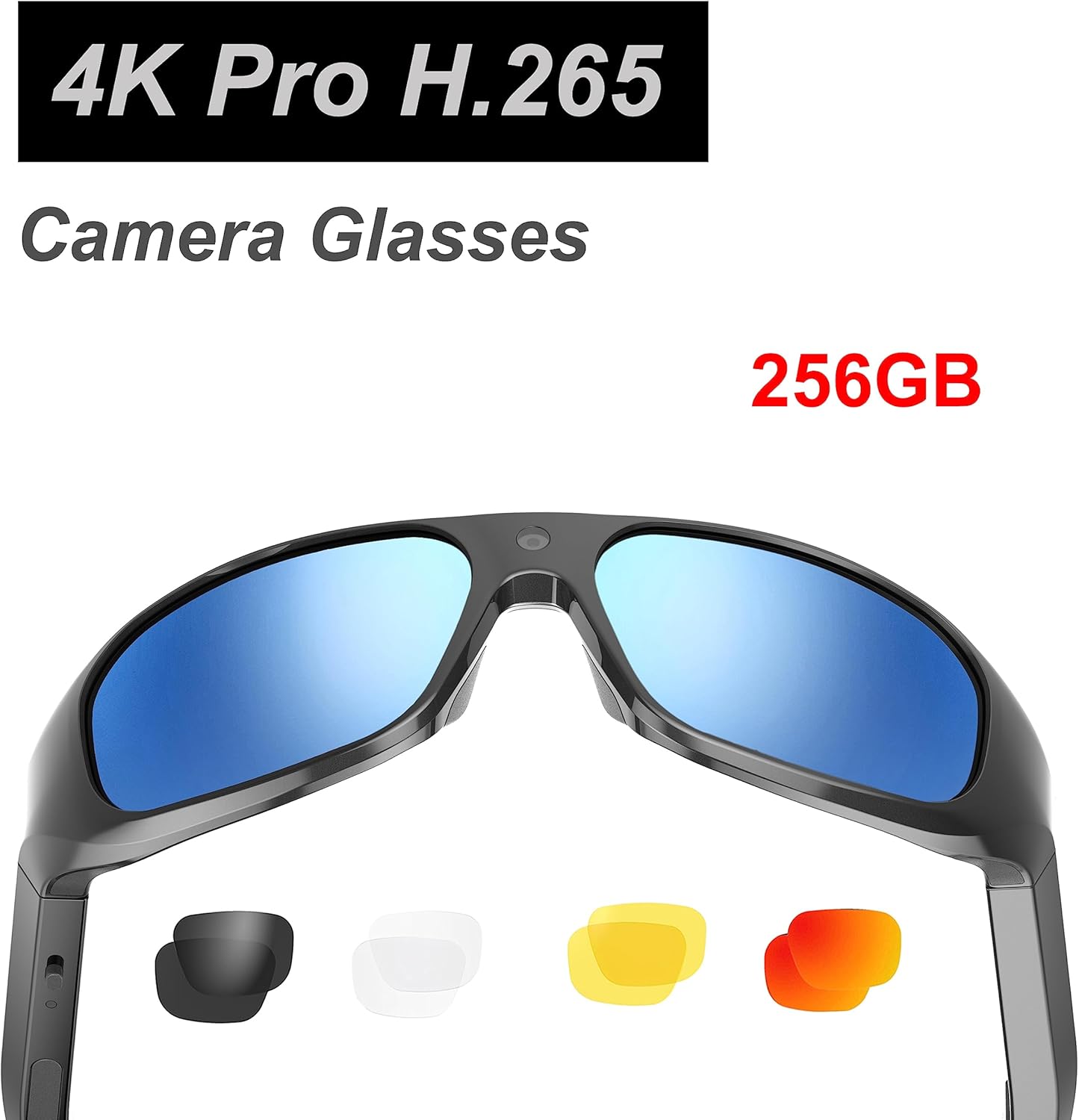
Image: Product packaging highlighting "4K Pro H.265 Camera Glasses" and "256GB" storage capability.
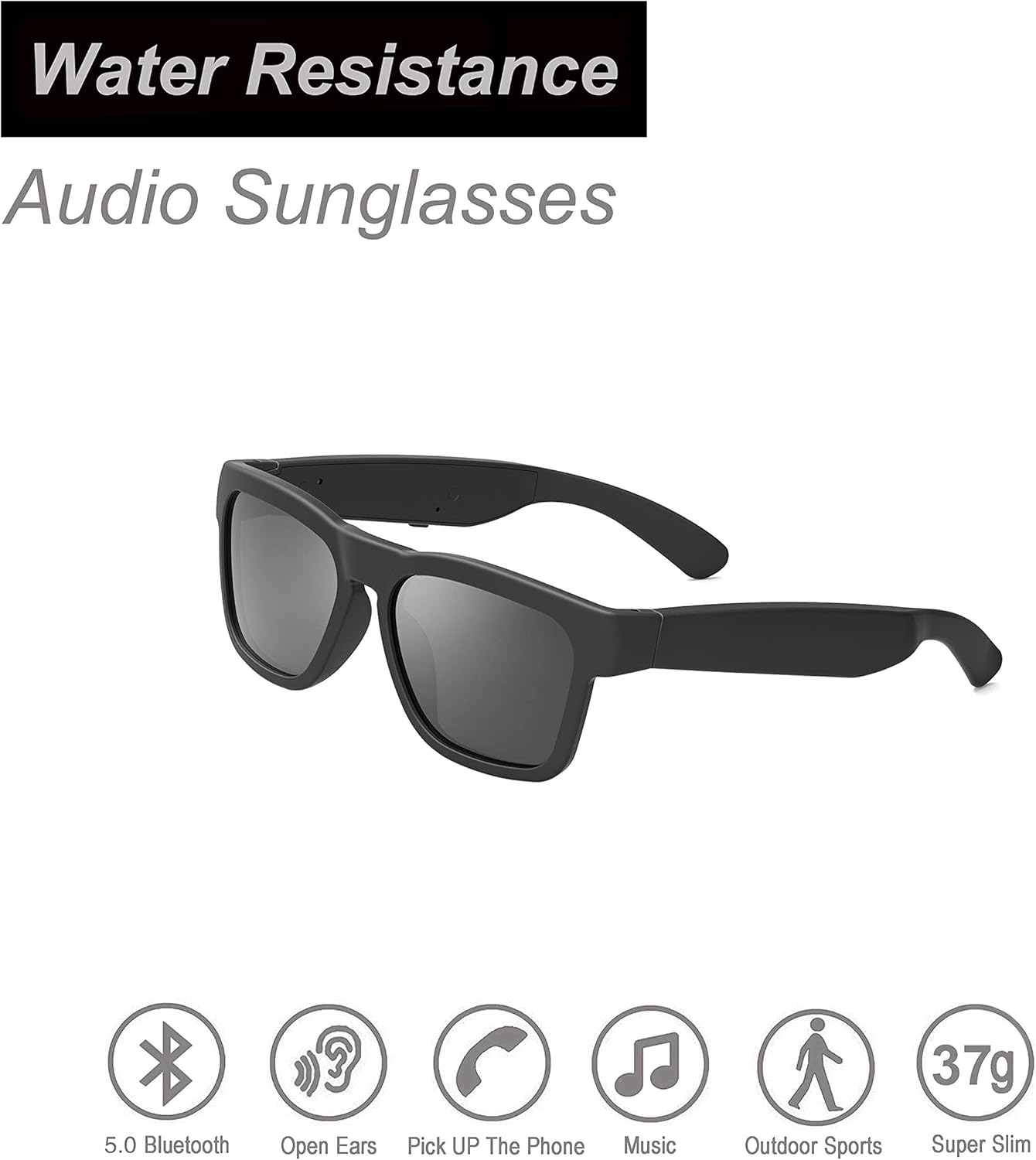
Image: OhO sunshine Audio Sunglasses highlighting "Water Resistance" and features like 5.0 Bluetooth, Open Ears, Pick Up The Phone, Music, Outdoor Sports, and Super Slim (37g).
وارنٽي ۽ سپورٽ
For warranty information and technical support, please refer to the official OhO sunshine webسائيٽ تي وڃو يا سڌو سنئون انهن جي ڪسٽمر سروس سان رابطو ڪريو. ڪنهن به وارنٽي دعوائن لاءِ خريداري جي ثبوت طور پنهنجي خريداري جي رسيد رکو.
آن لائن سپورٽ: Visit the OhO sunshine store on Amazon or their official webسوالن ۽ سپورٽ وسيلن لاءِ سائيٽ.OhO sunshine Amazon Store


