1. تعارف
خريد ڪرڻ لاءِ مهربانيasing the Claiks Electric Standing Desk. This manual provides essential information for the safe assembly, operation, and maintenance of your new desk. Please read these instructions carefully before use and retain them for future reference.

Image 1.1: The Claiks Electric Standing Desk, illustrating its dimensions (120cm width, 60cm depth, 72-118cm height) and integrated features like storage hooks and cable clips.
2. حفاظت جي ڄاڻ
محفوظ آپريشن کي يقيني بڻائڻ ۽ زخم يا نقصان کي روڪڻ لاءِ، مھرباني ڪري ھيٺ ڏنل حفاظتي ھدايتن تي عمل ڪريو:
- اوچائي جي ترتيب دوران ٻارن ۽ پالتو جانورن کي ڊيسڪ کان پري رکو.
- Ensure no obstacles are in the path of the desk's movement (up or down).
- ڊيسڪ کي اوور لوڊ نه ڪريو. وڌ ۾ وڌ لوڊ گنجائش 80 ڪلوگرام (176.4 پائونڊ) آهي.
- ڊيسڪ تي نه ويهو ۽ نه بيهو.
- Only use the provided power adapter and cable.
- If the desk makes unusual noises or movements, discontinue use immediately and contact customer support.
- مائع کي سڌو سنئون ڪنٽرول پينل تي يا بجلي جي حصن جي ويجهو رکڻ کان پاسو ڪريو.
3. پيڪيج مواد
Before assembly, verify that all components are present and undamaged. If any parts are missing or damaged, please contact Claiks customer support.

Image 3.1: All components included in the Claiks Electric Standing Desk package, laid out for assembly. This includes the tabletop (in two sections), leg frames, motor, control panel, screws, and tools.
اجزاء جي فهرست:
- Tabletop (2 sections)
- ٽنگ فريم (2)
- Crossbar/Support Beam
- Motor and Control Box
- ڪنٽرول پينل
- پاور اڊاپٽر ۽ ڪيبل
- Storage Hooks (2)
- ڪيبل ڪلپس
- اسيمبلي هارڊويئر (اسڪرو، واشر، ايلن رنچ)
4. سيٽ اپ ۽ اسيمبلي
Assembly typically requires one person. An electric drill (not included) is recommended for faster and more secure screw fastening, especially for the tabletop.
- انپيڪ اجزاء: پيڪنگ مان سڀني حصن کي احتياط سان هٽايو ۽ انهن کي صاف، نرم مٿاڇري تي رکو ته جيئن ڇڪڻ کان بچي سگهجي.
- ٽنگ فريم گڏ ڪريو: Attach the feet to the bottom of each leg column using the provided screws.
- Connect Crossbar: Secure the crossbar/support beam between the two leg columns. Ensure all screws are tightened.
- Attach Motor and Control Box: Mount the motor and control box to the designated positions on the frame, typically under the tabletop area. Connect the motor cables to the control box.
- Position Tabletop: Place the tabletop sections upside down on a soft surface. Carefully align the assembled frame onto the tabletop.
- Secure Tabletop: Fasten the tabletop to the frame using the provided screws. Ensure the tabletop sections are flush and securely joined.
- ڪنٽرول پينل انسٽال ڪريو: Mount the control panel to the front edge of the tabletop, typically on the right side, and connect its cable to the control box.
- لوازمات شامل ڪريو: Install the storage hooks and cable clips as desired.
- پاور Connectنيو: Plug the power adapter into the control box and then into a wall outlet.
- Initial Calibration (if necessary): Refer to the operating instructions for initial setup or calibration steps if the desk does not respond immediately.
5. آپريٽنگ هدايتون
Your Claiks Electric Standing Desk features intuitive controls for height adjustment and memory functions.

Image 5.1: The multi-function control panel with LED display, memory buttons (1, 2, 3), and up/down adjustment buttons.
5.1 اونچائي جي ترتيب
- مٿي/هي Butيون بٽڻ: استعمال ڪريو مٿي (▲) ۽ هيٺ (▼) arrow buttons to adjust the desk height. The desk will move smoothly at a speed of 20 mm/s.
- The adjustable height range is from 72 cm (28.3 inches) to 118 cm (46.5 inches).
- موجوده اوچائي LED اسڪرين تي ڏيکاريل آهي.
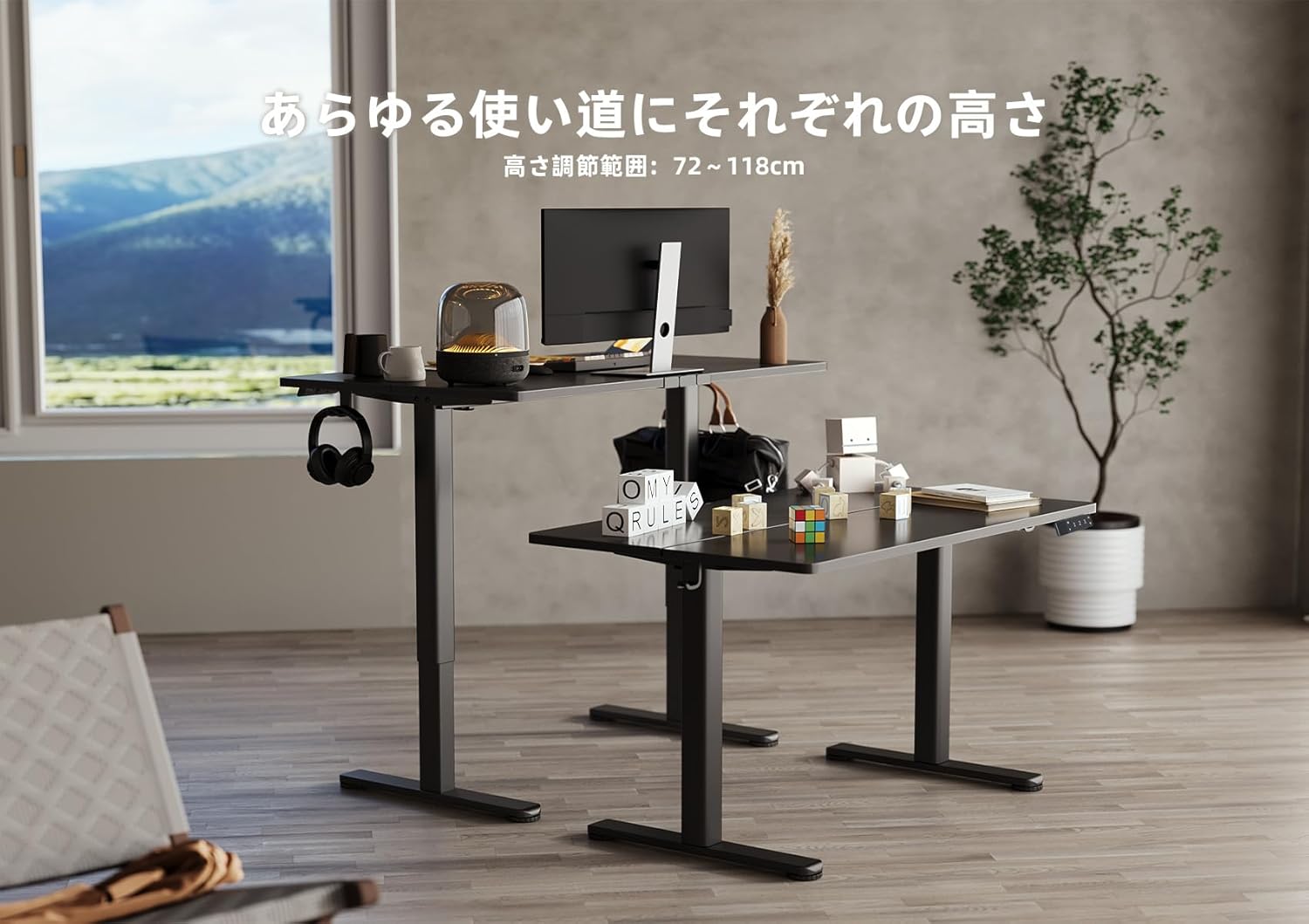
Image 5.2: Two Claiks Electric Standing Desks demonstrating the adjustable height range, suitable for various uses.
5.2 ميموري فنڪشن
The desk can store up to three preferred height settings.
- ياداشت جي پوزيشن مقرر ڪريو: مٿي/هيٺ بٽڻن کي استعمال ڪندي ڊيسڪ کي پنهنجي گهربل اوچائي تي ترتيب ڏيو.
- کي دٻايو "م" button. The LED display will flash.
- 3 سيڪنڊن اندر، نمبر بٽڻن مان هڪ کي دٻايو ("1", "2"، يا "3") to save the current height to that position. The display will show "S-1", "S-2", or "S-3" to confirm.
- ياداشت جي پوزيشن کي ياد ڪريو: بس لاڳاپيل نمبر بٽڻ کي دٻايو ("1", "2"، يا "3"). ڊيسڪ خودڪار طريقي سان محفوظ ڪيل اوچائي ڏانهن منتقل ٿي ويندو.
6. سار سنڀال
Proper maintenance ensures the longevity and optimal performance of your Claiks Electric Standing Desk.
- صفائي: The tabletop is made of melamine resin, which is resistant to water, heat, and dirt. Wipe the surface with a soft, damp ڪپڙو ۽ هلڪو صابڻ. گھڙڻ وارا صاف ڪندڙ يا سخت ڪيميڪلز کان پاسو ڪريو.
- ڪيبل جو انتظام: Regularly check and organize cables to prevent tangling or damage, especially during height adjustments. Use the provided cable clips.
- چڪاس: وقت بوقت سڀني پيچرن ۽ ڪنيڪشنن کي چيڪ ڪريو ته جيئن پڪ ٿئي ته اهي تنگ آهن. جيڪڏهن ضروري هجي ته ٻيهر مضبوط ڪريو.
- موٽر سنڀال: The motor is designed for durability. Avoid obstructing its movement or attempting to disassemble it.
7. مسئلا حل ڪرڻ
جيڪڏهن توهان کي پنهنجي ڊيسڪ سان مسئلا درپيش اچن ٿا، ته هيٺ ڏنل عام مسئلن ۽ حلن جو حوالو ڏيو:
| مسئلو | ممڪن سبب | حل |
|---|---|---|
| ڊيسڪ حرڪت نٿي ڪري. | بجلي ڪيبل ڪٽيل؛ اوورلوڊ؛ موٽر ۾ غلطي. | Check power connections. Reduce weight on desk. Unplug for 10 seconds, then plug back in to reset. |
| ڊيسڪ غير مساوي طور تي هلي ٿي يا غير معمولي شور ڪري ٿي. | ڍلو ڳنڍ؛ رڪاوٽ؛ وزن جي غير برابر ورڇ. | Check all assembly screws. Ensure no objects are interfering with leg movement. Redistribute weight evenly. |
| ڪنٽرول پينل تي غلطي ڪوڊ ڏيکاريل آهي. | مخصوص سسٽم جي غلطي. | Refer to the specific error code in a more detailed troubleshooting guide (if available) or contact customer support. Often, a power cycle (unplug and replug) can resolve temporary errors. |
If the problem persists after attempting these solutions, please contact Claiks customer support for assistance.
8. وضاحتون
- برانڊ: ڪليڪس
- ماڊل نمبر: P1.01.001.0004.JP
- پيداوار جي ماپ: 120 cm (Width) x 60 cm (Depth) x 70 cm (Height, minimum static)
- Adjustable قد جي حد: 72 cm - 118 cm (28.3 inches - 46.5 inches)
- کڻڻ جي رفتار: 20 mm/s (0.8 inches/s)
- وڌ ۾ وڌ لوڊ گنجائش: 80 ڪلوگرام (176.4 پائونڊ)
- شيء جو وزن: 20.8 ڪلو
- ٽيبل ٽاپ مواد: Melamine Resin
- بنيادي مواد: ڪاربان اسٽيل
- رنگ: ڪارو
- خاص خاصيتون: Height Adjustment, Memory Function (3 presets), Compact, Scratch Resistant
- ڪمري جو قسم: Study Room, Home Office

Image 8.1: The Claiks Electric Standing Desk demonstrating its robust 80kg load capacity.

Image 8.2: Illustration of the desk's quiet operation, comparing its 45dB noise level to common sounds.
9. وارنٽي ۽ سپورٽ
Claiks provides a 3 سالن جي ڪاريگر وارنٽي for this product. This warranty covers repairs or exchanges for manufacturing defects during the warranty period.
For customer support, repairs, or exchanges, please contact Claiks directly. Our customer support team is available in multiple languages, including English and Japanese, to assist you with any inquiries or issues.
مھرباني ڪري وارنٽي دعوائن لاءِ خريد ڪرڻ جو پنھنجو ثبوت رکو.


