1. تعارف
This manual provides instructions for the Jolly Line JL1719/COMP Universal TV Remote Control, designed for compatibility with Philips televisions. This remote is ready to use without requiring any programming.
اهم خاصيتون شامل آهن:
- Universal replacement remote control for Philips TV.
- Ready to use; no programming required.
- آرام سان سنڀالڻ لاءِ Ergonomic ڊيزائن.
2. سيٽ اپ
2.1 بيٽري لڳائڻ
ريموٽ ڪنٽرول کي ٻه (2) AAA 1.5V بيٽريون گهرجن (شامل نه آهن). انهن کي انسٽال ڪرڻ لاءِ انهن قدمن تي عمل ڪريو:
- ريموٽ ڪنٽرول جي پٺيءَ تي بيٽري جي دٻي جي احاطي کي ڳولھيو.
- ڍڪ کي هيٺئين طرف سلائڊ ڪريو يا ان کي کولڻ لاءِ لچ کي دٻايو.
- Insert two AAA batteries, ensuring the positive (+) and negative (-) terminals match the markings inside the compartment.
- بيٽري جي ڪمپارٽمينٽ جي ڍڪ کي تبديل ڪريو، ان کي واپس جاءِ تي سلائڊ ڪريو جيستائين اهو محفوظ طور تي ڪلڪ نه ڪري.
اهم: Ensure correct battery polarity. Do not mix old and new batteries, or different types of batteries.
2.2 شروعاتي استعمال
This Jolly Line remote control is pre-programmed for Philips TVs and does not require any configuration. Once batteries are installed, it is ready for immediate use with your compatible Philips television.
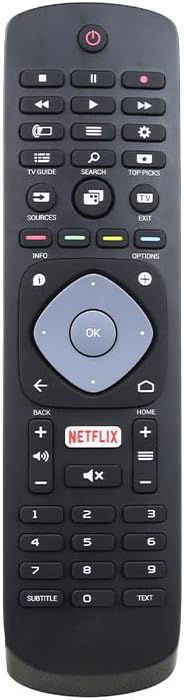
شڪل 1: سامهون view of the Jolly Line JL1719/COMP Universal TV Remote Control, showing all buttons and their layout.
3. آپريٽنگ هدايتون
Point the remote control directly at your Philips TV's infrared sensor. Ensure there are no obstructions between the remote and the TV.
3.1 Common Button Functions
- طاقت (🏻): ٽي وي آن يا آف ڪري ٿو.
- نمبر بٽڻ (0-9): سڌو سنئون چينل چونڊيندو آهي.
- چينل مٿي / هيٺ (▲/▼): چينلن کي ترتيب وار تبديل ڪري ٿو.
- حجم مٿي/هيٺ (+/-): ٽي وي جي مقدار کي ترتيب ڏئي ٿو.
- خاموش (🔇): ٽي وي جي آواز کي خاموش يا غير خاموش ڪري ٿو.
- ذريعو / ان پٽ: Selects different input sources (HDMI, AV, etc.).
- نيويگيشن بٽڻ (مٿي، هيٺ، کاٻي، ساڄي): Navigates menus and on-screen options.
- ٺيڪ / داخل ڪريو: مينيو ۾ چونڊ جي تصديق ڪري ٿو.
- واپس / واپسي: پوئين اسڪرين يا مينيو ڏانهن واپس اچي ٿو.
- گھر (⌂): ٽي وي جي مين مينيو يا سمارٽ ٽي وي انٽرفيس تائين رسائي حاصل ڪري ٿو.
- Netflix: Direct access button for the Netflix application.
- ڄاڻ: موجوده پروگرام يا ان پٽ بابت معلومات ڏيکاري ٿو.
- اختيارن: Accesses context-sensitive options for the current screen.
- ٽي وي ھدايت: اليڪٽرانڪ پروگرام گائيڊ کوليو.
- ڳولا: Initiates a search function on the TV.
- مٿيون چونڊون: Accesses recommended content or features.
- نڪرڻ: موجوده مينيو يا ايپليڪيشن مان نڪرندو آهي.
- Play/Pause, Stop, Rewind, Fast Forward: ميڊيا پلے بیک کي ڪنٽرول ڪري ٿو.
- ذيلي عنوان: Toggles subtitles on/off.
- متن: Accesses teletext or similar text-based services.
Note: Specific button functionalities may vary slightly depending on your Philips TV model.
4. سار سنڀال
4.1 ريموٽ ڪنٽرول کي صاف ڪرڻ
پنهنجي ريموٽ ڪنٽرول کي صاف ڪرڻ لاءِ، نرم، سڪل ڪپڙو استعمال ڪريو. ضدي مٽيءَ لاءِ، ٿورو ڊيampڪپڙي کي پاڻي يا نرم، غير رگڙيندڙ صاف ڪندڙ سان ڌوئڻ ڏيو. سخت ڪيميڪل يا رگڙيندڙ مواد استعمال ڪرڻ کان پاسو ڪريو، ڇاڪاڻ ته اهي ريموٽ جي مٿاڇري يا اندروني حصن کي نقصان پهچائي سگهن ٿا.
4.2 بيٽري مٽائڻ
Replace batteries when the remote control's response becomes sluggish or stops working. Refer to Section 2.1 for battery installation instructions. Always dispose of used batteries responsibly according to local regulations.
5. مسئلا حل ڪرڻ
جيڪڏهن توهان کي پنهنجي ريموٽ ڪنٽرول سان مسئلا درپيش اچن ٿا، ته هيٺ ڏنل مسئلا حل ڪرڻ جا قدم آزمايو:
- ريموٽ جواب نه ڏئي رهيو آهي:
- چيڪ ڪريو ته بيٽريون صحيح پولارٽي سان صحيح طرح سان داخل ڪيون ويون آهن.
- بيٽرين کي نئين AAA بيٽرين سان تبديل ڪريو.
- پڪ ڪريو ته ريموٽ ڪنٽرول ۽ ٽي وي جي انفراريڊ سينسر جي وچ ۾ ڪا به رڪاوٽ نه آهي.
- پڪ ڪريو ته توهان ٽي وي سينسر جي اثرائتي حد اندر آهيو.
- ڪجھ بٽڻ ڪم نه ڪري رهيا آهن:
- This remote is designed for Philips TVs. Ensure your TV is a Philips model.
- ريموٽ ڪنٽرول کي صاف ڪريو، خاص طور تي غير جوابي بٽڻن جي چوڌاري، ڪنهن به مٽي يا ملبي کي هٽائڻ لاءِ.
- Some advanced functions might not be supported by all Philips TV models.
- TV responds intermittently:
- هي گهٽ بيٽري پاور جي نشاندهي ڪري سگهي ٿو. بيٽريون تبديل ڪريو.
- Ensure a clear line of sight to the TV.
If the problem persists after trying these steps, please refer to the support information in Section 7.
6. وضاحتون
| خاصيت | تفصيل |
|---|---|
| ماڊل نمبر | JL1719/COMP (Manufacturer Part Number), 33-03-0034 (Item Model Number) |
| برانڊ | GBC (Jolly Line Compatible Series) |
| مطابقت | فلپس ٽي وي |
| بيٽرين جي ضرورت آهي | 2 x AAA 1.5V (شامل نه آهي) |
| پيداوار جي ماپ | 7.09 x 1.97 x 0.79 انچ (1.5 x 5.3 x 20 سينٽي) |
| شيءِ جو وزن | 3.52 اونس |
| رنگ | ڪارو |
| خاص خصوصيت | Ergonomic, Pre-Programmed |
| وڌ ۾ وڌ سپورٽ ٿيل ڊوائيسز | 1 (ٽيليويزن) |

Figure 2: The Jolly Line JL1719/COMP Universal TV Remote Control shown within its retail packaging.
7. وارنٽي ۽ سپورٽ
7.1 وارنٽي ڄاڻ
Specific warranty details for the Jolly Line JL1719/COMP remote control are typically provided at the point of purchase or within the product packaging. Please retain your proof of purchase for any warranty claims. For detailed warranty terms, contact the seller or manufacturer directly.
7.2 ڪسٽمر سپورٽ
For further assistance, technical support, or inquiries regarding your Jolly Line JL1719/COMP Universal TV Remote Control, please contact the retailer from whom you purchased the product or the manufacturer, GBC. Contact information can usually be found on the product packaging or the seller's webسائيٽ.


