تعارف
The Logitech K585 Multi-Device Slim Wireless Keyboard is designed for seamless multi-tasking across various devices. This manual provides comprehensive instructions for setting up, operating, maintaining, and troubleshooting your keyboard to ensure optimal performance and longevity.

The Logitech K585 keyboard, showcasing its slim design and rose color, with a built-in cradle for devices.
دٻي ۾ ڇا آهي
پڪ ڪريو ته سڀئي جزا توهان جي پيڪيج ۾ موجود آهن:
- Logitech K585 ملٽي ڊيوائس سلم وائرليس ڪي بورڊ
- 2 AAA batteries (pre-installed or separate)
- Logitech Unifying USB receiver
- User documentation (this manual)

An illustration of the items included in the product packaging: the K585 keyboard and two AAA batteries.
سيٽ اپ ڪريو
1. بيٽري لڳائڻ
The keyboard requires two AAA batteries for operation. If not pre-installed, open the battery compartment located on the top edge of the keyboard, insert the batteries, and close the compartment. The Unifying USB receiver is also stored in this compartment.
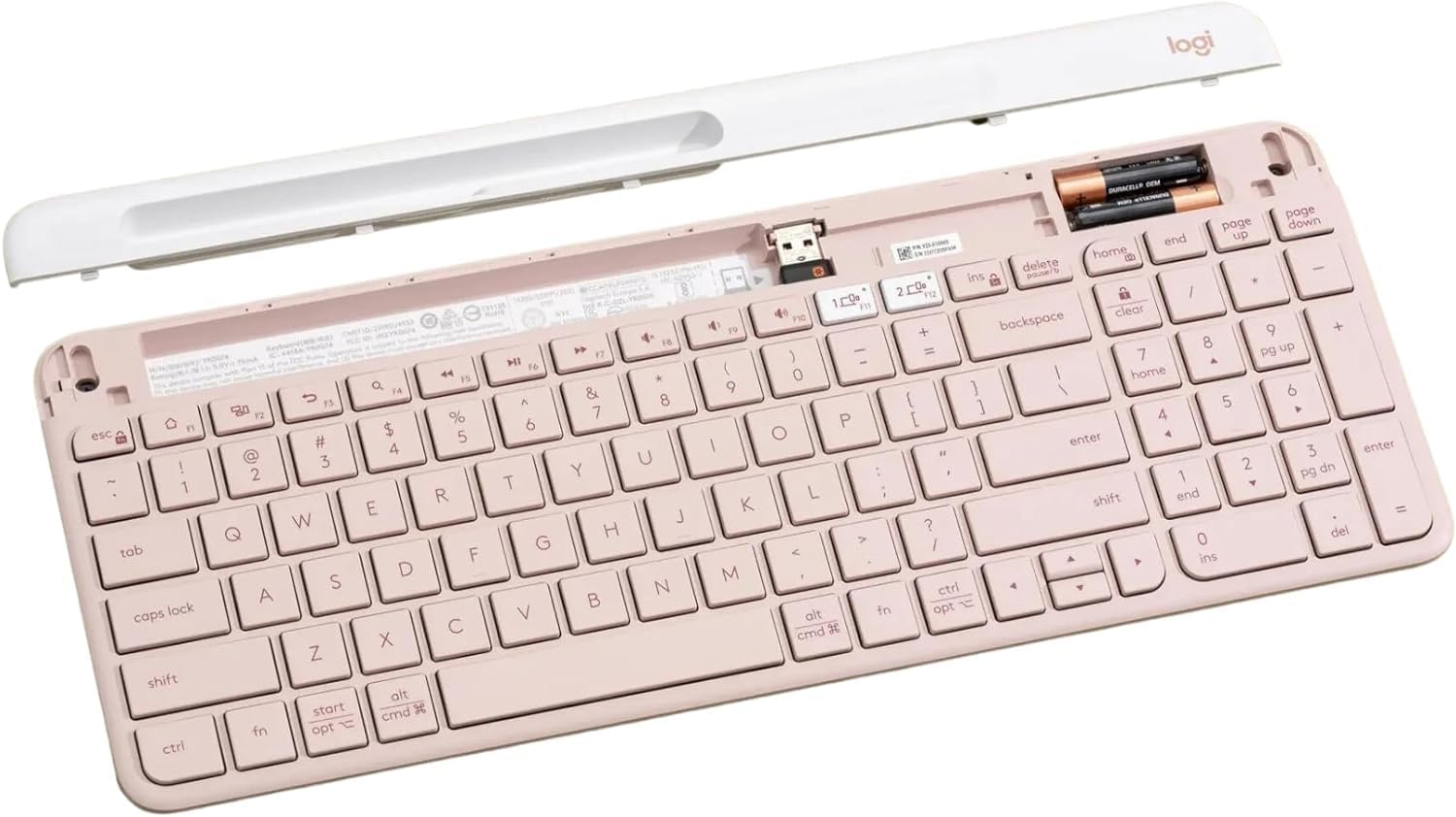
اندروني view of the keyboard, highlighting the battery slots and the dedicated storage for the USB receiver.
2. Connecting via USB Receiver
- Remove the Unifying USB receiver from the battery compartment.
- USB رسيور کي توهان جي ڪمپيوٽر تي موجود USB پورٽ ۾ پلگ ان ڪريو.
- Turn on the keyboard using the power switch located on the right side.
- ڪيبورڊ خودڪار طريقي سان توهان جي ڊوائيس سان ڳنڍجي وڃي.
3. بلوٽوت ذريعي ڳنڍڻ
The K585 keyboard supports Bluetooth Low Energy (BLE) for wireless connection.
- پڪ ڪريو ته ڪيبورڊ فعال آهي.
- Press and hold one of the Easy-Switch keys (1 or 2) for three seconds until the LED light above the key starts blinking rapidly. This indicates pairing mode.
- On your device (computer, tablet, smartphone), go to Bluetooth settings and select
لاڳاپيل دستاويز - K585 ROSE

Logitech K585 ملٽي ڊيوائس ڪي بورڊ سيٽ اپ گائيڊ
Logitech K585 ملٽي ڊيوائس سلم وائرليس ڪي بورڊ لاءِ جامع سيٽ اپ گائيڊ. بيٽريون ڪيئن انسٽال ڪجي، USB رسيور يا بلوٽوٿ ذريعي ڪنيڪٽ ڪجي، ڪيترن ئي ڊوائيسز سان جوڙو ٺاهيو وڃي، ۽ OS لي آئوٽ چونڊيو وڃي.
Logitech K480 ملٽي ڊيوائس بلوٽوٿ ڪي بورڊ يوزر مينوئل
مختلف آپريٽنگ سسٽمز ۾ ڪمپيوٽرن، ٽيبليٽ ۽ اسمارٽ فونز سان بيحد آپريشن لاءِ Logitech K480 ملٽي ڊيوائس بلوٽوٿ ڪي بورڊ کي سيٽ اپ ڪرڻ، ڳنڍڻ ۽ مسئلو حل ڪرڻ لاءِ هڪ جامع گائيڊ.
Logitech K780 ملٽي ڊيوائس ڪي بورڊ: خاصيتون، سيٽ اپ، ۽ ڪنيڪٽيوٽي گائيڊ
Explore the Logitech K780 Multi-Device Keyboard. This guide covers its features, how to connect to computers, phones, and tablets via Bluetooth Smart or Unifying receiver, and enhanced functions for various operating systems.
Logitech K780 ملٽي ڊيوائس ڪي بورڊ: خاصيتون، ڪنيڪٽيوٽي، ۽ سيٽ اپ گائيڊ
Logitech K780 ملٽي ڊيوائس ڪي بورڊ دريافت ڪريو، هڪ ورسٽائل ڪي بورڊ جيڪو ڪمپيوٽرن، اسمارٽ فونز ۽ ٽيبليٽز جي وچ ۾ بيحد سوئچنگ لاءِ ٺهيل آهي. هي گائيڊ ان جي خاصيتن، ڊبل ڪنيڪٽوٽي آپشنز (بلوٽوٿ اسمارٽ ۽ يونيفائنگ رسيور)، بهتر ڪيل ڪمن، ۽ مختلف آپريٽنگ سسٽمز لاءِ سيٽ اپ هدايتن جي تفصيل ڏئي ٿو.
Tastiera Logitech K780 ملٽي ڊيوائس: Funzionalità، Connettività ۽ Layout
Guida completa alla tastiera Logitech K780 Multi-Divice, che copre le sue funzionalità, come collegarla a più dispositivi tramite Bluetooth Smart e Unifying, funzioni ottimizzate e doppio layout per diversi system operativi.
Logitech K780 ملٽي ڊيوائس ڪي بورڊ: توهان جي سڀني ڊوائيسز لاءِ بي عيب ڪنيڪٽوٽي
Explore the Logitech K780 Multi-Device Keyboard. Learn how to connect and use this versatile keyboard with your computer, tablet, and smartphone via Unifying or Bluetooth Smart for enhanced productivity. Discover its features, setup, and multi-device pairing.