1. تعارف
Thank you for choosing the ATTACK SHARK Ajazz AK820 Mechanical Keyboard. This 75% TKL keyboard is designed for gaming and productivity, featuring hot-swappable switches, customizable RGB backlighting, and a convenient multi-function knob. This manual provides detailed instructions for setup, operation, maintenance, and troubleshooting to ensure optimal performance and longevity of your keyboard.
2. اهم خاصيتون
- 75٪ لي آئوٽ (82 ڪيز): Compact design retaining essential arrow and function keys, optimizing desk space. Features N-key rollover for simultaneous key presses.
- Multi-Function Metal Knob: Allows independent control of volume level and mute function. Compatible with Mac and Windows operating systems.
- Gasket Mounted Design: Coupled with a Flex-cut PC plate and 5 layers of sound insulation (Poron sandwich cotton, IXPE under-axis pad, PET premium sound pad, bottom cotton, bottom silicone) to maximally reduce noise and provide a softer, more elastic typing feel.
- Hot-Swappable Mechanical Sea Salt Switches: High-quality PCB supports 3/5-pin hot-swap, allowing easy switch replacement without soldering. Pre-lubed Sea Salt Linear switches offer a smooth and pleasing typing experience with a 50 million keystroke lifespan.
- آر جي بي بيڪ لائيٽنگ: South-facing LEDs with 1.6M RGB. Offers 20 lighting effects changeable via "FN+|" and customizable via driver software. Double-shot PBT keycaps provide superior shine-through.
3. پيڪيج مواد
- ATTACK SHARK Ajazz AK820 Mechanical Keyboard
- USB-سي ڪيبل
- 2-ان-1 ڪي ڪيپ/سوئچ پلر

Image 1: The ATTACK SHARK Ajazz AK820 Mechanical Keyboard and its included USB-C cable.

تصوير 2: هڪ اوورview highlighting the 82-key layout and key features like Knob Design, Gasket Mount, PBT Keycaps, RGB, 75% Layout, and Hot Swap capability.
4. سيٽ اپ گائيڊ
4.1 ڪي بورڊ کي ڳنڍڻ
- Locate the USB-C port on the back or side of the keyboard.
- مهيا ڪيل USB-C ڪيبل جي هڪ پڇاڙي کي ڪيبورڊ سان ڳنڍيو.
- Connect the other end of the USB-C cable to an available USB port on your computer (Laptop or PC).
- The keyboard is plug-and-play and should be automatically recognized by your operating system (Windows/Mac).

Image 3: The keyboard displaying its RGB backlighting, illustrating the 16.8 million colors and FN key combinations for controlling lighting modes.
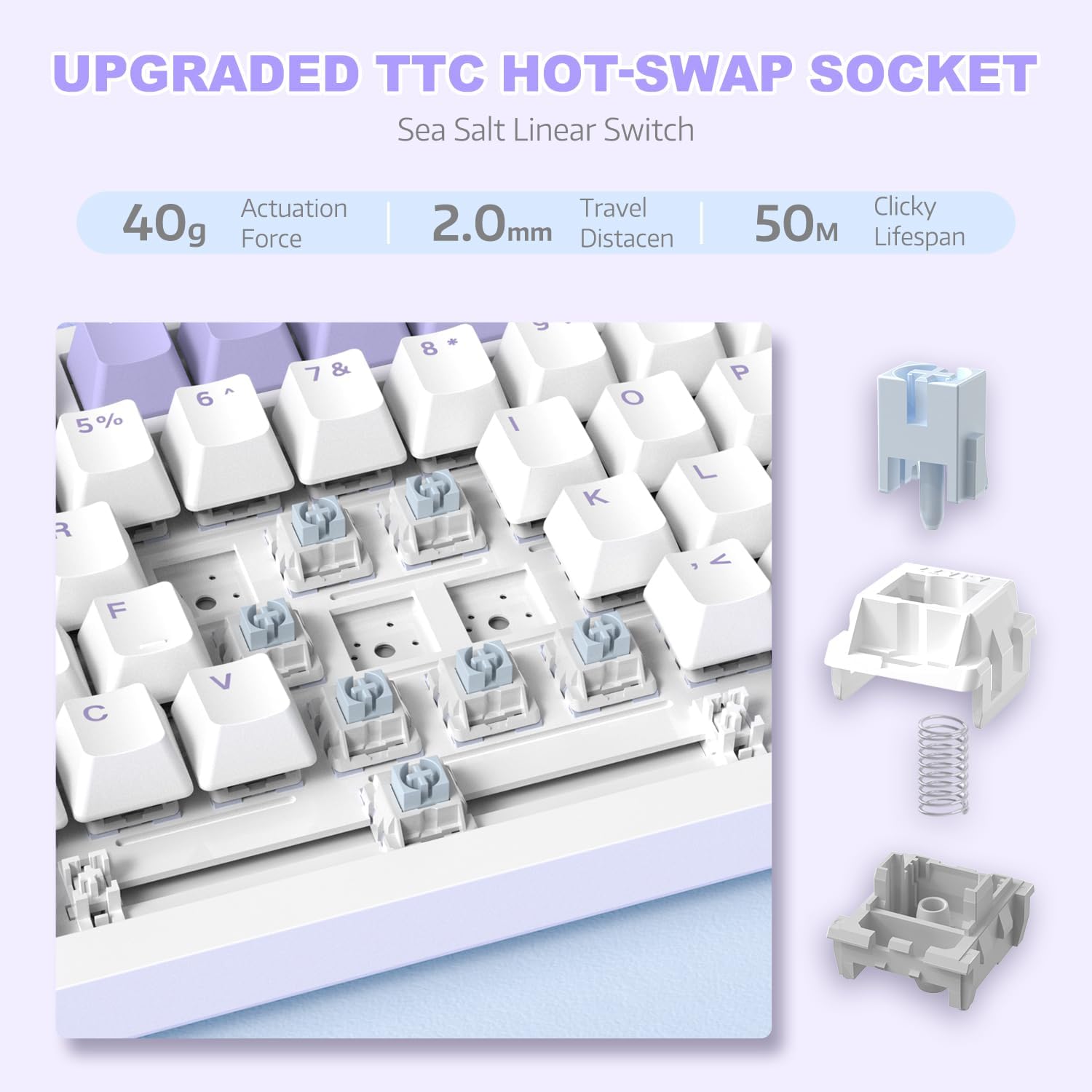
تصوير 4: هڪ تفصيلي view of the hot-swappable switch socket, demonstrating how switches can be easily removed and replaced.
5. آپريٽنگ هدايتون
5.1 Multi-Function Knob Control
The metal knob located on the top right of the keyboard provides convenient multimedia control:
- Turn Clockwise: حجم وڌايو.
- Turn Counter-clockwise: حجم گھٽايو.
- ھيٺ دٻايو: آڊيو کي خاموش/غير خاموش ڪريو.

Image 5: The multimedia knob, illustrating its functions for adjusting volume and muting audio.
5.2 آر جي بي بيڪ لائيٽنگ ڪنٽرول
The keyboard features vibrant RGB backlighting with multiple effects. Use the following key combinations to control the lighting:
- FN + | (Backslash): Cycle through 20 different lighting effects.
- ايف اين + ايڪس: Turn RGB backlighting ON/OFF.
- Refer to the included quick guide for additional lighting customization options or download the dedicated driver software for advanced control.
5.3 گرم-سوپنگ سوئچ ۽ ڪي ڪيپس
The AK820 supports hot-swapping, allowing you to change mechanical switches and keycaps without soldering.
- ڪي ڪيپس هٽائڻ: Use the keycap puller tool to gently grip the keycap and pull upwards until it detaches from the switch.
- سوئچز کي هٽائڻ: Use the switch puller (the other end of the 2-in-1 tool) to grip the top and bottom clips of the switch. Gently pull upwards until the switch detaches from the PCB.
- سوئچ لڳائڻ: Align the pins of the new 3-pin or 5-pin mechanical switch with the holes on the PCB. Press down firmly until the switch clicks into place. Ensure pins are not bent.
- ڪي ڪيپس لڳائڻ: Align the cross-stem of the keycap with the stem of the switch and press down firmly until it is seated.

Image 6: Highlighting the durable PBT keycaps, known for their oil and wear resistance.
5.4 آپريٽنگ سسٽم مطابقت
The keyboard is compatible with both Windows and Mac operating systems. No special drivers are typically required for basic functionality.

Image 7: Visual representation of the keyboard's compatibility with both Mac and Windows operating systems.
6. سار سنڀال
6.1 ڪي بورڊ صاف ڪرڻ
- صفائي ڪرڻ کان اڳ ڪيبورڊ کي ڪمپيوٽر کان ڌار ڪريو.
- ڪي ڪيپس جي وچ مان مٽي ۽ ملبہ اُڏائڻ لاءِ دٻيل هوا جو ڪين استعمال ڪريو.
- For surface cleaning, use a soft, lint-free cloth lightly dampپاڻي يا نرم صفائي واري محلول سان صاف ڪريو. وڌيڪ نمي کان پاسو ڪريو.
- صفائي جا محلول سڌو سنئون ڪيبورڊ تي نه اسپري ڪريو.
6.2 ڪي ڪيپ ۽ سوئچ ڪيئر
- When removing keycaps or switches, do so gently to avoid damaging the components.
- Store spare keycaps and switches in a clean, dry place.

Image 8: An exploded diagram illustrating the multi-layer noise reduction installation, including PORON sandwich cotton, IXPE switch pads, PET voice actor pdd, bottom cotton, and bottom silicone.
7. مسئلا حل ڪرڻ
7.1 ڪي بورڊ جواب نه ڏئي رهيو آهي
- پڪ ڪريو ته USB-C ڪيبل ڪيبورڊ ۽ ڪمپيوٽر ٻنهي سان محفوظ طور تي ڳنڍيل آهي.
- ڪيبورڊ کي پنهنجي ڪمپيوٽر تي ڪنهن ٻئي USB پورٽ سان ڳنڍڻ جي ڪوشش ڪريو.
- ڪمپيوٽر جي مخصوص مسئلي کي رد ڪرڻ لاءِ ٻئي ڪمپيوٽر تي ڪيبورڊ آزمايو.
- پنهنجي ڪمپيوٽر کي ٻيهر شروع ڪريو.
7.2 RGB Backlighting Not Working/Incorrect
- دٻايو FN + X to ensure the RGB is turned on.
- دٻايو FN + | (Backslash) مختلف روشني جي طريقن ذريعي چڪر ڪرڻ لاءِ.
- If using custom settings, ensure the driver software is installed and configured correctly.
7.3 Keys Not Registering (Anti-Ghosting)
The AK820 features N-key rollover (NKRO) to prevent ghosting. If specific keys are not registering:
- Ensure the keycap and switch are properly seated. Gently press down on the keycap to ensure it's fully attached.
- If a specific switch is faulty, use the hot-swap feature to replace it with a new one.

Image 9: Illustration of the 82-key anti-ghosting feature, demonstrating the ability to register multiple simultaneous key presses.
7.4 Video Demonstration: AK820 Keyboard Overview
وڊيو 1: هڪ سرڪاري اوورview of the AK820 75% Wired RGB Gasket Mechanical Keyboard, demonstrating its features including the volume knob, hot-swappable switches, and RGB lighting effects.
8. وضاحتون
| خاصيت | تفصيل |
|---|---|
| ماڊل نمبر | AK820 |
| پيداوار جي ماپ | 12.87 x 5.35 x 1.57 انچ |
| شيءِ جو وزن | 2.05 پائونڊ |
| ٺاهيندڙ | شارڪ تي حملو |
| رابطي ٽيڪنالاجي | وائرڊ (USB-C) |
| ڪي بورڊ جي وضاحت | گيمنگ |
| ڪنجي جو تعداد | 82 |
| سوئچ جو قسم | Sea Salt Linear Switch (Hot-Swappable) |
| ڪي ڪيپ مواد | پي بي ٽي |
| پٺڀرائي | آر جي بي (ڏکڻ طرف منهن ڪندڙ ايل اي ڊي) |
| خاص خاصيتون | 5 Layers of sound insulation cotton, CNC Metal Knob, Hot-Swappable |
| مطابقت رکندڙ ڊوائيسز | ليپ ٽاپ، پي سي (ونڊوز، ميڪ) |
9. وارنٽي ۽ سپورٽ
For warranty information and technical support, please refer to the official ATTACK SHARK webسائيٽ تي وڃو يا سڌو سنئون انهن جي ڪسٽمر سروس سان رابطو ڪريو. ڪنهن به وارنٽي دعوائن لاءِ خريداري جي ثبوت طور پنهنجي خريداري جي رسيد رکو.
ٺاهيندڙ: شارڪ تي حملو
تاريخ پهرين دستياب: ڊسمبر 15، 2023


