تعارف
This manual provides comprehensive instructions for the installation, operation, and maintenance of the Zapco HB-410-ADSP 10-Channel DSP / 8-Channel Class D Amplifier. The HB-410-ADSP is designed to integrate advanced digital sound processing with efficient amplification, offering a versatile solution for car audio systems. Please read this manual thoroughly before using the device to ensure proper functionality and longevity.

تصوير: سامهون view of the Zapco HB-410-ADSP ampلائفائر، شوڪasinان جي ڪمپيڪٽ ڊيزائن ۽ برانڊنگ جي ڪري.
خاصيتون ۽ وضاحتون
اهم خاصيتون:
- 10-Channel Digital Sound Processor (DSP): Equipped with a 31-band equalizer for precise audio tuning.
- 8-چينل ڪلاس ڊي Ampزنده: Delivers 70 Watts (Max) per channel.
- ان پٽ جا اختيار: Includes 4-channel high-level inputs and 2-channel RCA inputs for versatile source connectivity.
- ٻاھر نڪرڻ جا اختيار: Features 10-channel RCA outputs for system expansion.
- پلگ ۽ راند مطابقت: Designed for straightforward integration into existing audio systems.
- Bluetooth 5.1 Streaming: Enables wireless audio playback from compatible devices.
- Integrated Music Player: Supports various audio formats including MP2, MP3, MP4, WMA, APE, FLAC, AAC, M4A, WAV, AIF, and AIFC.
- DSP Control Tools: Accessible via PC software and a dedicated mobile application.
ٽيڪنيڪل وضاحتون:
| ماڊل نمبر | HB-410-ADSP |
| Ampو lifيڪ طاقت | 8 x 70 Watt (Max) |
| چينلن جو تعداد | 10 (DSP), 8 (Ampو lifيڪ) |
| پيداوار جي ماپ (L x W x H) | 160mm x 115mm x 45mm (6.3 x 4.53 x 1.77 انچ) |
| وزن | تقريبن 6 پائونڊ |
| چڙهڻ جو قسم | مٿاڇري جبل |
| بلوٽوت ورزن | 5.1 |
| سپورٽ ٿيل آڊيو فارميٽ | MP2, MP3, MP4, WMA, APE, FLAC, AAC, M4A, WAV, AIF, AIFC |
سيٽ اپ ۽ تنصيب
Proper installation is crucial for optimal performance. It is recommended that installation be performed by a qualified professional. Ensure the vehicle's battery is disconnected before beginning any wiring.
ڪنيڪشن ختمview:
- پاور ڪنيڪشن Connect the +12V, GND, and REM (Remote Turn-On) wires to the appropriate terminals.
- اعلي سطحي ان پٽ: Use the 4-channel high-level inputs for direct connection to factory head unit speaker outputs.
- آر سي اي انپٽس: Utilize the 2-channel RCA inputs for aftermarket head units or other audio sources.
- آر سي اي جا نتيجا: The 10-channel RCA outputs allow for connection to additional amplifiers or external audio processors.
- اسپيڪر جا نتيجا: Connect your speakers to the designated speaker output terminals.
- PC USB: Connect to a computer for DSP software control and configuration.

تصوير: تفصيلي view of the Zapco HB-410-ADSP's input and output terminals, including RCA, high-level, power, and USB connections.
آپريٽنگ هدايتون
The HB-410-ADSP offers extensive control over your audio system through its Digital Sound Processor and integrated features.
Digital Sound Processor (DSP) Control:
The DSP can be configured using either a PC application or a mobile application. Both interfaces provide access to the 31-band equalizer and other DSP tools for fine-tuning your audio.
- پي سي سافٽ ويئر: ڳنڍيو amplifier to your computer via the PC USB port. Install the Zapco DSP software to access the full graphical user interface (GUI) for detailed adjustments.
- موبائل ايپ: Download the Zapco Harmony DSP mobile application from your device's app store. Connect via Bluetooth to control basic DSP functions and the integrated music player.
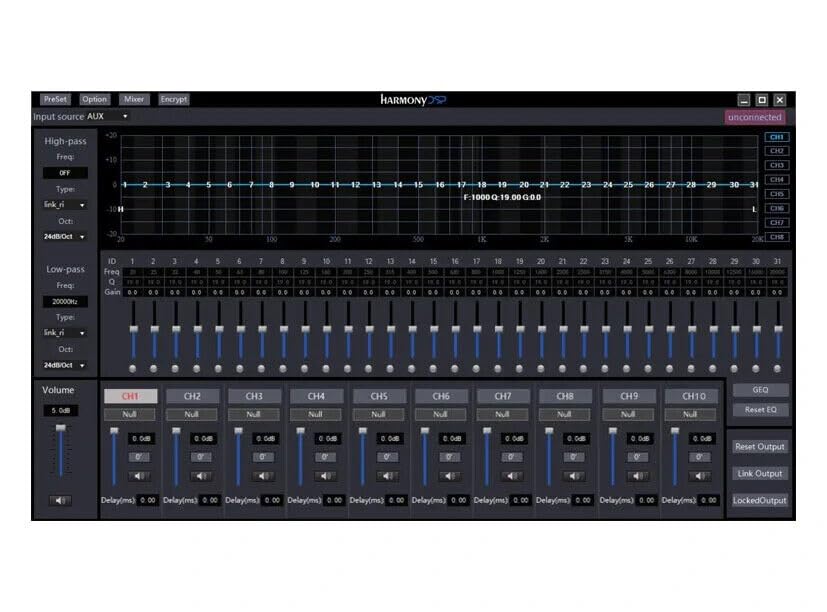
تصوير: Screenshot of the Zapco Harmony DSP PC software, showing the 31-band equalizer and channel controls for precise audio tuning.
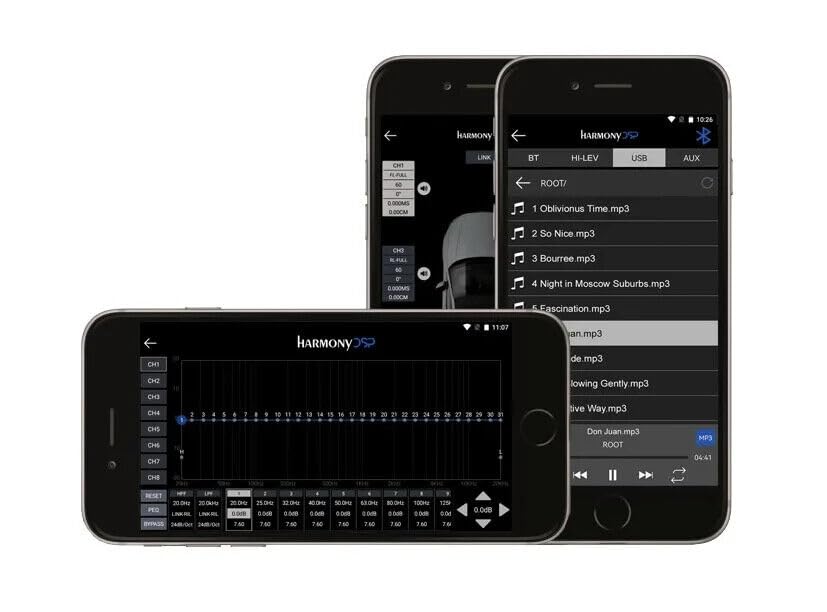
تصوير: Screenshots of the Zapco Harmony DSP mobile application on a smartphone, illustrating the interface for Bluetooth streaming and DSP adjustments.
بلوٽوٿ اسٽريمنگ:
To stream audio wirelessly, enable Bluetooth on your mobile device and pair it with the HB-410-ADSP. The device name will typically appear as "Zapco HB-410-ADSP" or similar. Once paired, you can play audio from your device through the ampوierيڪ زنده
Integrated Music Player:
جي amplifier includes a built-in music player that supports various file formats. You can manage and play music files directly through the mobile application.
سار سنڀال
The Zapco HB-410-ADSP is designed for durability and requires minimal maintenance. Follow these guidelines to ensure its continued performance:
- صفائي: ٻاھرين کي صاف ڪرڻ لاء ھڪڙو نرم، سڪل ڪپڙو استعمال ڪريو amplifier. Avoid using harsh chemicals or abrasive cleaners.
- وينٽيليشن: انهي کي يقيني بڻايو وڃي ته amplifier's ventilation openings are not obstructed to prevent overheating.
- ڪنيڪشن: وقتي طور تي سڀني وائرنگ ڪنيڪشنن کي چيڪ ڪريو ته جيئن پڪ ڪري سگهجي ته اهي محفوظ ۽ سنکنرن کان پاڪ آهن.
- ماحول: انسٽال ڪريو amplifier in a location that is protected from excessive moisture, dust, and extreme temperatures.
مشڪلاتون
If you encounter issues with your Zapco HB-410-ADSP, refer to the following common problems and solutions:
- طاقت ناهي:
- Check all power connections (+12V, GND, REM) for proper contact and voltage.
- Verify that the vehicle's battery is charged.
- تسلسل لاءِ ڪنهن به ان لائن فيوز جو معائنو ڪريو.
- ڪوبه آڊيو آئوٽ:
- Ensure all input and output cables are securely connected.
- Check the source device (head unit, phone) for audio output.
- Verify DSP settings; ensure channels are not muted or gain is not set too low.
- Confirm speaker connections are correct and speakers are functional.
- تحريف ٿيل آڊيو:
- Reduce input gain if the signal is clipping.
- اسپيڪر امپيڊنس مطابقت چيڪ ڪريو ampوierيڪ زنده
- Review DSP equalizer and crossover settings for anomalies.
- Mobile App Issues (Input/Output Mapping):
- Some users have reported inconsistencies with input channel mapping to outputs when using the mobile application. If precise mapping is required, it is recommended to use the PC software for configuration.
- Ensure the mobile app is updated to the latest version.
- بلوٽوٿ ڪنيڪشن جا مسئلا:
- کي يقيني بڻايو ampلائفائر پيئرنگ موڊ ۾ آهي يا دريافت ڪرڻ جي قابل آهي.
- Delete previous pairings on your mobile device and re-attempt pairing.
- Move the mobile device closer to the amplifier to rule out range issues.
وارنٽي ۽ سپورٽ
For warranty information, please refer to the documentation provided with your purchase or visit the official Zapco website. If you require technical assistance or have questions not covered in this manual, please contact Zapco customer support through their official channels.
آن لائين وسيلا: For additional support and software downloads, visit the Zapco Store on Amazon or the official Zapco webسائيٽ.


