1. تعارف
Thank you for choosing the RAINPOINT WiFi Automatic Irrigation System. This system is designed to provide efficient and convenient watering for your lawn and garden, offering smart control via a mobile application, voice commands, and flexible scheduling options. This manual provides detailed instructions for setup, operation, and maintenance to ensure optimal performance of your irrigation system.
2. پيداوار جا حصا
The RAINPOINT WiFi Automatic Irrigation System typically includes the following components:
- WiFi Irrigation Computer: The main watering timer unit with a brass inlet.
- WiFi Hub: Connects the irrigation computer to your home WiFi network for remote control.
- استعمال ڪندڙ دستي: هن دستاويز.
- لوازمات: May include Teflon tape for sealing connections.

شڪل 2.1: ختمview of the RAINPOINT WiFi Irrigation System components, showing the irrigation computer, WiFi hub, and a smartphone displaying the control application.
3. سيٽ اپ ۽ تنصيب
3.1 قبل از انسٽاليشن چيڪ لسٽ
- Ensure you have 3 AAA 1.5V Alkaline batteries (not included) for the irrigation computer.
- Confirm your WiFi network is 2.4GHz.
- Locate a suitable outdoor faucet (3/4" NH US or 3/4" or 1" BSP EU).
3.2 Activating the Valve (Important)
Due to long shipping and storage times, the valve's silicone diaphragm may stick together. Follow these steps to activate the valve and ensure proper water flow:
- Install batteries into the irrigation computer and screw the timer onto the garden faucet by hand.
- نل کي بند رکو.
- Press the timer button. You will hear a "click" as the valve inside the timer opens for manual watering. After a few seconds, press the timer button again. The "click" sound will repeat, and the timer valve will close.
- Repeat Step 3 for 3 to 5 times.
- ٽيسٽ: Turn on the faucet a little bit, and then repeat Step 3 to check if the water flows out or shuts off as expected.
If the timer valve is activated successfully, you can proceed with confidence. If not, please repeat Step 3 several times or contact customer support immediately.

Figure 3.1: Important valve activation instructions to ensure proper functionality after storage and shipping.
3.3 جسماني تنصيب
Once the valve is activated:
- Ensure the brass inlet on the irrigation computer is securely attached to your outdoor faucet. The brass inlet is designed for durability and resistance to high water pressure.
- Connect your standard 3/4" garden hose to the water outlet of the irrigation computer.
- Turn on your outdoor faucet.

Figure 3.2: The durable brass water inlet, designed for enhanced longevity and resistance to wear compared to plastic alternatives.
4. ايپ جي انسٽاليشن ۽ ڪنيڪشن
The RAINPOINT WiFi Irrigation Computer is controlled via a smartphone application.
- ايپ ڊائون لوڊ ڪريو: ڳولھيو "RainPoint Tuya" in your device's app store (Google Play Store for Android or Apple App Store for iOS) and download it. Note: Ensure you download "RainPoint Tuya" and not "RainPoint Home".
- اڪائونٽ ٺاهيو: ايپ کوليو ۽ هڪ نئون صارف اڪائونٽ ٺاهڻ لاءِ هدايتن تي عمل ڪريو يا جيڪڏهن توهان وٽ اڳ ۾ ئي هڪ آهي ته لاگ ان ڪريو.
- ڊوائيسز شامل ڪريو:
- Plug in the WiFi Hub to a power outlet within range of your WiFi router and the irrigation computer.
- ايپ ۾، "ڊيوائس شامل ڪريو" يا "+" آئڪن چونڊيو.
- Follow the in-app instructions to connect the WiFi Hub to your 2.4GHz WiFi network.
- Once the hub is connected, the app will guide you to connect the irrigation computer via Bluetooth initially, and then link it to the WiFi Hub for remote control.
Once connected, you can manage and monitor your irrigation system from anywhere with an internet connection.
5. آپريٽنگ هدايتون
5.1 Watering Modes and Scheduling
The RAINPOINT system offers two primary watering modes:
- Normal Watering Mode: Set specific start times and durations for watering cycles.
- Cycle & Soak Mode: This mode allows for frequent, short watering cycles followed by soak times. This is ideal for slopes or dense soils to prevent runoff and ensure water penetrates deeply to plant roots, improving water efficiency.
You can set up to 20 watering plans across both modes to meet diverse irrigation needs.

Figure 5.1: The app interface showing options for setting up to 20 watering cycles, including both normal and cycle & soak modes.

Figure 5.2: An illustration of the Cycle & Soak mode, demonstrating how short watering bursts followed by soak periods can optimize water absorption and reduce waste.
5.2 Intelligent Rain Delay
The system can automatically skip scheduled watering based on local weather forecasts to prevent overwatering during rain or snow. You can also manually set a rain delay for 24, 48, or 72 hours via the app.

Figure 5.3: The app's rain delay function, which can automatically adjust watering schedules based on local weather conditions or be manually set.
5.3 دستي پاڻي ڏيڻ
You can initiate manual watering directly from the app or by pressing the button on the WiFi irrigation computer. This allows for temporary watering (1 minute to 24 hours) without interrupting your pre-set schedules, useful for tasks like car washing or filling a pool.

Figure 5.4: Manual watering can be activated instantly via the app or directly on the device, providing flexibility for immediate watering needs.
5.4 وائس ڪنٽرول
The RAINPOINT WiFi Irrigation Computer is compatible with Amazon Alexa and Google Assistant. You can use simple voice commands to turn the timer on or off, providing hands-free control.

Figure 5.5: Voice control integration with smart home assistants like Alexa and Google Assistant for convenient operation.
5.5 Family Co-Management
The app allows you to invite family members to manage the irrigation timer, enabling shared control and maintenance of your garden.
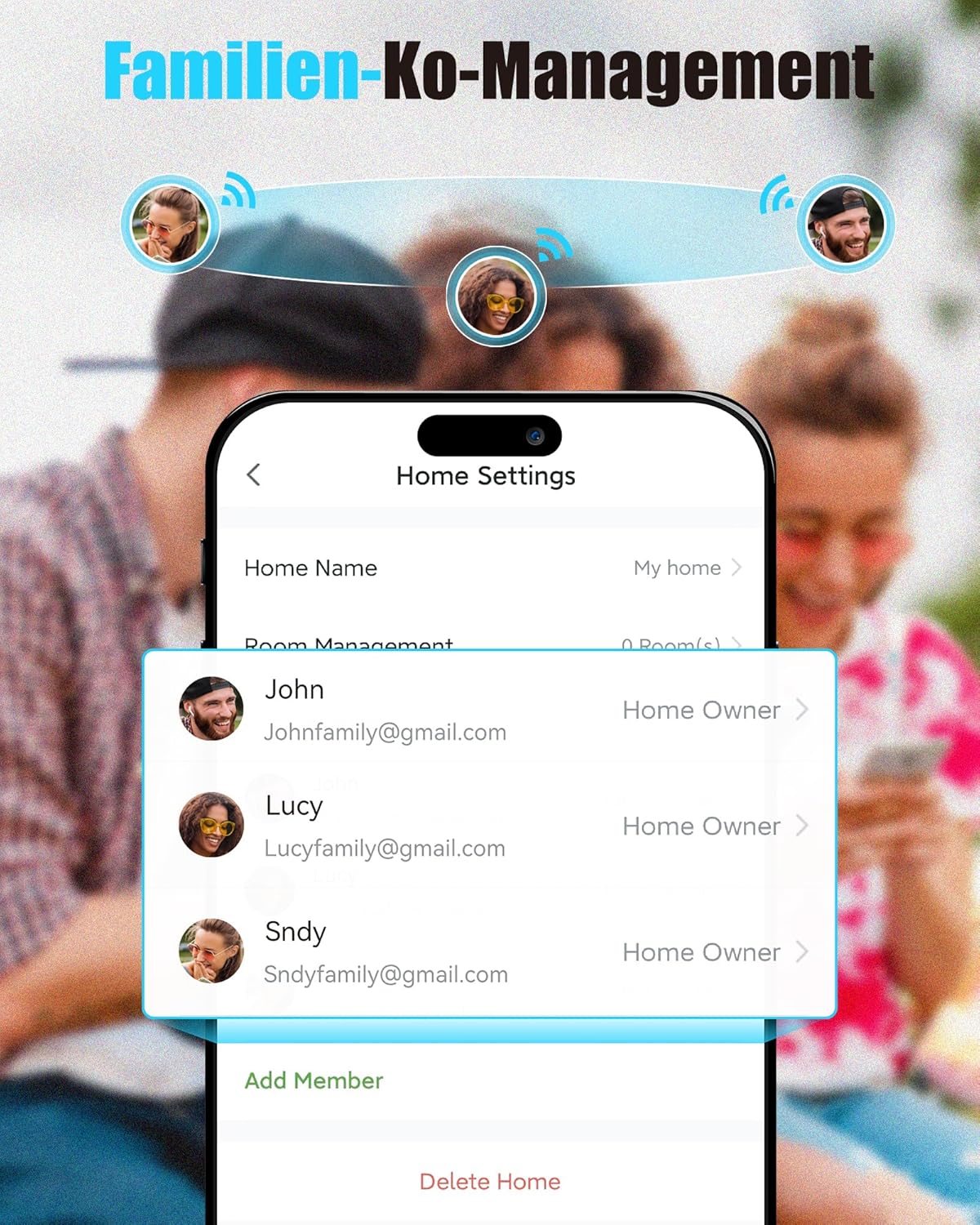
Figure 5.6: The family co-management feature allows multiple users to control and monitor the irrigation system.
5.6 Expandable System
You can add additional RAINPOINT irrigation timers (sold separately) to create multiple watering zones in your garden, all managed through the same app and WiFi Hub.

Figure 5.7: The system supports expansion with additional timers to manage multiple watering zones efficiently.
6. سار سنڀال
- بيٽري مٽائڻ: Replace the 3 AAA batteries in the irrigation computer when the low battery indicator appears in the app or on the device.
- صفائي: Periodically check the brass inlet filter for debris and clean it to ensure unobstructed water flow.
- سياري ڪرڻ: Before freezing temperatures, disconnect the irrigation computer from the faucet, remove batteries, and store the unit indoors in a dry, protected area to prevent damage from freezing water.
7. مسئلا حل ڪرڻ
- پاڻي جو وهڪرو ناهي:
- پڪ ڪريو ته نل مڪمل طور تي کليل آهي.
- Check if the valve activation steps (Section 3.2) were performed correctly.
- Verify batteries are installed correctly and have sufficient charge.
- Check for blockages in the inlet filter or hose.
- ايپ ڪنيڪشن جا مسئلا:
- Ensure the WiFi Hub is powered on and within range of your WiFi router.
- Confirm your WiFi network is 2.4GHz.
- Restart the WiFi Hub and your router.
- Ensure the irrigation computer is within Bluetooth range of the WiFi Hub for initial connection, and then within WiFi range of the hub for remote control.
- غلط پاڻي ڏيڻ جو شيڊول:
- Review your schedules in the RainPoint Tuya app.
- Check if a rain delay is active.
8. وضاحتون
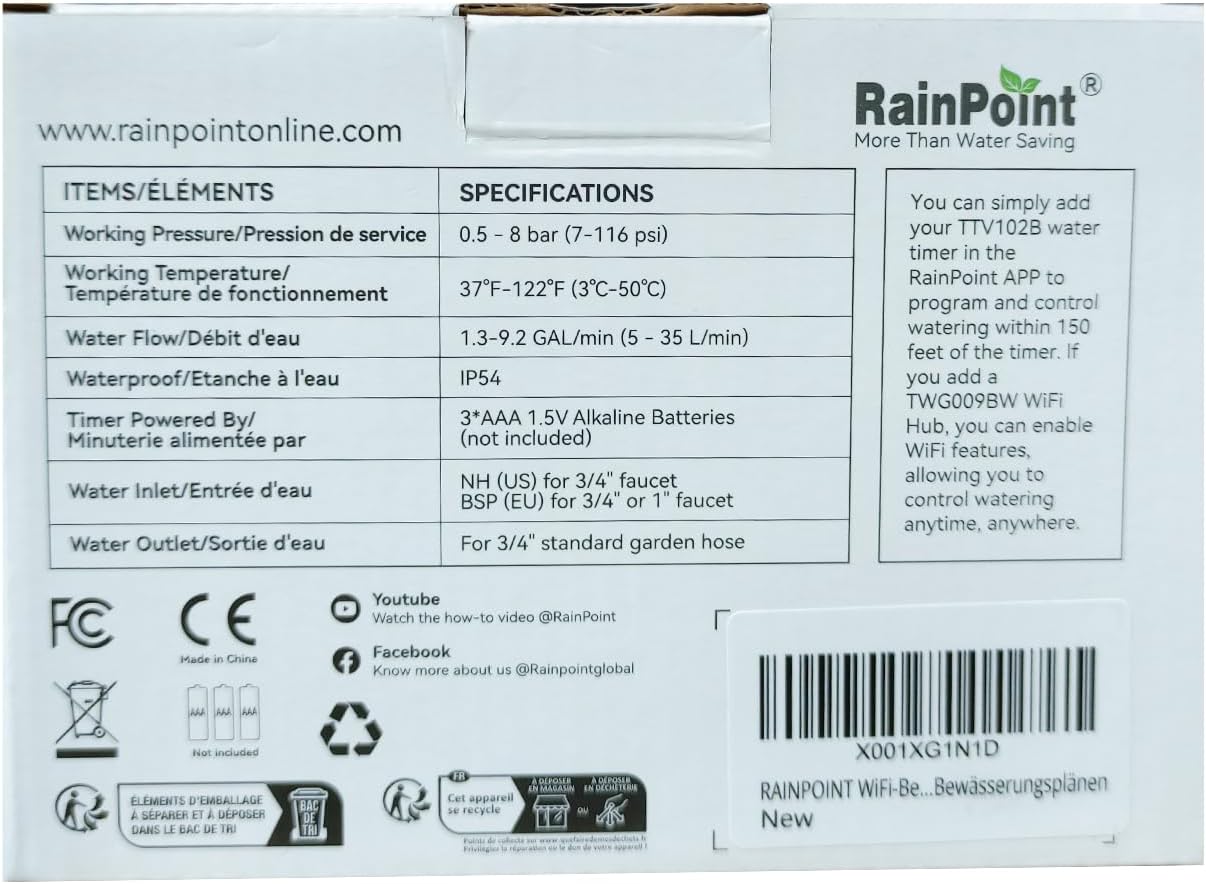
Figure 8.1: Product packaging displaying technical specifications and features.
| شيءِ | تفصيل |
|---|---|
| ڪم ڪندڙ دٻاءُ | 0.5 - 8 بار (7-116 psi) |
| ڪم ڪندڙ درجه حرارت | 37°F-122°F (3°C-50°C) |
| پاڻيءَ جو وهڪرو | 1.3-9.2 GAL/min (5 ~ 35 L/min) |
| پنروڪ درجه بندي | IP54 |
| Timer Power Source | 3*AAA 1.5V Alkaline Batteries (not included) |
| پاڻي جي داخل ٿيڻ | NH (US) for 3/4" faucet / BSP (EU) for 3/4" or 1" faucet |
| واٽر آئوٽليٽ | For 3/4" standard garden hose |
| پيداوار جي ماپ | 14.7D x 7.5W x 10.6H سينٽي ميٽر |
| شيءِ جو وزن | 0.45 ڪلوگرام |
| مواد | Plastic (with brass inlet) |
9. سپورٽ ۽ رابطو
For further assistance or inquiries, please contact RAINPOINT customer support:
- يو ايس ٽول فري: +1 833-381-5659 (Mon-Fri: 9:30 AM-5:30 PM PST)
- DE ٽول فري: +49 800-182-0576 (Mon-Fri: 9:00 AM-5:00 PM CET)
- UK Toll-Free: +44 800-808-5337 (Mon-Fri: 9:00 AM-5:00 PM CET)
- اي ميل: service@rainpointonline.com
- WhatsApp: +1 626-780-5952
You can also find more information and how-to videos on the official RainPoint YouTube and Facebook channels.
- يوٽيوب: Watch how-to videos @RainPoint
- فيسبوڪ: Know more about us @Rainpointglobal


