1. تعارف ۽ مطابقت
This manual provides detailed instructions for the installation, operation, and maintenance of your autoabc Wireless CarPlay/Android Auto 8.9-inch Linux Touchscreen Multimedia Radio Receiver. This device is designed to upgrade your vehicle's infotainment system while retaining original car functionalities.
1.1. گاڏين جي مطابقت
This product is specifically designed for the following BMW models with a CCC-System:
- بي ايم ڊبليو 3 سيريز: E90، E91، E92، E93 (2005-2010)
- BMW 5 Series: E60, E63, E64 (2005-2010)
اهم: Please verify your vehicle's system is a CCC-System before purchase and installation. If you are unsure, consult a professional or contact autoabc customer support.

Image 1.1: Compatibility chart for BMW E-series models and CCC system.
2. اهم خاصيتون
The autoabc Multimedia Radio Receiver offers a range of advanced features to enhance your driving experience:
- وائرليس ۽ وائرڊ ڪار پلي/اينڊرائيڊ آٽو: Seamlessly integrate your smartphone for navigation, music, calls, and more using intelligent voice assistants.
- High-Definition 8.9-inch Touchscreen: A 1920 x 720 resolution LED display provides a clear and vibrant visual experience.
- اصل خصوصيت برقرار رکڻ: ڪار جي سڀني اصلي ڪمن کي برقرار رکي ٿو، بشمول ريڊيو، ampلائفائر، جوائس اسٽڪ ڪنٽرول، پوئتيview camera, and vehicle information display (speed, fuel, oil pressure, safety warnings).
- ڪيترائي ڪنٽرول طريقا: Supports control via the original car knob, steering wheel buttons, and the new touchscreen interface.
- اسڪرين مررنگ: Features Airplay and Autolink for mirroring your phone's screen, and supports USB media playback.
- ڪئميرا سپورٽ: Compatible with factory original reverse cameras, parking radar, and aftermarket front view DVR (AHD/CVBS).

Image 2.1: Control methods supported by the system, including original car knob, steering wheel buttons, and the new touchscreen. Also highlights camera support.

Image 2.2: Visual representation of screen mirroring capabilities (Airplay, Autolink) and USB media playback.
3. سيٽ اپ ۽ تنصيب
3.1. Pre-Installation Notice: AUX Function Activation
Due to the age of some compatible car models, the AUX function may not be active by default. It is crucial to activate the AUX function in your car before using this product to ensure audio output. You can activate the AUX function using a dedicated activator tool or by seeking assistance from a car dealership or a qualified car repair shop.
3.2. انسٽاليشن اوورview
Installation involves replacing the original display screen and connecting the new unit with the provided cables. While the installation is designed to be straightforward, professional installation is recommended if you are not familiar with car electronics. An installation video may be available; please check the product page or contact customer support for guidance.
شامل اجزاء:
- مکيه ڊسپلي يونٽ
- پاور ڪيبل
- USB ڪيبل
- AUX ڪيبل
- استعمال ڪندڙ دستي
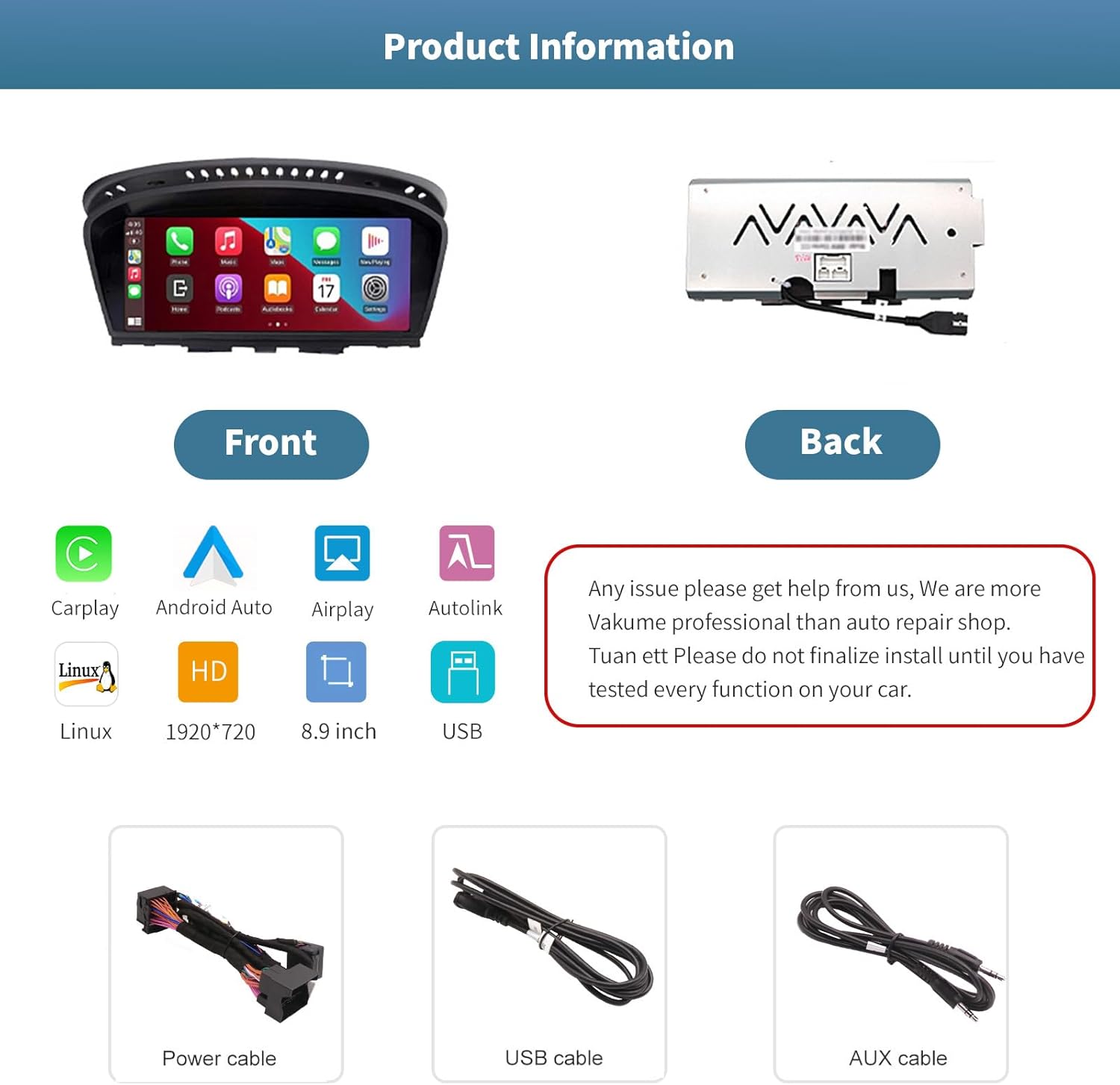
تصوير 3.1: اڳيان ۽ پوئتي views of the autoabc multimedia receiver, along with the included power, USB, and AUX cables.
نوٽ: Do not finalize the installation until you have tested every function on your car. For any installation issues, please contact autoabc support.
4. آپريشن
4.1. سسٽم جي وچ ۾ سوئچنگ
The unit allows for one-button switching between your original BMW iDrive system and the new Linux-based multimedia system. This ensures you can access all original car functions while enjoying the new features.

Image 4.1: Interface showing the option to switch between the original car system and the new Linux system.
4.2. Using CarPlay and Android Auto
Once connected wirelessly or via USB, CarPlay or Android Auto will launch, providing access to your phone's navigation, communication, and entertainment apps directly on the 8.9-inch touchscreen. Use voice commands or the touchscreen for safe operation while driving.

Image 4.2: The autoabc multimedia receiver installed in a BMW, showcasing the CarPlay/Android Auto interface.
4.3. Screen Mirroring (Airplay/Autolink)
Utilize Airplay for iOS devices or Autolink for Android devices to mirror your smartphone's screen onto the unit's display. This allows you to view photos, videos, and other content directly from your phone.
4.4. Customizing the Startup Screen
You can personalize the startup logo of your unit. Follow these steps:
- 1920 x 720 پڪسل جي ريزوليوشن سان هڪ PNG تصوير ٺاهيو.
- تصوير جو نالو تبديل ڪريو file to 'updatelogo.png'.
- Place the 'updatelogo.png' file in the root directory of a USB drive.
- Insert the USB drive into the reserved USB port on the unit. A prompt will confirm the logo change is successful.
- نئون اسٽارٽ اپ لوگو لاڳو ڪرڻ لاءِ ڪار کي ريسٽارٽ ڪريو.

Image 4.3: Step-by-step guide for customizing the unit's startup logo.
5. سار سنڀال
To ensure the longevity and optimal performance of your autoabc multimedia receiver, follow these general maintenance guidelines:
- اسڪرين جي صفائي: ٽچ اسڪرين کي نرميءَ سان صاف ڪرڻ لاءِ نرم، لِنٽ فري ڪپڙو استعمال ڪريو. ضدي داغن لاءِ، ٿورو ڊيampڪپڙي کي پاڻي يا اسڪرين محفوظ ڪلينر سان ڌوئڻ ڏيو. سخت ڪيميڪلز يا رگڙيندڙ مواد کان پاسو ڪريو.
- انتهائي گرمي پد کان بچاء: يونٽ کي گهڻي عرصي تائين سخت گرمي يا سردي ۾ نه لڳايو، ڇاڪاڻ ته اهو ان جي اليڪٽرانڪ حصن کي متاثر ڪري سگهي ٿو.
- ڪيبل جو انتظام: پڪ ڪريو ته سڀئي ڪيبل محفوظ طريقي سان ڳنڍيل آهن ۽ پنچ يا تنگ نه آهن، جيڪي نقصان يا وقفي وقفي سان ڪنيڪٽوٽي جو سبب بڻجي سگهن ٿا.
6. مسئلا حل ڪرڻ
If you encounter issues with your autoabc multimedia receiver, refer to the following common problems and solutions:
- ڪوبه آڊيو آئوٽ:
- Ensure the AUX function in your car's original system is activated. This is a common requirement for audio output.
- Check all audio cable connections, especially the AUX cable.
- ڪار پلي/اينڊرائيڊ آٽو ڪنيڪشن جا مسئلا:
- Verify your phone's Bluetooth and Wi-Fi are enabled and correctly paired with the unit.
- Restart both your phone and the car's infotainment system.
- پڪ ڪريو ته توهان جي فون جو آپريٽنگ سسٽم جديد آهي.
- Microphone Echo or Poor Call Quality:
- Check for any obstructions near the microphone.
- Adjust the microphone sensitivity settings if available in the unit's menu.
- Ensure your phone's volume is not excessively high, which can cause feedback.
- اسڪرين ڇهڻ جو جواب نه ڏئي رهي آهي:
- يونٽ ٻيهر شروع ڪريو.
- پڪ ڪريو ته اسڪرين صاف ۽ ملبي کان پاڪ آهي.
- AirPlay/Autolink Connection Failure:
- Ensure both the unit and your phone are connected to the same Wi-Fi network (if applicable for the mirroring method).
- Follow the specific connection steps for AirPlay or Autolink as detailed in the unit's on-screen instructions or a supplementary guide.
If these steps do not resolve the issue, please contact autoabc customer support for further assistance.
7. وضاحتون
| خاصيت | تفصيل |
|---|---|
| ڊسپلي سائيز | 8.9 انچ |
| ڊسپلي قرارداد | 1920 x 720 |
| آپريٽنگ سسٽم | Linux (supports Android Auto, CarPlay) |
| رابطي ٽيڪنالاجي | Bluetooth, Wireless (for CarPlay/Android Auto) |
| خاص خصوصيت | ٽچ اسڪرين |
| ڪنٽرول جو طريقو | Touchscreen, Voice Command, Original Car Knob, Steering Wheel Buttons |
| چڙهڻ جو قسم | پينل جبل |
| شيءِ جو وزن | 3.12 پائونڊ (1.42 ڪلوگرام) |
| پيڪيج جي ماپ | 11.81 x 7.24 x 6.73 انچ |
8. وارنٽي ۽ سپورٽ
آٽو اي بي سي توهان جي پراڊڪٽ لاءِ بهترين ڪسٽمر سروس ۽ مدد فراهم ڪرڻ لاءِ پرعزم آهي.
8.1. وارنٽي ڄاڻ
- One-Year Global Warranty: Your product is covered by a one-year global warranty from the date of purchase.
- 12 Months Replacement: Replacement is available within 12 months for eligible issues.
- 60 Days No Worry Return: پنهنجي ذهني سڪون لاءِ 60 ڏينهن جي واپسي جي پاليسي مان لطف اندوز ٿيو.
8.2. ٽيڪنيڪل سپورٽ
- LIFETIME Technical Service Support: autoabc provides lifetime technical support for your product.
- 24-Hour Quick Reply: 24 ڪلاڪن اندر توهان جي سوالن جو تڪڙو جواب ملڻ جي اميد رکو.
- اسان سان رابطو ڪريو: For any questions, issues, or technical assistance, please contact us via Amazon Email. Our team is ready to provide reliable online technical support.

تصوير 8.1: مٿيview of autoabc's customer support and warranty commitments.


