1. تعارف
This manual provides detailed instructions for the setup, operation, and maintenance of your FEELWORLD DH156 15.6-inch Portable Monitor. Please read this manual thoroughly before using the product to ensure proper functionality and to prevent damage.
1.1 پيداوار ختمview
The FEELWORLD DH156 is a 15.6-inch Full HD (1920x1080) portable monitor designed for versatility and ease of use. It features an IPS glossy screen with a 170° wide viewing angle, delivering accurate and bright colors. Its ultra-slim and lightweight design makes it ideal for travelers, students, gamers, and professionals needing an extended display on the go.
1.2 اهم خاصيتون
- Full HD 1080p IPS Screen: 1920x1080 resolution with a 170° full viewing angle for vibrant and detailed visuals.
- وسيع مطابقت: Equipped with two full-feature USB Type-C ports and one Mini HDMI port, supporting connections to laptops, PCs, phones, Macbooks, PS5/PS4, Xbox, and Switch.
- Ultra-slim and Portable: Weighing approximately 1.6 lbs, its compact design allows for easy transport in suitcases and backpacks.
- Multiple Compatible Modes: Supports Duplicate Mode, Extended Mode, and Second Screen Mode to enhance work efficiency and viewتجربو.
- بلٽ ان ڊبل اسپيڪر: Provides integrated audio for an immersive experience without external speakers.
2. پيڪيج مواد
مھرباني ڪري پيڪيج کي احتياط سان چيڪ ڪريو ته جيئن پڪ ڪري سگھجي ته سڀ شيون موجود آھن ۽ سٺي حالت ۾ آھن.
- 1 x 15.6" Portable Monitor (FEELWORLD DH156)
- 1 x ٽائپ-سي پاور ڪيبل
- 1 x ٽائپ-سي ڊيٽا ڪيبل
- 1 x Mini HDMI Cable
- 1 x استعمال ڪندڙ دستياب
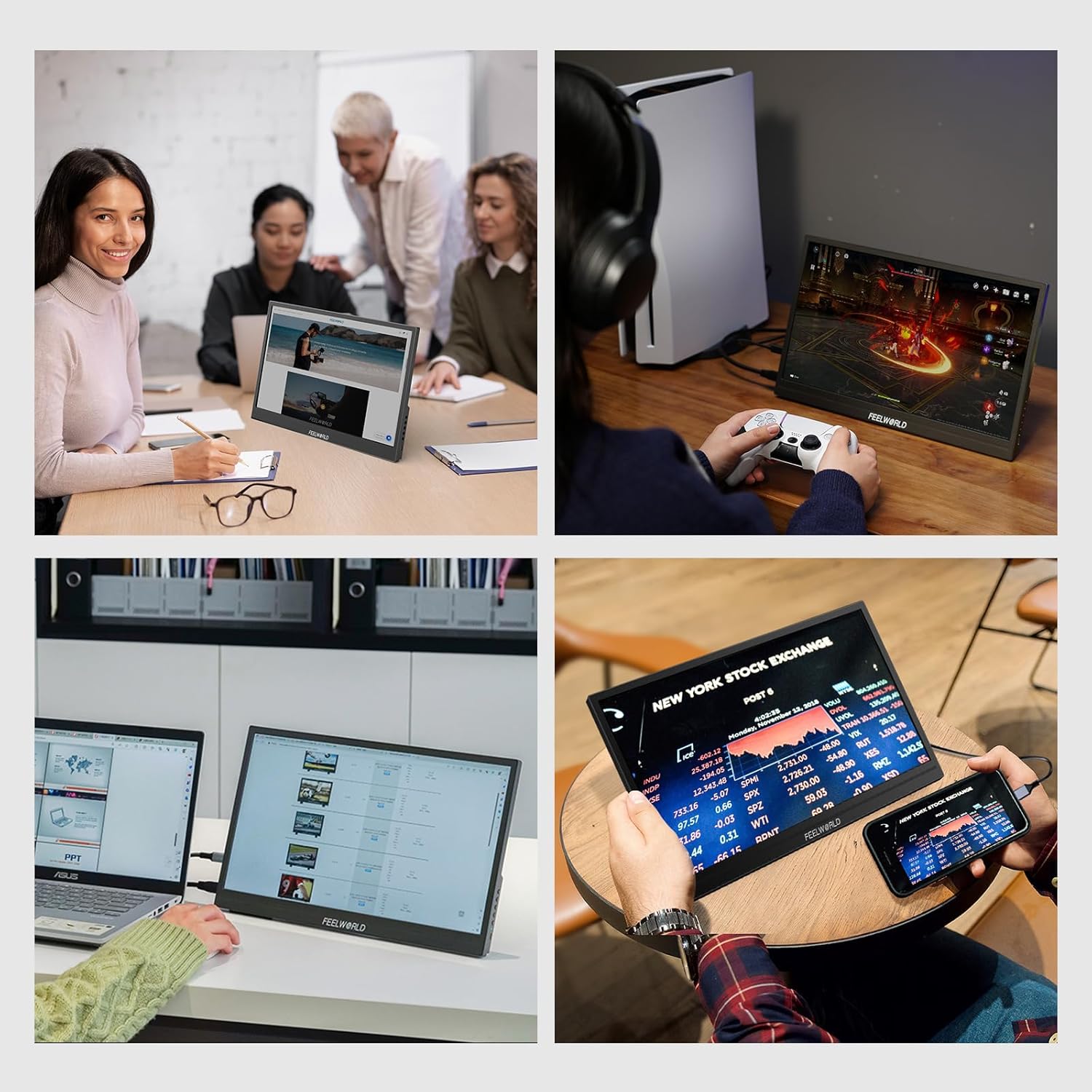
Figure 2.1: Included accessories for the FEELWORLD DH156 portable monitor.
3. پراڊڪٽ ختمview
3.1 جسماني طول و عرض
The DH156 monitor is designed for portability and features a compact form factor.

Figure 3.1: Dimensions of the FEELWORLD DH156 portable monitor.
3.2 Port Layout and Controls
The monitor features various ports and control buttons for easy connectivity and operation.

شڪل 3.2: پاسي view detailing the monitor's ports and control buttons.
- 3.5mm آڊيو پورٽ: هيڊفون يا ٻاهرين اسپيڪرن کي ڳنڍڻ لاءِ.
- USB ٽائپ-سي (x2): Full-feature ports for power supply and display signal transmission.
- ميني HDMI: For video/audio input from compatible devices.
- OSD Buttons: Used for navigating the On-Screen Display menu.
- پاور بٽڻ: To turn the screen on/off.
- روشني اشارو: Green for detected input signal, Red for no input signal.

Figure 3.3: Connectivity options for various devices.
4. سيٽ اپ جون هدايتون
4.1 Connecting to a Laptop/PC (USB-C)
- Ensure your laptop/PC supports USB 3.1 Type-C DP Alt-Mode for video output.
- Connect one end of the provided Type-C data cable to a full-feature USB Type-C port on your laptop/PC.
- Connect the other end of the Type-C data cable to one of the full-feature USB Type-C ports on the DH156 monitor.
- The monitor should automatically detect the signal and power on. If not, press the Power button.

Figure 4.1: Connecting the monitor to a laptop via USB-C.
4.2 فون سان ڳنڍڻ (USB-C)
- Ensure your phone supports USB 3.1 Type-C DP Alt-Mode.
- Connect one end of the provided Type-C data cable to your phone.
- Connect the other end of the Type-C data cable to one of the full-feature USB Type-C ports on the DH156 monitor.
- The monitor will display your phone's screen.
4.3 گيمنگ ڪنسولز (HDMI) سان ڳنڍڻ
- Connect one end of the provided Mini HDMI cable to the Mini HDMI port on the DH156 monitor.
- Connect the other end of the Mini HDMI cable to the HDMI output port on your gaming console (e.g., PS4, PS5, Xbox, Switch).
- Connect the Type-C power cable to the monitor's Type-C power port and a power adapter (not included) for power.
- Select the HDMI input source on the monitor using the OSD menu if it does not switch automatically.
Video 4.1: This video demonstrates the setup, connectivity options, and key features of the FEELWORLD DH156 portable monitor, including connecting to laptops, phones, and gaming consoles, as well as OSD button operation.
5. مانيٽر کي هلائڻ
5.1 پاور آن/آف
Press the Power button located on the side of the monitor to turn it on or off.
5.2 او ايس ڊي مينيو نيويگيشن
The On-Screen Display (OSD) menu allows you to adjust various settings of the monitor, such as brightness, contrast, color, and input source.
- Press the 'MENU' button to open the OSD menu.
- Use the 'UP' and 'DOWN' arrow buttons to navigate through menu options.
- Press the 'MENU' button again to select an option or confirm a setting.
- Press the 'EXIT' button to return to the previous menu or exit the OSD.
5.3 گھڻن ڊسپلي موڊس
The DH156 monitor supports several display modes to suit your needs:
- نقل موڊ: توهان جي بنيادي اسڪرين کي آئيني ڏئي ٿو، پيشڪش يا مواد شيئر ڪرڻ لاءِ مثالي.
- وڌايل موڊ: Extends your desktop workspace, allowing for multitasking across two screens.
- ٻيو اسڪرين موڊ: پورٽيبل مانيٽر کي واحد ڊسپلي طور استعمال ڪري ٿو، پرائمري اسڪرين کي بند ڪري ٿو.
اهي موڊ عام طور تي توهان جي آپريٽنگ سسٽم جي ڊسپلي سيٽنگز ذريعي ترتيب ڏئي سگهجن ٿا (مثال طور، ونڊوز ڊسپلي سيٽنگون، macOS سسٽم ترجيحات).

Figure 5.1: The monitor in various usage scenarios, demonstrating its versatility.
6. آڊيو خاصيتون
6.1 Built-in Dual Speakers
The FEELWORLD DH156 monitor includes integrated dual stereo speakers, providing audio output directly from the monitor. This eliminates the need for external speakers in many situations, enhancing portability.

Figure 6.1: Monitor displaying content with an indication of its dual stereo speakers.
For private listening, you can connect headphones or earbuds to the 3.5mm audio port on the side of the monitor.
7. سار سنڀال ۽ سنڀال
- اسڪرين جي صفائي: نرم، لِنٽ کان خالي ڪپڙو استعمال ڪريو ٿورڙو ڊيampened with water or a screen cleaner. Avoid using harsh chemicals or abrasive materials.
- سي جي صفائيasing: مانيٽر صاف ڪريو casing نرم، سڪل ڪپڙي سان.
- اسٽوريج: جڏهن استعمال ۾ نه هجي، مانيٽر کي ٿڌي، سڪل جاءِ تي، سڌي سج جي روشني ۽ انتهائي گرمي پد کان پري رکو.
- سنڀالڻ: Handle the monitor with care to avoid dropping or impacting it, which could damage the screen or internal components.
- طاقت: Always use the provided cables and a compatible power source.
8. مسئلا حل ڪرڻ
If you encounter issues with your FEELWORLD DH156 monitor, please refer to the following common solutions:
| مسئلو | ممڪن سبب | حل |
|---|---|---|
| ڪابه ڊسپلي ناهي/"ڪو به سگنل ناهي" پيغام | Incorrect input source selected, loose cable connection, device not outputting signal, insufficient power. | Check all cable connections. Ensure the source device is powered on and outputting a signal. Select the correct input source via the OSD menu. Ensure the monitor is receiving adequate power, especially when using HDMI. |
| Screen flickers or displays abnormal colors | Faulty cable, graphics driver issue, power instability. | Try a different cable. Update your device's graphics drivers. Ensure a stable power supply. |
| اسپيڪرن/هيڊفونن مان ڪو به آواز نه ٿو اچي | Volume too low, incorrect audio output selected on source device, faulty audio cable/headphones. | Increase monitor volume via OSD. Check audio output settings on your connected device. Test with different headphones or audio cables. |
| مانيٽر آن نٿو ٿئي | بجلي ناهي، ناقص پاور ڪيبل/اڊاپٽر. | Ensure the power cable is securely connected to a working power source. Try a different power adapter if available. |
9. ٽيڪنيڪل وضاحتون
| خاصيت | تفصيل |
|---|---|
| برانڊ | محسوس ڪيو |
| ماڊل نمبر | ڊي ايڇ 156 |
| اسڪرين جي ماپ | 15.6 انچ |
| اسٽينڊنگ اسڪرين ڊسپلي سائيز | 15.6 انچ |
| قرارداد | 1920 x 1080 پڪسل (FHD 1080p) |
| اسپيڪٽ ريشو | 16:9 |
| اسڪرين جي مٿاڇري جي وضاحت | چمڪندڙ |
| پيداوار جي ماپ | 14.2 x 9 x 0.7 انچ |
| شيءِ جو وزن | 1.6 پائونڊ |
| ٺاهيندڙ | محسوس ڪيو |
| پهرين دستياب تاريخ | جنوري 16، 2024 |
10. وارنٽي ۽ سپورٽ جي معلومات
10.1 وارنٽي
The FEELWORLD DH156 Portable Monitor comes with a standard manufacturer's warranty. Please refer to the warranty card included in your package or visit the official FEELWORLD webتفصيلي وارنٽي شرطن ۽ ضابطن لاءِ سائيٽ. وارنٽي دعوائن لاءِ خريداري جي ثبوت طور پنهنجي خريداري جي رسيد رکو.
10.2 ٽيڪنيڪل سپورٽ
For technical assistance, troubleshooting beyond this manual, or service inquiries, please contact FEELWORLD customer support through their official webسائيٽ يا توهان جي پراڊڪٽ دستاويزن ۾ ڏنل رابطي جي معلومات.
10.3 اختياري تحفظ جا منصوبا
Additional protection plans may be available for purchase to extend coverage beyond the standard warranty. These plans typically offer extended service and support. Examples شامل آهن:
- 3 سالن جو تحفظ وارو منصوبو
- 4 سالن جو تحفظ وارو منصوبو
- مڪمل حفاظت (گهڻن اهل خريدارين کي ڍڪيندڙ مهيني سبسڪرپشن)
Please check with your retailer or the FEELWORLD official channels for availability and details on these protection plans.


