1. تعارف
This manual provides detailed instructions for the safe and efficient operation of your Xprinter XP-P323B Portable Thermal Printer. Please read this manual thoroughly before using the device to ensure proper functionality and to prevent damage. The XP-P323B is designed for printing receipts and labels, offering portability and high-speed capabilities for various business needs.
2. حفاظت جي ڄاڻ
- پرنٽر کي پاڻي يا گهڻي نمي جي سامهون نه رکو.
- پرنٽر کي ڇڏڻ يا ان کي مضبوط اثرن جي تابع ڪرڻ کان پاسو ڪريو.
- صرف مخصوص پاور اڊاپٽر ۽ لوازمات استعمال ڪريو.
- پرنٽر کي گرمي جي ذريعن ۽ سڌي سج جي روشني کان پري رکو.
- پرنٽر کي پاڻ ڌار ڪرڻ يا مرمت ڪرڻ جي ڪوشش نه ڪريو. قابل سروس اهلڪارن سان رابطو ڪريو.
- آپريشن دوران مناسب وائنٽيليشن کي يقيني بڻائي.
3. پيڪيج مواد
پڪ ڪريو ته سڀئي شيون پيڪيج ۾ موجود آهن:
- Xprinter XP-P323B Portable Thermal Printer
- Power Adapter (not explicitly listed but standard)
- USB Cable (not explicitly listed but standard)
- Sample Thermal Paper Roll (not explicitly listed but standard)
- استعمال ڪندڙ جو دستياب (ھي دستاويز)
4. پراڊڪٽ ختمview
The Xprinter XP-P323B is a compact and efficient thermal printer designed for various printing tasks. It supports NV logo download and picture printing (BMP format), along with concentration adjustment for print quality.
4.1. Printer Components

شڪل 1: سامهون view of the Xprinter XP-P323B Portable Thermal Printer, showing the power button, display, and a sample label being printed.
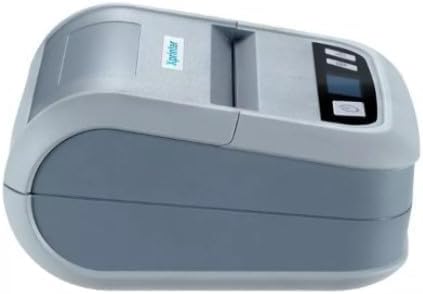
شڪل 2: پاسي view of the Xprinter XP-P323B, highlighting its compact design and the Xprinter logo.
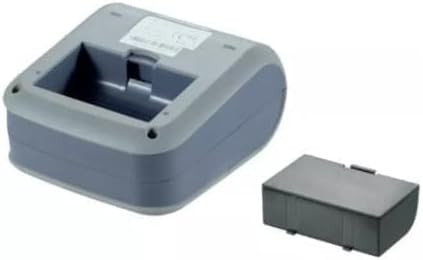
شڪل 3: هيٺان view of the Xprinter XP-P323B, showing the base and the removable battery compartment.
5. سيٽ اپ
5.1. بيٽري کي چارج ڪرڻ
- پاور اڊاپٽر کي پرنٽر جي چارجنگ پورٽ سان ڳنڍيو.
- پاور اڊاپٽر کي وال آئوٽليٽ ۾ لڳايو.
- The charging indicator light will illuminate. Allow the printer to charge fully before first use.
5.2. Loading Thermal Paper/Labels
- Open the paper compartment cover by gently pushing the release latch.
- Insert the thermal paper roll with the printing surface facing the print head. Ensure the roll is seated correctly.
- Pull a small amount of paper out past the print head.
- ڪاغذ جي ڪمپارٽمينٽ جي ڍڪ کي مضبوطيءَ سان بند ڪريو جيستائين اهو جاءِ تي نه اچي.
5.3. هڪ ڊوائيس سان ڳنڍڻ
The XP-P323B supports USB and Bluetooth connectivity.
5.3.1. USB ڪنيڪشن
- مهيا ڪيل USB ڪيبل استعمال ڪندي پرنٽر کي پنهنجي ڪمپيوٽر سان ڳنڍيو.
- Install the necessary printer drivers (available from the Xprinter website or included software).
5.3.2. Bluetooth Connection (for Smartphones/iOS)
- پڪ ڪريو ته پرنٽر فعال آهي.
- On your smartphone or iOS device, go to Bluetooth settings and enable Bluetooth.
- ڳولھيو available devices and select 'XP-P323B' (or similar name).
- Enter the pairing PIN if prompted (refer to printer documentation for default PIN, often '0000' or '1234').
- Once paired, you can use a compatible printing application to send print jobs.
6. پرنٽر هلائڻ
6.1. بنيادي پرنٽنگ
- پڪ ڪريو ته پرنٽر توهان جي ڊوائيس سان ڳنڍيل آهي ۽ ڪاغذ ڀريو پيو آهي.
- Open the document or image you wish to print on your connected device.
- Select the print option within your application.
- Choose 'XP-P323B' as the printer.
- Adjust print settings as needed (e.g., paper size, print quality).
- پرنٽ جو ڪم شروع ڪريو.
6.2. NV Logo and Picture Printing
The printer supports downloading and printing NV (Non-Volatile) logos and BMP format pictures. This functionality typically requires specific software or commands. Refer to the advanced programming guide or software documentation for detailed instructions on how to upload and print custom logos or images.
6.3. Adjusting Print Concentration
Print concentration can be adjusted to optimize print quality. This setting is usually accessible through the printer driver software on a computer or within the settings of a compatible mobile printing application. Consult your software's help section for specific steps.
7. سار سنڀال
7.1. پرنٽر جي صفائي
- ٻاهران: پرنٽر جي ٻاهرين حصي کي نرم، ڊي سان صاف ڪريو.amp ڪپڙو. استعمال نه ڪريو سخت ڪيميائي يا گھڻائي صاف ڪندڙ.
- پرنٽ سر: The thermal print head should be cleaned periodically to ensure optimal print quality. Use a cotton swab lightly dampened with isopropyl alcohol. Gently wipe the print head surface. Allow it to dry completely before closing the cover and resuming operation.
- ڪاغذ جو رستو: نرم برش يا دٻيل هوا استعمال ڪندي ڪاغذ جي رستي مان ڪنهن به ڪاغذ جي مٽي يا ملبي کي هٽايو.
7.2. اسٽوريج
When not in use for extended periods, store the printer in a cool, dry place, away from direct sunlight and extreme temperatures. Remove the paper roll if storing for a very long time to prevent dust accumulation.
8. مسئلا حل ڪرڻ
| مسئلو | ممڪن سبب | حل |
|---|---|---|
| پرنٽر آن نٿو ٿئي | Low battery; Power adapter not connected; Faulty power adapter | Charge the battery; Ensure power adapter is securely connected; Try a different power outlet or adapter |
| ڪابه پرنٽ آئوٽ پُٽ ناهي | No paper; Paper loaded incorrectly; Printer not connected; Driver issue | Load paper correctly; Re-establish connection; Reinstall printer drivers |
| خراب پرنٽ معيار | Dirty print head; Low print concentration; Low battery | Clean the print head; Adjust print concentration in software; Charge the battery |
| بلوٽوٿ ڪنيڪشن ناڪام | Bluetooth off on device; Incorrect pairing PIN; Printer out of range | Enable Bluetooth; Re-enter correct PIN; Move device closer to printer |
9. وضاحتون
| برانڊ | ايڪسپرنٽر |
| ماڊل نمبر | XP-P323B |
| شيون طول و عرض (D x W x H) | 15D x 7W x 10H سينٽي ميٽر |
| رابطي ٽيڪنالاجي | USB |
| پرنٽر ٽيڪنالاجي | حرارتي |
| خاص خاصيتون | پورٽبل |
| رنگ | ڀورو |
| مطابقت رکندڙ ڊوائيسز | اسمارٽ فونز |
| ڪنٽرولر جو قسم | iOS |
| وڌ ۾ وڌ ميڊيا سائيز | 4 x 6 انچ |
| پرنٽ ميڊيا | ليبلز |
| ڪاغذ جي ماپ | 4 x 6 انچ |
| پرنٽر آئوٽ | مونوڪروم |
| Maximum Print Speed (Black and White) | 40 mm/s (estimated from context) |
| شيءِ جو وزن | 300 گرام |
10. وارنٽي ۽ سپورٽ
For warranty information and technical support, please refer to the warranty card included with your product or visit the official Xprinter webسائيٽ. وارنٽي دعوائن لاءِ خريداري جي ثبوت طور پنهنجي خريداري جي رسيد رکو.


