پيداوار ختمview
The Svetaecho A100 Dual Controller Charger Station is designed to provide efficient and convenient charging for your Xbox controllers. Featuring a unique robot helmet-inspired design with LED indicators, it ensures your controllers are always ready for extended gaming sessions. This kit includes two high-capacity 5520mWh rechargeable battery packs, eliminating the need for disposable batteries.

Image: The Svetaecho A100 Dual Controller Charger Station, showcasing its design with two Xbox controllers docked and two rechargeable battery packs.
دٻي ۾ ڇا آهي
- 2 x 5520mWh Xbox One Rechargeable Batteries
- 1 x Charger Dock for Xbox Series X Rechargeable Battery Pack
- 1 x USB-C چارجنگ ڪيبل
- 4 x Battery Covers (for various Xbox controller models)
- 1 x استعمال ڪندڙ دستياب

تصوير: هڪ مڪمل view of all items included in the package: the charging dock, two rechargeable batteries, a USB-C cable, and four different battery covers.
سيٽ اپ جون هدايتون
- بيٽري پيڪ انسٽال ڪريو:
Open the battery compartment on your Xbox controller. Insert one of the provided 5520mWh rechargeable battery packs, ensuring proper alignment with the contacts. Close the compartment with the appropriate battery cover for your controller model.

Image: Visual instructions demonstrating how to remove the old battery cover, insert the new rechargeable battery pack, and attach the compatible battery cover.
- چارجنگ اسٽيشن سان ڳنڍيو:
Connect the included USB-C charging cable to the port on the back of the charger dock. Plug the other end of the USB-C cable into a compatible USB power source (e.g., Xbox console, USB wall adapter).
- Place Controllers on Dock:
Carefully place your Xbox controllers onto the charging slots of the dock. Ensure the controllers are seated correctly and the charging contacts align. The robot helmet's LED indicators will illuminate to show the charging status.
آپريٽنگ هدايتون
LED اشارا
The charger station features clear LED indicators on the robot helmet design to show the charging status of each controller:
- Red Breathing Light: اشارو ڪري ٿو ته ڪنٽرولر هن وقت چارج ڪري رهيو آهي.
- مضبوط سائي روشني: ظاهر ڪري ٿو ته ڪنٽرولر مڪمل طور تي چارج ٿيل آهي يا اسٽينڊ بائي موڊ ۾ آهي.
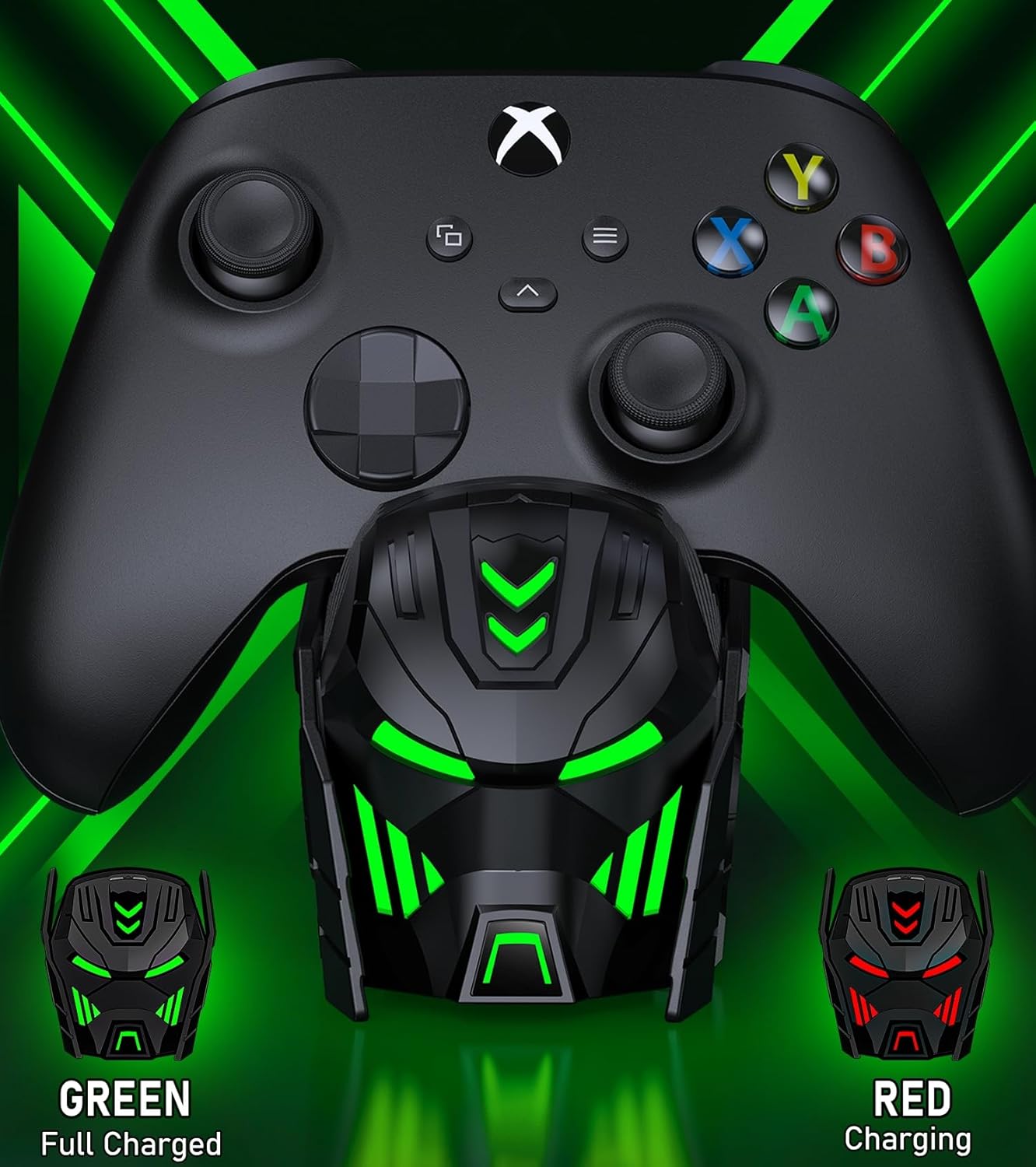
Image: Close-up of the charger station's robot helmet face, illustrating the red light for charging and the green light for a fully charged or standby state.
لائيٽ ڪنٽرول بٽڻ
A touch button is integrated into the design, allowing you to control the LED ambient light. You can switch between charging indicators (red/green) or turn the LED lights off completely.
پيداوار جون خاصيتون ۽ فائدا
- وڌايل راند جو وقت: Each 5520mWh battery pack provides 18-25 hours of continuous playtime, ensuring uninterrupted gaming sessions.
- تيز چارج: It takes approximately 4-5 hours to fully charge both battery packs simultaneously.
- ڊگھي بيٽري زندگي: The rechargeable batteries can be recharged up to 2000 times, offering a cost-effective and environmentally friendly alternative to disposable AA batteries.
- ذھني تحفظ: Built with an intelligent charging board, the dock provides overheating, short-circuit, over-voltage, and over-current protection to safeguard your batteries and controllers.
- سجيل ڊيزائن: The robot helmet-inspired aesthetic with cool LED ambient light adds a unique and appealing look to your gaming setup.

Image: Key performance metrics of the charger, highlighting its fast charging, high battery capacity, and long playing time.
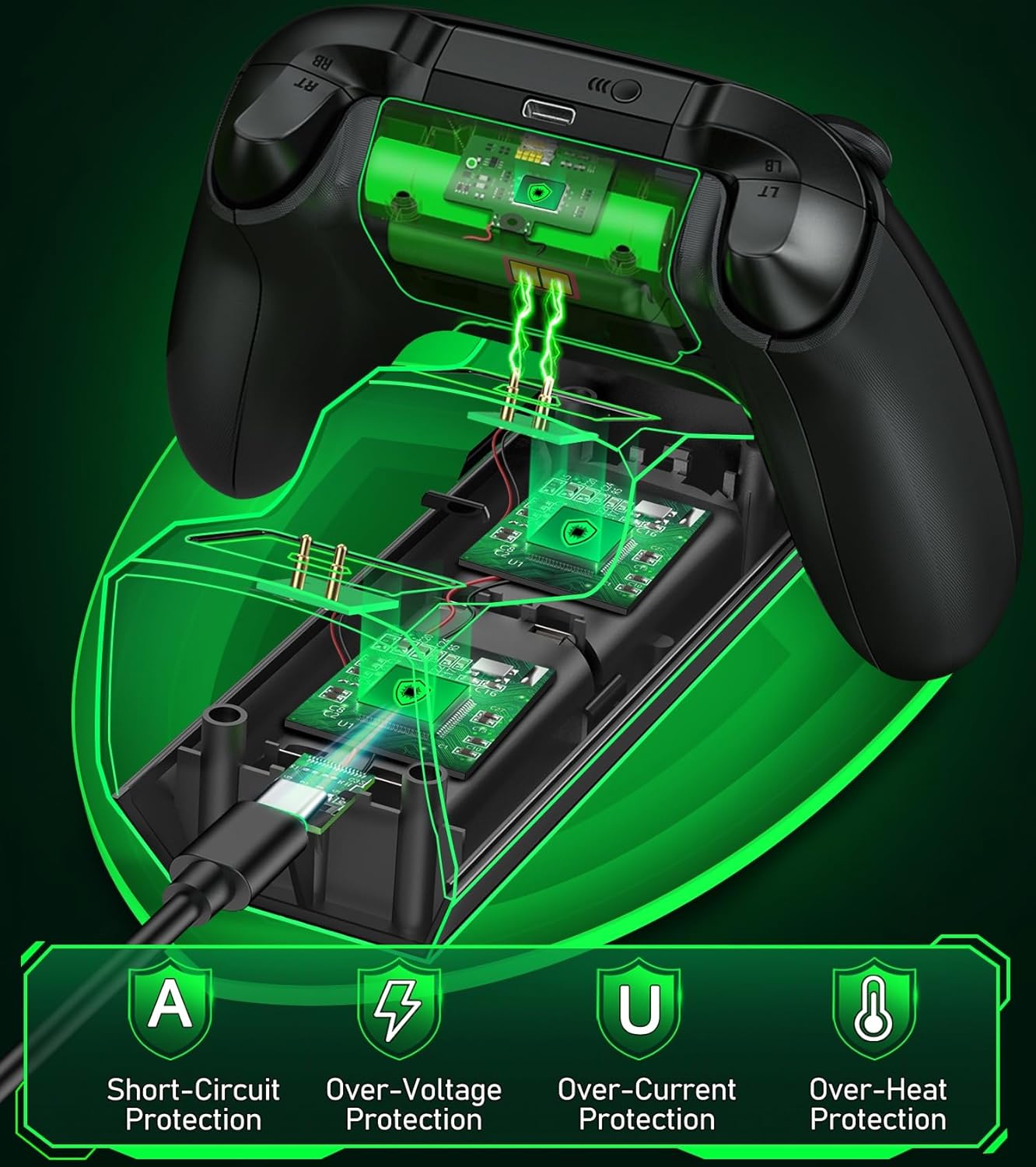
Image: A visual representation of the multiple safety protections integrated into the charging station, including short-circuit, over-voltage, over-current, and over-heat protection.
مطابقت
The Svetaecho A100 Dual Controller Charger Station is compatible with a wide range of Xbox controllers, including:
- Xbox سيريز X/S ڪنٽرولرز
- ايڪس باڪس ون ڪنٽرولرز
- Xbox One X Controllers
- Xbox One S Controllers
- Xbox Elite Controllers

Image: A compatibility chart illustrating different Xbox controller models and the corresponding battery covers provided for each, ensuring broad compatibility.
سار سنڀال
- Keep the charging station and batteries dry and clean.
- Wipe surfaces with a soft, dry cloth. Avoid using abrasive cleaners or solvents.
- سڌو سج جي روشني ۽ انتهائي گرمي پد کان پري ٿڌي، سڪل جاءِ تي ذخيرو ڪريو.
- Do not disassemble the product or attempt repairs yourself. Contact customer support if issues arise.
مشڪلاتون
- Controllers not charging:
- Ensure the USB-C cable is securely connected to both the charging station and the power source.
- تصديق ڪريو ته بجلي جو ذريعو فعال آهي ۽ ڪافي طاقت فراهم ڪري رهيو آهي.
- Check if the battery packs are correctly inserted into the controllers and the controllers are properly seated on the charging dock.
- Ensure the charging contacts on both the controller and the dock are clean and free of debris.
- ايل اي ڊي اشارا ڪم نه ڪري رهيا آهن:
- Press the light control button to ensure the LEDs are not turned off.
- Confirm the charging station is receiving power.
- Short battery life after charging:
- Ensure the batteries are fully charged (solid green LED).
- گهڻي استعمال سان بيٽري جي ڪارڪردگي وقت سان گڏ گهٽجي سگهي ٿي.
وضاحتون
| خاصيت | تفصيل |
|---|---|
| ماڊل نمبر | A100 |
| بيٽري جي گنجائش | 2 x 5520mWh |
| چارج ڪرڻ وقت | لڳ ڀڳ. 4-5 ڪلاڪ |
| في چارج راند جو وقت | 18-25 ڪلاڪ |
| ريچارج سائيڪلون | 2000 ڀيرا تائين |
| ان پٽ | USB-C |
| پيداوار جي ماپ | 7.99 x 3.5 x 2.83 انچ |
| شيءِ جو وزن | 15.2 اونس |
| ٺاهيندڙ | سويتاچو |
سرڪاري پراڊڪٽ وڊيو
Video: An official product video from Svetaecho demonstrating the features and functionality of the Xbox Controller Charger Station with Robot Helmet design, including LED indicators, battery storage, and fast charging capabilities.
وارنٽي ۽ سپورٽ
For warranty information and customer support, please refer to the warranty card included in your package or visit the official Svetaecho store on Amazon:
وڌايل ڪوريج لاءِ تحفظ جا منصوبا پڻ موجود آهن:
- 2 سالن جو تحفظ وارو منصوبو: خريداري لاءِ موجود آهي.
- 3 سالن جو تحفظ وارو منصوبو: خريداري لاءِ موجود آهي.
- مڪمل تحفظ: مهيني جو منصوبو جيڪو گذريل ۽ مستقبل جي اهل خريدارين کي ڍڪيندو آهي.


